PUSH & LIFT

COACH

Push & Lift · your lap against a reference lap, corner by corner

What is COACH?

COACH is a DDU: a driving display that floats above the simulator. It compares your driving with a reference lap (a CSV file) at the same point on the track. It warns you before each corner: distance to braking, braking strength, gear and turn direction. After the corner, it tells you whether you braked earlier or later than the reference driver and whether you gained or lost time.

  • It works with iRacing and Le Mans Ultimate.
  • It is a paid app. It requires the Push & Lift engine, which the Suite starts automatically.
  • The reference can be your own CSV, your last lap of the session or one of the reference laps included with Push & Lift.
  • You can open two extra displays above and below the DDU and fill them with data from a catalogue of 168 displays (times, fuel, rivals, weather…).

Opening it from the Suite

  1. Open the Push & Lift screen from the bar logo.
  2. In the left menu, group DDU, click COACH.
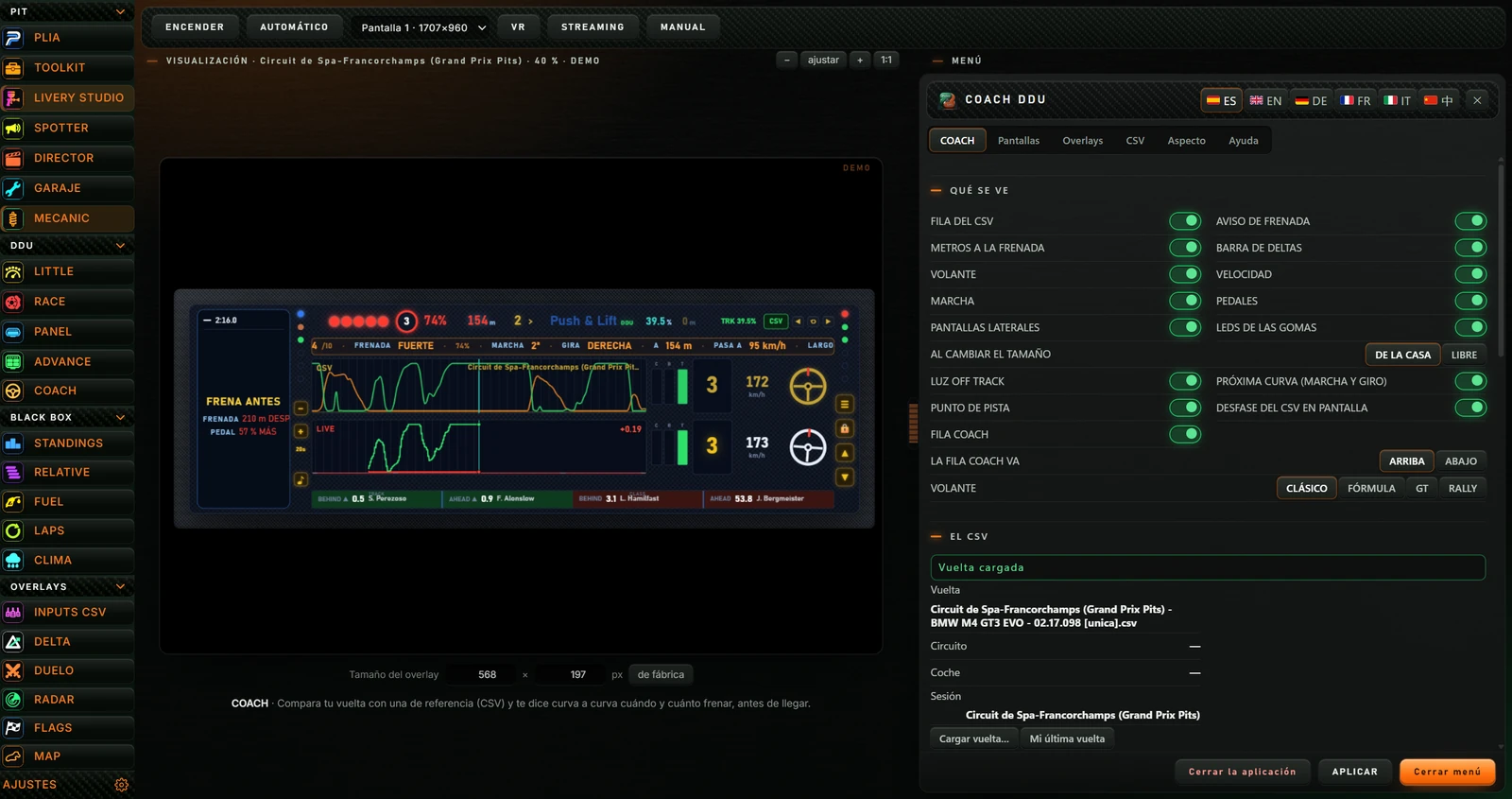
  3. The COACH workbench opens: buttons at the top, a preview with sample data on the left and the COACH menu on the right.
Push & Lift screen with COACH selected in the DDU group in the left menu. At the top are the ENCENDER, AUTOMÁTICO, Pantalla 1 · 1707×960 dropdown, VR, STREAMING and MANUAL controls. Below them, the label VISUALIZACIÓN · Circuit de Spa-Francorchamps (Grand Prix Pits) · 40 % · DEMO and the zoom-out, fit, zoom-in and 1:1 buttons. In the centre, the COACH preview has DEMO in the corner: a braking countdown, 74 %, 154 m, the Push & Lift logo, the CURVA 4/10 FRENADA FUERTE strip, the CSV and LIVE graphs, gears, speeds, two steering wheels, the FRENA ANTES advice on the left and the rivals bar at the bottom. Below the preview, Tamaño del overlay shows 568 × 197 px and the factory-reset button, followed by a sentence explaining that COACH compares your lap with a reference lap (CSV) and tells you when and how hard to brake for each corner before you reach it. On the right, the COACH DDU menu has the COACH, Pantallas, Overlays, CSV, Aspecto and Ayuda tabs.
COACH selected in the Suite menu, switched off: top buttons, preview with sample data (DEMO) and the COACH menu on the right.

2.1 Top buttons

Suite button row for COACH: ENCENDER, AUTOMÁTICO, monitor selector Pantalla 1 · 1707×960, VR, STREAMING and MANUAL. Below, VISUALIZACIÓN with the circuit, 58 % and DEMO, plus minus, fit, plus and 1:1 zoom buttons.
The buttons used to control COACH from the Suite.
ButtonWhat it does
ENCENDER (TURN ON) / APAGAR (TURN OFF)Shows COACH floating on the screen, or hides it. When on, the button reads APAGAR (Switch off) and its icon appears in the bar.
AUTOMÁTICO (AUTOMATIC)The tooltip explains that it starts automatically when the simulator (iRacing or Le Mans Ultimate) starts and stops when it closes. Click to enable it; click again to disable it. The Suite checks every 5 seconds whether the simulator is running.
Monitor dropdownSelects the monitor for COACH. Each option shows the monitor number and resolution, for example «Pantalla 1 · 1707×960».
VRShows a note asking you to capture the «PL OVERLAYS» window in OpenKneeboard.
STREAMINGCopies the COACH address for an OBS browser source and shows its size: «Enlace copiado para OBS (fuente de navegador, 900×380): http://127.0.0.1:8377/coach?transparente=1» (Link copied for OBS, browser source, 900×380).
MANUALOpens the COACH manual on pushandlift-ir.com in the browser.

2.2 Preview and size

  • With COACH off, the preview uses engine test data: there is no need to drive on track. Its label shows VISUALIZACIÓN (Preview), the circuit, lap position in % and DEMO.
  • − zooms out, + zooms in, ajustar (fit) fits it into the available space and 1:1 displays it at actual size.
  • Drag the preview with the mouse. Double-click to centre it again.
  • Tamaño del overlay (Overlay size): enter the width or height in pixels (width 80–6000, height 40–4000). COACH scales proportionally. de fábrica (factory default) restores its original size.
  • Drag the orange divider between the preview and menu to divide the space. Double-click to split it equally.

With COACH on, the preview is replaced by a notice explaining that the overlay is live and floating on the screen, menu changes apply there immediately, and hovering over it reveals EDITAR (Edit) to move it. The label reads EN VIVO (Live) and repeats that menu changes affect the floating overlay.

Getting started

  1. Select COACH in the Suite’s DDU group.
  2. Load a reference lap in the CSV tab of the menu (see 4.7). If none is loaded, the menu opens directly on that tab.
  3. Click ENCENDER. COACH appears on the screen.
  4. Go out on track. COACH warns you about each corner of the reference lap.

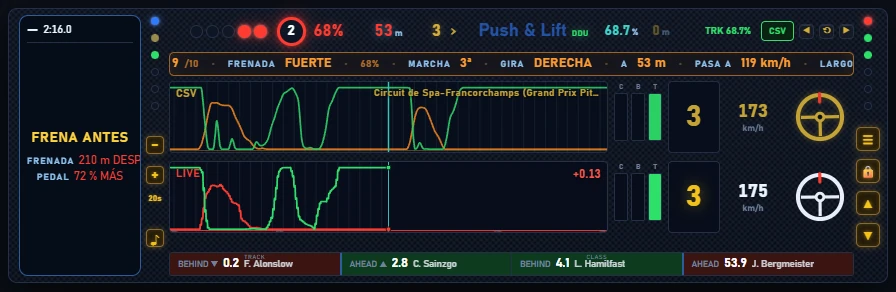
Read COACH from top to bottom: the orange strip shows the next corner; the CSV row shows the reference driver; the LIVE row shows your driving; the left display shows the next corner and then assesses the corner just completed.
Every screen explained

4.1 The COACH DDU

COACH approaching a braking point. At the top: five LEDs, two of them red, a circle showing 2, 68 % in red, 53 m, gear 3 with an arrow, the Push & Lift DDU logo, 68.7 %, 0 m, the TRK 68.7 % box, the CSV button and the offset buttons. Below, the orange strip reads 9/10 FRENADA FUERTE 68 % MARCHA 3ª GIRA DERECHA A 53 m PASA A 119 km/h LARGO. The CSV row has its graph, gear 3, 173 km/h and the gold steering wheel. The LIVE row has its graph, +0.13, gear 3, 175 km/h and the white steering wheel. On the left, the display reads FRENA ANTES, FRENADA 210 m DESPUÉS and PEDAL 72 % MÁS. At the bottom, the bar shows BEHIND 0.2 F. Alonslow, AHEAD 2.8 C. Sainzgo, BEHIND 4.1 L. Hamilfast and AHEAD 53.9 J. Bergmeister.
COACH approaching a hard braking zone with test data: active countdown and upcoming-corner strip.

The header

What you seeMeaning
Five LEDs and the round indicatorThe braking countdown. In the last 3.2 seconds before the reference braking point, the LEDs light up and the round indicator counts 3, 2, 1. While the reference driver brakes, it shows BRAKE in red and the brake percentage alongside. If the driver only lifts off, it shows LIFT in blue.
Metres (for example «154 m»)Distance to the next braking point, coloured by braking intensity. The tooltip says «Metros hasta la siguiente frenada» (Metres to the next braking point).
Gear and arrowGear for the next corner and its direction. The tooltip explains the gear and turn direction for the upcoming corner.
Push & Lift DDU logoChanges colour with the reference driver’s actions and warnings. See 4.2.
% (for example «39.5 %»)Your position around the lap. Use it to check that the CSV is aligned with the track. The tooltip says «Punto de la pista donde estás» (Current track position).
Reference offset in metres («0 m»)How many metres you have shifted the reference using the offset buttons. Dimmed at zero; gold when shifted.
TRK boxTrack position. Shows BOX in the garage and BOX BOX in the pit lane. Hover to see the loaded reference.
CSVOpens the lap CSV file picker. Green when a reference is loaded, red when none is loaded.
◀ ⟲ ▶Reference offset: ◀ shifts the CSV 5 m earlier, ⟲ removes the offset, ▶ shifts it 5 m later. Use this when the reference braking point is slightly ahead of or behind where it should be.

The upcoming-corner strip

Appears as you approach each corner. In order: CURVA (corner number and total, e.g. 4/10), braking intensity (SOLO LEVANTAR: lift only; SUAVE: light; MEDIA: medium; FUERTE: hard; A TOPE: maximum) and brake %, MARCHA (gear), GIRA IZQUIERDA or DERECHA (turn left or right), A (distance in metres), PASA A (minimum speed) and LARGO (braking length in metres). Colours indicate intensity: blue for lift, green for light braking, yellow medium, orange hard, red maximum.

The CSV and LIVE rows

  • CSV (top, orange and gold): the reference driver at this point and in the next few seconds. Throttle and brake graph with the reference name, clutch, brake and throttle bars (C, B, T), gear, speed and gold steering wheel.
  • LIVE (bottom): the same data for your driving, with a white steering wheel. The time difference against the reference appears at the graph’s top right (e.g. «+0.19»).
  • With no reference loaded, the CSV row reads «SIN REFERENCIA CARGADA» (No reference loaded).

The left display

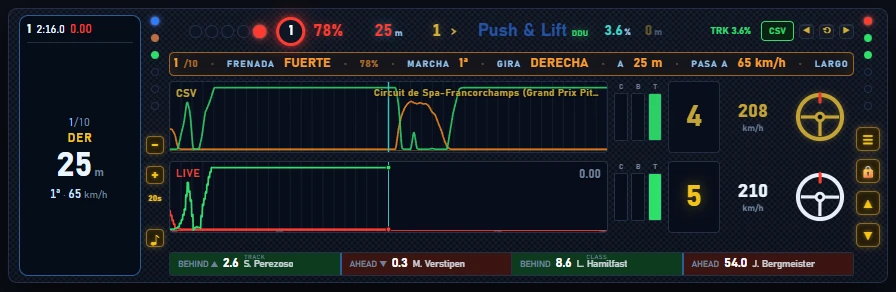
The lap and its time appear at the top. Approaching a corner, it shows its number (e.g. 2/10), IZQ or DER (left or right), distance in large text, gear and corner speed. After the corner, it assesses the result:
  • Large advice text: FRENA ANTES (Brake earlier), FRENA MÁS TARDE (Brake later), MÁS PEDAL (More pedal), MENOS PEDAL (Less pedal) or BIEN AHÍ (Well done).
  • FRENADA (Braking): how many metres ANTES (earlier) or DESPUÉS (later) you braked than the reference, or IGUAL (the same).
  • PEDAL: whether you pressed MÁS (more), MENOS (less) or IGUAL (the same), in %.
  • GANAS or PIERDES (Gain or loss): time gained or lost in that corner.
COACH during braking for turn 1. The circle shows 1 and 78 %, with 25 m, gear 1 and the strip 1/10 FRENADA FUERTE 78 % MARCHA 1ª GIRA DERECHA A 25 m PASA A 65 km/h. The display on the left reads 1/10, DER, 25 m and 1ª · 65 km/h. The CSV row shows gear 4 and 208 km/h; the LIVE row shows 0.00, gear 5 and 210 km/h.
25 m before corner 1: the left display shows the upcoming corner in large text.

The side buttons

ButtonWhat it does
− and + (left)«Alejar traza» and «Acercar traza» (Zoom trace out/in) change the graphs’ time span from 5 to 50 seconds, one second at a time. The current span appears below, e.g. «20s» (default).
♪ (left)«Encender el sonido» or «Callar el sonido» (Enable/mute sound). When enabled, it turns green and plays a short beep. This is the main switch for audio warnings (see 4.4).
☰ (right)«Menú» (Menu): opens Push & Lift with COACH selected and its menu visible.
🔒 (right)«PILOTAR» (Drive) lets clicks pass through to the simulator and hides the buttons. Press Ctrl+Alt+L to return.
▲ and ▼ (right)«Pantalla de arriba» and «Pantalla de abajo» (Top/bottom display): open or close extra displays above and below the DDU (see 4.3). The button lights up when open.

Side lights and bottom bar

  • At the top of each side, a blue light on the left and a red one on the right light up while COACH receives car data.
  • Two lights per side show tyre temperature: blue cold, green in range, red overheated. Hover to see the tyre and temperature («Goma delantera izquierda»: front-left tyre…).
  • Three lights per side illuminate towards the corner according to lateral force: one from 0.5 G, two from 1 G and three from 1.5 G.
  • Bottom bar: TRACK BEHIND and AHEAD (cars behind and ahead on track), plus CLASS BEHIND and AHEAD (cars in your class), each with a time gap in seconds and name.
  • LUZ OFF TRACK (Off-track light): leaving the track makes the whole frame flash red three times.

On track, «Push» changes colour with the reference driver’s inputs: blue with no pedals, yellow to red when braking, light green to green when accelerating. «Lift» turns blue when the driver lifts off. The «&» provides warnings:

«&» colourMeaning (shown on hover)
Flashing red«Te has salido de pista» (You have left the track)
Flashing yellow«Te van a adelantar» (You are about to be overtaken)
Orange«Bandera amarilla o incidente delante» (Yellow flag or incident ahead)
Green, red or blue after braking«Frenada buena», «Frenaste poco» or «Te pasaste de freno» (Good braking, too little braking or too much braking)

Off track, the entire logo changes colour: red if COACH has received no engine data for 3 seconds; flashing blue when not in the car; steady blue in the garage; flashing amber in the pit lane; flashing green on exit. Grey with no reference loaded. DDU is green when the engine is connected («PL MOTOR conectado y sirviendo datos») and flashes orange when it does not respond («PL MOTOR no responde»).

4.3 Top and bottom displays

Use ▲ and ▼ to open two extra displays, each with three slots. Select the content of each slot in the Pantallas (Screens) tab of the menu (see 4.5).
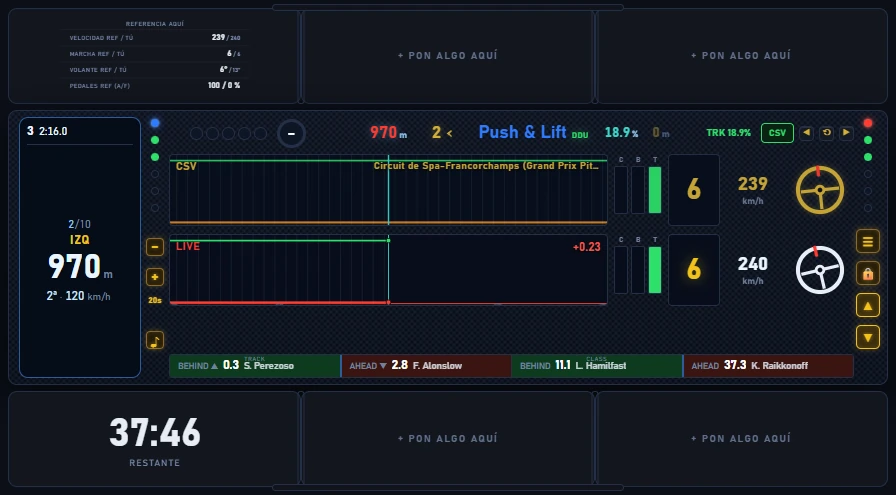
COACH with both extra displays open. At the top are three slots: the first contains REFERENCIA AQUÍ (Velocidad ref / tú 239 / 240, Marcha ref / tú 6 / 6, Volante ref / tú 6° / 13°, Pedales ref (A/F) 100 / 0 %); the other two show + PON ALGO AQUÍ. At the bottom are three slots: the first shows 37:46 RESTANTE and the other two show + PON ALGO AQUÍ. The ▲ and ▼ buttons on the right are lit.
Top and bottom displays open: REFERENCIA AQUÍ at the top, TIEMPO DE SESIÓN at the bottom and four empty slots.
  • An empty slot reads «+ PON ALGO AQUÍ» (Put something here). Click it to open Push & Lift on the COACH menu.
  • Drag the dividers between slots to allocate their widths («Arrastra para repartir»). Drag the edge tab to change the display height («Arrastra para el alto de esta pantalla»).
  • Both extra displays start closed whenever COACH opens, even if they contain items. Open them with ▲ and ▼.
  • PILOTAR mode (🔒) hides empty slots and dividers.

The menu appears to the right of the Suite workbench. Its title is COACH DDU and it has six tabs: COACH, Pantallas, Overlays, CSV, Aspecto (Appearance) and Ayuda (help).

Menu header and footer

ButtonWhat it does
ES, EN, DE, FR, IT, 中Changes the menu language.
Yellow dotOnly appears when test data is enabled. Its tooltip says «Datos de ensayo — púlsalo para volver a la sesión real» (Test data — click to return to the real session). Click to stop using test data.
✕ and Cerrar menú (Close menu)Hide the Push & Lift window. Esc does the same.
Cerrar la aplicación (Close application)Switches COACH off and hides the Push & Lift window.
APLICAR (APPLY)Sends changes to COACH. Briefly shows «✔ APLICADO» (Applied).

Hover over an option to see an explanation strip at the bottom of the menu:
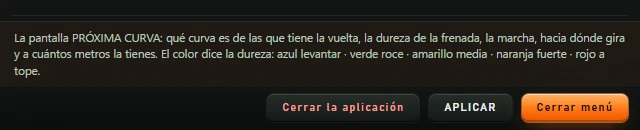
Bottom of the menu with the help strip explaining the PRÓXIMA CURVA display: the corner's number within the lap, braking intensity, gear, turn direction and distance in metres. Colour indicates braking intensity: blue for lifting off, green for a light touch, yellow for medium braking, orange for hard braking and red for maximum braking. Below are the Cerrar la aplicación, APLICAR and Cerrar menú buttons.
Help strip while hovering over AVISO DE FRENADA (Braking warning).

The COACH tab

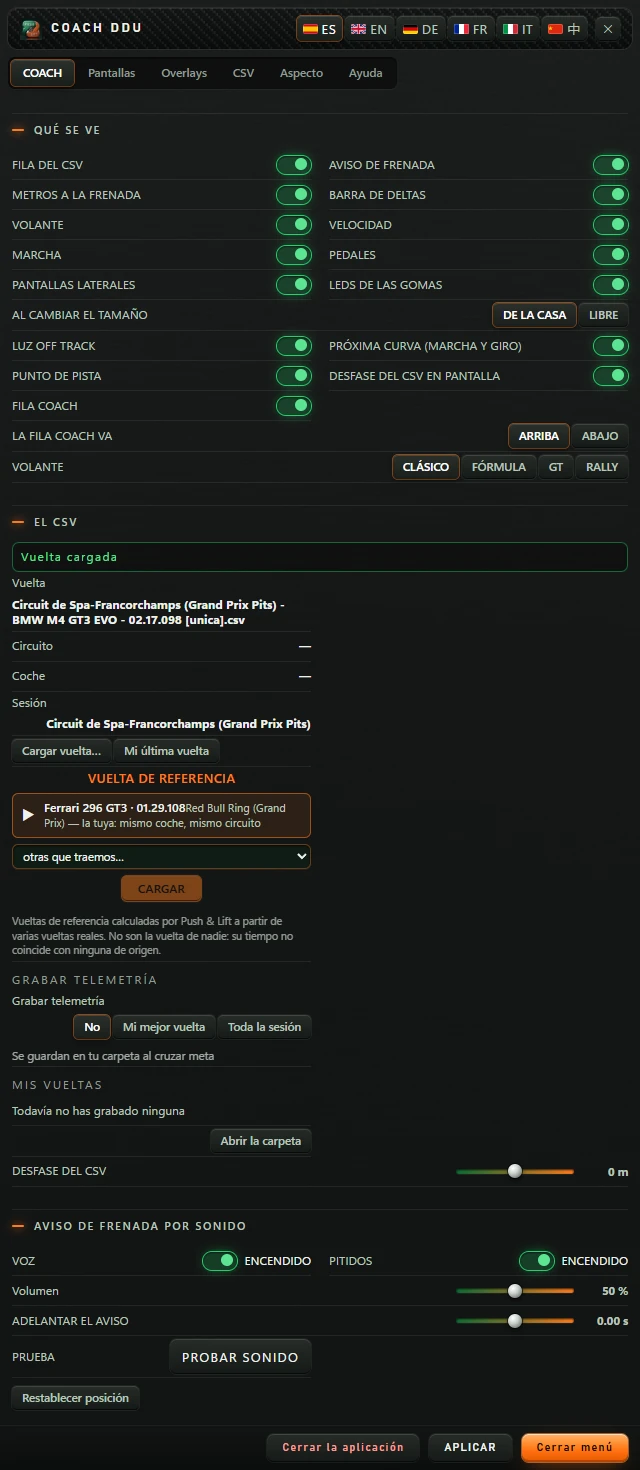
The menu's COACH tab. The QUÉ SE VE block has these switches on: FILA DEL CSV, AVISO DE FRENADA, METROS A LA FRENADA, BARRA DE DELTAS, VOLANTE, VELOCIDAD, MARCHA, PEDALES, PANTALLAS LATERALES, LEDS DE LAS GOMAS, LUZ OFF TRACK, PRÓXIMA CURVA (MARCHA Y GIRO), PUNTO DE PISTA, DESFASE DEL CSV EN PANTALLA and FILA COACH; AL CAMBIAR EL TAMAÑO offers DE LA CASA and LIBRE; LA FILA COACH VA offers ARRIBA and ABAJO; VOLANTE offers CLÁSICO, FÓRMULA, GT and RALLY. The EL CSV block shows Vuelta cargada, the lap details, Cargar vuelta… and Mi última vuelta, VUELTA DE REFERENCIA, Grabar telemetría, Mis vueltas and DESFASE DEL CSV at 0 m. The AVISO DE FRENADA POR SONIDO block has VOZ and PITIDOS on, Volumen at 50 %, ADELANTAR EL AVISO at 0.00 s and PRUEBA with PROBAR SONIDO. Finally, Restablecer posición.
The COACH tab with default settings. EL CSV is the same block as in the CSV tab.

It has four blocks:

  • QUÉ SE VE (WHAT YOU SEE): which parts of the DDU are visible. Every switch is explained in 5.1.
  • EL CSV (THE CSV): the same block as in the CSV tab (see 4.7) and, at the end, DESFASE DEL CSV (CSV OFFSET).
  • AVISO DE FRENADA POR SONIDO (BRAKING ALERT BY SOUND): voice, beeps, volume, warning lead time and a test (see 5.2).
  • Restablecer posición (Reset Position): moves COACH to the centre of screen 1. Useful if it has gone off screen.

4.5 The Pantallas tab

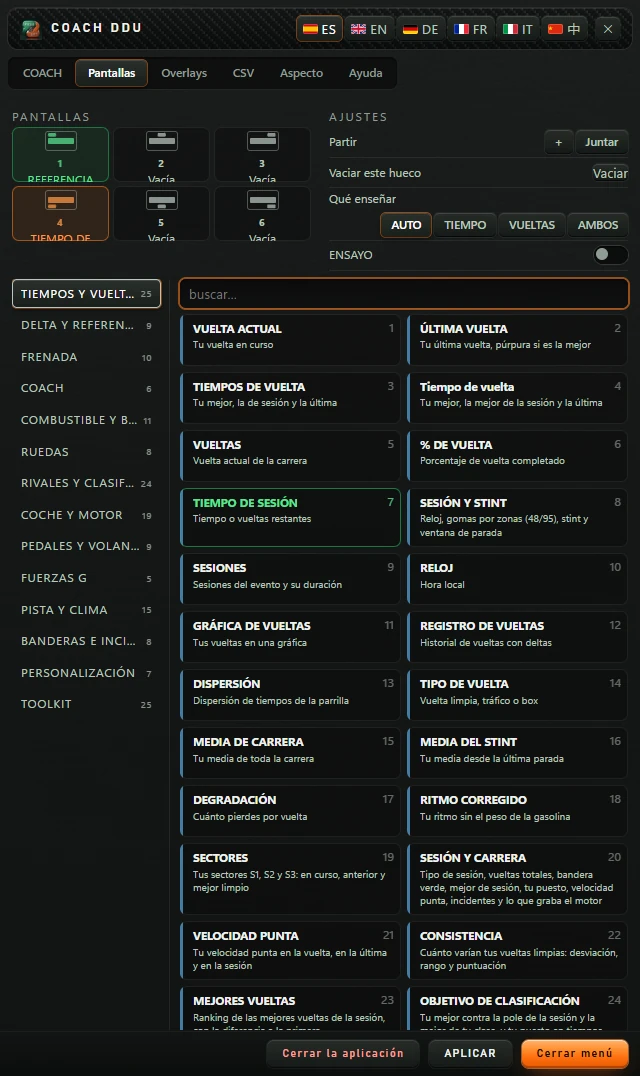
The Pantallas tab. At the top left, PANTALLAS contains six slots: 1 REFERENCIA AQUÍ in green, 2 Vacía, 3 Vacía, 4 TIEMPO DE SESIÓN selected in orange, 5 Vacía and 6 Vacía. At the top right, AJUSTES contains Partir with the + and Juntar buttons, Vaciar este hueco with Vaciar, Qué enseñar with AUTO, TIEMPO, VUELTAS and AMBOS, and ENSAYO with a switch. Below on the left are the groups TIEMPOS Y VUELTAS 25, DELTA Y REFERENCIA 9, FRENADA 10, COACH 6, COMBUSTIBLE Y BOXES 11, RUEDAS 8, RIVALES Y CLASIFICACIÓN 24, COCHE Y MOTOR 19, PEDALES Y VOLANTE 9, FUERZAS G 5, PISTA Y CLIMA 15, BANDERAS E INCIDENTES 8, PERSONALIZACIÓN 7 and TOOLKIT 25. On the right are the buscar… field and the cards in the TIEMPOS Y VUELTAS group, from VUELTA ACTUAL to OBJETIVO DE CLASIFICACIÓN, with TIEMPO DE SESIÓN marked in green.
The Pantallas tab with two filled slots. Slot 4 is selected and its settings appear on the right.
  • PANTALLAS (Displays): slots in the two extra displays. Slots 1–3 are at the top (ARRIBA 1, 2, 3); slots 4–6 at the bottom (ABAJO 1, 2, 3). Each shows its content or «Vacía» (Empty). Selected slots are orange; filled slots are green.
  • AJUSTES (Settings) for the selected slot:
    • Partir (Split): + splits the slot into two side by side. Each display supports up to 8 slots. Juntar (Merge) joins the slot back to its neighbour.
    • Vaciar este hueco (Clear this slot): Vaciar (Clear) removes its content. Only appears for filled slots.
    • Settings specific to the item you placed. If there are none, it says «Sin ajustes» (No settings). All are listed in the appendix.
  • Below is the catalogue: groups on the left (with the number of displays in each), the buscar… (search…) field and cards. Click a card to place it in the selected slot. Cards already in use are green. The number in each card’s corner is the same across all apps.
  • The TOOLKIT group contains kits made with TOOLKIT.

4.6 The Overlays tab

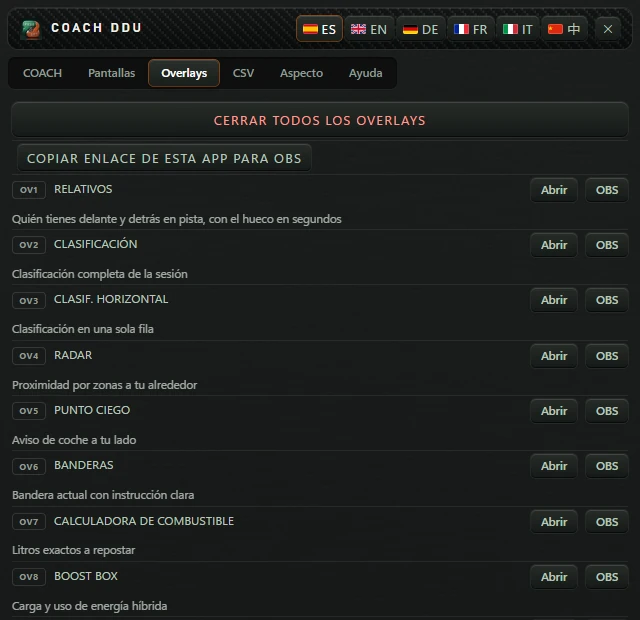
The Overlays tab. At the top are the CERRAR TODOS LOS OVERLAYS and COPIAR ENLACE DE ESTA APP PARA OBS buttons. Below is the numbered overlay list: OV1 RELATIVOS, OV2 CLASIFICACIÓN, OV3 CLASIF. HORIZONTAL, OV4 RADAR, OV5 PUNTO CIEGO, OV6 BANDERAS, OV7 CALCULADORA DE COMBUSTIBLE, OV8 BOOST BOX and OV9 DELTA, each with its description and the Abrir and OBS buttons.
The start of the Overlays tab. The list continues to OV35.
  • CERRAR TODOS LOS OVERLAYS (CLOSE ALL OVERLAYS): closes separate overlays opened from this list. Reports how many were closed, or that none were open.
  • COPIAR ENLACE DE ESTA APP PARA OBS (COPY THIS APP'S LINK FOR OBS): copies the COACH address for OBS. Shows «COPIADO — pégalo en OBS como “Navegador”» (Copied — paste it into an OBS browser source).
  • The list of 35 separate overlays, OV1 to OV35 (each number is the same across all apps), each with a description, Abrir (Open) and OBS. OBS copies that overlay’s link and briefly shows COPIADO (Copied).
  • The note below explains: click OBS for the desired tool, add a browser source in OBS and paste the link. The background is transparent. The link works on the same PC used for the stream.
Inside the Suite workbench, Abrir does not open an overlay: testing showed no response. To use a separate overlay, switch it on from its app in the Suite.

The 35 overlays are: RELATIVOS (Relative), CLASIFICACIÓN (Standings), CLASIF. HORIZONTAL (Horizontal standings), RADAR, PUNTO CIEGO (Blind spot), BANDERAS (Flags), CALCULADORA DE COMBUSTIBLE (Fuel calculator), BOOST BOX, DELTA, GRÁFICA DE DELTA (Delta graph), ALERTA DE ADELANTAMIENTO (Overtake alert), AYUDA EN BOXES (Pit assistance), DIGIFLAG, MAPA (Map), MAPA HORIZONTAL (Horizontal map), METEOROLOGÍA (Weather), PEDALES Y VOLANTE (Pedals and wheel), FUERZAS G COMBINADAS (Combined G-forces), GRÁFICA DE VUELTAS (Lap graph), REGISTRO DE VUELTAS (Lap log), CARA A CARA (Head to head), TIEMPO DE SESIÓN (Session time), PLAN DE CARRERA (Race plan), PANEL AVANZADO (Advanced panel), TABLA DE CLASIFICACIÓN (Standings table), TIEMPO DE VUELTA (Lap time), BLOQUE DE DATOS (Data block), BARRAS RADAR (Radar bars), MINI MAPA (Mini map), DISPERSIÓN DE TIEMPOS (Time scatter), FRENADA (Braking), PROXIMIDAD (Proximity), DELTA vs REF, SESIÓN Y STINT (Session and stint) and METEO (Weather).
4.7 The CSV tab

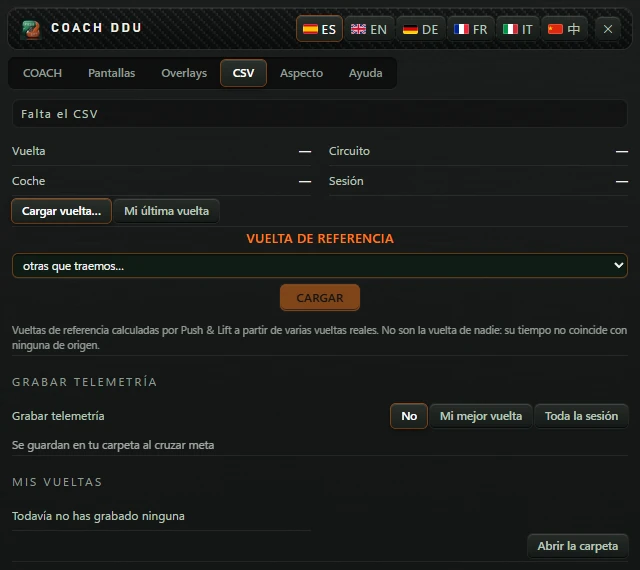
The CSV tab with no lap loaded: the Falta el CSV notice; Vuelta, Circuito, Coche and Sesión showing a dash; the Cargar vuelta… and Mi última vuelta buttons; VUELTA DE REFERENCIA with the otras que traemos… list and the CARGAR button; an explanation of reference laps; GRABAR TELEMETRÍA with No, Mi mejor vuelta and Toda la sesión; MIS VUELTAS with Todavía no has grabado ninguna and the Abrir la carpeta button.
The CSV tab with no lap loaded.
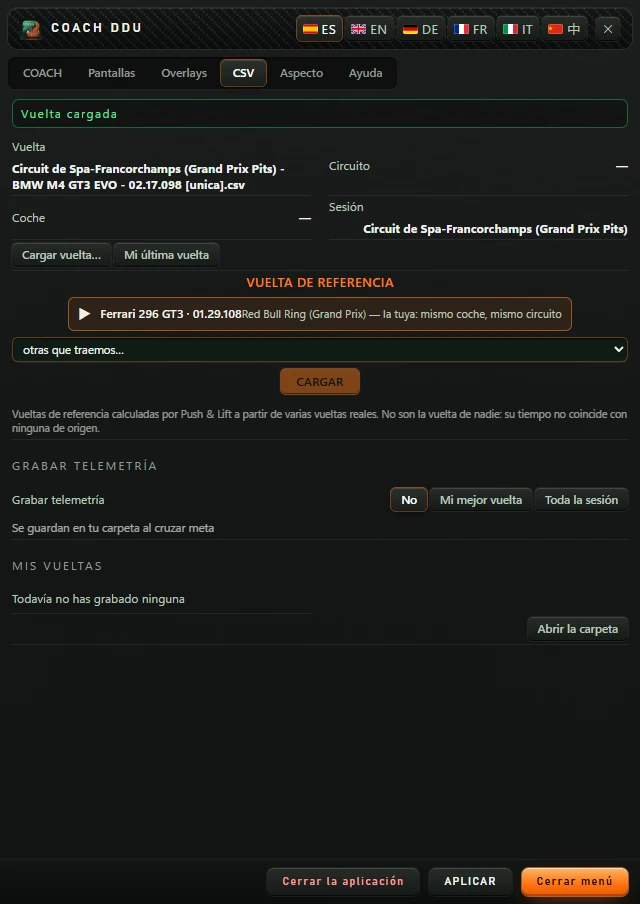
The CSV tab with a lap loaded: the Vuelta cargada notice; Vuelta: Circuit de Spa-Francorchamps (Grand Prix Pits) - BMW M4 GT3 EVO - 02.17.098 [unica].csv; Sesión: Circuit de Spa-Francorchamps (Grand Prix Pits); VUELTA DE REFERENCIA with a suggestion, Ferrari 296 GT3 · 01.29.108 Red Bull Ring (Grand Prix) — la tuya: mismo coche, mismo circuito, the otras que traemos… list and CARGAR.
The CSV tab with a Push & Lift reference lap loaded (test data).

The loaded lap

  • The status at the top reads «Falta el CSV» (CSV missing), «Vuelta cargada» (Lap loaded), «Coincide con la sesión» (Matches the session, green), «Otro circuito» (Different track) or «Es de otro coche» (Different car, orange).
  • Vuelta (Lap), Circuito (Track), Coche (Car): reference details. Sesión (Session): the current circuit.
  • Cargar vuelta… (Load lap…): opens the Windows «Cargar CSV de vuelta» (Load lap CSV) file picker.
  • Mi última vuelta (My last lap): uses your last complete lap of this session as the reference. Tells you if none is available yet.

Reference lap

  • Laps calculated by Push & Lift from several real laps. They do not belong to an individual driver and their time does not match any source lap. There are 30 included.
  • If one matches your car, it is suggested at the top with ▶ («la tuya: mismo coche, mismo circuito»: same car and track; or «mismo coche, otro circuito»: same car, different track). Click to load it.
  • The otras que traemos… (other included laps…) list contains the others, with circuit, car and time. Select one and click CARGAR (Load). Shows «CARGANDO…» (Loading), then «Cargada. Ya puedes rodar.» (Loaded, ready to drive) or «No se ha podido cargar» (Could not load).

GRABAR TELEMETRÍA and MIS VUELTAS (Record telemetry and My laps)

  • Grabar telemetría (Record telemetry): No, Mi mejor vuelta (My best lap) or Toda la sesión (Whole session). Laps are saved to your folder when you cross the finish line.
  • MIS VUELTAS (My laps): your recorded laps, each with Usar (Use) (loads it as the reference) and Borrar (Delete). With none recorded, it says «Todavía no has grabado ninguna» (No laps recorded yet). Abrir la carpeta (Open the folder) opens the folder where they are saved.

4.8 The Aspecto tab

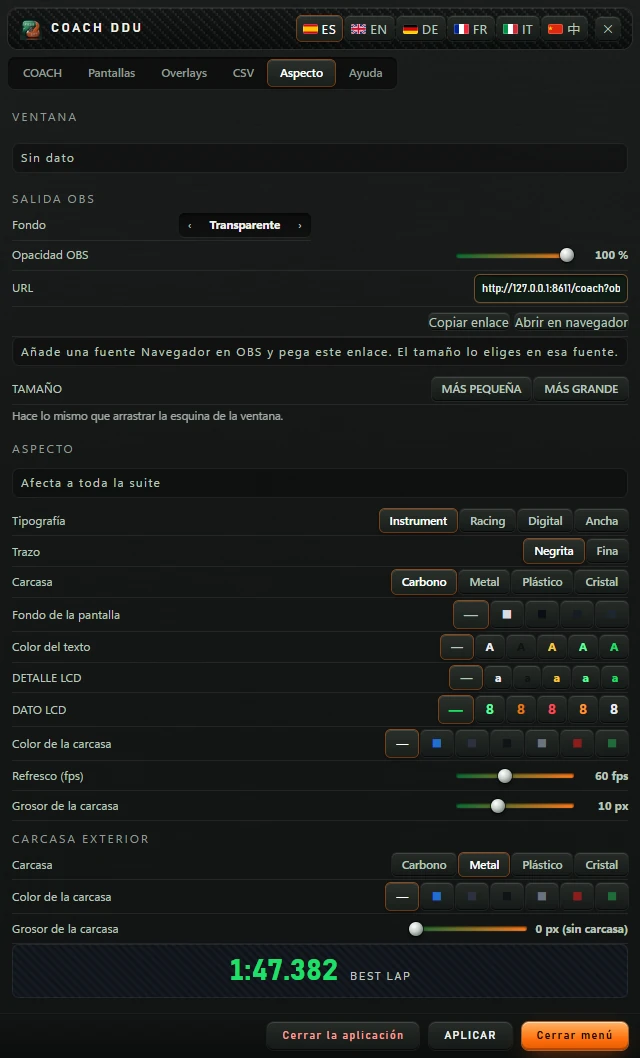
The Aspecto tab. VENTANA has the Sin dato notice. SALIDA OBS: Fondo Transparente with arrows, Opacidad OBS 100 %, URL, the Copiar enlace and Abrir en navegador buttons, and a notice explaining that you should add a Browser source in OBS and paste this link, then choose the size in that source. TAMAÑO has MÁS PEQUEÑA and MÁS GRANDE and a note explaining that these do the same as dragging the window corner. ASPECTO has the Afecta a toda la suite notice: Tipografía with Instrument, Racing, Digital and Ancha; Trazo with Negrita and Fina; Carcasa with Carbono, Metal, Plástico and Cristal; Fondo de la pantalla; Color del texto; DETALLE LCD; DATO LCD; Color de la carcasa; Refresco 60 fps; Grosor de la carcasa 10 px. CARCASA EXTERIOR: Carcasa with Metal selected, Color de la carcasa and Grosor de la carcasa 0 px (sin carcasa). At the bottom, the 1:47.382 BEST LAP sample.
The Aspecto tab with COACH off: VENTANA shows «Sin dato» until it is switched on.

Window

Shows «Sin dato» (No data) both with COACH off and on: COACH runs inside the shared overlay window, so this block has nothing to display. To position COACH, use its placement frame (see 4.10) and the Suite’s monitor selector.

SALIDA OBS (OBS OUTPUT)

  • Fondo (Background): use ‹ and › to select Transparente (Transparent), Croma verde (Green chroma) or Negro (Black).
  • Opacidad OBS (OBS opacity): 20 % to 100 %.
  • URL: the OBS address, which changes with the settings above. Copiar enlace (Copy link) copies it (shows «Copiado» or «No se pudo copiar»: Copied or Could not copy). Abrir en navegador (Open in browser) opens it.

SIZE

MÁS PEQUEÑA (SMALLER) and MÁS GRANDE (BIGGER), with a note saying this does the same as dragging the window corner. Testing with COACH on showed these controls did not change its size. To resize it, use Tamaño del overlay in the Suite (see 2.2).

ASPECTO and CARCASA EXTERIOR (Appearance and Outer frame)

Colours, font and frame. The notice says «Afecta a toda la suite» (Affects the whole suite). Each option is explained in 5.3. The «1:47.382 BEST LAP» sample below previews the font.
4.9 The Ayuda tab

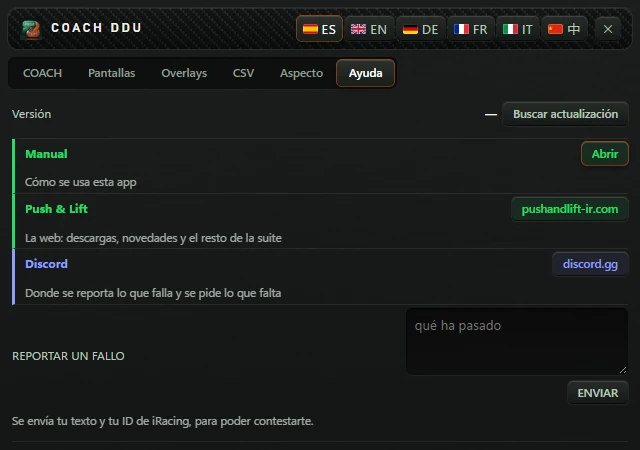
The Ayuda tab: Versión showing a dash and the Buscar actualización button; Manual, described as Cómo se usa esta app, with Abrir; Push & Lift, described as the website for downloads, news and the rest of the suite, with pushandlift-ir.com; Discord, described as the place to report problems and request missing features, with discord.gg; REPORTAR UN FALLO with a qué ha pasado text box and the ENVIAR button, plus a note explaining that your text and iRacing ID are sent so that you can receive a reply.
The Ayuda tab.
RowWhat it does
Versión (Version) · Buscar actualización (Check for updates)Should show the version and whether an update is available. Inside the Suite the version is «—» and the button always reports «La web no contesta» (Website not responding). Check for updates in the Suite’s AJUSTES (Settings).
Manual · AbrirOpens a «Manual · COACH» window with the help included in the engine.
Push & Lift · pushandlift-ir.comOpens the website.
Discord · discord.ggOpens the Push & Lift Discord.
REPORTAR UN FALLO (REPORT A PROBLEM) · ENVIAR (SEND)Describe what happened in the «qué ha pasado» box and press ENVIAR (Send). Your text and iRacing ID are sent so you can receive a reply. It then shows «Enviado. Gracias.» (Sent, thank you) or «No se ha podido enviar.» (Could not send).

4.10 COACH running on your screen

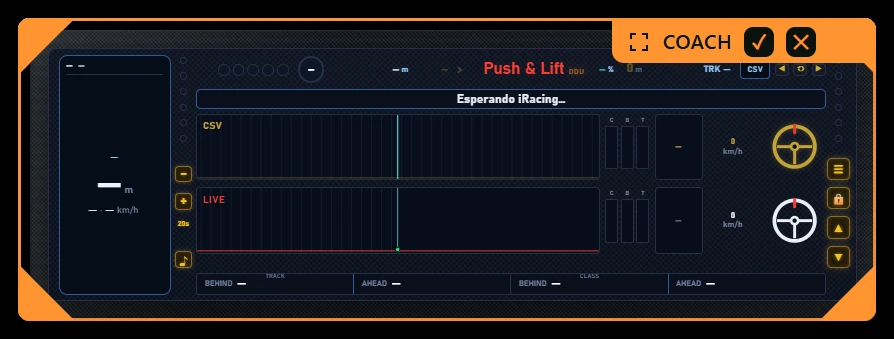
COACH just switched on, floating on the screen with an orange frame. At the top right of the frame is an orange tab with an icon, the name COACH, a ✓ button and a ✕ button. Inside, COACH without the simulator: the strip reads Esperando iRacing…, the Push & Lift logo is red and the data fields have no values.
COACH just switched on with no simulator running: orange placement frame and «Esperando iRacing…» (Waiting for iRacing) strip.
  • Clicking ENCENDER, COACH appears with an orange placement frame: drag it into position.
  • On the frame tab: ✓ «Terminar de editar» (Finish editing) and ✕ «Cerrar el overlay» (Close overlay). Right-click the frame to open Push & Lift with COACH selected.
  • Later, hover over it to reveal EDITAR (EDIT) to reposition it. F6 does the same for all overlays.
  • With no simulator running, the strip reads «Esperando iRacing…» (Waiting for iRacing).

Configuration, option by option

Change everything in the menu with COACH switched on: as the Suite explains, menu changes affect the COACH display on screen. If COACH does not pick them up, press APLICAR.

5.1 QUÉ SE VE (What is shown, COACH tab)

These are all switches and are enabled by default.

OptionWhat it shows or hides
FILA DEL CSV (CSV ROW)The reference row (graph, pedals, gear, speed and gold steering wheel). Switching it off shrinks the DDU to show only your data.
AVISO DE FRENADA (BRAKING ALERT)The upcoming-corner strip.
METROS A LA FRENADA (METRES TO BRAKING)The distance counter in the header.
BARRA DE DELTAS (DELTA BAR)The bottom bar with cars ahead and behind. Removing it reduces the DDU height.
VOLANTE (Steering wheel)Both steering wheels.
VELOCIDAD (speed)Both speeds.
MARCHA (GEAR)Both gears.
PEDALES (PEDALS)The C, B and T bars in both rows.
PANTALLAS LATERALES (SIDE SCREENS)The left display (upcoming corner and corner assessment).
LEDS DE LAS GOMAS (TYRE LEDS)The tyre temperature lights.
LUZ OFF TRACK (OFF-TRACK LIGHT)The three red frame flashes when you leave the track.
PRÓXIMA CURVA (MARCHA Y GIRO) (NEXT CORNER (GEAR AND TURN))The gear and arrow in the header.
PUNTO DE PISTA (TRACK POINT)The lap % in the header.
DESFASE DEL CSV EN PANTALLA (CSV OFFSET ON SCREEN)The offset in metres in the header.
FILA COACH y LA FILA COACH VA (ARRIBA / ABAJO) (FILA COACH and LA FILA COACH VA (COACH row and Row position: ARRIBA / ABAJO, Top / Bottom))Their help refers to the JUEZ DE CURVA (Corner judge) display. In this version, corner assessment is in the left display and these two options make no visible change. To hide the assessment, switch off PANTALLAS LATERALES (Side displays).
OptionValuesWhat it does
AL CAMBIAR EL TAMAÑO (WHEN RESIZING)DE LA CASA (default) · LIBREDE LA CASA (Original): dragging the corner scales all of COACH while keeping its proportions. LIBRE (Free): width and height change separately.
VOLANTECLÁSICO (default) · FÓRMULA · GT · RALLYThe shape of both steering wheels.

5.2 EL CSV and audio (COACH tab)

OptionValuesWhat it does
DESFASE DEL CSVSlider from −50 m to +50 m in 1 m steps (0 m)Shifts the reference backwards or forwards on the track. It does the same as the DDU’s ◀ ⟲ ▶ buttons, which move it in 5 m steps.

BRAKING ALERT BY SOUND

OptionValuesWhat it does
VOZ (voice)Switch with ENCENDIDO / APAGADO (On / Off)A voice counts down: «tres», «dos», «uno», then «frena» (three, two, one, brake), or «levanta» (lift) for a lift-only corner. When the reference driver releases the brake, it says «acelera» (accelerate).
PITIDOS (BEEPS)Switch with ENCENDIDO / APAGADO (On / Off)A beep at 3, 2 and 1 seconds before the braking point and another at the braking point.
Volumen (Volume)0 % to 100 % in steps of 5 (50 %)Warning volume. The overlay volume in the Suite’s AJUSTES (Settings) also applies.
ADELANTAR EL AVISO (ADVANCE THE ALERT)−1.00 s to +1.00 s in steps of 0.05 (0.00 s)Positive values make the warning sound earlier; negative values make it sound later.
PRUEBA · (PRUEBA (Test) ·) PROBAR SONIDO (TEST SOUND)ButtonPlays a test beep at the selected volume.
By default, VOZ and PITIDOS (Voice and Beeps) say ENCENDIDO (On), but audio is muted: the DDU’s ♪ button says «Encender el sonido» (Enable sound). Press ♪ (it turns green) to hear it. Switching VOZ or PITIDOS off and on in the menu also enables it.

5.3 ASPECTO and CARCASA EXTERIOR (Aspecto tab)

OptionValuesWhat it changes
Tipografía (Font)Instrument (default) · Racing · Digital · Ancha (Wide)The font used for data.
Trazo (Stroke)Negrita (Bold, default) · Fina (Thin)The font weight.
Carcasa (Housing)Carbon (default) · Metal · Plastic · GlassInner-frame texture.
Fondo de la pantalla (Screen background)— (default) and four coloursBackground of the extra-screen slots. Selecting a colour automatically adjusts text colour.
Color del texto (Text colour)— (default) and five coloursText colour in those slots.
DETALLE LCD (LCD DETAIL)— (default) and five coloursSmall-label colour.
DATO LCD (LCD VALUE)— (default) and five coloursData colour.
Color de la carcasa (Casing colour)— (default) and six coloursInner-frame colour.
Refresco (fps) (Refresh (fps))20–120 fps, in steps of 5 (60 fps)How many times per second COACH redraws.
Grosor de la carcasa (Casing thickness)0–30 pxInner-frame thickness.
CARCASA EXTERIOR (OUTER SHELL)
CarcasaCarbon · Metal (default) · Plastic · GlassOuter-frame texture.
Color de la carcasa— (default) and six coloursOuter-frame colour.
Grosor de la carcasa0–30 px (0 px, no housing)Outer-frame thickness.

Typical tasks, step by step

Drive against a Push & Lift lap

  1. In the Suite, select COACH and open the tab CSV .
  2. Under VUELTA DE REFERENCIA (reference lap), click the ▶ suggestion or choose one in otras que traemos… and click CARGAR.
  3. Wait for “Cargada. Ya puedes rodar.” (loaded, ready to drive) and click ENCENDER.
  4. Go on track and check the notice says “Coincide con la sesión” (matches the session).

Drive against your own CSV

  1. Tab CSV → Cargar vuelta…, or the button CSV on the DDU.
  2. Choose the file in “Cargar CSV de vuelta” (load lap CSV).
  3. Check the notice: “Otro circuito” (another track) or “Es de otro coche” (another car) means the lap does not match what you are driving.

Use your own lap as reference

  1. Complete a full lap and cross the finish line.
  2. Tab CSV → Mi última vuelta.

To save laps for another day: in Grabar telemetría choose Mi mejor vuelta or Toda la sesión. Laps save when you cross the finish line and appear in MIS VUELTAS with Usar.

Align the reference with the track

  1. If the countdown is consistently early or late relative to the correct braking point, click ◀ or ▶ on the DDU (5 m each time), or adjust DESFASE DEL CSV in the menu.
  2. Offset metres appear in gold in the header. ⟲ resets it to zero.

Hear the countdown

  1. Click ♪ on the DDU until it turns green.
  2. In the COACH tab, set VOZ (voice), PITIDOS (beeps), or both to ENCENDIDO (on).
  3. Adjust Volumen (volume) and click PROBAR SONIDO.
  4. For an earlier alert, increase ADELANTAR EL AVISO (advance alert).

Put data above or below the DDU

  1. Menu → tab Pantallas. Choose a slot: 1–3 above, 4–6 below.
  2. Search the catalogue and click a card. Adjust its settings on the right.
  3. On the DDU, click ▲ or ▼ to show that screen.

Pass clicks through to the simulator

  1. Click 🔒 on the DDU. Buttons disappear and clicks pass through.
  2. Press Ctrl+Alt+L to interact with it again.

Use COACH in OBS

  1. Click STREAMING in the Suite, or in the menu: tab Aspecto → SALIDA OBS (OBS output) → Copiar enlace.
  2. In OBS, add a browser source and paste the link. Size: 900 × 380.

View in VR

Click VR in the Suite: in OpenKneeboard capture “PL OVERLAYS”.
Common problems and solutions

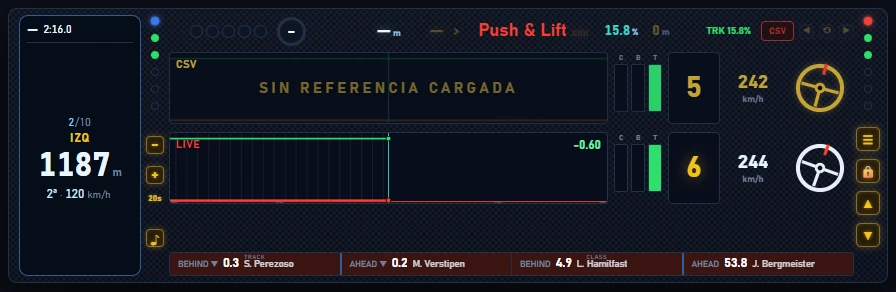
CSV row says “SIN REFERENCIA CARGADA” (no reference loaded), CSV button red

COACH without a reference: CSV row reads SIN REFERENCIA CARGADA, header CSV button red, next-corner distance and gear unavailable.
COACH without a reference lap.

No reference lap. Load one in the CSV tab or with the button CSV (see 6).

COACH only says “Esperando a PL MOTOR…” (waiting for PL MOTOR)

No engine data yet. Wait a few seconds; if it persists, check the engine dot on the Push & Lift bar and turn it on if off.
Logo turns red, DDU flashes orange and data stops updating

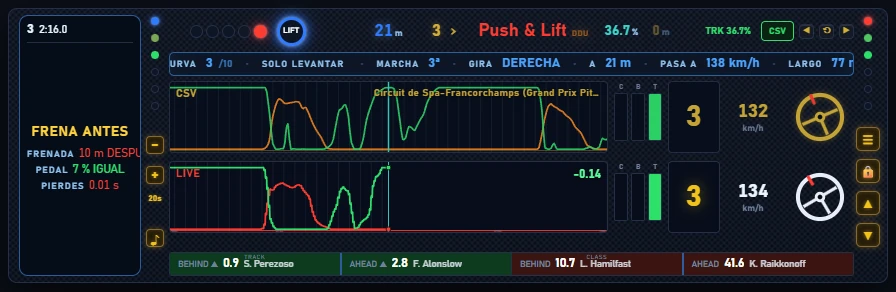
COACH with engine stopped: red Push & Lift logo, orange DDU text, data frozen on the last corner.
When the engine stops responding, the last received data freezes on screen.

COACH receives no engine data. Check the engine dot on the Push & Lift bar; if off or down, click to start it.

CSV tab warns “Otro circuito” or “Es de otro coche”

Reference track or car differs from your current session. Load another.

No sound

Click ♪ on the DDU until green (see the note in 5.2). Also check Volumen and VOZ or PITIDOS set to ENCENDIDO.

Cannot see the upper or lower screens

They start closed whenever COACH opens. Click ▲ or ▼.

Cannot click anything in COACH

PILOTAR mode is active: press Ctrl+Alt+L.

COACH is off screen

COACH tab → Restablecer posición.

Aspecto tab: VENTANA says “Sin dato”, MÁS GRANDE does nothing

This always happens with COACH, on or off. Position it using the orange frame or EDITAR (see 4.10) and resize it using Tamaño del overlay in the Suite.

Strip says “Esperando iRacing…” (waiting for iRacing)

No simulator open, or you are not in the car yet. Start iRacing or Le Mans Ultimate and enter the track.

VUELTA DE REFERENCIA suggestion belongs to another track

Suggestions match similar words in track names: two tracks named “Grand Prix” may seem identical. Check the displayed track before loading; if it is wrong, choose another in otras que traemos….

8. Appendix: available upper and lower screens

The 168 screens in the Pantallas catalogue, grouped with card number and settings. Almost all include ENSAYO, which displays test data.

TIEMPOS Y VUELTAS · 24 (TIMES AND LAPS · 24)

#ScreenOptions
1VUELTA ACTUAL (CURRENT LAP)
Your lap in progress
No settings
2ÚLTIMA VUELTA (LAST LAP)
Your last lap, purple if it is the best
No settings
3TIEMPOS DE VUELTA (LAP TIMES)
Your best, session best and last
No settings
4Tiempo de vuelta (Lap time)
Your best, session best and last
No settings
5VUELTAS (LAPS)
Current race lap
No settings
6% DE VUELTA (LAP %)
Percentage of lap completed
No settings
7TIEMPO DE SESIÓN (SESSION TIME)
Time or laps remaining
  • Qué enseñar: AUTO · TIEMPO · VUELTAS · AMBOS (Show: AUTO · TIME · LAPS · BOTH)
  • ENSAYO: interruptor (apagado) (TEST: toggle (off))
8SESIÓN Y STINT (SESSION & STINT)
Clock, tyre zones (48/95), stint and pit window
  • Margen de gasolina: de 0 a 10 vta, de 0,5 en 0,5 (3 vta) (Fuel margin: 0–10 laps, steps 0.5 (3 laps))
  • Comparar con la vuelta de referencia: interruptor (apagado) (Compare with reference lap: toggle (off))
  • ENSAYO: interruptor (apagado)
9SESIONES (SESSIONS)
Event sessions and their duration
  • ENSAYO: interruptor (apagado)
10RELOJ (CLOCK)
Local time
  • Qué hora: La del ordenador · La de la pista (Time source: computer · track)
11GRÁFICA DE VUELTAS (LAP GRAPH)
Your laps on a graph
  • Vueltas: de 5 a 30 (12) (Laps: 5–30 (12))
  • Filtrar vueltas de boxes (muy lentas): interruptor (apagado) (Filter very slow pit laps: toggle (off))
  • Filtrar vueltas con amarilla: interruptor (apagado) (Filter yellow-flag laps: toggle (off))
  • ENSAYO: interruptor (apagado)
12REGISTRO DE VUELTAS (LAP LOG)
Lap history with deltas
  • Filas: de 5 a 15 (8) (Rows: 5–15 (8))
  • Columna delta: interruptor (encendido) (Delta column: toggle (on))
  • Columna temperatura: interruptor (encendido) (Temperature column: toggle (on))
  • Marcar mejor de sesión: interruptor (apagado) (Mark session best: toggle (off))
  • ENSAYO: interruptor (apagado)
13DISPERSIÓN (DISPERSION)
Spread of lap times across the grid
  • Coches: de 5 a 24 (12) (Cars: 5–24 (12))
14TIPO DE VUELTA (LAP TYPE)
Clean lap, traffic or pit lap
No settings
15MEDIA DE CARRERA (RACE AVERAGE)
Your average over the whole race
No settings
16MEDIA DEL STINT (STINT AVERAGE)
Your average since the last stop
No settings
17DEGRADACIÓN (DEGRADATION)
How much you lose per lap
No settings
18RITMO CORREGIDO (CORRECTED PACE)
Your pace without the fuel weight
  • Segundos por litro: de 0,01 a 0,1 s/L, de 0,01 en 0,01 (0,03 s/L) (Seconds per litre: 0.01–0.1 s/L, steps 0.01 (0.03 s/L))
19SECTORES (SECTORS)
Your S1, S2 and S3 sectors: current, previous and best clean
  • Qué filas: Todas · En curso · Anterior · Mejor (Rows: all · current · previous · best)
  • ENSAYO: interruptor (apagado)
20SESIÓN Y CARRERA (SESSION AND RACE)
Session type, total laps, green flag, session best, your position, top speed, incidents and what the engine records
  • Tipo y sesión: interruptor (encendido) (Type and session: toggle (on))
  • Carrera y bandera verde: interruptor (encendido) (Race and green flag: toggle (on))
  • Mejor y tu puesto: interruptor (encendido) (Best and your position: toggle (on))
  • Velocidad punta: interruptor (encendido) (Top speed: toggle (on))
  • Incidentes piloto y equipo: interruptor (apagado) (Driver/team incidents: toggle (off))
  • Lo que graba el motor: interruptor (apagado) (What the engine records: toggle (off))
  • ENSAYO: interruptor (apagado)
21VELOCIDAD PUNTA (TOP SPEED)
Your top speed on the current lap, last lap and session
  • Unidad: km/h · mph (Unit: km/h · mph)
  • ENSAYO: interruptor (apagado)
22CONSISTENCIA (CONSISTENCY)
How much your clean laps vary: deviation, range and score
  • Vueltas que cuentan: de 4 a 20 (8) (Laps counted: 4–20 (8))
  • ENSAYO: interruptor (apagado)
23MEJORES VUELTAS (BEST LAPS)
Ranking of the session's best laps, with the gap to first
  • Filas: de 3 a 10 (5) (Rows: 3–10 (5))
  • Solo mi clase: interruptor (apagado) (My class only: toggle (off))
  • ENSAYO: interruptor (apagado)
24OBJETIVO DE CLASIFICACIÓN (QUALIFYING TARGET)
Your best against the session pole and your class best, plus your position by lap time
  • ENSAYO: interruptor (apagado)

DELTA Y REFERENCIA · 8 (DELTA AND REFERENCE · 8)

#ScreenOptions
25DELTA
Difference from your reference
  • Comparar contra: CSV · BEST · LAST · OPTIMAL · SESSION · SESSION OPT (Compare against: CSV · BEST · LAST · OPTIMAL · SESSION · SESSION OPT)
26DELTA vs REF
Difference from your reference, as a number and by sector
  • Comparar contra: CSV · BEST · LAST · OPTIMAL · SESSION · SESSION OPT
  • Rango de la barra: de 0,5 a 5 s, de 0,5 en 0,5 (3 s) (Bar range: 0.5–5 s, steps 0.5 (3 s))
  • Número grande: interruptor (encendido) (Large number: toggle (on))
  • Tendencia (mejorando/perdiendo): interruptor (encendido) (Trend, gaining/losing: toggle (on))
  • Vuelta prevista: interruptor (encendido) (Predicted lap: toggle (on))
  • Los tres tercios de la vuelta: interruptor (apagado) (Three thirds of the lap: toggle (off))
  • ENSAYO: interruptor (apagado)
27DELTA BAR
Difference from your reference, as a bar
  • Comparar contra: CSV · BEST · LAST · OPTIMAL · SESSION · SESSION OPT
  • Rango de la barra: de 0,5 a 5 s, de 0,5 en 0,5 (2 s) (Bar range: 0.5–5 s, steps 0.5 (2 s))
  • Número grande: interruptor (encendido)
  • Tendencia (mejorando/perdiendo): interruptor (encendido)
  • Vuelta prevista: interruptor (encendido)
  • ENSAYO: interruptor (apagado)
28DELTA GRÁFICA (DELTA CHART)
Your delta plotted over time
  • Comparar contra: CSV · BEST · LAST · OPTIMAL · SESSION · SESSION OPT
  • Ventana: de 10 a 60 s, de 5 en 5 (30 s) (Window: 10–60 s, steps 5 (30 s))
  • ENSAYO: interruptor (apagado)
29INFO CSV (CSV INFO)
Which reference is loaded and whether it matches your session
No settings
30VUELTA DE REFERENCIA (Reference lap)
Which CSV reference is loaded
No settings
31FRENADAS DE LA REFERENCIA (REFERENCE BRAKING POINTS)
Your reference's braking points
  • ENSAYO: interruptor (apagado)
32PEDALES VS REFERENCIA (PEDALS VS REFERENCE)
Your pedals against the reference
  • Segundos: de 4 a 15 s (8 s) (Seconds: 4–15 s (8 s))
  • ENSAYO: interruptor (apagado)

FRENADA · 9 (BRAKING · 9)

#ScreenOptions
33AVISO DE FRENADA
Countdown to your braking point
  • LEDs 3·2·1: interruptor (encendido) (3·2·1 LEDs: toggle (on))
  • Marcha objetivo: interruptor (encendido) (Target gear: toggle (on))
  • ENSAYO: interruptor (apagado)
34AVISO DE FRENADA 2 (BRAKING ALERT 2)
Braking countdown bar
  • ENSAYO: interruptor (apagado)
35FRENO PRÓXIMA CURVA (NEXT-CORNER BRAKE)
How much braking the next corner requires
  • ENSAYO: interruptor (apagado)
36METROS DE FRENADA (BRAKING DISTANCE)
Metres to your braking point
  • ENSAYO: interruptor (apagado)
37FRENADA (BRAKING)
  • LEDs de cuenta atrás: interruptor (encendido) (Countdown LEDs: toggle (on))
  • Marcha mínima: interruptor (encendido) (Minimum gear: toggle (on))
  • ENSAYO: interruptor (apagado)
38PUSH / LIFT
PUSH or LIFT according to pedal input
No settings
142BARRA RACE (RACE BAR)
The RACE LED bar: 5 lights that go out during the 3 s before braking, plus the round 3–2–1–BRAKE display, with 6 styles
  • ENSAYO: interruptor (apagado)
  • ESTÉTICA: OVAL · REDONDO · BARRA · CUADRADO · F1 · SOLO (LOOK: OVAL · ROUND · BAR · SQUARE · F1 · SOLO)
143PL LITTLE
The ultralight VR overlay: braking countdown, temperature of all 4 tyres and metres to the corner, with minimal LEDs
  • ENSAYO: interruptor (apagado)
  • % FRENADA + CUENTA 3·2·1: interruptor (encendido) (BRAKING % + 3·2·1 COUNT: toggle (on))
  • GOMA FRÍA (°C): de 20 a 80 (48) (COLD TYRE (°C): 20–80 (48))
  • GOMA PASADA (°C): de 70 a 130 (95) (OVERHEATED TYRE (°C): 70–130 (95))
39ZONA DE FRENADA (BRAKING ZONE)
The upcoming braking zone in detail: number, distance, length, requested pressure and difference
  • ENSAYO: interruptor (apagado)

COACH · 5

#ScreenOptions
40COACH DE CURVA (CORNER COACH)
Advice for each corner
  • ENSAYO: interruptor (apagado)
140PANEL COACH (COACH PANEL)
The complete COACH panel: CSV and LIVE traces, braking warning, deltas and lap
  • ENSAYO: interruptor (apagado)
  • VOLANTE: CLÁSICO · FÓRMULA · GT · RALLY (STEERING WHEEL: CLASSIC · FORMULA · GT · RALLY)
  • GOMA FRÍA (°C): de 20 a 80 (48)
  • GOMA PASADA (°C): de 70 a 130 (95)
41FRENO Y MARCHA (BRAKE AND GEAR)
Braking and gear for the corner
  • ENSAYO: interruptor (apagado)
42COPILOTO (CO-DRIVER)
Large driving notifications
  • ENSAYO: interruptor (apagado)
43REFERENCIA AQUÍ (REFERENCE HERE)
What your reference does at this point: speed, gear, steering and pedals compared with yours
  • Datos de la referencia (pista, coche, vuelta): interruptor (apagado) (Reference data, track/car/lap: toggle (off))
  • ENSAYO: interruptor (apagado)

COMBUSTIBLE Y BOXES · 10 (FUEL AND PITS · 10)

#ScreenOptions
44GASOLINA (FUEL)
Litres and consumption
No settings
45BARRA DE GASOLINA (FUEL BAR)
Tank level as a bar, warns when on reserve
No settings
46VUELTAS DE GASOLINA (FUEL LAPS)
Laps remaining with your fuel
No settings
47OBJETIVO DE CONSUMO (CONSUMPTION TARGET)
Your consumption against the target
  • Objetivo: de 1 a 5 L, de 0,1 en 0,1 (2,8 L) (Target: 1–5 L, steps 0.1 (2.8 L))
48REPOSTAJE (REFUELLING)
Exact litres to add
  • Vueltas objetivo: de 1 a 40 (10) (Target laps: 1–40 (10))
  • Margen de seguridad: de 0 a 5 L, de 0,5 en 0,5 (1 L) (Safety margin: 0–5 L, steps 0.5 (1 L))
  • Consumo medio: 3 MIN · VUELTAS (Average consumption: 3 MIN · LAPS)
  • Descontar vueltas de amarilla: interruptor (apagado) (Subtract yellow-flag laps: toggle (off))
  • Estrategias de paradas: interruptor (apagado) (Pit-stop strategies: toggle (off))
  • Depósito: de 20 a 150 L, de 5 en 5 (60 L) (Tank: 20–150 L, steps 5 (60 L))
  • ENSAYO: interruptor (apagado)
49VENTANA DE PARADA (PIT WINDOW)
When your pit window opens
  • Margen de vueltas: de 1 a 5 (2) (Lap margin: 1–5 (2))
50ESTRATEGIA DE BOXES (PIT STRATEGY)
Fuel and pressures for the next stop
  • ENSAYO: interruptor (apagado)
51AYUDA DE BOXES (PIT ASSISTANCE)
Limiter, distance to your pit box and tyres
  • Límite del pit lane: de 40 a 120 km/h, de 5 en 5 (60 km/h) (Pit-lane limit: 40–120 km/h, steps 5 (60 km/h))
  • Gomas (temperaturas): interruptor (encendido) (Tyres, temperatures: toggle (on))
  • Crono de parada: interruptor (encendido) (Pit-stop timer: toggle (on))
  • ENSAYO (entrada a boxes): interruptor (apagado) (TEST, pit entry: toggle (off))
52PLAN DE GASOLINA (FUEL PLAN)
The engine's fuel plan: average and last consumption, valid laps, remaining range, laps left, litres needed and surplus or shortfall
  • ENSAYO: interruptor (apagado)
53MIS PARADAS (MY STOPS)
Your stops: count, total time in pits, last, average and current stop
  • ENSAYO: interruptor (apagado)

RUEDAS · 7 (TYRES · 7)

#ScreenOptions
54GOMAS (TYRES)
Average temperature of each tyre
  • Temperatura estimada por rueda: interruptor (apagado) (Estimated temperature per wheel: toggle (off))
55GOMAS 3 ZONAS (3-ZONE TYRES)
Temperatures across each tyre's zones
No settings
56DESGASTE DE GOMAS (TYRE WEAR)
Wear percentage for each tyre
  • ENSAYO: interruptor (apagado)
141TEMPERATURA PREDICHA (PREDICTED TEMPERATURE)
All 4 tyres with COACH's colour curve and their direction: trend and when they will enter green or overheat
  • ENSAYO: interruptor (apagado)
  • HORIZONTE (s): de 10 a 120 (30) (HORIZON (s): 10–120 (30))
  • GOMA FRÍA (°C): de 20 a 80 (48)
  • GOMA PASADA (°C): de 70 a 130 (95)
57SIMETRÍA (SYMMETRY)
Left/right difference
No settings
58PRESIÓN DE GOMAS (TYRE PRESSURE)
Hot, cold and requested pit-stop pressure for each tyre
  • Unidad: kPa · PSI · bar (Unit: kPa · PSI · bar)
  • Enseñar la presión en frío: interruptor (encendido) (Show cold pressure: toggle (on))
  • Enseñar la pedida para la parada: interruptor (encendido) (Show requested pit-stop pressure: toggle (on))
  • ENSAYO: interruptor (apagado)
59DATOS LMU (LMU DATA)
Extra Le Mans Ultimate data: brake, grip, camber, toe, carcass, wear, aids, energy, gaps, dents and track limits
  • Tabla de las cuatro ruedas: interruptor (encendido) (Four-wheel table: toggle (on))
  • TC, corte, deslizamiento y ABS: interruptor (encendido) (TC, cut, slip and ABS: toggle (on))
  • Batería y energía: interruptor (encendido) (Battery and energy: toggle (on))
  • Huecos, abolladuras y límites de pista: interruptor (encendido) (Gaps, dents and track limits: toggle (on))
  • ENSAYO: interruptor (apagado)

RIVALES Y CLASIFICACIÓN · 23 (RIVALS AND STANDINGS · 23)

#ScreenOptions
60POSICIÓN (POSITION)
Your position, gold when leading
No settings
61CLASIFICACIÓN (STANDINGS)
Full session standings
  • Tu mejor vuelta contra la referencia: interruptor (apagado) (Your best lap against reference: toggle (off))
  • Filas: de 5 a 20 (10) (Rows: 5–20 (10))
  • Hueco: interruptor (encendido) (Gap: toggle (on))
  • Última vuelta: interruptor (encendido) (Last lap: toggle (on))
  • Mejor vuelta: interruptor (apagado) (Best lap: toggle (off))
  • Paradas: interruptor (apagado) (Stops: toggle (off))
  • iRating: interruptor (apagado) (iRating: toggle (off))
  • Posición de clase: interruptor (apagado) (Class position: toggle (off))
  • Compuesto: interruptor (apagado) (Compound: toggle (off))
  • Coche: interruptor (apagado) (Car: toggle (off))
  • Vueltas: interruptor (apagado) (Laps: toggle (off))
  • Columna extra: Ninguna · Equipo · Nombre de clase · Estado (OUT/PIT/BOX, fuera de pista) · Vueltas de stint · Push to pass · Reparaciones rápidas · Radio (quién habla) · Puestos ganados y salida · Puesto en vivo en la clase · Hueco con el primero de la clase · Intervalo con el de delante de la clase · Mejor vuelta de la clase · Duración de la última parada · Ritmo limpio · Posición no confirmada (Extra column: none · team · class name · status (OUT/PIT/BOX, off track) · stint laps · Push to pass · fast repairs · radio speaker · positions gained and start · live class position · gap to class leader · interval to class car ahead · class best lap · last stop duration · clean pace · unconfirmed position)
  • Datos de cabecera (SOF de clase, clases, desde vuelta): interruptor (apagado) (Header data, class SOF/classes/since lap: toggle (off))
62CLASIFICACIÓN TV (TV STANDINGS)
Standings on a single row
  • Rotar por toda la parrilla: interruptor (apagado) (Rotate through entire field: toggle (off))
  • Segundos por página: de 3 a 20 s (6 s) (Seconds per page: 3–20 s (6 s))
  • Pilotos a mostrar: de 3 a 8 (3) (Drivers shown: 3–8 (3))
63CLASIFICACIÓN DE BOXES (PIT STANDINGS)
Who lost the most time in pits and their stops
  • Filas: de 5 a 20 (10)
64Tabla de clasificación (Standings table)
Who is racing with you and their rating
  • Cuántos: de 3 a 20 (10) (Count: 3–20 (10))
65HUECOS (GAPS)
Gap to the cars ahead and behind
No settings
66RELATIVE
Who is ahead and behind on track
  • La vuelta de referencia como un rival más: interruptor (apagado) (Reference lap as another rival: toggle (off))
  • Estilo: LÍNEAS · CAJAS (Style: LINES · BOXES)
  • Coches por lado: de 1 a 5 (3) (Cars per side: 1–5 (3))
  • Número: interruptor (encendido) (Number: toggle (on))
  • Licencia: interruptor (encendido) (Licence: toggle (on))
  • iRating: interruptor (encendido) (iRating: toggle (on))
  • Hueco: interruptor (encendido)
  • Última vuelta: interruptor (apagado) (Last lap: toggle (off))
  • Paradas: interruptor (apagado)
  • Resaltar equipo: interruptor (encendido) (Highlight team: toggle (on))
  • Compuesto: interruptor (apagado)
  • Cabecera (pista · SOF · posición): interruptor (apagado) (Header, track/SOF/position: toggle (off))
  • Columna extra: Ninguna · Mejor vuelta del rival · Última vuelta del rival · Vueltas de stint · Estado (OUT/PIT/BOX, fuera de pista) · Push to pass · Reparaciones rápidas · Hueco medido o estimado · Modo sesión (Extra column: none · rival best lap · rival last lap · stint laps · status (OUT/PIT/BOX, off track) · Push to pass · fast repairs · measured/estimated gap · session mode)
67RELATIVE BÁSICO (BASIC RELATIVE)
Simple relative, only the essentials
No settings
68RELATIVE COMPACTO (COMPACT RELATIVE)
Reduced relative for limited space
No settings
69RELATIVE POR POSICIÓN (RELATIVE BY POSITION)
Cars around your race position
No settings
70RELATIVE SPRINT (SPRINT RELATIVE)
Relative with licence and iRating
No settings
71DUELO (DUEL)
Direct duel with a rival
  • ENSAYO (sectores): interruptor (apagado) (TEST, sectors: toggle (off))
  • Rival: DELANTE · DETRÁS · LÍDER (Rival: AHEAD · BEHIND · LEADER)
72RETROVISOR (REAR-VIEW MIRROR)
Rivals approaching from behind
  • Ventana de aviso: de 1 a 10 s, de 0,5 en 0,5 (3 s) (Warning window: 1–10 s, steps 0.5 (3 s))
  • Rivales a mostrar: 1 · 2 · 3 · 4 (Rivals shown: 1 · 2 · 3 · 4)
  • Nombre: interruptor (encendido) (Name: toggle (on))
  • Posición: interruptor (encendido) (Position: toggle (on))
  • Licencia: interruptor (apagado) (Licence: toggle (off))
  • iRating: interruptor (apagado)
  • Barra de proximidad: interruptor (encendido) (Proximity bar: toggle (on))
  • Flash P+1/P-1: interruptor (encendido) (Flash P+1/P-1: toggle (on))
  • Mi posición: interruptor (encendido) (My position: toggle (on))
  • Sólo otras clases (multiclase): interruptor (apagado) (Other classes only, multiclass: toggle (off))
  • ENSAYO (rivales de prueba): interruptor (apagado) (TEST, demo rivals: toggle (off))
73BARRAS RADAR (RADAR BARS)
Nearby cars: ahead, behind and alongside
  • Alcance: de 10 a 60 m, de 5 en 5 (40 m) (Range: 10–60 m, steps 5 (40 m))
  • ENSAYO: interruptor (apagado)
  • Coches que llegan de lejos y nivel de aviso: interruptor (apagado) (Distant approaching cars and warning level: toggle (off))
74PROXIMIDAD (PROXIMITY)
  • Alcance: de 10 a 60 m, de 5 en 5 (30 m) (Range: 10–60 m, steps 5 (30 m))
  • ENSAYO: interruptor (apagado)
75ÁNGULO MUERTO (BLIND SPOT)
Warning of a car alongside
  • Estilo: CAJAS · FLECHAS · BARRAS (Style: BOXES · ARROWS · BARS)
  • Color del aviso: NARANJA · ROJO · AZUL (Warning colour: ORANGE · RED · BLUE)
  • ENSAYO: interruptor (apagado)
76AMENAZA DE UNDERCUT (UNDERCUT THREAT)
Rivals who could undercut you
  • Pérdida por parada: de 15 a 45 s (25 s) (Pit-stop loss: 15–45 s (25 s))
77FUERZA DE PARRILLA (STRENGTH OF FIELD)
Strength of field (average iRating)
No settings
78iRATING
iRating gained or lost
  • ENSAYO: interruptor (apagado)
79SAFETY RATING
Safety Rating gained or lost
  • ENSAYO: interruptor (apagado)
80RADIO
Who is speaking on the radio now
  • Segundos que se mantiene: de 0 a 6 (2) (Hold seconds: 0–6 (2))
  • ENSAYO: interruptor (apagado)
81DUELOS DE LA PISTA (ON-TRACK DUELS)
Cars running close together in the race, from closest to furthest apart
  • Distancia máxima (s): de 0,3 a 3, de 0,1 en 0,1 (1) (Maximum gap (s): 0.3–3, steps 0.1 (1))
  • Filas: de 1 a 5 (3) (Rows: 1–5 (3))
  • ENSAYO: interruptor (apagado)
82DOBLADOS (LAPPED CARS)
How many cars lap you and how many you lap
  • ENSAYO: interruptor (apagado)

COCHE Y MOTOR · 18 (CAR AND ENGINE · 18)

#ScreenOptions
83Panel avanzado (Advanced panel)
Gear, speed, RPM and position, with shift lights
  • Marcha y velocidad de la referencia en la curva: interruptor (apagado) (Reference gear/speed in the corner: toggle (off))
  • Luces de cambio: interruptor (apagado) (Shift lights: toggle (off))
  • Franja de abajo: interruptor (encendido) (Bottom strip: toggle (on))
  • Hora: interruptor (encendido) (Time: toggle (on))
84MARCHA
Current gear
No settings
85VELOCIDAD
Your speed
No settings
86RPM
Engine revolutions
No settings
87LEDS DE CAMBIO (SHIFT LEDS)
Shift LEDs with flashing rev limit
  • Umbrales de los LEDs y ralentí: interruptor (apagado) (LED thresholds and idle: toggle (off))
88BARRA DE RPM (RPM BAR)
Engine speed as a bar with coloured lights
No settings
89BARRA DE VELOCIDAD (SPEED BAR)
Speed as a bar
No settings
90GRÁFICA DE VELOCIDAD (SPEED CHART)
Your speed plotted over time
  • Segundos: de 10 a 60 s, de 5 en 5 (30 s) (Seconds: 10–60 s, steps 5 (30 s))
91MOTOR (ENGINE)
Engine water and oil
  • ENSAYO: interruptor (apagado)
92LÍQUIDOS (FLUIDS)
Fluid levels and temperatures
  • ENSAYO: interruptor (apagado)
93VOLTAJE (VOLTAGE)
Battery voltage
  • ENSAYO: interruptor (apagado)
94ENERGÍA HÍBRIDA (HYBRID ENERGY)
Hybrid energy charge and usage
  • ENSAYO: interruptor (apagado)
  • Potencia, modo, regeneración y energía virtual: interruptor (apagado) (Power, mode, regeneration and virtual energy: toggle (off))
95ABS · TC
When ABS and traction control intervene
  • ENSAYO: interruptor (apagado)
  • Enseñar el ajuste de TC y ABS: interruptor (apagado) (Show TC/ABS setting: toggle (off))
96REPARTO DE FRENADA (BRAKE BIAS)
Configured brake bias
  • ENSAYO: interruptor (apagado)
97REPARTO REAL (ACTUAL BRAKE BIAS)
Actual brake bias
  • ENSAYO: interruptor (apagado)
98BLOQUEO DE RUEDA (WHEEL LOCKUP)
Warning of a locked wheel under braking
  • ENSAYO: interruptor (apagado)
99ACTITUD DEL COCHE (CAR ATTITUDE)
Car sideslip
  • ENSAYO: interruptor (apagado)
  • Qué ángulo: Deslizamiento · Cabeceo · Balanceo · Rumbo (Angle: slip · pitch · roll · heading)
100AJUSTES DEL COCHE (CAR SETTINGS)
TC, ABS, brake bias, limiter and pit speed limit, tank, consumption, idle and LED thresholds
  • TC, ABS y reparto de frenada: interruptor (encendido) (TC, ABS and brake bias: toggle (on))
  • Boxes y depósito: interruptor (encendido) (Pits and tank: toggle (on))
  • Consumo, ralentí y LEDs: interruptor (encendido) (Consumption, idle and LEDs: toggle (on))
  • ENSAYO: interruptor (apagado)

PEDALES Y VOLANTE · 8 (PEDALS AND STEERING WHEEL · 8)

#ScreenOptions
101ACELERADOR (THROTTLE)
Acelerador (Throttle)
No settings
102FRENO (BRAKE)
Brake
No settings
103EMBRAGUE (CLUTCH)
Embrague (Clutch)
No settings
104PEDALES
Pedals as bars
  • Lectura sin procesar: interruptor (apagado) (Raw reading: toggle (off))
105GRÁFICA DE PEDALES (PEDAL CHART)
Throttle and brake on a scrolling graph
  • Segundos: de 5 a 20 s (8 s) (Seconds: 5–20 s (8 s))
106PEDALES Y VOLANTE (PEDALS AND STEERING WHEEL)
Throttle, brake and clutch on a graph
  • Segundos: de 5 a 20 s (8 s)
  • Embrague: interruptor (encendido) (Clutch: toggle (on))
107VOLANTE
Live steering angle
No settings
108SUAVIDAD AL VOLANTE (STEERING SMOOTHNESS)
How smoothly you steer
No settings

FUERZAS G · 4 (G-FORCES · 4)

#ScreenOptions
109FUERZAS G (G FORCES)
G-forces on a traction circle
  • Escala G: de 1 a 4 G, de 0,5 en 0,5 (2,5 G) (G scale: 1–4 G, steps 0.5 (2.5 G))
  • Envolvente de tracción (máximos): interruptor (apagado) (Traction envelope, maximums: toggle (off))
  • ENSAYO: interruptor (apagado)
110FUERZAS G COMBINADAS (COMBINED G-FORCES)
Actual G-forces from the SDK on a traction circle
  • Escala G: de 1 a 4 G, de 0,5 en 0,5 (2,5 G)
  • Ver LAT y LONG en numeros: interruptor (apagado) (Show LAT/LONG numbers: toggle (off))
  • Envolvente de tracción (máximos): interruptor (apagado)
  • ENSAYO: interruptor (apagado)
111G LONGITUDINAL (LONGITUDINAL G)
Acceleration and braking in G
  • Escala G: de 1 a 4 G, de 0,5 en 0,5 (2,5 G)
112G LATERAL (LATERAL G)
Lateral cornering force in G
  • Escala G: de 1 a 4 G, de 0,5 en 0,5 (2,5 G)

PISTA Y CLIMA · 14 (TRACK AND WEATHER · 14)

#ScreenOptions
113CIRCUITO (CIRCUIT)
Track name
No settings
114DATOS DEL CIRCUITO (TRACK DATA)
Track and session: SDK data
No settings
115MAPA DEL CIRCUITO (TRACK MAP)
The track with all cars
  • Posiciones: interruptor (apagado) (Positions: toggle (off))
  • Mi posición exacta, rumbo y superficie: interruptor (apagado) (My exact position, heading and surface: toggle (off))
116MAPA LINEAL (LINEAR MAP)
The track as a line, cars as dots
No settings
117MINI MAPA (MINI MAP)
Vertical strip centred on you
  • Ventana: de 5 a 40 s, de 5 en 5 (20 s) (Window: 5–40 s, steps 5 (20 s))
118METEO (WEATHER)
Track, air and rain, with the engine's forecast in one sentence
  • Previsión (cuánto tarda en mojar o secar): interruptor (apagado) (Forecast, time to wet/dry: toggle (off))
  • ENSAYO: interruptor (apagado)
  • Detalle de la previsión: interruptor (apagado) (Forecast detail: toggle (off))
119TEMP. AIRE (AIR TEMP.)
Air temperature
No settings
120TEMP. PISTA (TRACK TEMP.)
Asphalt temperature
No settings
121HUMEDAD (HUMIDITY)
Air humidity
  • ENSAYO: interruptor (apagado)
122RIESGO DE LLUVIA (RAIN RISK)
Probability of rain
  • ENSAYO: interruptor (apagado)
123VIENTO (WIND)
Wind direction and strength
  • ENSAYO: interruptor (apagado)
124AGARRE DE PISTA (TRACK GRIP)
How track grip improves
  • ENSAYO: interruptor (apagado)
125CIELO Y PISTA (SKY AND TRACK)
Sky, fog, air density, sun, track time, reported wetness, surface under the car and length
  • Cielo: interruptor (encendido) (Sky: toggle (on))
  • Niebla: interruptor (encendido) (Fog: toggle (on))
  • Densidad del aire: interruptor (encendido) (Air density: toggle (on))
  • Altura del sol: interruptor (encendido) (Sun elevation: toggle (on))
  • Hora de pista: interruptor (encendido) (Track time: toggle (on))
  • Mojado declarado: interruptor (encendido) (Reported wetness: toggle (on))
  • Material bajo el coche: interruptor (encendido) (Surface material beneath car: toggle (on))
  • Longitud de la pista: interruptor (encendido) (Track length: toggle (on))
  • ENSAYO: interruptor (apagado)
126ATARDECER (SUNSET)
Time until sunset (or sunrise) at the track, calculated from sun elevation
  • ENSAYO: interruptor (apagado)

BANDERAS E INCIDENTES · 7 (FLAGS AND INCIDENTS · 7)

#ScreenOptions
127BANDERAS (FLAGS)
Current flag with a clear instruction
  • Texto indicativo: interruptor (encendido) (Status text: toggle (on))
  • Avisar: amarilla: interruptor (encendido) (Warn: yellow flag: toggle (on))
  • Avisar: azul: interruptor (encendido) (Warn: blue flag: toggle (on))
  • Avisar: última vuelta y cuenta atrás: interruptor (encendido) (Warn: last lap/countdown: toggle (on))
  • Avisar: verde y salida: interruptor (encendido) (Warn: green/start: toggle (on))
  • Avisar: restos en pista: interruptor (encendido) (Warn: debris: toggle (on))
  • Avisar: rival en boxes: interruptor (encendido) (Warn: rival pitting: toggle (on))
  • ENSAYO (rota banderas): interruptor (apagado) (TEST, rotating flags: toggle (off))
128PANEL LED (LED PANEL)
LED panel showing the flag
  • Diseño: BLOQUE ÚNICO · DIVIDIDO (Layout: SINGLE BLOCK · SPLIT)
  • ENSAYO: interruptor (apagado)
129INCIDENTES (INCIDENTS)
Your incidents and the limit
  • Incidentes del piloto y del equipo: interruptor (apagado) (Driver/team incidents: toggle (off))
130REGISTRO DE INCIDENTES (INCIDENT LOG)
The latest incidents involving all cars: off track, slow, collision and pits, with time, car and speed
  • Filas: de 2 a 10 (5) (Rows: 2–10 (5))
  • ENSAYO: interruptor (apagado)
131REALIZACIÓN (DIRECTING)
What DIRECTOR is doing: mode, car on air, notifications and cut log
  • Filas: de 1 a 8 (4) (Rows: 1–8 (4))
  • ENSAYO: interruptor (apagado)
132REPARACIÓN (REPAIR)
Remaining mandatory and optional repair time in seconds
  • ENSAYO: interruptor (apagado)
133DIARIO DE CARRERA (RACE DIARY)
Events as they happen: flags, pit stops, fastest laps, changes of leader and your position, incidents
  • Filas: de 3 a 12 (6) (Rows: 3–12 (6))
  • ENSAYO: interruptor (apagado)

PERSONALIZACIÓN · 6 (CUSTOMISATION · 6)

#ScreenOptions
134Bloque de datos (Data block)
A single large value of your choice
  • Qué dato: Velocidad · Revoluciones · Marcha · Combustible · Posición · Última vuelta · Mejor vuelta · Temperatura de pista · Incidentes · Ajuste de TC · Ajuste de ABS · Presión de aceite · Presión de combustible · Presión de admisión · Nivel de agua · Consumo por hora · Cabeceo · Balanceo · Rumbo · Velocidad punta de la vuelta · Velocidad punta de la última vuelta · Velocidad punta de la sesión · Capacidad del depósito · Límite de velocidad en boxes · Hora de pista · Delta contra la última · Delta contra la óptima · Delta contra la mejor de sesión · Delta contra la óptima de sesión · Mejor vuelta de la sesión · Mi puesto en la clase · Vueltas totales de la carrera · Vueltas grabadas · Paradas grabadas (Data: speed · RPM · gear · fuel · position · last lap · best lap · track temperature · incidents · TC setting · ABS setting · oil pressure · fuel pressure · intake pressure · water level · hourly consumption · pitch · roll · heading · current-lap top speed · last-lap top speed · session top speed · tank capacity · pit speed limit · track time · delta to last · delta to optimal · delta to session best · delta to session optimal · session best lap · my class position · total race laps · recorded laps · recorded stops)
135NOTAS (NOTES)
Track notes, editable with a click
No settings
136LOGO
Your Push&Lift emblem
No settings
137LOGO CON IMAGEN (IMAGE LOGO)
Your logo: upload a JPG or PNG
  • Imagen (JPG o PNG): elegir una imagen PNG o JPG (Image, JPG or PNG: choose a PNG or JPG)
  • Ajuste: Entera · Rellenar (Fit: entire · fill)
138TEXTO LIBRE (FREE TEXT)
Your own text, fixed or scrolling, normal or LED-panel style
  • Texto: campo de texto, hasta 120 letras (Texto (Text): text field, up to 120 letters)
  • Movimiento: Fijo · Desplazándose (Movement: fixed · scrolling)
  • Estilo: Normal · Panel LED (Style: normal · LED panel)
  • Velocidad: de 1 a 10 (5) (Speed: 1–10 (5))
139BIENVENIDA (WELCOME)
How to build your dashboard
No settings

TOOLKIT · 25

#ScreenOptions
144Base · ADVANCE
Driver tool · 0
No settings
145Base · CSV
Driver tool · 0
No settings
146Base · Frenada (Base · Braking)
Driver tool · 0
No settings
147Base · Coach
Driver tool · 0
No settings
148Broadcast · Carrera (Broadcast · Race)
Driver tool · 0
No settings
149Coach · Referencia y consejos (Coach · Reference and advice)
Driver tool · 0
No settings
150CSV · Referencia (CSV · Reference)
Driver tool · 0
No settings
151Frenada · Puntos de frenada (Braking · Braking points)
Driver tool · 0
No settings
152Mezcla · Clima y carrera (Mix · Weather and race)
Driver tool · 0
No settings
153Referencias · Deltas (References · Deltas)
Driver tool · 0
No settings
154Spotter · Alrededor (Spotter · Around)
Driver tool · 0
No settings
155Stream · Directo (Stream · Live)
Driver tool · 0
No settings
156Especial · Carrera, tiempos y rivales (Special · Race, times and rivals)
Driver tool · 0
No settings
157Especial · Telemetría contra CSV (Special · Telemetry against CSV)
Driver tool · 0
No settings
158Especial · Gasolina, gomas y motor (Special · Fuel, tyres and engine)
Driver tool · 0
No settings
159Overlay · Frenada y delta (Overlay · Braking and delta)
Driver tool · 0
No settings
160Overlay · Gasolina y gomas (Overlay · Fuel and tyres)
Driver tool · 0
No settings
161Overlay · Rivales cerca (Overlay · Nearby rivals)
Driver tool · 0
No settings
162RACE · Clima (RACE · Weather)
Driver tool · 0
No settings
163RACE · Frenada y coach (RACE · Braking and coach)
Driver tool · 0
No settings
164RACE · Gasolina (RACE · Fuel)
Driver tool · 0
No settings
165RACE · Hotlap
Driver tool · 0
No settings
166RACE · Resistencia (RACE · Endurance)
Driver tool · 0
No settings
167RACE · Rivales (RACE · Rivals)
Driver tool · 0
No settings
168RACE · Sprint GT3
Driver tool · 0
No settings