 PUSH & LIFTPUSH & LIFT
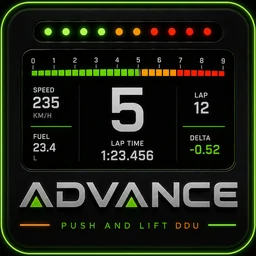
Push & Lift · the large dashboard: boxes or a complete preset
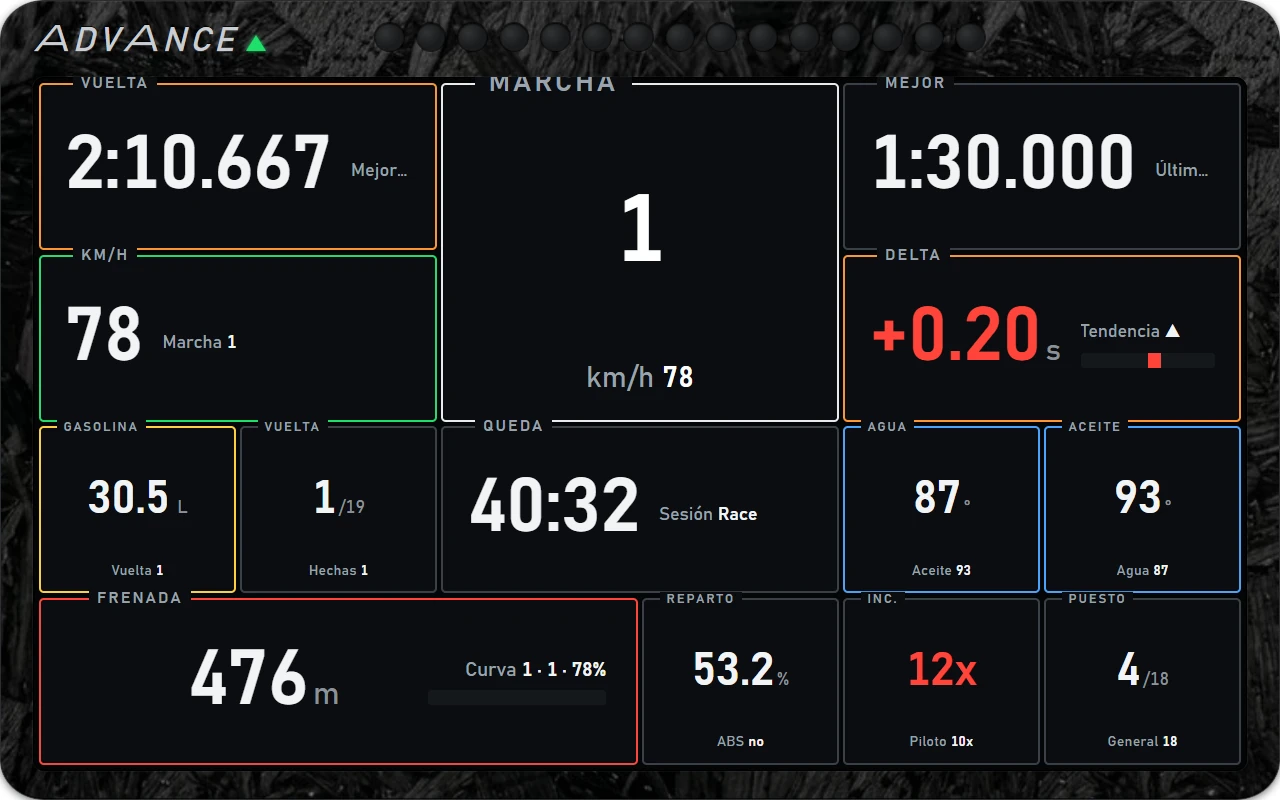
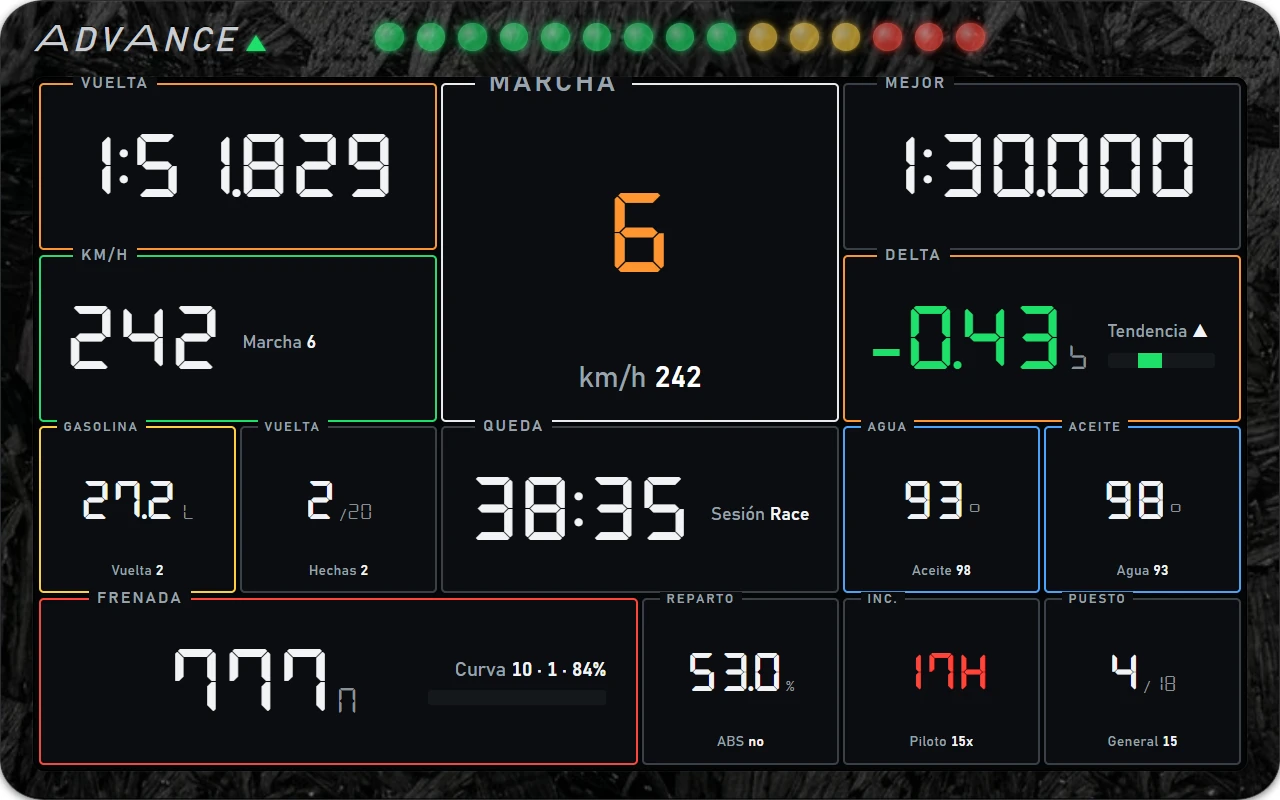
ADVANCE is a floating dashboard (DDU): a housing with ADVANCE branding, a top LED strip and a large screen below. The screen is divided into boxes with one value per box: lap, gear, delta, fuel, braking…
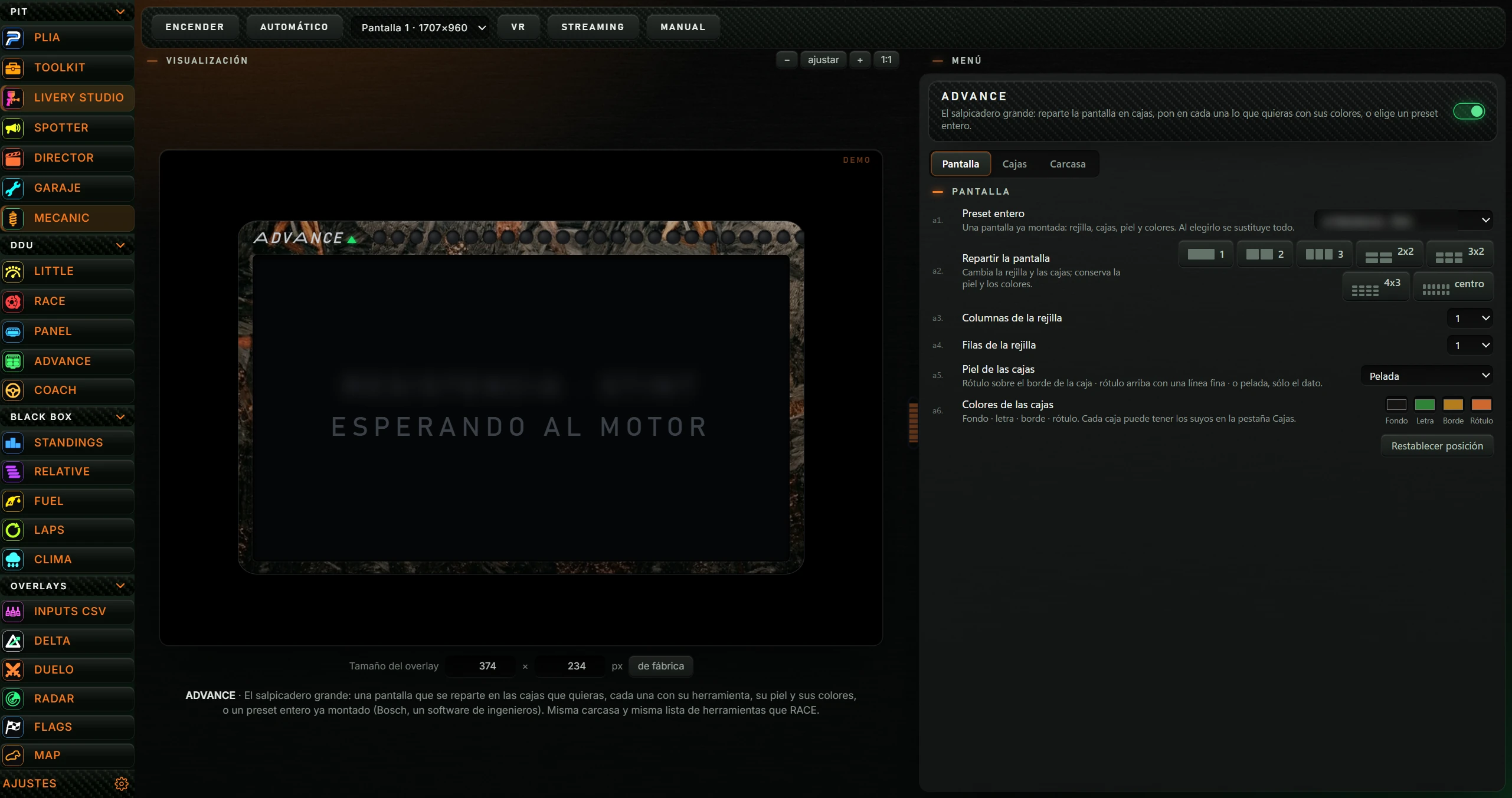
| Button | Action |
|---|---|
| ENCENDER (TURN ON) / APAGAR (TURN OFF) | Shows ADVANCE floating over the simulator or hides it. When on, the button says APAGAR. |
| AUTOMÁTICO (AUTOMATIC) | When enabled (highlighted), ADVANCE starts with iRacing or Le Mans Ultimate and stops when it closes. Click again to disable. |
| Monitor dropdown | The monitor for ADVANCE, for example Pantalla 1 · 1707×960. |
| VR | Explains VR viewing: in OpenKneeboard, capture PL OVERLAYS. |
| STREAMING | Copies ADVANCE's address for an OBS browser source and gives its dimensions: 640×400. |
| MANUAL (MANUAL) | Opens this manual on the Push & Lift website in your browser. |
These controls are shared by all DDUs and explained in the SUITE manual.
ADVANCE's menu is on the right. Changes save automatically and immediately affect the preview and, if on, the floating ADVANCE. See section 4.2.
With ADVANCE on, right-click opens Push & Lift with ADVANCE selected to edit its menu.
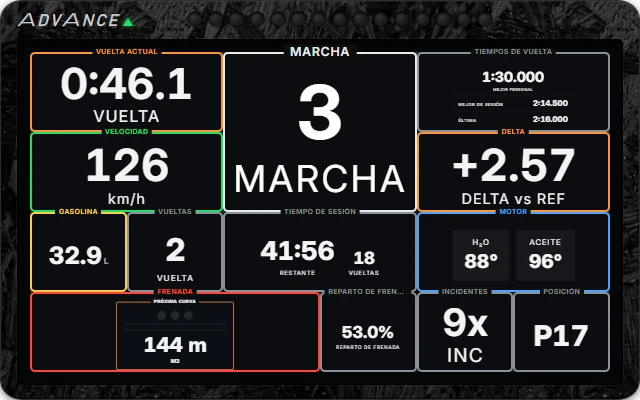
On first launch, ADVANCE uses GT3 · cajas con rótulo en el borde (GT3 · boxes with border labels): 6 × 4 grid, black forged carbon housing, ADVANCE branding and 15 tachometer LEDs.
| Area | Description |
|---|---|
| Carcasa (Housing) | Rounded outer frame. Choose texture and opacity in Carcasa. |
| ADVANCE branding | Top left with a green triangle. Can be hidden. |
| Tira de LEDs (LED strip) | At top centre. Shows tachometer, braking countdown or delta (see 5.3). Can be hidden. |
| Pantalla (Screen) | Dark glass containing boxes in a grid of columns and rows. |
| Cajas (Boxes) | One value each. Layout adapts to shape: centred in a square box; value left and details right in a wide box. |
| Label | Box name (VUELTA, MARCHA, DELTA…). On the border, above a line, or absent, depending on skin. |
Value colours follow the data: green for good (such as negative delta), red for bad and orange for warning.
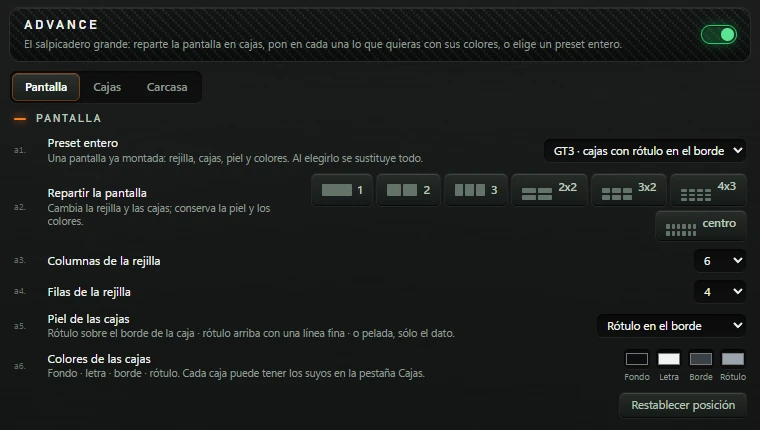
The heading reads ADVANCE and a description of arranging boxes, tools and colours or choosing a whole preset.
| Option | Action |
|---|---|
| Preset entero (Complete preset) (a1) | A complete screen: grid, boxes, skin and colours. Choosing it replaces everything. Includes 8 ADVANCE presets and TOOLKIT ADVANCE screens marked ★ (see 5.1). Any later change sets it to Libre (lo mío) (Custom: mine). |
| Repartir la pantalla (Arrange screen) (a2) | Changes grid and boxes, retaining skin and colours. Buttons: 1, 2, 3, 2x2, 3x2, 4x3 and centro (centre). Selected button highlighted. Existing boxes are replaced by the layout's boxes. |
| Columnas de la rejilla (Grid columns) (a3) | From 1 to 12. |
| Filas de la rejilla (Grid rows) (a4) | From 1 to 8. |
| Piel de las cajas (Box skin) (a5) | Label on the border, above a thin line, or bare with just the value. Options: Rótulo en el borde (Border label), Rótulo arriba, con línea (Top label with line) and Pelada (Bare). Applies to boxes without an individual skin. |
| Colores de las cajas (Box colours) (a6) | Background, text, border and label. Each box can override these under Cajas. Click a swatch to choose colour. |
| Restablecer posición (Reset position) | With ADVANCE on, centres it on screen. Useful when out of sight. |
One card per box in grid placement order: left to right, top to bottom. If a box does not fit, the next smaller box may fill the gap.
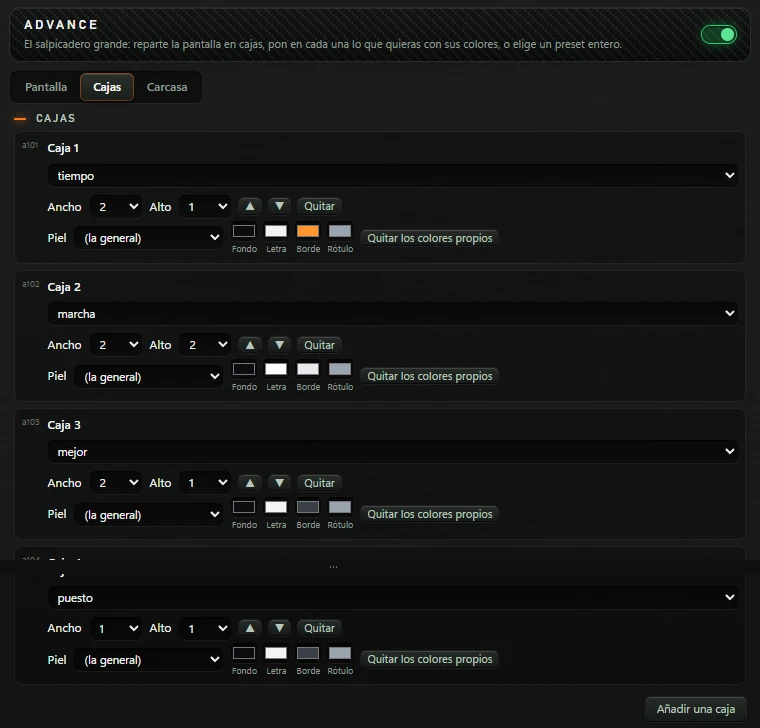
| Control | Action |
|---|---|
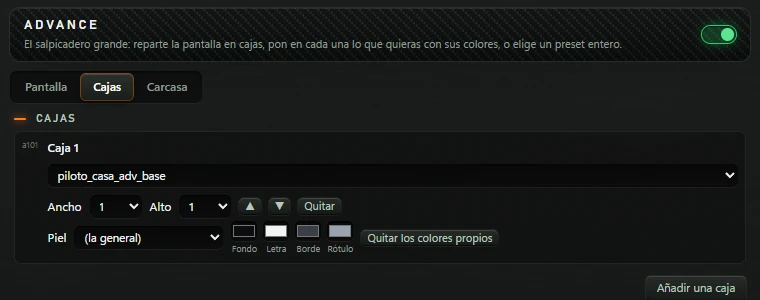
| Caja 1, Caja 2… (Box 1, Box 2…) | Box number. |
| Tool list | What this box displays. Available tools are described in 5.2. |
| Ancho (Width) and Alto (Height) | Columns and rows occupied by this box: 1 up to the grid's column/row count. |
| ▲ and ▼ | Move the box up/down the list, changing its screen position. |
| Quitar (Remove) | Removes the box without confirmation. |
| Piel (Skin) | (la general) (global) uses the Pantalla tab's skin. Also available: Rótulo en el borde (Border label), Rótulo arriba, con línea (Top label with line) or Pelada (Bare) for this box only. |
| Fondo (Background), Letra (Text), Borde (Border), Label | Individual box colours. Without overrides, the global colours appear. |
| Quitar los colores propios (Clear custom colours) | Returns to global colours. |
| Añadir una caja (Add box) | Adds a 1 × 1 current-lap box at the end, shown as tiempo in the list. |
Any change here sets the preset to Libre (lo mío) (Custom: mine).
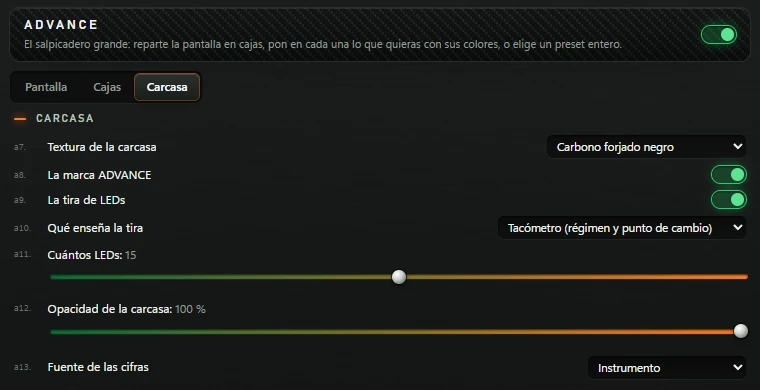
Every option is explained in 5.3.
Selecting one changes grid, boxes, skin, colours, texture and LED strip. Branding, opacity and digit font retain your settings.
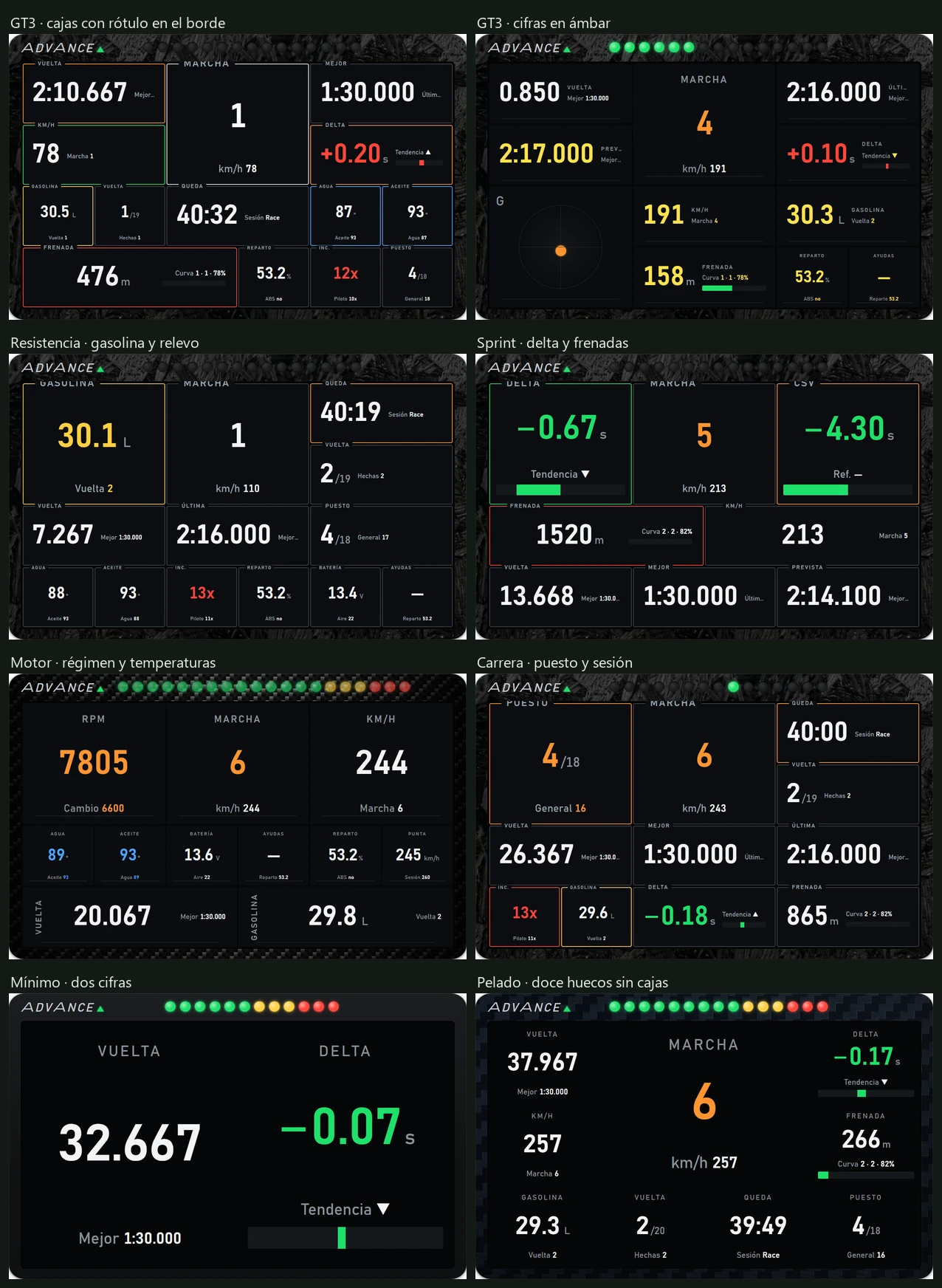
| Preset | Grid | Piel (Skin) | Housing · LEDs | What it shows |
|---|---|---|---|---|
| GT3 · cajas con rótulo en el borde (GT3 · boxes with border labels) (factory default) | 6 × 4 | Rótulo en el borde (Border label) | Black forged carbon · 15, tachometer | Vuelta en curso (Current lap), Marcha (Gear, large), Mejor vuelta (Best lap), Velocidad (Speed), Delta a mi mejor (Delta to my best), Combustible (Fuel), Vueltas (Laps), Tiempo de sesión (Session time), Temperatura del agua (Water temperature), Temperatura del aceite (Oil temperature), Próxima frenada (Next braking), Reparto de frenada (Brake bias), Incidentes (Incidents), Puesto (Position). |
| GT3 · cifras en ámbar (GT3 · amber digits) | 6 × 4 | Rótulo arriba, con línea (Top label with line) | Black forged carbon · 15, tachometer | Vuelta en curso, Marcha, Última vuelta (Last lap), Vuelta prevista (Predicted lap), Delta a mi mejor, Fuerza G (G-force), Velocidad, Combustible, Próxima frenada, Reparto de frenada, Testigos ABS · TC (ABS/TC indicators). Yellow digits. |
| Resistencia · gasolina y relevo (Endurance · fuel and stint) | 6 × 4 | Rótulo en el borde (Border label) | Black forged carbon · 15, tachometer | Combustible (large), Marcha, Tiempo de sesión, Vueltas, Vuelta en curso, Última vuelta, Puesto, Temperatura del agua, Temperatura del aceite, Incidentes, Reparto de frenada, Batería (Battery), Testigos ABS · TC. |
| Sprint · delta y frenadas (Sprint · delta and braking) | 6 × 4 | Rótulo en el borde (Border label) | Black forged carbon · 15, braking countdown | Delta a mi mejor, Marcha, Delta al CSV (Delta to CSV), Próxima frenada, Velocidad, Vuelta en curso, Mejor vuelta, Vuelta prevista. |
| Motor · régimen y temperaturas (Engine · RPM and temperatures) | 6 × 4 | Rótulo arriba, con línea (Top label with line) | Classic carbon · 20, tachometer | Régimen (RPM), Marcha, Velocidad, Temperatura del agua, Temperatura del aceite, Batería, Testigos ABS · TC, Reparto de frenada, Velocidad punta (Top speed), Vuelta en curso, Combustible. |
| Carrera · puesto y sesión (Race · position and session) | 6 × 4 | Rótulo en el borde (Border label) | Black forged carbon · 15, delta | Puesto (large), Marcha, Tiempo de sesión, Vueltas, Vuelta en curso, Mejor vuelta, Última vuelta, Incidentes, Combustible, Delta a mi mejor, Próxima frenada. |
| Mínimo · dos cifras (Minimal · two values) | 2 × 1 | Pelada (Bare) | Matt plastic · 12, tachometer | Vuelta en curso and Delta a mi mejor. |
| Pelado · doce huecos sin cajas (Bare · twelve spaces without boxes) | 4 × 3 | Pelada (Bare) | Blue carbon · 15, tachometer | Vuelta en curso, Marcha (large), Delta a mi mejor, Velocidad, Próxima frenada, Combustible, Vueltas, Tiempo de sesión, Puesto. |
Below the 8 presets are TOOLKIT ADVANCE screens marked ★: base kits ★ Base · ADVANCE, ★ Base · CSV, ★ Base · Frenada (Braking), ★ Base · Coach, ★ Broadcast · Carrera (Race), ★ Coach · Referencia y consejos (Reference and advice), ★ CSV · Referencia (Reference), ★ Frenada · Puntos de frenada (Braking points), ★ Mezcla · Clima y carrera (Weather and race), ★ Referencias · Deltas (References · Deltas), ★ Spotter · Alrededor (Around you), ★ Stream · Directo (Live), plus your own saved Pantalla ADVANCE kits.
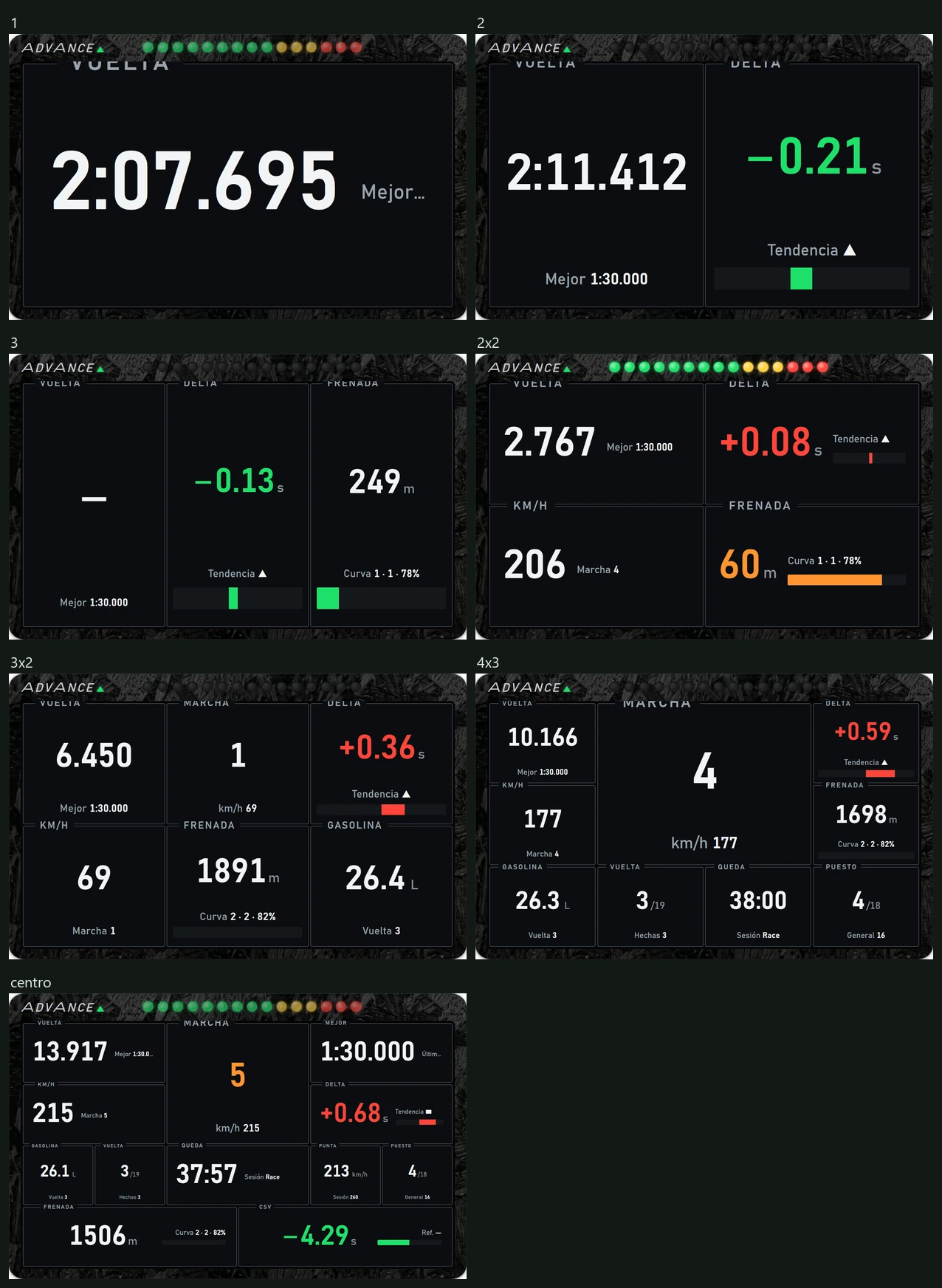
| Reparto (Brake bias) | Grid | Boxes provided |
|---|---|---|
| 1 | 1 × 1 | Vuelta en curso (Current lap). |
| 2 | 2 × 1 | Vuelta en curso and Delta a mi mejor. |
| 3 | 3 × 1 | Vuelta en curso, Delta a mi mejor, Próxima frenada. |
| 2x2 | 2 × 2 | Vuelta en curso, Delta a mi mejor, Velocidad, Próxima frenada. |
| 3x2 | 3 × 2 | Vuelta en curso, Marcha, Delta a mi mejor, Velocidad, Próxima frenada, Combustible. |
| 4x3 | 4 × 3 | Vuelta en curso, Marcha (2 × 2), Delta a mi mejor, Velocidad, Próxima frenada, Combustible, Vueltas, Tiempo de sesión, Puesto. |
| centro (centre) | 6 × 4 | Vuelta en curso, Marcha (2 × 2), Mejor vuelta, Velocidad, Delta a mi mejor, Combustible, Vueltas, Tiempo de sesión, Velocidad punta, Puesto, Próxima frenada (3 columns wide), Delta al CSV (3 columns wide). |
Each box lists TOOLKIT's groups: BANDERAS E INCIDENTES (FLAGS/INCIDENTS), COACH, COCHE Y MOTOR (CAR/ENGINE), COMBUSTIBLE Y BOXES (FUEL/PITS), DELTA Y REFERENCIA (DELTA/REFERENCE), FRENADA (BRAKING), FUERZAS G (G-FORCES), PEDALES Y VOLANTE (PEDALS/STEERING), PERSONALIZACIÓN (CUSTOMISATION), PISTA Y CLIMA (TRACK/WEATHER), RIVALES Y CLASIFICACIÓN (RIVALS/STANDINGS), RUEDAS (TYRES), TIEMPOS Y VUELTAS (TIMES/LAPS). RACE bars marked · appear at the end of the last group. A current tool outside the catalogue appears at the top under its short name.
ADVANCE can render:
Selecting another catalogue tool leaves the box saying ELIGE UNA HERRAMIENTA (CHOOSE A TOOL).
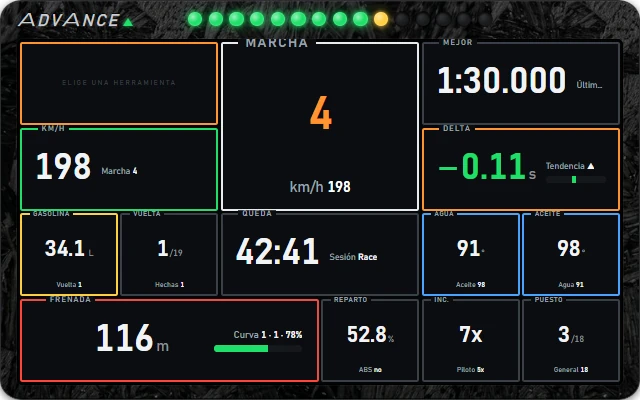
RACE bars are marked ·: TOOLKIT's · RACE · Clima (Weather), · RACE · Frenada y coach (Braking/coach), · RACE · Gasolina (Fuel), · RACE · Hotlap, · RACE · Resistencia (Endurance), · RACE · Rivales (Rivals), · RACE · Sprint GT3 and your saved Barra RACE kits; plus RACE pieces · Gasolina y vueltas (Fuel/laps), · Próxima frenada (Next braking), · Temperaturas (Temperatures).
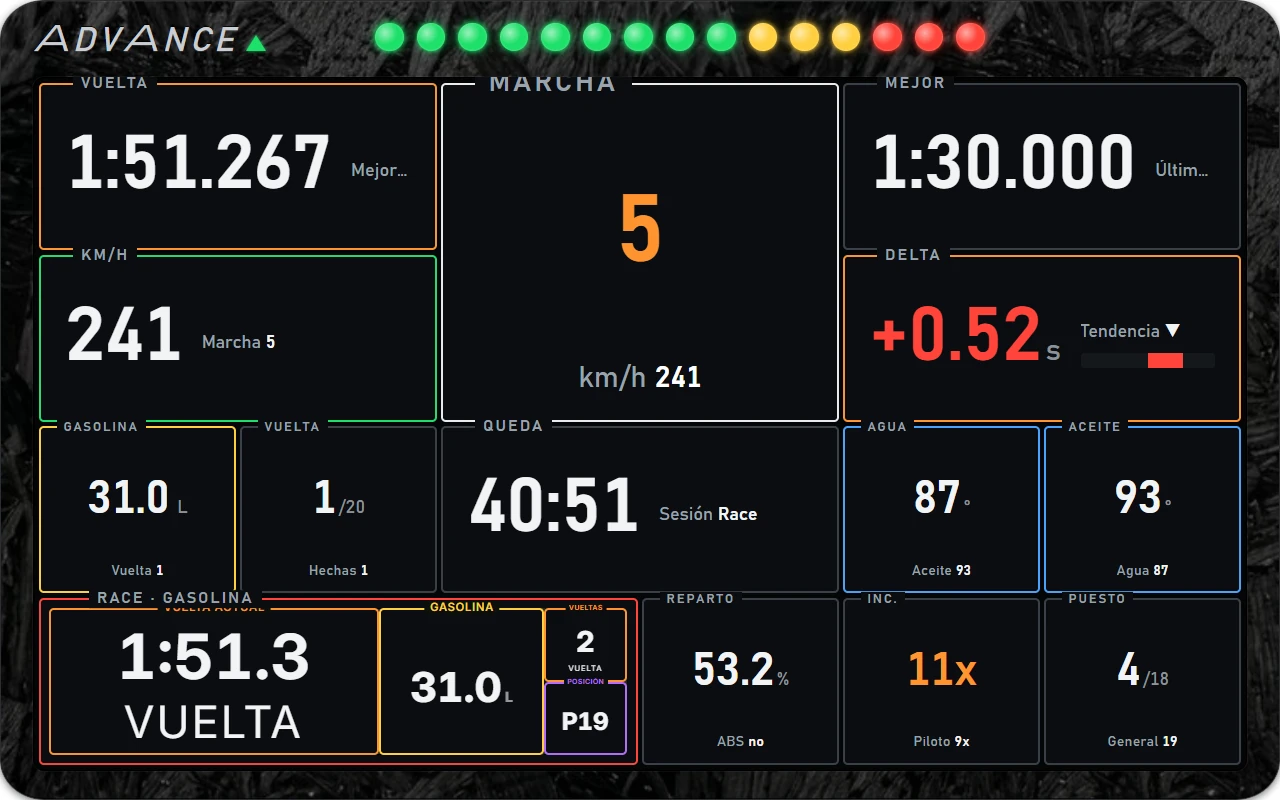
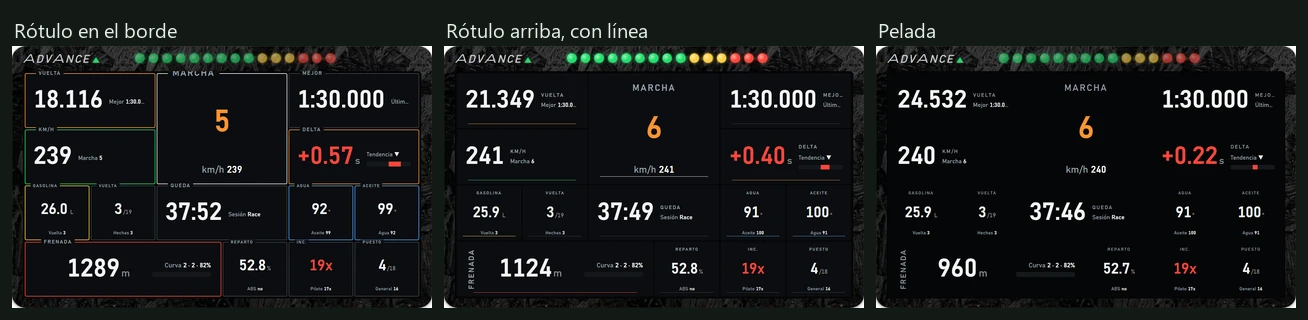
| Piel (Skin) | Appearance |
|---|---|
| Rótulo en el borde (Border label) | Frame in Borde colour; the name interrupts its top edge in Rótulo colour. |
| Rótulo arriba, con línea (Top label with line) | No frame; name above and thin Borde-coloured line below. |
| Pelada (Bare) | No frame or background, just the value. |
GT3 default colours: near-black Fondo, white Letra, dark-grey Borde and grey Rótulo.
| Option | Values | Factory default | Action |
|---|---|---|---|
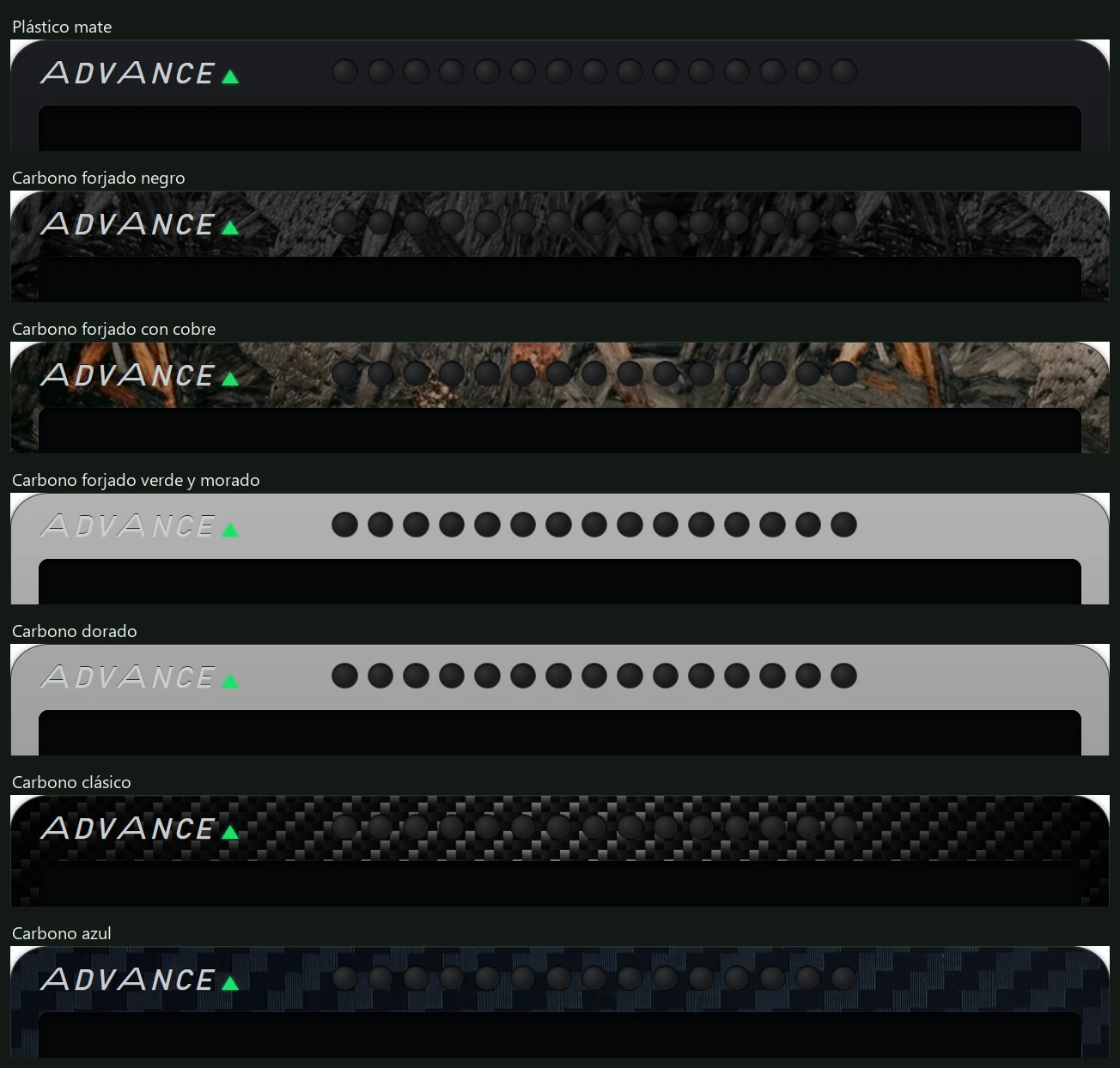
| Textura de la carcasa (Housing texture) (a7) | Plástico mate (Matt plastic), Carbono forjado negro (Black forged carbon), Carbono forjado con cobre (Copper forged carbon), Carbono forjado verde y morado (Green/purple forged carbon), Carbono dorado (Gold carbon), Carbono clásico (Classic carbon), Carbono azul (Blue carbon) | Carbono forjado negro (Black forged carbon) | Outer frame finish. |
| La marca ADVANCE (ADVANCE branding) (a8) | Toggle | Enabled | Shows/hides ADVANCE at top left. |
| La tira de LEDs (The LED strip) (a9) | Toggle | Enabled | Shows/hides the LED strip. |
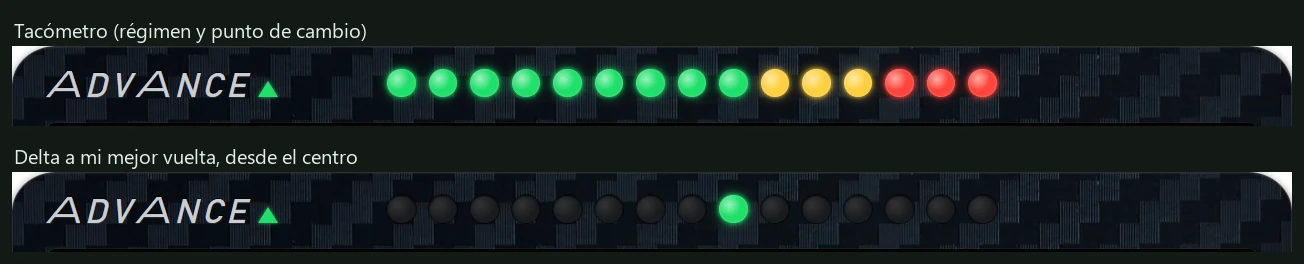
| Qué enseña la tira (What the strip shows) (a10) | Tacómetro (régimen y punto de cambio) (Tachometer: RPM/shift point) · Cuenta atrás de la frenada (últimos 300 m) (Braking countdown: last 300 m) · Delta a mi mejor vuelta, desde el centro (Delta to my best, from centre) | Tachometer | See below. |
| Cuántos LEDs (LED count) (a11) | 6 to 24, in steps of one | 15 | LED count. |
| Opacidad de la carcasa (Housing opacity) (a12) | 20 % to 100 %, in steps of 5 | 100 % | Makes all of ADVANCE more or less transparent. |
| Fuente de las cifras (Digit font) (a13) | Instrumento (Instrument) · Digital (siete segmentos) (Digital: seven segments) | Instrumento (Instrument) | Digital gives box values a seven-segment display style. TOOLKIT kits are unaffected. |
| What you see | What to do |
|---|---|
| Boxes say ESPERANDO AL MOTOR and LEDs are off | No car data for over 4 seconds. Enter the track in iRacing or Le Mans Ultimate and check the engine is on in the Push & Lift bar. |
| A box says ELIGE UNA HERRAMIENTA | ADVANCE cannot render the selected tool. Choose one it supports (see 5.2). |
| ADVANCE is on but invisible | Check the menu header switch is green, housing opacity and monitor selection; it may be on another monitor. |
| ADVANCE is off-screen | Pantalla tab → Restablecer posición (Reset position). Centres it. |
| Preset says Libre (lo mío) | Expected after modifying a preset. Select it again to restore it; your changes will be lost. |
| Choosing a layout replaced my boxes | Expected: layouts provide their own boxes, preserving only skin and colours. |
| A RACE bar looks tiny | Bars are wide. Increase the box's Ancho (Width) . |
| Cajas shows one box with a name beginning piloto_ | A TOOLKIT screen (★) is selected. This is the whole kit; edit it in TOOLKIT. |
| The whole screen says ELIGE UNA HERRAMIENTA after deleting a TOOLKIT kit | The selected kit no longer exists. Choose another preset under Pantalla. |
| A box says HERRAMIENTA NO VÁLIDA (INVALID TOOL) | The selected RACE bar has a problem and cannot render. Open, check and save it in TOOLKIT, or choose another. |
| My TOOLKIT screen is absent from Preset entero | Only kits saved in TOOLKIT as Pantalla ADVANCE (ADVANCE display) appear here. RACE bars appear in box lists, marked ·. |
| With many LEDs, the strip extends too far right | At factory size, 24 LEDs reach the edge. Reduce Cuántos LEDs (LED count) or enlarge ADVANCE. |
| A top label is clipped | With Rótulo en el borde, top-row labels can be partly hidden. Try Rótulo arriba, con línea. |