 PUSH & LIFTPUSH & LIFT

Push & Lift · simulator settings explained and one click away
GARAJE shows your simulator's settings one by one, in your language, explaining what each does. Change and save them with a click without editing .ini files by hand.
GARAJE has three areas:
| Area | Purpose |
|---|---|
| CONFIGURACIÓN (CONFIGURATION) | View, search and change simulator settings. |
| DOCTOR | Your iRacing installation's condition: disk space, crashes, paints and backups. |
| PC y perfiles (PC and profiles) | A separate window for your hardware, monitors, settings profiles, full backups, history and recovery. |

With GARAJE selected, the Push & Lift screen offers:
When GARAJE is closed, “Cerrada.” (Closed) appears instead. These buttons are shared by all PIT apps and explained in the SUITE manual.
Only one GARAJE can be open. Opening it again brings the existing window to the front.
GARAJE always opens in CONFIGURACIÓN (CONFIGURATION) on the first tab of the simulator last selected. Opening it from the Suite uses the Suite's language.
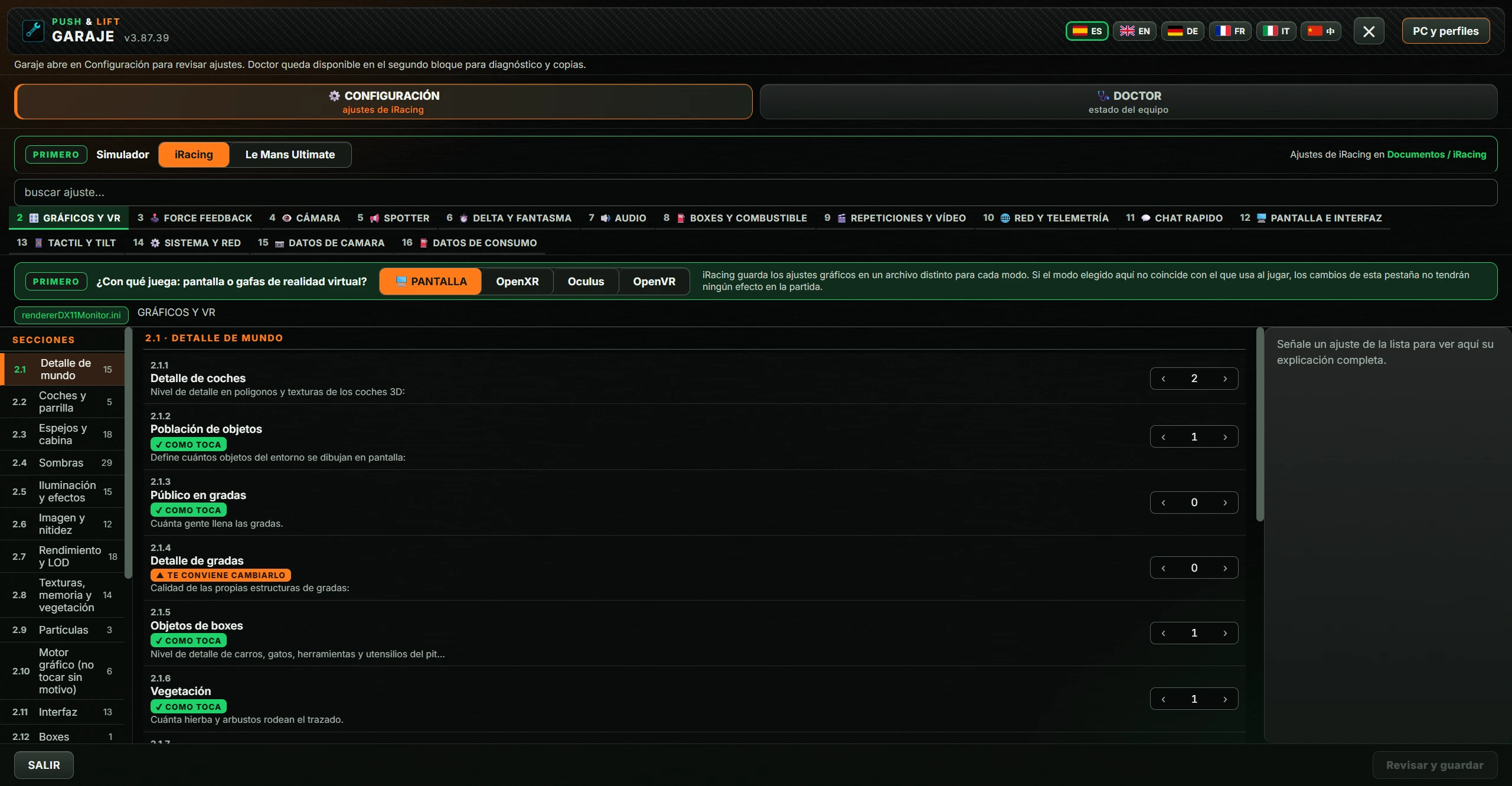
From top to bottom, the window has:
| Button or text | Action |
|---|---|
| PUSH & LIFT GARAJE and version | App name and version number. |
| Flags ES EN DE FR IT 中 | Change the whole window's language: Spanish, English, German, French, Italian or Chinese. The selected flag is marked. GARAJE remembers the language. If switching fails, it says “No se ha podido cambiar el idioma. La selección anterior se conserva.” (Unable to change language; previous selection retained). |
| ✕ (Cerrar: Close) | Closes GARAJE immediately. |
| PC y perfiles (PC and profiles) | Opens the window PC y perfiles (PC and profiles). |
| Text below | Explains that GARAJE opens in Configuración for reviewing settings, with Doctor available in the second block for diagnostics and backups. |
Two large blocks below the header. The selected one has a coloured border.
Sections are numbered: DOCTOR uses 1.1–1.4 and CONFIGURACIÓN tabs start at 2.
Choose the simulator whose settings you want to see: iRacing or Le Mans Ultimate. The selection is orange and remembered. Switching simulator discards unsaved changes.
Text on the right says whether the simulator is running. This is checked every 5 seconds:
| Text | Meaning |
|---|---|
| “Ajustes de iRacing en Documentos / iRacing” (iRacing settings in Documents / iRacing) | iRacing is closed. You can save. |
| “iRacing está abierto: ciérralo antes de guardar, o pisará los cambios al cerrar” (iRacing is open: close before saving or it will overwrite changes on exit) | Close iRacing before saving. |
| “Le Mans Ultimate encontrado en Steam · el juego está cerrado: se puede guardar” (Found on Steam · game closed: saving allowed) | Le Mans Ultimate is closed. You can save. |
| “Le Mans Ultimate está abierto: ciérralo antes de guardar, o pisará los cambios al cerrar” (Game open: close before saving or it will overwrite changes on exit) | Close Le Mans Ultimate before saving. |
| “Estado del simulador desconocido: no se puede guardar ni restaurar hasta comprobar que está cerrado” (Simulator state unknown: saving/restoring blocked until closure is verified) | GARAJE cannot tell whether the simulator is running. Saving and restoring are blocked. |
Type in buscar ajuste… (search setting…) at least two letters. GARAJE searches all tabs of the selected simulator.
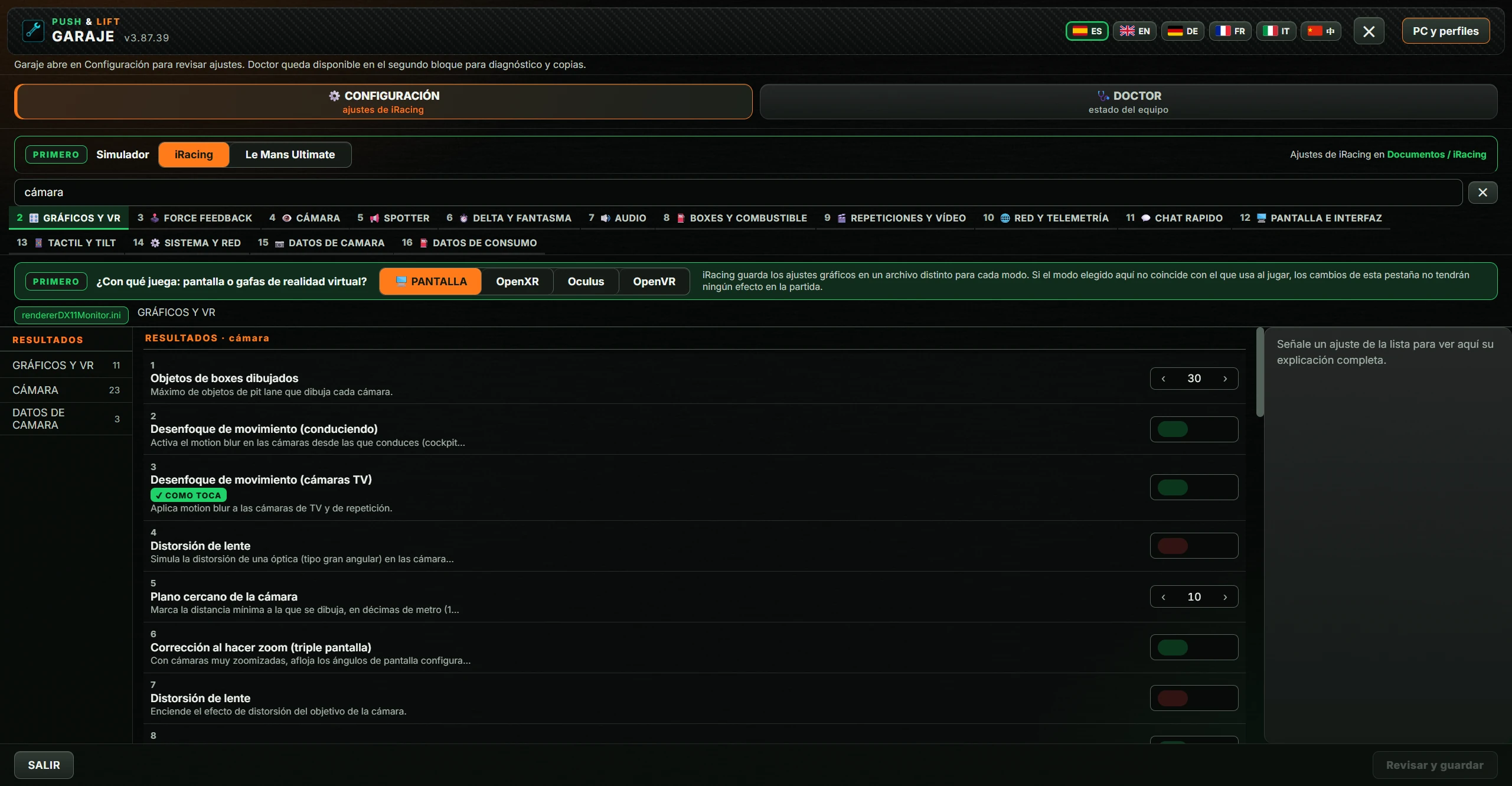
Each tab has a number, icon and name. iRacing tabs run from 2 GRÁFICOS Y VR (GRAPHICS AND VR) to 16 DATOS DE CONSUMO (CONSUMPTION DATA); Le Mans Ultimate tabs run from 2 GRÁFICOS (GRAPHICS) to 8 VARIOS (MISCELLANEOUS). The complete list is in 5.3 and 5.4.
Below the tabs, a green label names the main file for that tab (for example app.ini), with the tab name beside it.
Only appears in iRacing's tab GRÁFICOS Y VR (GRAPHICS AND VR) . iRacing stores graphics separately for each mode. Choose the one you use:
The chosen mode is orange and remembered. If its file does not exist yet, the button is grey with “Modo sin archivo · iRacing lo crea al arrancar en él” (No file: iRacing creates it on startup in this mode). The reminder on the right says changes have no effect in game if this mode differs from the one you actually use.
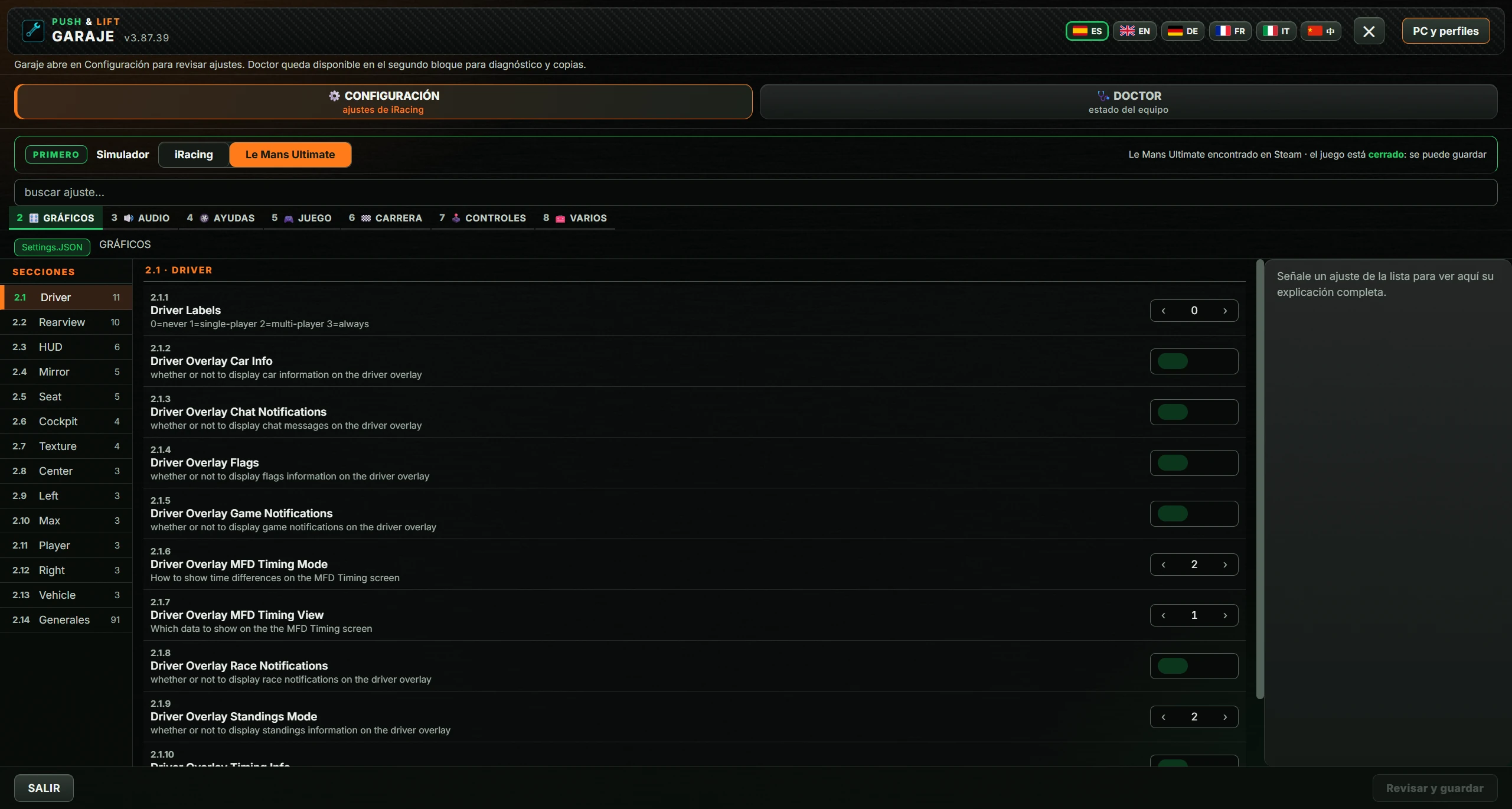
The left column divides the tab into numbered sections (2.1, 2.2…), each with a name and setting count. Click one to view its settings. The selected section is orange.
The section number and uppercase name appear at the top. Each row has:
Changed values stay marked until saved. Returning to the original value removes the pending change.
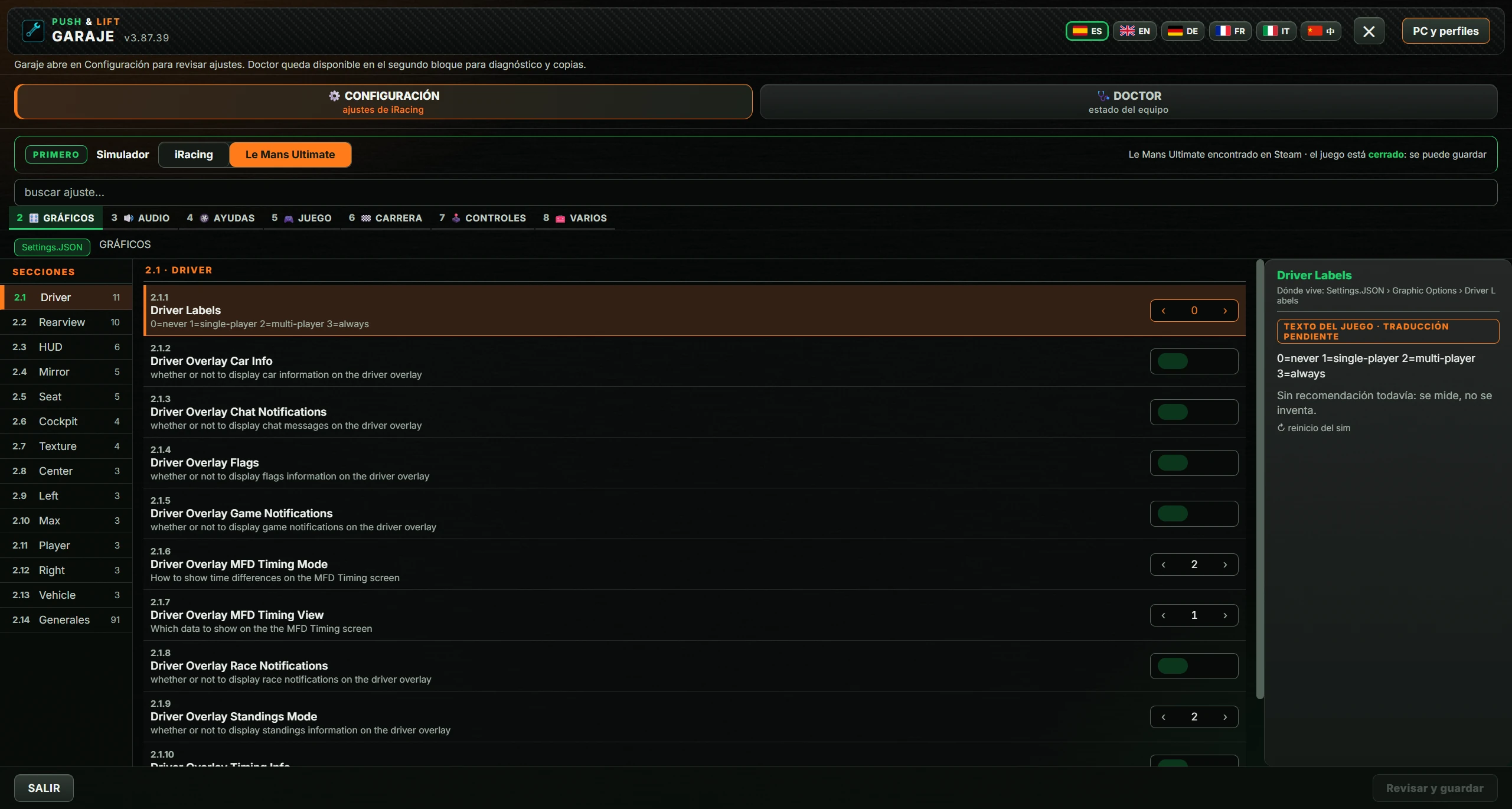
Click a row to view its information on the right. With nothing selected, it asks you to select a setting to see its full explanation.
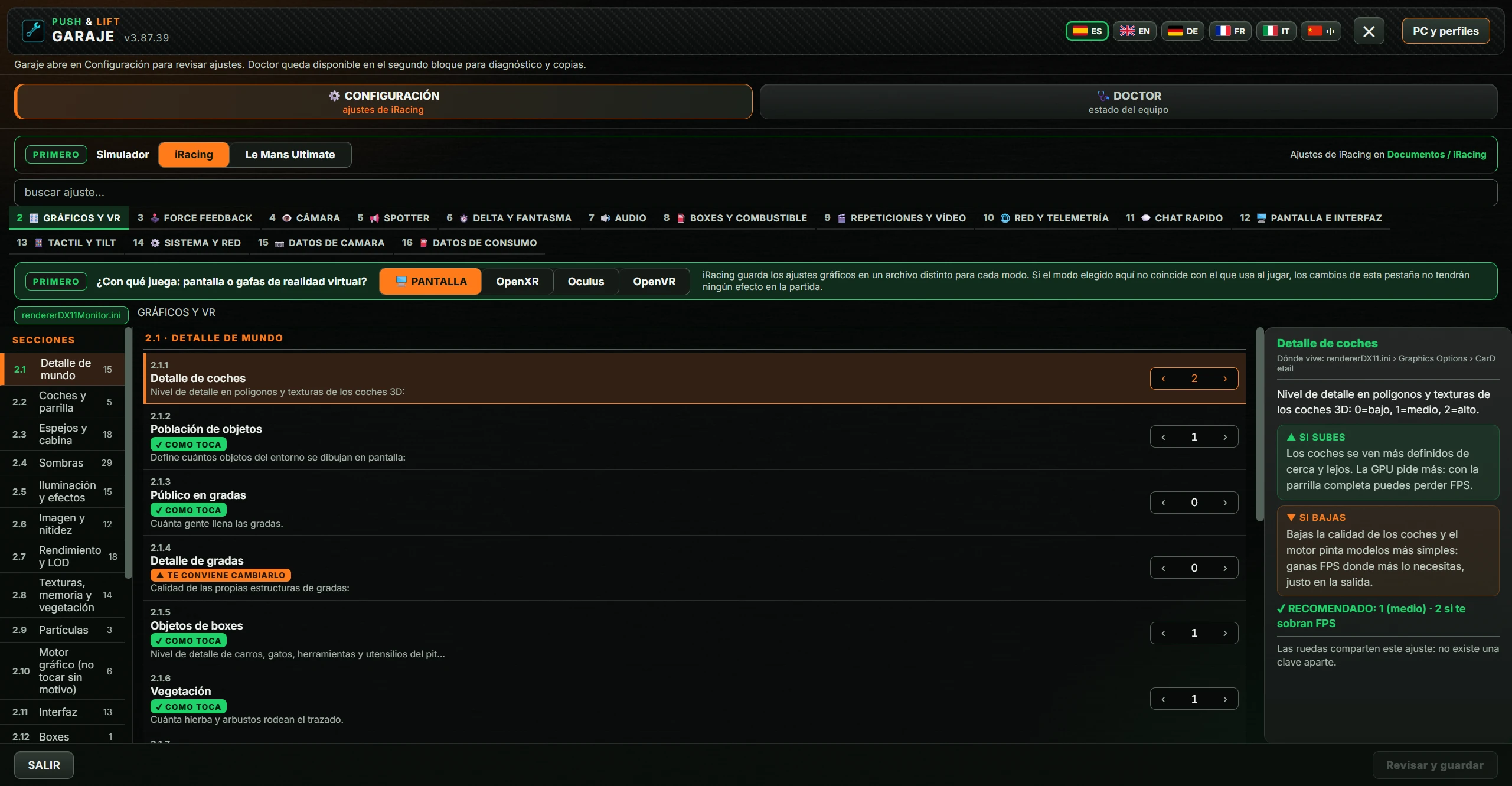
The panel may contain:
| Area | Meaning |
|---|---|
| Title | The setting name. |
| Dónde vive (Location) | File, section and key where the setting is stored. |
| Explanation | What the setting does. |
| ▲ SI SUBES / ▼ SI BAJAS (IF INCREASED / DECREASED) | What happens when you increase or decrease the value. Switches use ▲ SI ACTIVAS / ▼ SI DESACTIVAS (IF ENABLED / DISABLED). |
| CADA VALOR (EACH VALUE) | Instead of the above, explains each possible value. |
| ✔ RECOMENDADO (RECOMMENDED) | The recommended value, with COMO TOCA or TE CONVIENE CAMBIARLO where applicable. |
| rango (range) | Minimum and maximum for numbers, for example “rango: 10 a 64” (range 10–64). |
| Nota (Note) | An extra notice about the setting. |
| ↻ reinicio del sim (simulator restart) | The change takes effect after restarting the simulator. |
| no está en tu ini (not in your ini) | The setting is missing from your file. |
| TEXTO DEL JUEGO · TRADUCCIÓN PENDIENTE (GAME TEXT · TRANSLATION PENDING) | The explanation is the game's original, untranslated text. This occurs in Le Mans Ultimate. |
| Sin recomendación todavía: se mide, no se inventa. (No recommendation yet: measured, not invented.) | No recommended value for this setting. |
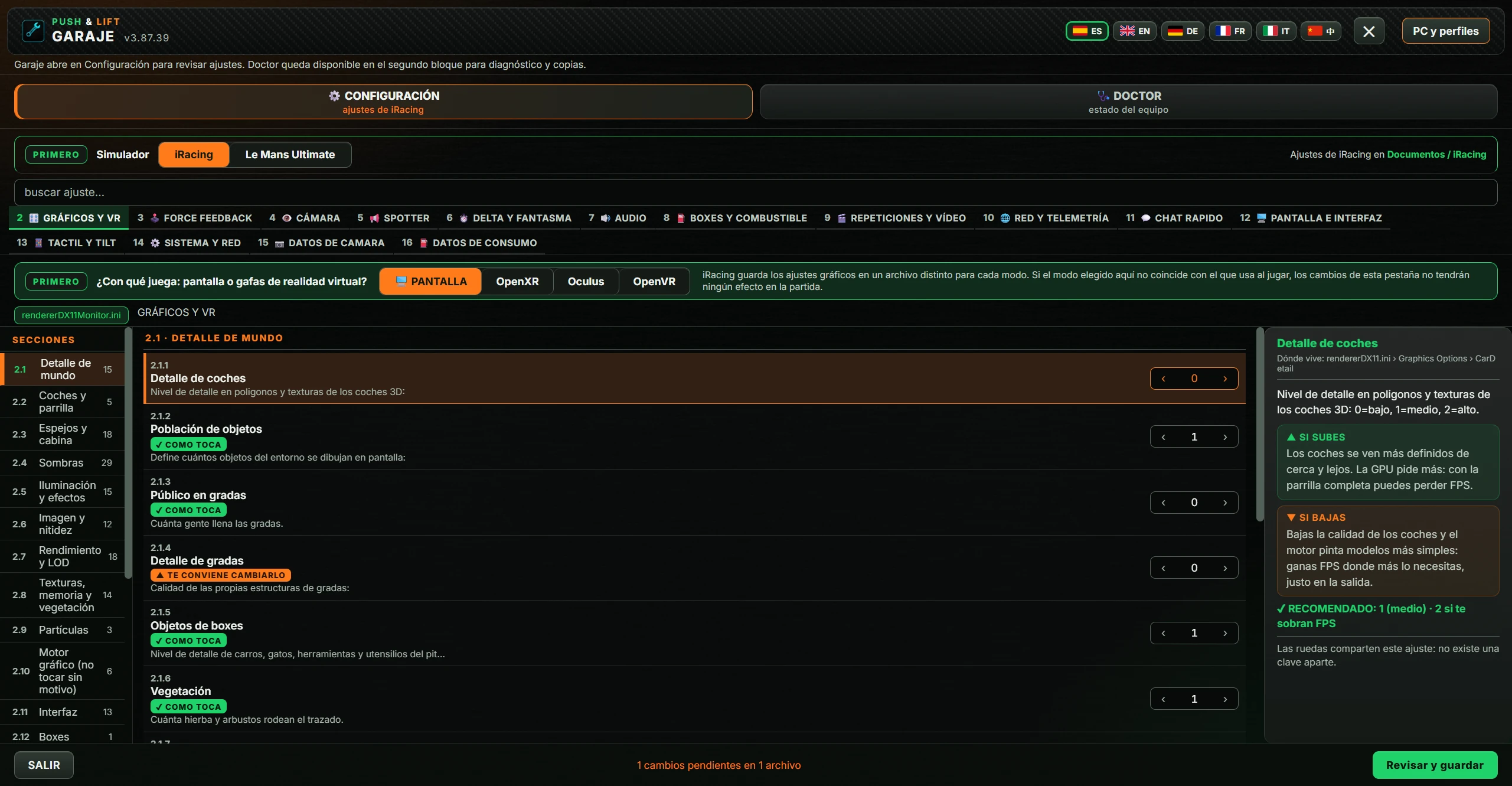
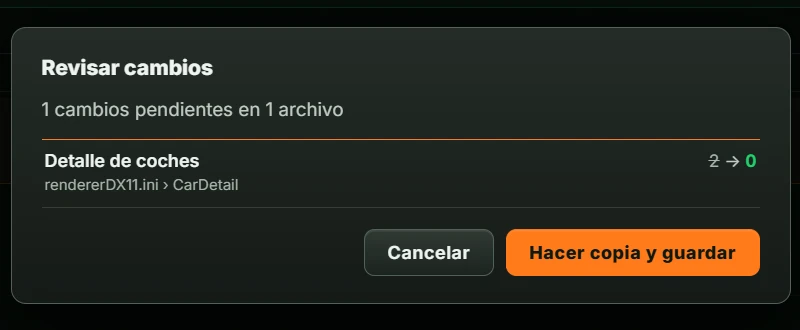
Each change shows its name, file and key, crossed-out old value and new value.
A notice then appears with Cerrar (Close):
| Notice | What happened |
|---|---|
| “N ajustes guardados” (N settings saved) | Everything saved. The list reloads with the new values. |
| “iRacing está abierto: no se ha guardado nada. Ciérralo y vuelve a guardar.” (iRacing open: nothing saved. Close it and save again.) | Close iRacing and repeat. |
| “Le Mans Ultimate está abierto: no se ha guardado nada.” (Le Mans Ultimate open: nothing saved.) | Close Le Mans Ultimate and repeat. |
| “No se puede comprobar si el simulador está cerrado. No se ha modificado nada. Revisa su estado e inténtalo otra vez.” (Cannot verify simulator is closed. Nothing changed. Check its state and retry.) | GARAJE cannot determine whether the simulator is running. |
| “Hay valores que no valen. No se ha guardado nada:” (Invalid values. Nothing saved:) | The invalid settings and reasons appear below. |
| “No se ha podido escribir en los archivos de iRacing: no se ha guardado nada.” (Unable to write iRacing files: nothing saved.) | Windows prevented writing the file. |
| “Guardado a medias. Se han escrito N ajuste(s), pero han fallado …” (Partially saved: N settings written, but others failed…) | Some changes were saved. Failed changes remain pending. |
| “No se ha podido verificar el resultado. Algún archivo puede haber cambiado. Revisa PC y perfiles → Recuperación antes de volver a guardar.” (Result unverified; files may have changed. Review Recovery before saving again.) | GARAJE cannot confirm what was written. Open Recuperación (Recovery). |
Clicking outside a dialog also closes it.
With Le Mans Ultimate selected, the window is the same but uses its own tabs: 2 GRÁFICOS (GRAPHICS), 3 AUDIO, 4 AYUDAS (AIDS), 5 JUEGO (GAME), 6 CARRERA (RACE), 7 CONTROLES (CONTROLS) and 8 VARIOS (MISCELLANEOUS). All settings are in the game's Settings.JSON.
Click DOCTOR · estado del equipo (DOCTOR · system condition). At the top, the label DIAGNÓSTICO (DIAGNOSTICS) and a description of checking hardware and the iRacing installation before changing settings. Four rows follow, each with a title, value, green summary, explanation and large button at right.
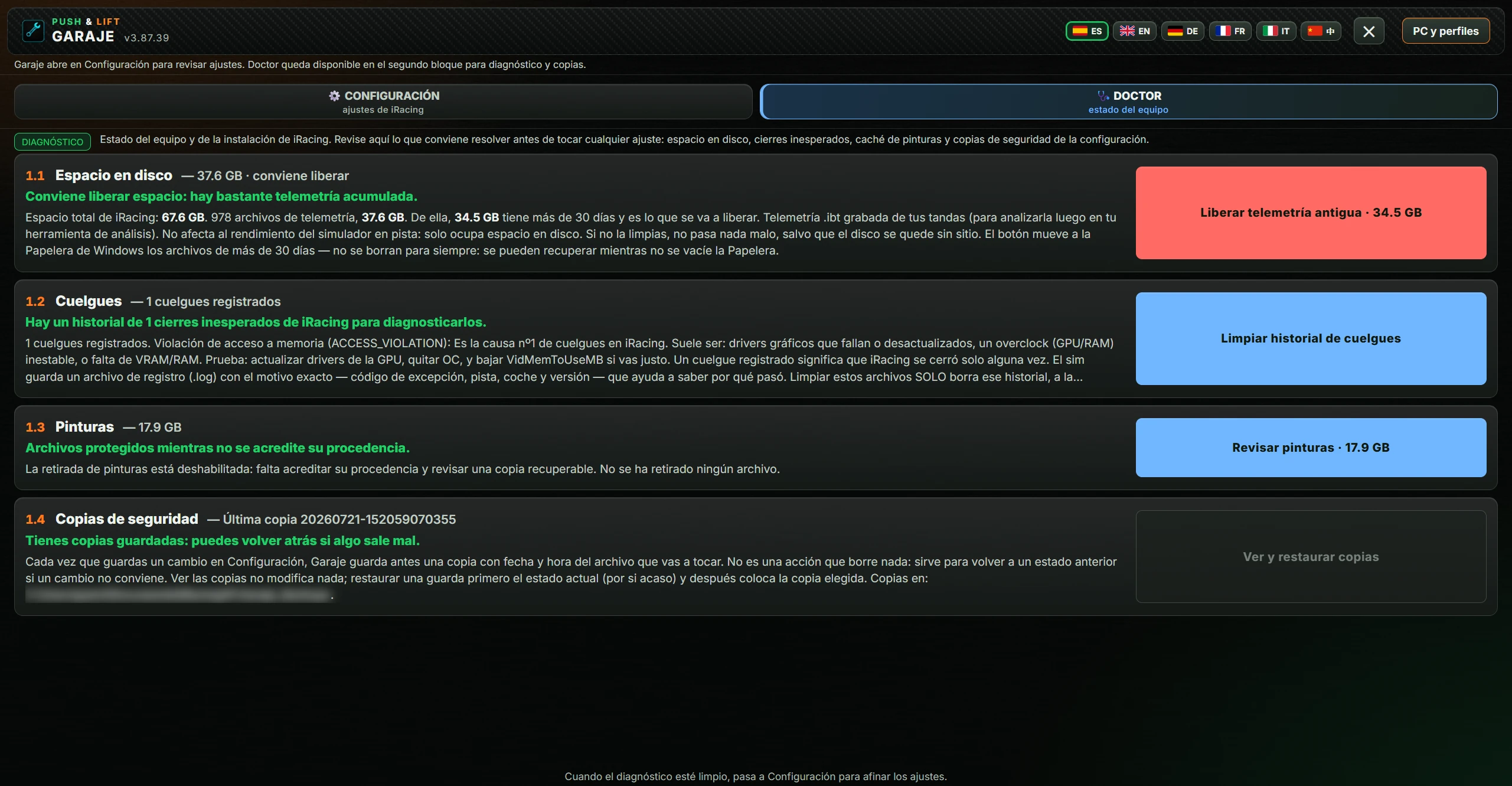
The bottom says to move to Configuración once diagnostics are clear. Button colours indicate urgency: red, action advised; blue, something available to do; grey, nothing urgent. “Nada pendiente aquí” (Nothing pending here) has no action.
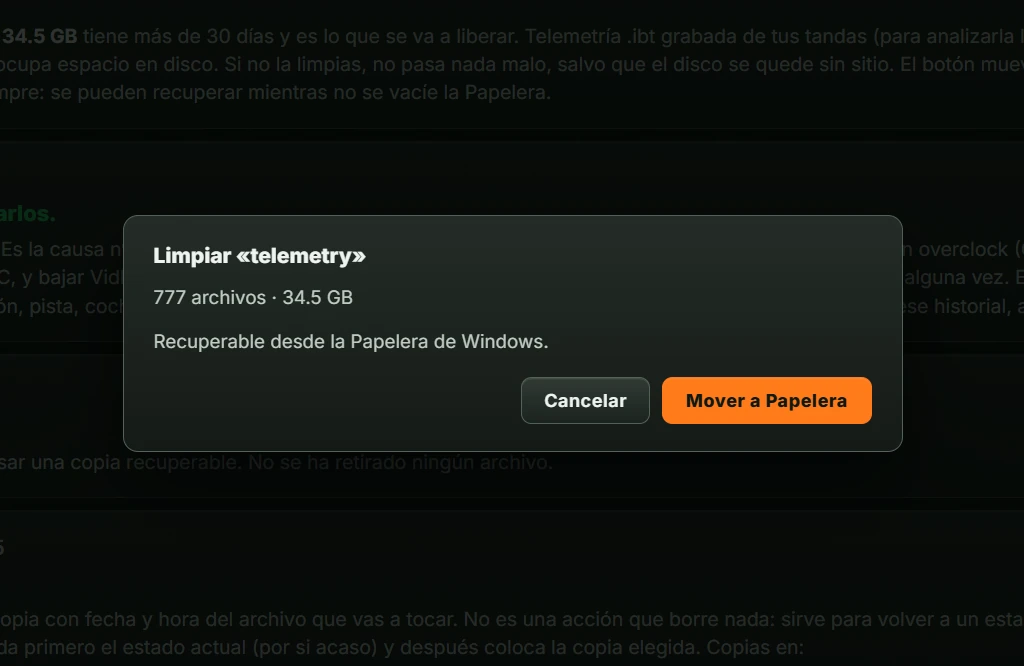
Space used by iRacing and saved telemetry (.ibt). Telemetry does not affect performance; it only occupies disk space.
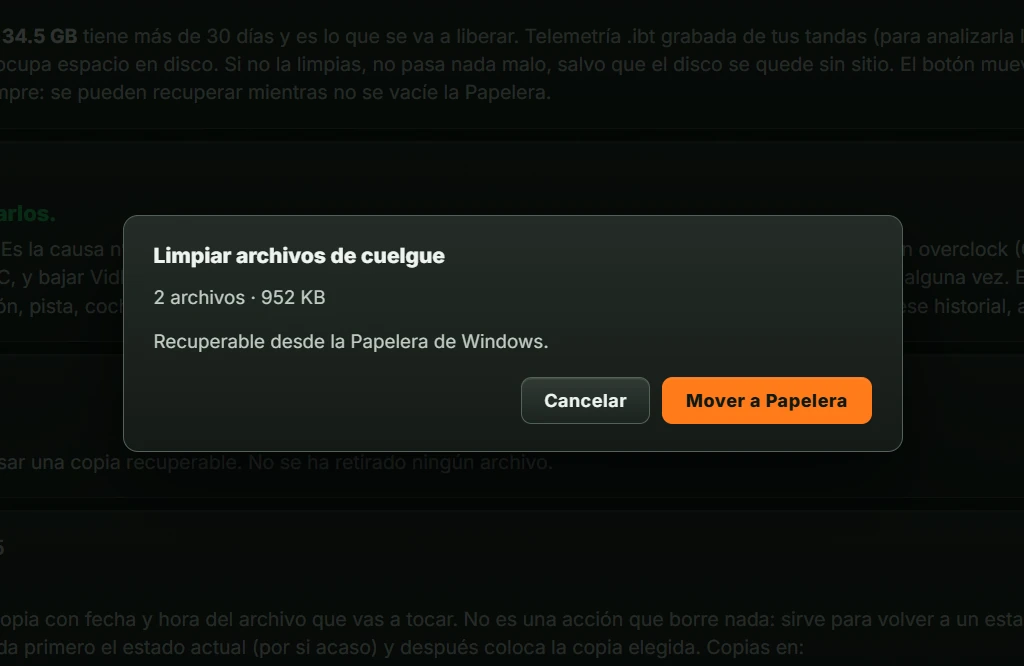
How often iRacing closed unexpectedly. Where possible, GARAJE identifies the failure and gives advice, for example for an access violation (ACCESS_VIOLATION).
Space used by downloaded paints. GARAJE does not delete them: “La retirada de pinturas está deshabilitada…” (Paint removal is disabled).
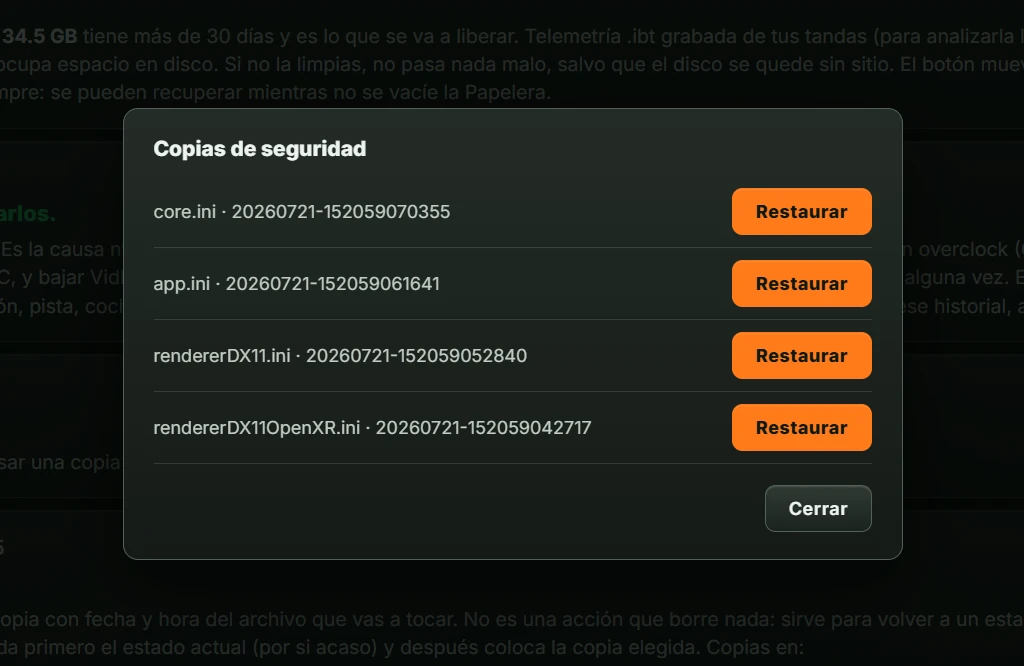
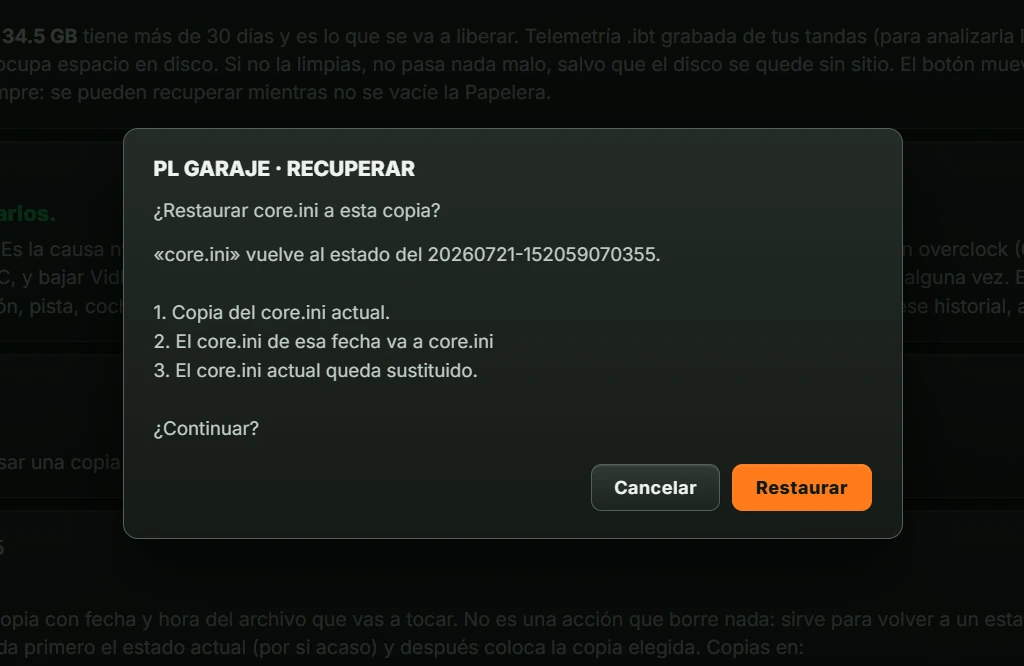
Each save in CONFIGURACIÓN first creates a dated and timed backup of the file being changed. This row shows the latest backup date and folder.
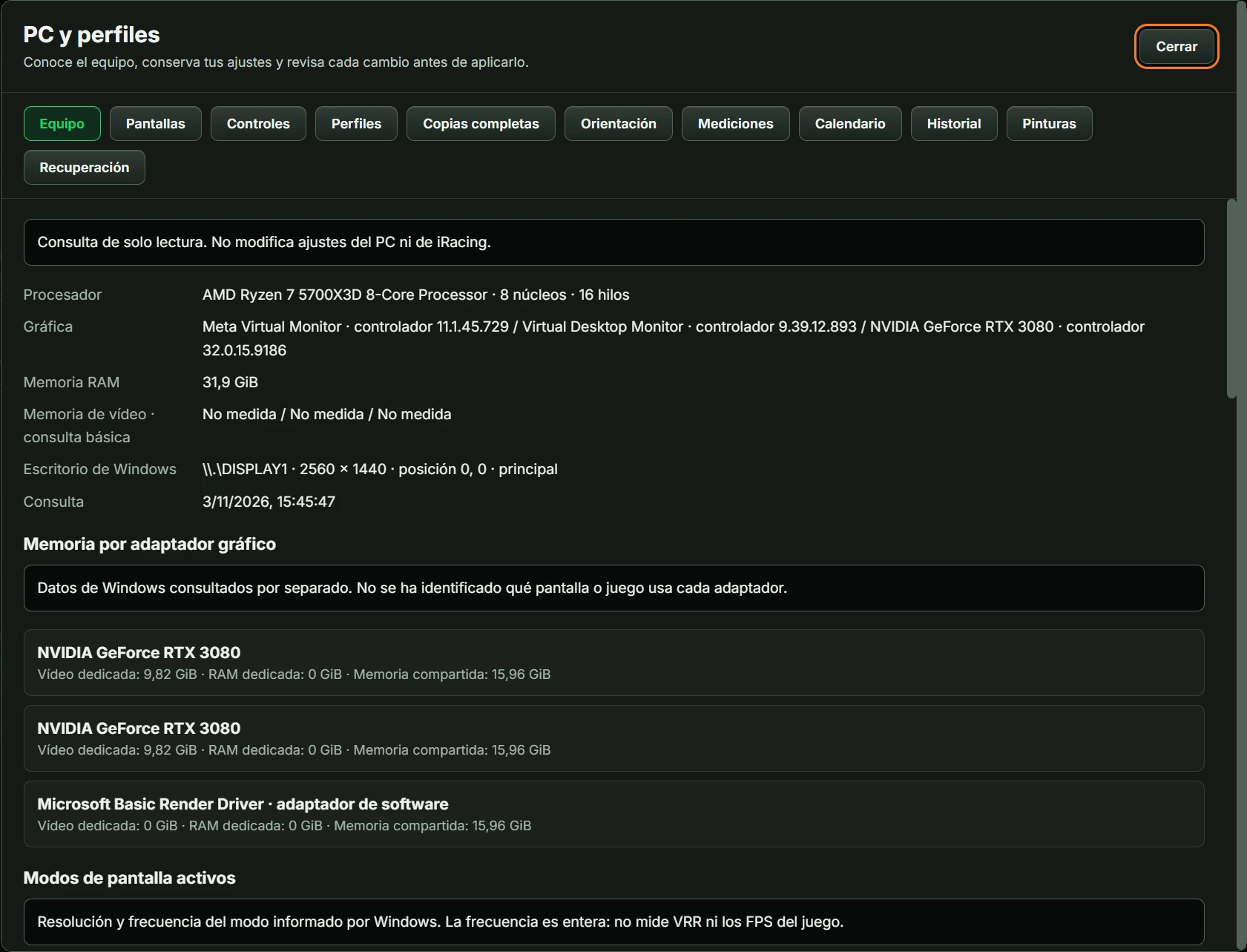
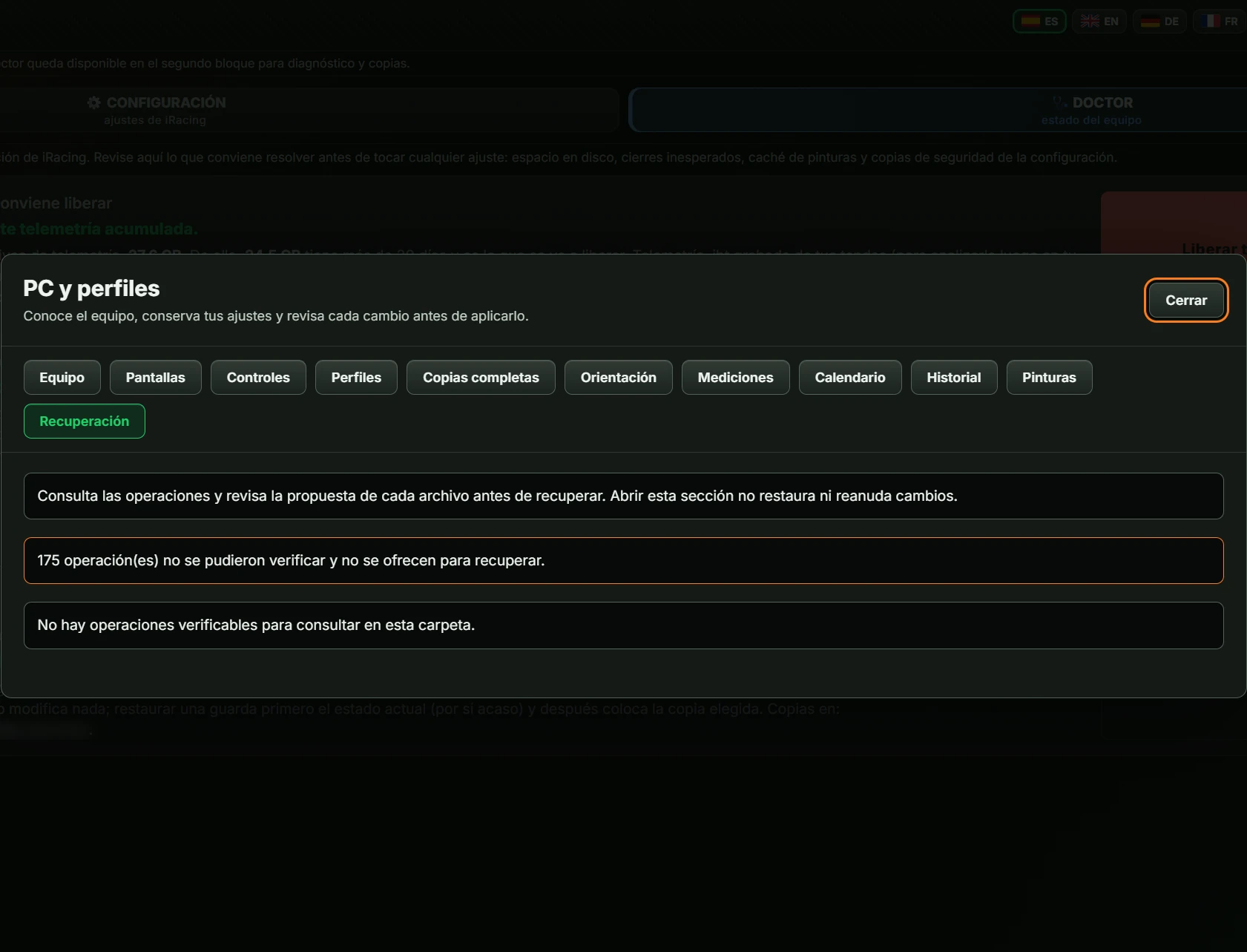
Click PC y perfiles (PC and profiles) in the header. A window opens above it, explaining that you can inspect your hardware, preserve settings and review changes before applying them. It has a button Cerrar (Close) (Esc also closes it). There are eleven section buttons; the selected one is green. It always opens on Equipo (Hardware).
Profiles and plans are for iRacing. With Le Mans Ultimate selected, a notice says these features are available for iRacing and asks you to select iRacing in GARAJE.
What Windows reports about your PC. Read-only; changes nothing.
“Medidas de monitores planos” (Flat-monitor measurements) is a wizard for one or three flat monitors. It is not for VR or curved monitors.
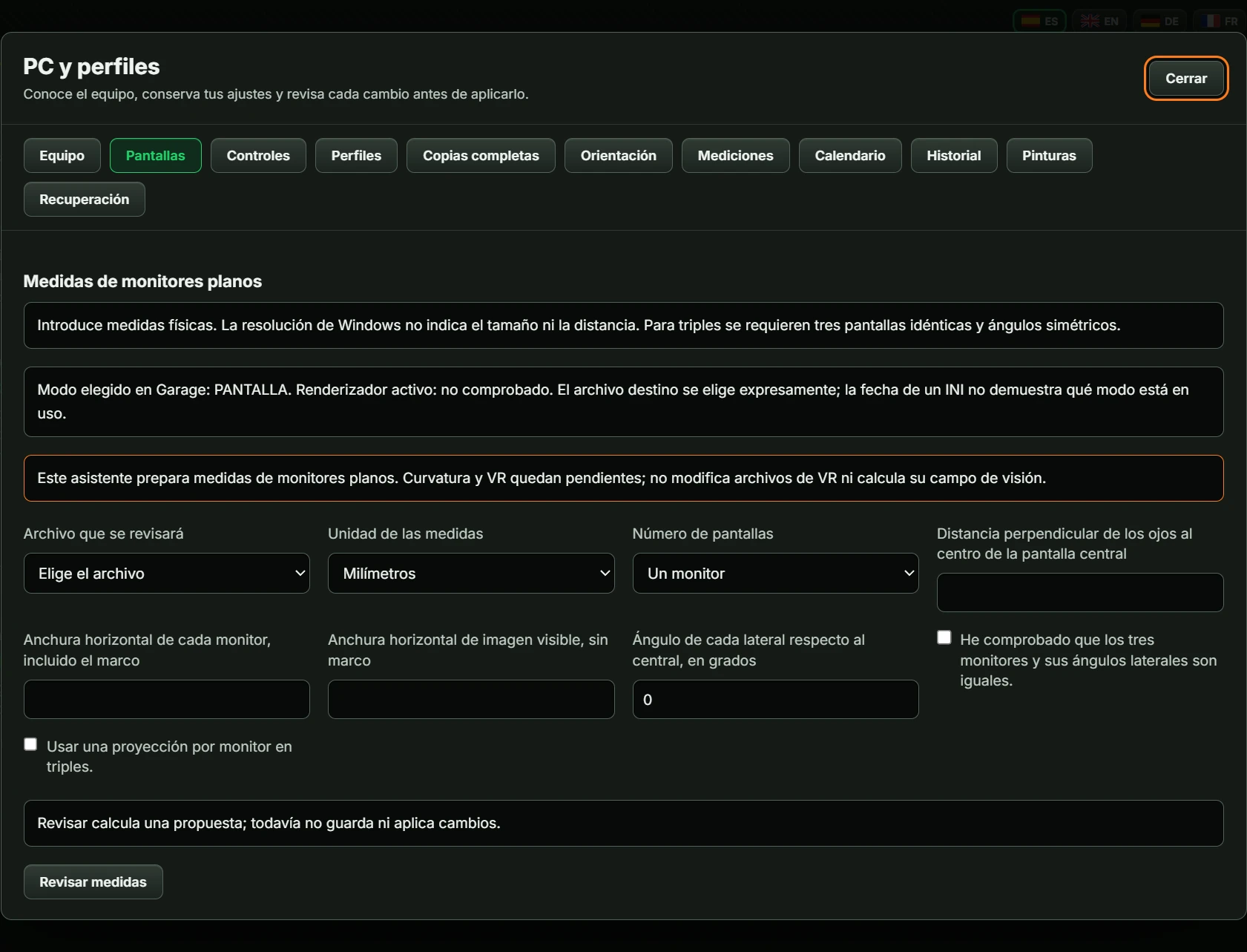
| Field | What to enter |
|---|---|
| Archivo que se revisará (File to review) | rendererDX11Monitor.ini or rendererDX11.ini, whichever exist on your PC. |
| Unidad de las medidas (Measurement unit) | Milímetros (Millimetres), Centímetros (Centimetres) or Pulgadas (Inches). |
| Número de pantallas (Monitor count) | Un monitor (One monitor) or Tres monitores (Three monitors). |
| Distancia perpendicular de los ojos al centro de la pantalla central (Perpendicular eye distance to centre of central monitor) | Distance from your eyes to the screen. |
| Anchura horizontal de cada monitor, incluido el marco (Horizontal monitor width including bezel) | Total monitor width. |
| Anchura horizontal de imagen visible, sin marco (Visible image width excluding bezel) | Image width. |
| Ángulo de cada lateral respecto al central, en grados (Side monitor angle relative to centre, in degrees) | For triples, side-monitor rotation. Starts at 0; maximum 89. |
| He comprobado que los tres monitores y sus ángulos laterales son iguales. (I verified all three monitors and side angles match.) | Checkbox for triples. |
| Usar una proyección por monitor en triples. (Use one projection per monitor in triples.) | Checkbox for triples. Without it, the angle has no effect in iRacing. |
Revisar medidas (Review measurements) calculates a proposal without saving. “Revisión de medidas · file” shows horizontal coverage in degrees and a table of setting, current value and plan target. Then:
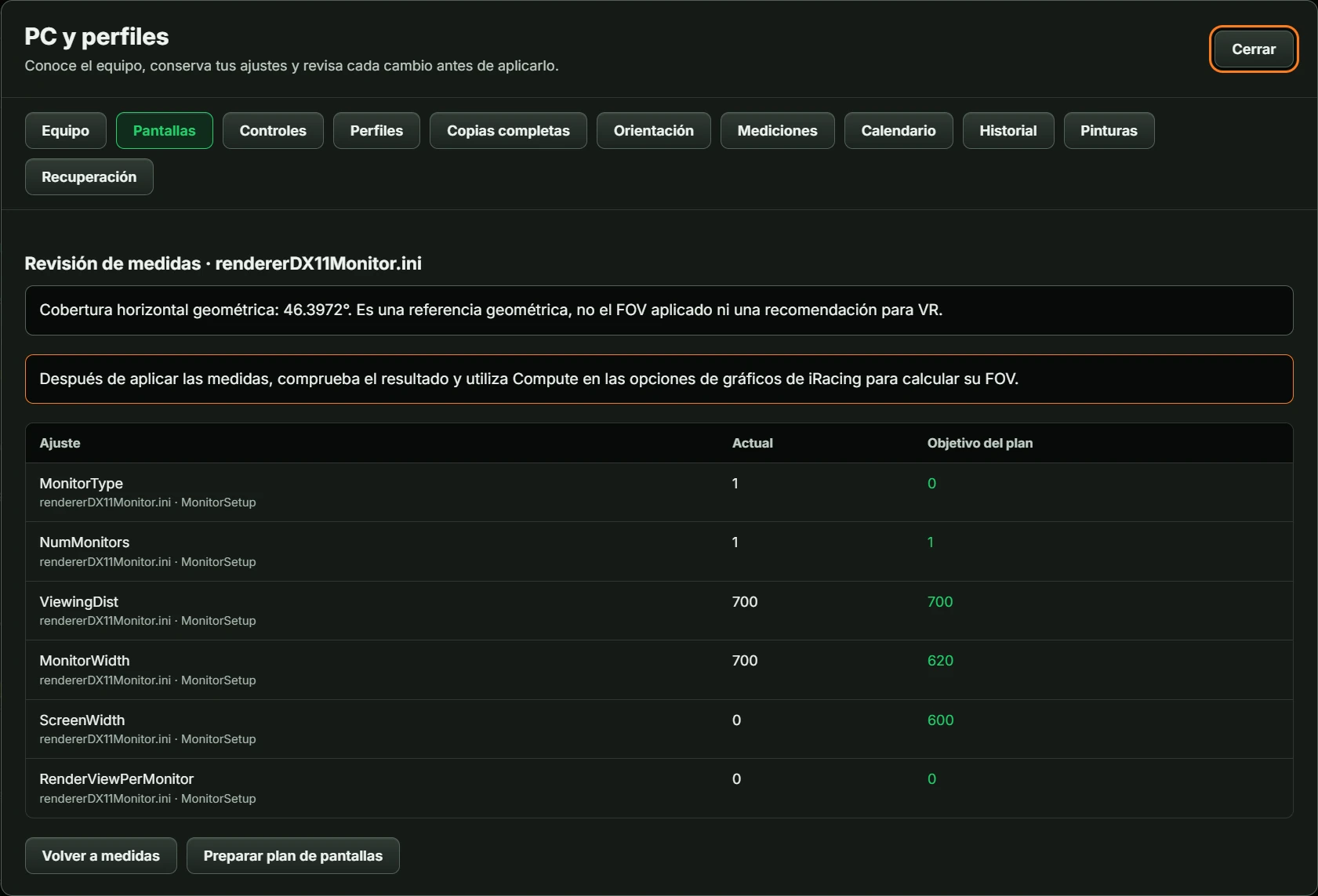
After applying measurements, use Compute in iRacing graphics options to calculate FOV. Without a monitor file, GARAJE asks you to open and close iRacing in monitor mode before preparing settings.
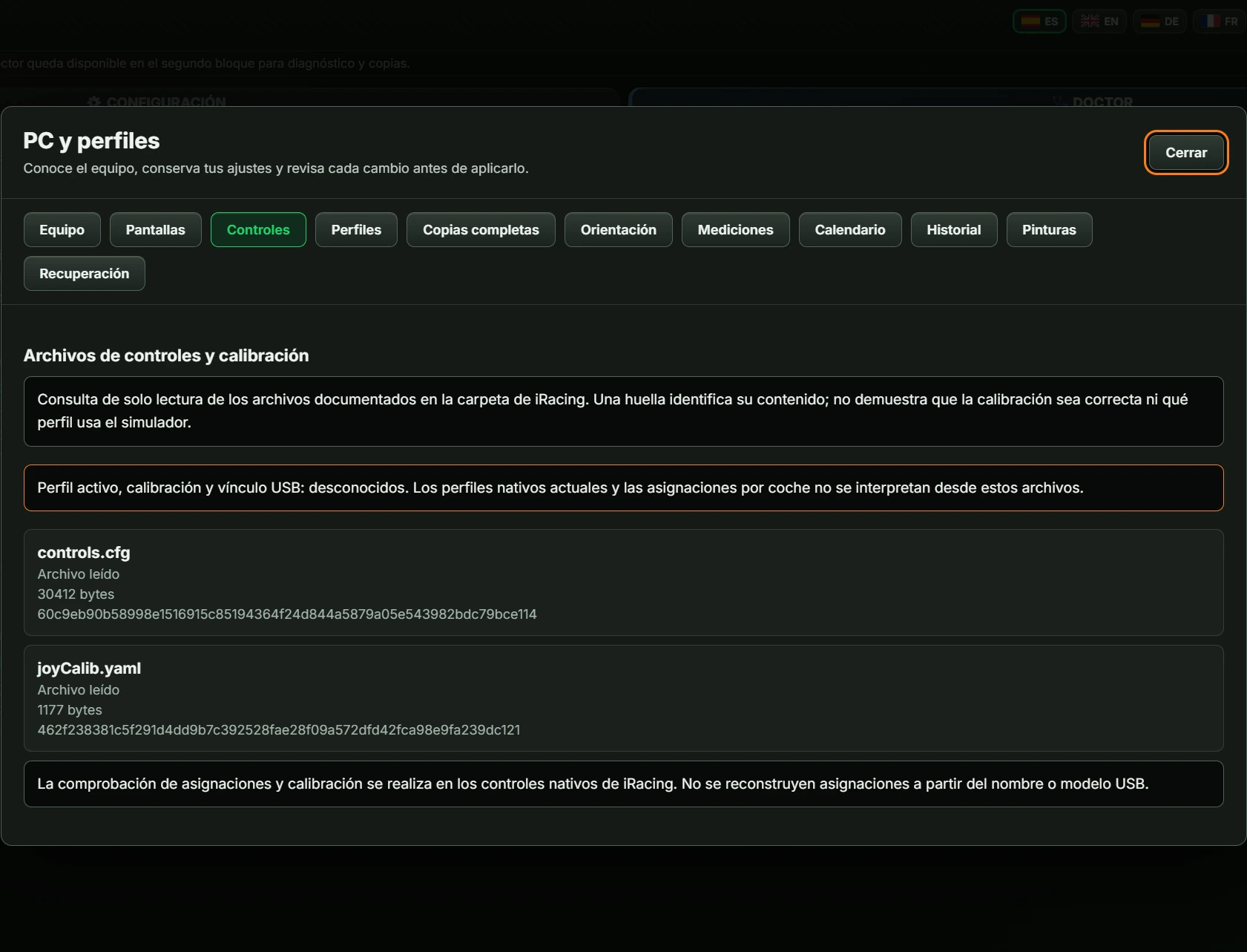
“Archivos de controles y calibración” (Control and calibration files) lists files in the iRacing folder with size and a content fingerprint. Read-only: it does not assess calibration quality or change anything. Each file shows “Archivo leído” (Read), “No encontrado en esta ubicación” (Not found here) or “No verificable” (Unverifiable).
A profile saves part of your current iRacing settings for later comparison or restoration. Saving a profile does not change the simulator.
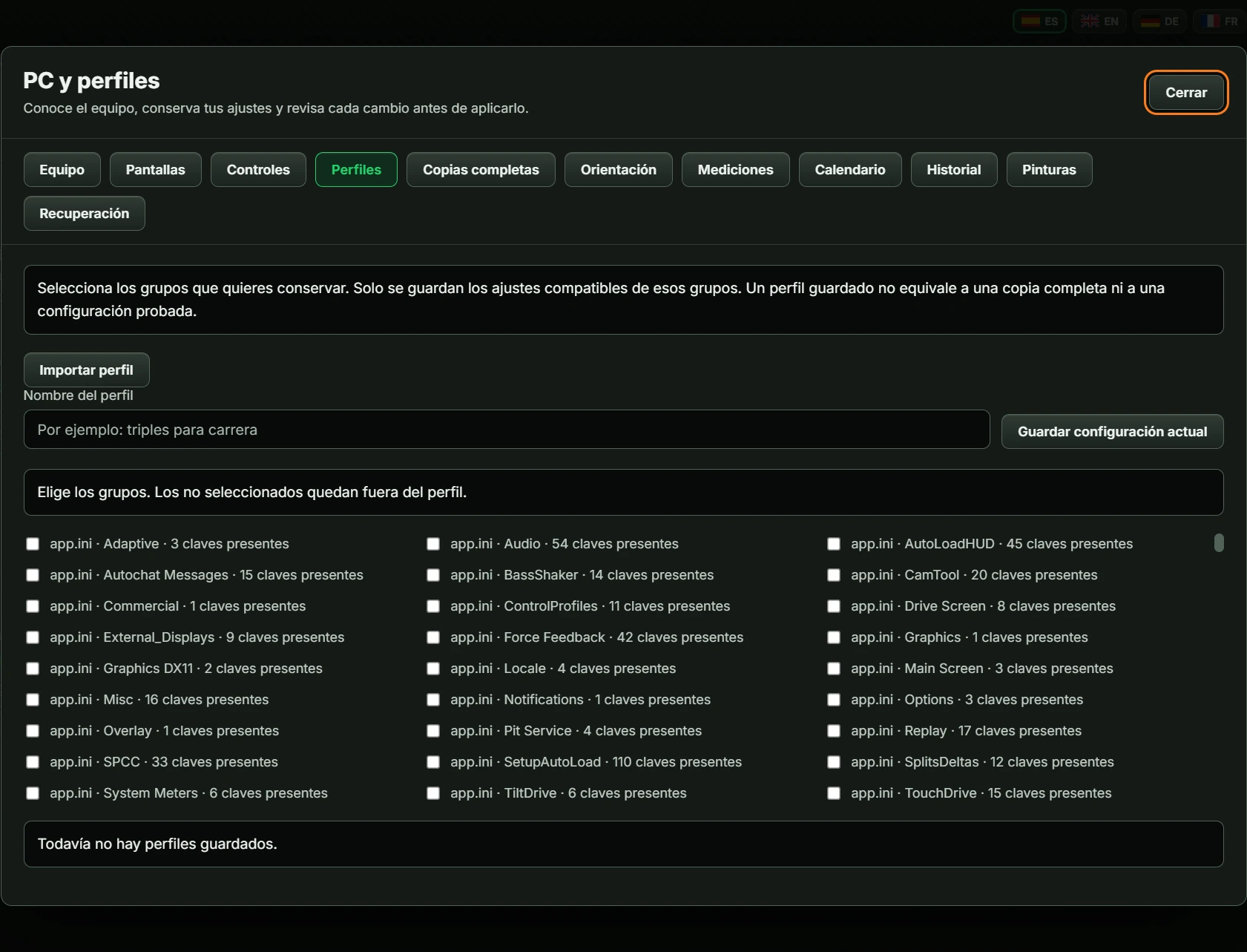
Below: profile count (“Todavía no hay perfiles guardados.” if none) and one row per profile, with name, setting count, date and three buttons:
| Button | Action |
|---|---|
| Comparar (compare) | Shows a table of differences from your current settings. Makes no changes. From here, Preparar plan (prepare plan) prepares the change and Volver a perfiles (back to profiles) goes back. |
| Copiar grupos (copy groups) | Creates a new profile combining two: choose the Perfil de destino (destination profile) and the source groups. Revisar copia (review copy) shows the differences; enter the Nombre del nuevo perfil (new profile name) and click Guardar perfil combinado (save combined profile). Volver a copiar grupos (back to copying groups) goes back. Original profiles are unchanged. |
| Exportar (export) | Prepares the profile as JSON text to transfer to another PC. Contains only compatible numeric settings, without name or date. Descargar JSON (download JSON) saves it as garage-perfil.json. |
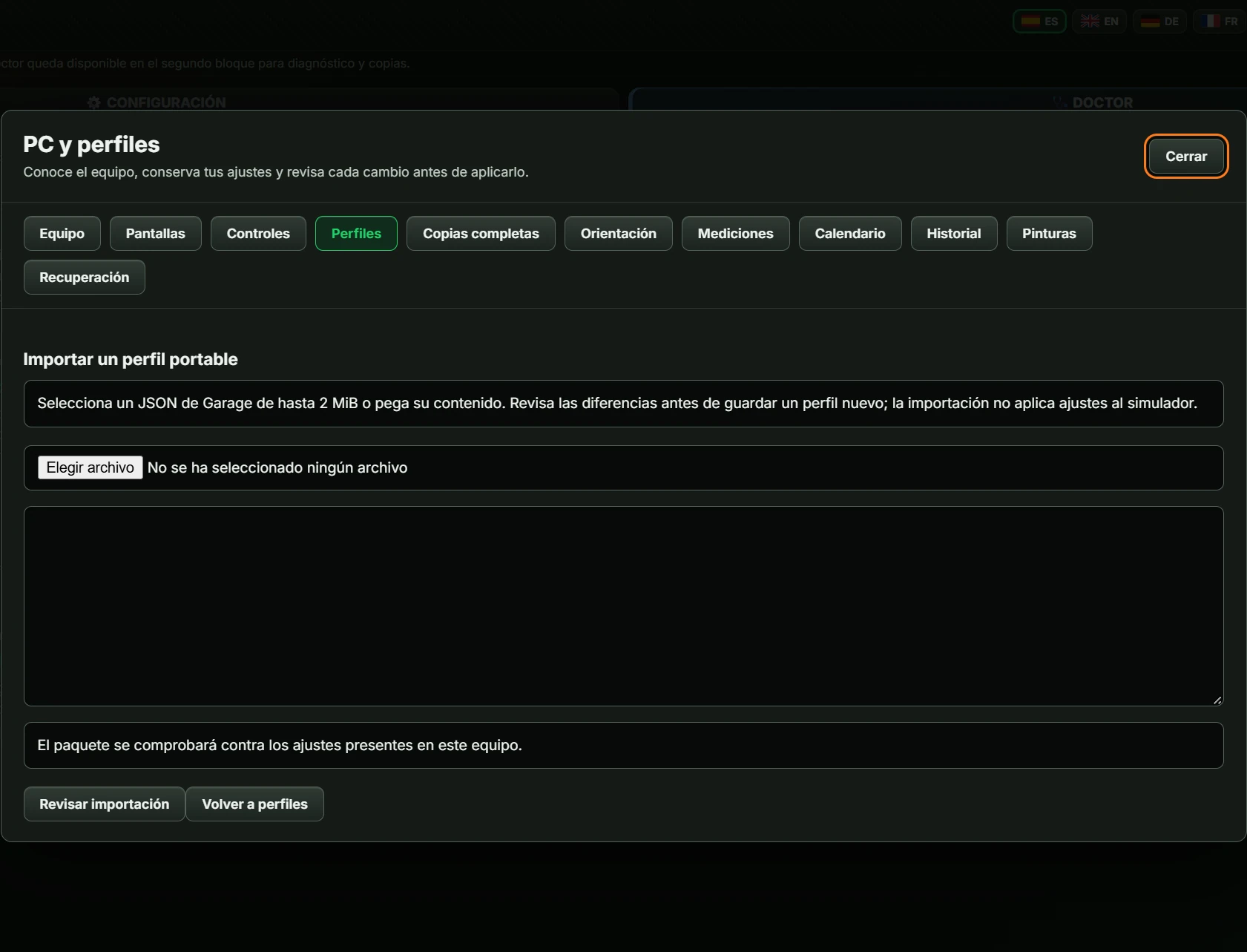
Importing a profile: choose a GARAJE JSON file up to 2 MiB or paste its contents in the box. Click Revisar importación (review import) to see differences, enter the Nombre del nuevo perfil (new profile name) and click Guardar perfil importado (save imported profile). Creates a new profile without changing iRacing. Volver a importación (back to import) and Volver a perfiles (back to profiles) take you back.
A plan is the exact list of changes GARAJE will write, based on a profile or monitor measurements. The screen Revisar plan · nombre (review plan · name) shows:
Aplicar plan (apply plan) (green) first asks whether you reviewed the differences. Confirming writes the changes and reports that the plan was applied and the previous settings preserved in a backup, with Ver historial (view history) and a back button.
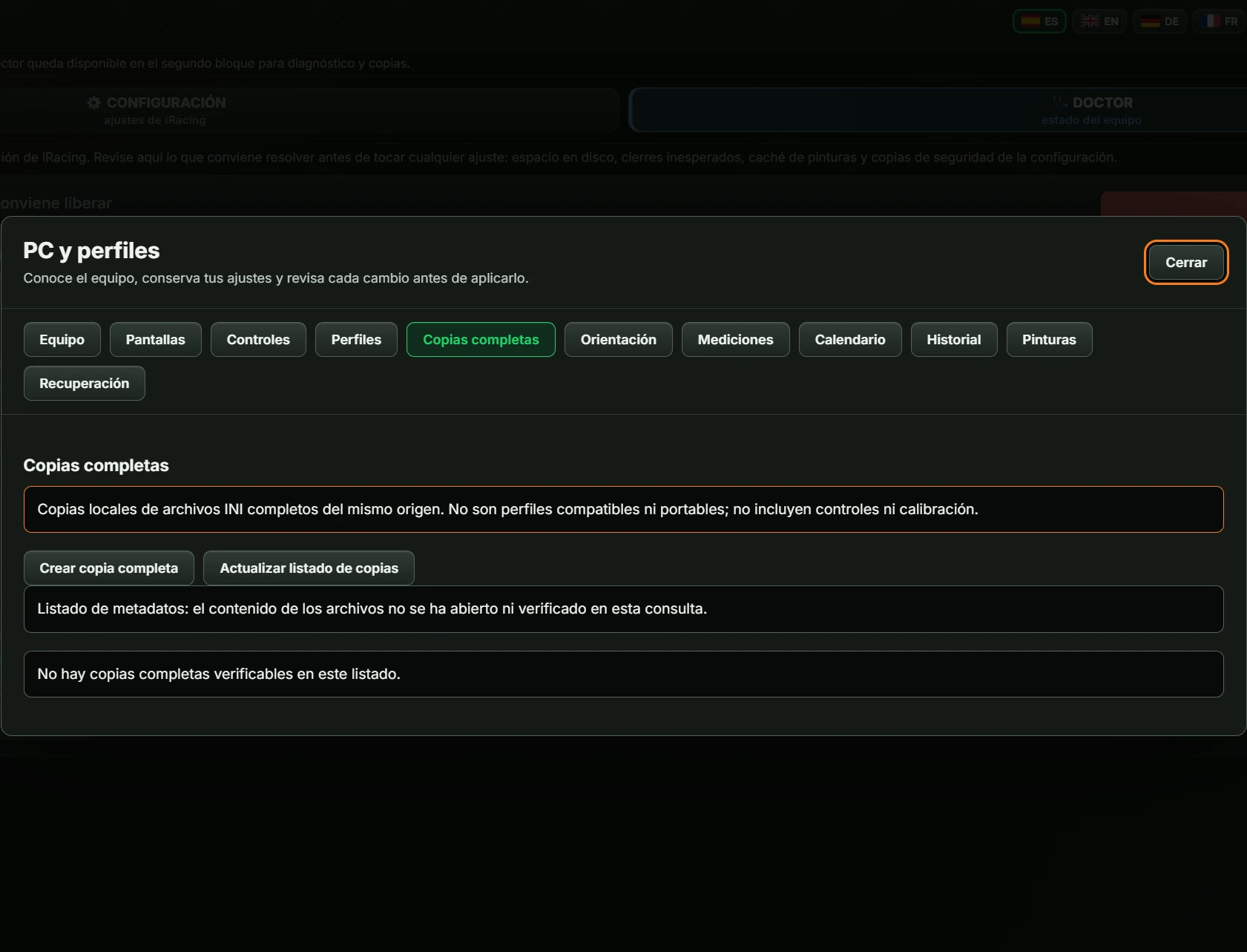
A full backup saves entire iRacing .ini files on your PC. It excludes controls and calibration and is not intended for transfer to another PC.
Advice to help decide what to change. Makes no changes.
One card per suggestion: explanation, Coste o contrapartida (cost/trade-off), Para decidir con datos (deciding with data), Alternativas (alternatives), Cómo comprobarlo (verification) and iRacing help links. Missing requirements produce a warning: this guidance does not propose values to apply without the data needed for a verifiable change. Some cards include Abrir asistente de pantallas (open monitor wizard) or Abrir mediciones (open measurements).
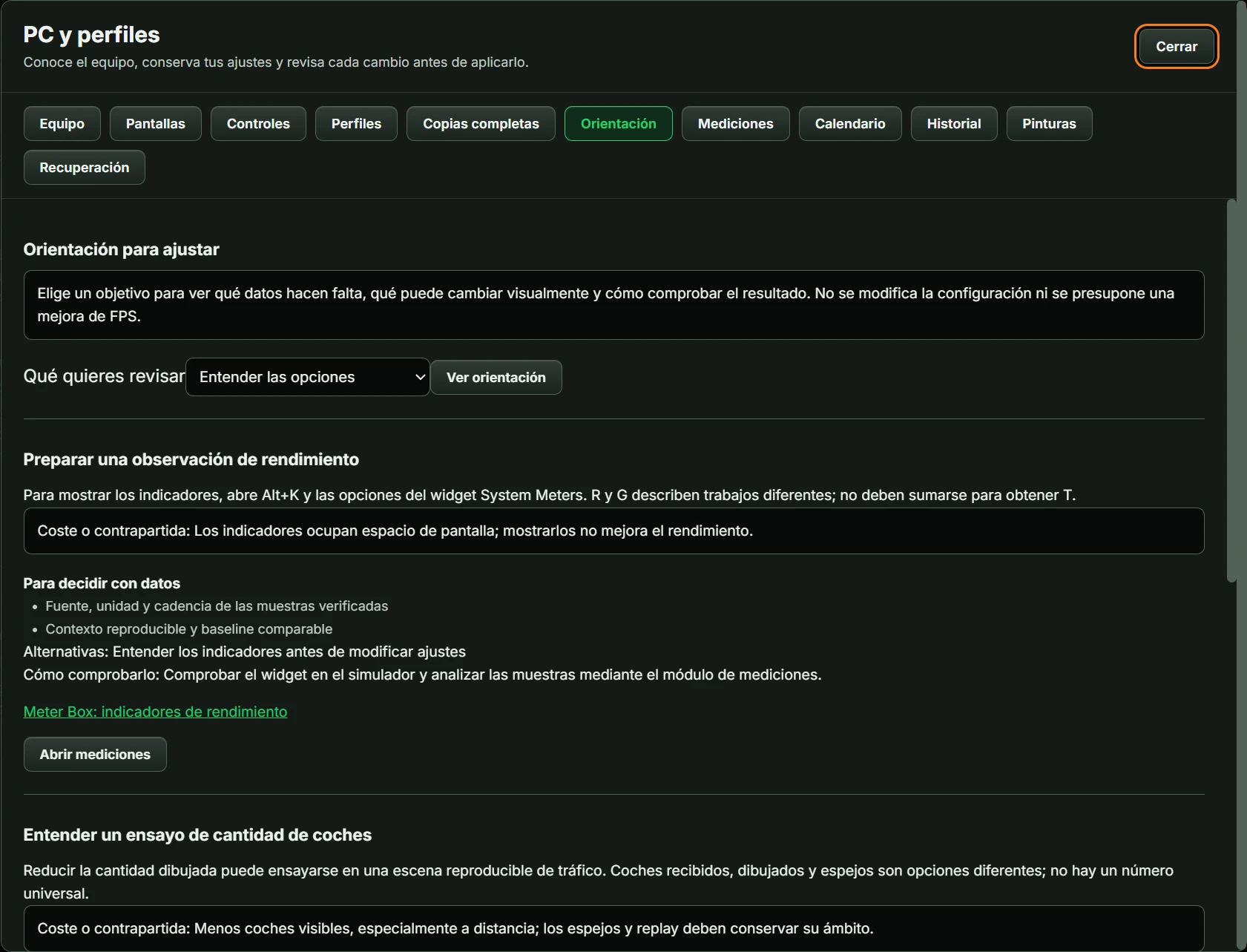
| Qué quieres revisar (what you want to review) | Cards shown |
|---|---|
| Entender las opciones (understand options) | Preparar una observación de rendimiento (prepare performance observation) · Entender un ensayo de cantidad de coches (understand a car-count trial) · Entender el escalado de resolución (understand resolution scaling) |
| Preparar una medición (prepare a measurement) | Preparar una observación de rendimiento (prepare performance observation) |
| Medidas de los monitores (monitor dimensions) | Preparar la geometría de paneles planos (prepare flat-panel geometry) |
| Tirones o falta de estabilidad (stuttering or instability) | Preparar una observación de rendimiento (prepare performance observation) · Entender un ensayo de cantidad de coches (understand a car-count trial) · Entender el escalado de resolución (understand resolution scaling) |
| Calidad de imagen (image quality) | Entender el escalado de resolución (understand resolution scaling) |
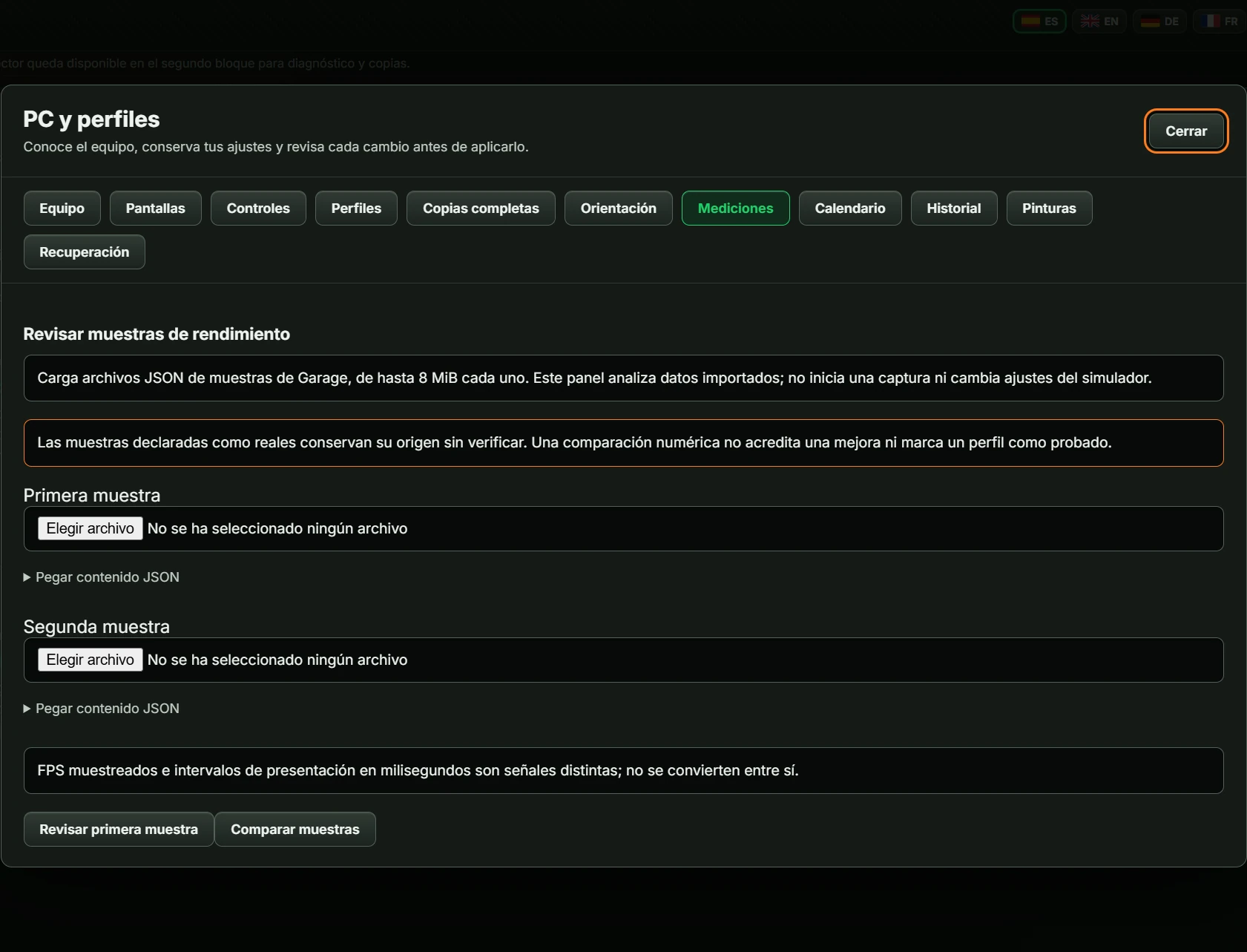
Analyses performance samples (FPS or frame intervals) saved in GARAJE JSON files up to 8 MiB. Does not take measurements itself or change settings.
Reads a calendar JSON file up to 2 MiB and lets you mark favourite series. No internet or iRacing connection; times are UTC.
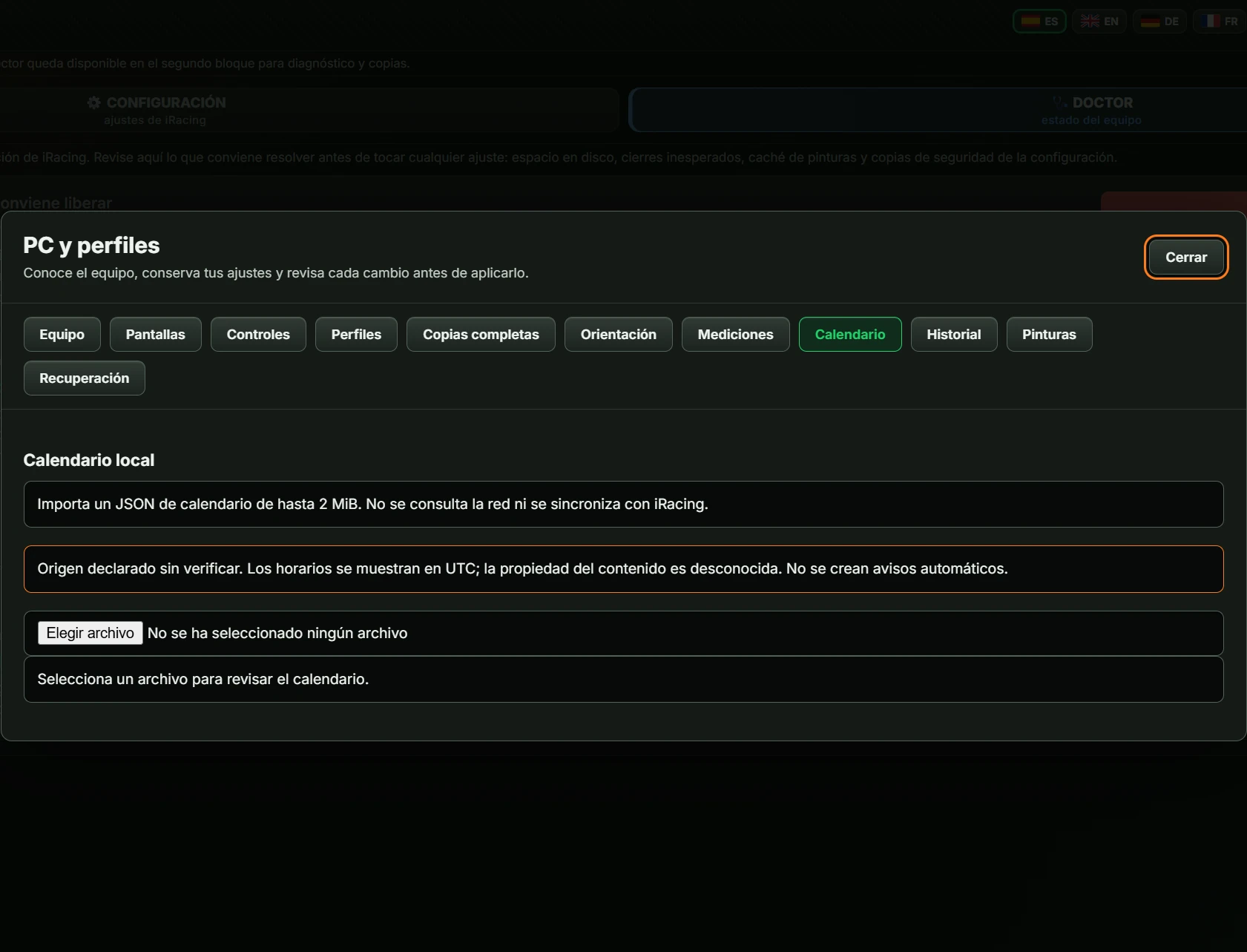
With a file loaded, shows the period, source and date declared by the file, then one table per series: Evento (event), Semana declarada (declared week), Inicio UTC (UTC start), Fin UTC (UTC end), ID de circuito (track ID), IDs de coches (car IDs), with checkbox Serie N · favorita (series N · favourite). Buttons:
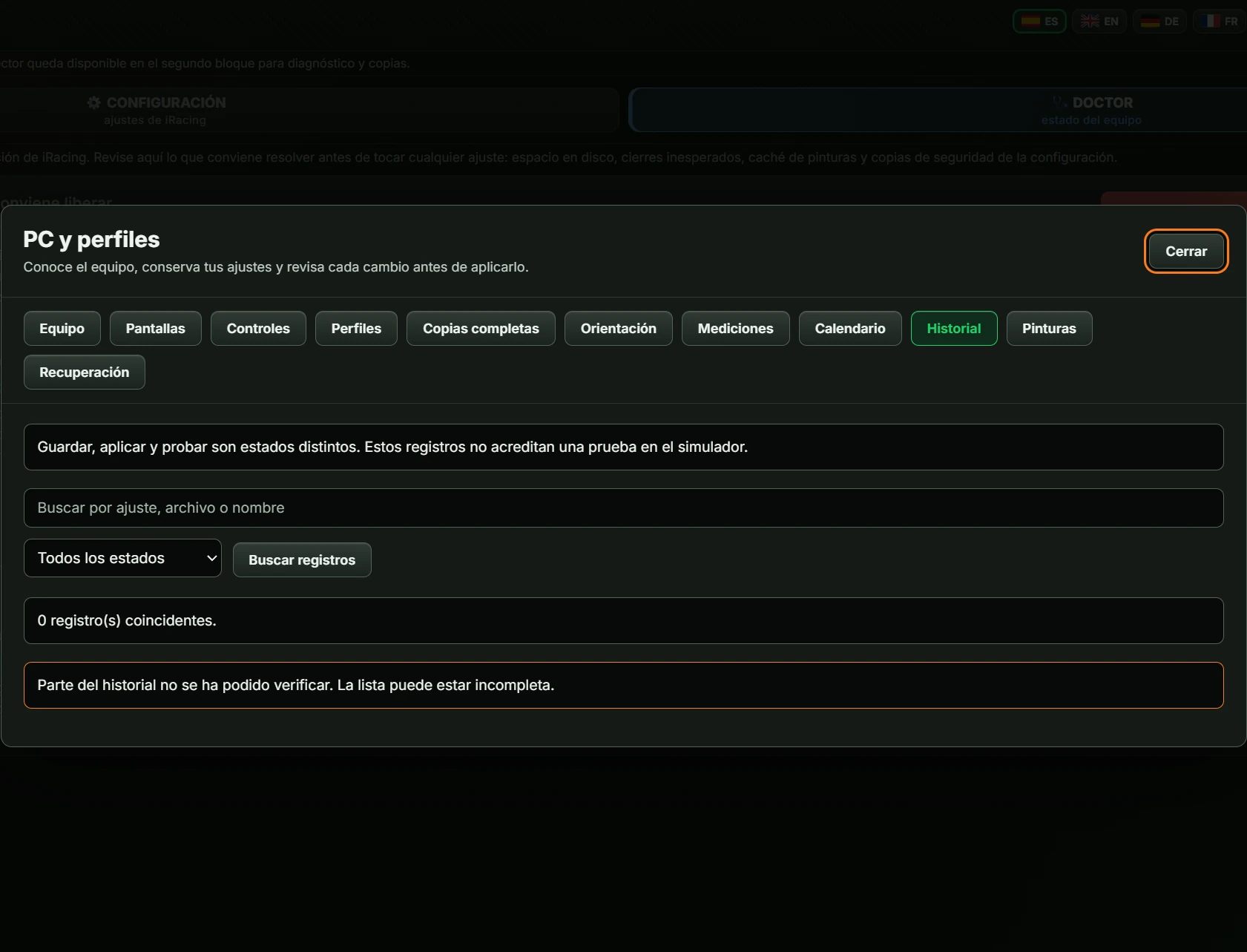
Profiles, plans and operations saved on this PC.
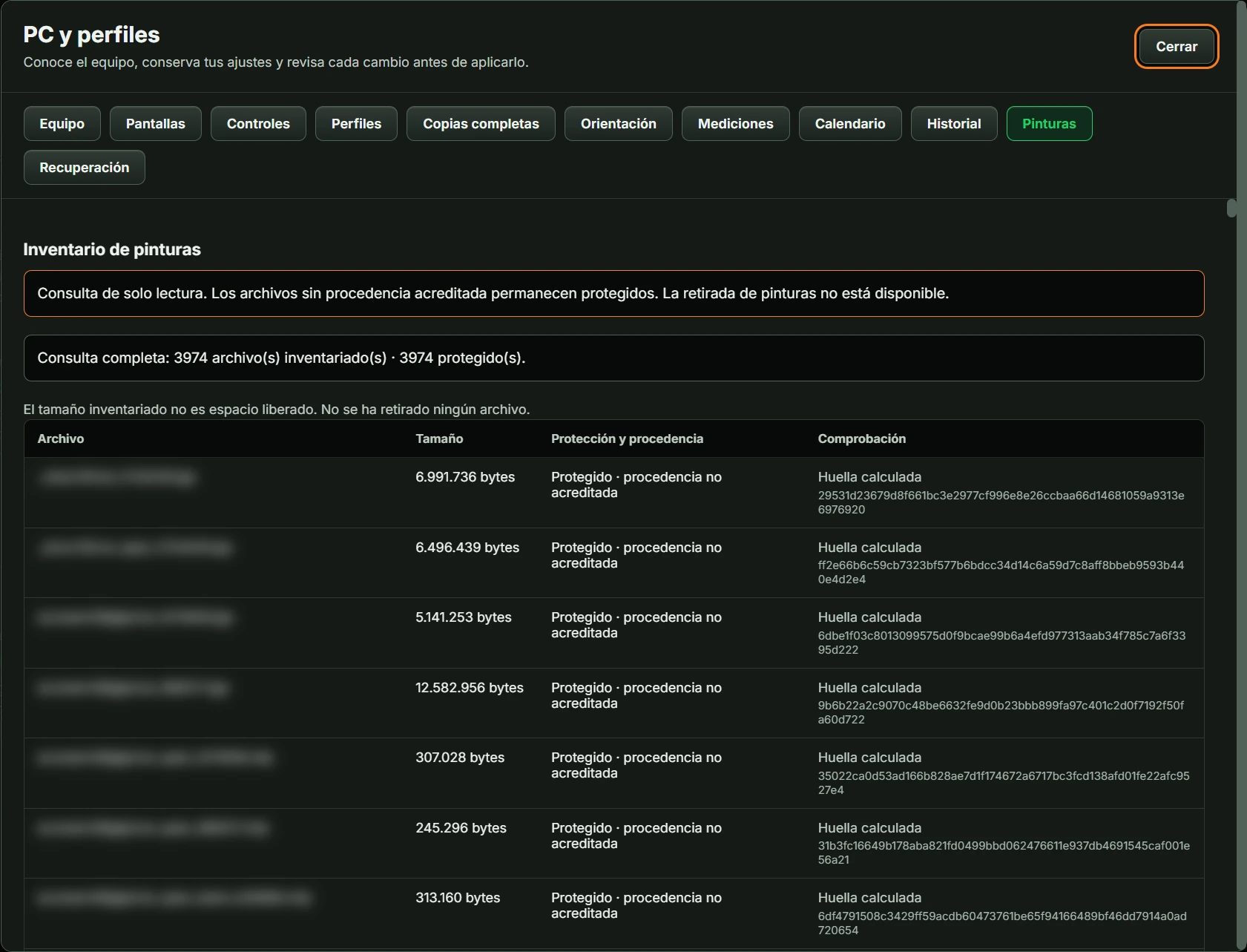
iRacing paint-file inventory: file, size, protection and fingerprint. Read-only: GARAJE does not remove paints. Large collections take time to read. Also available through Revisar pinturas (review paints) in DOCTOR.
Write operations performed by GARAJE, to undo if something went wrong. Opening this section changes nothing.
| Control | How it works |
|---|---|
| Toggle | Click to turn on (green) or off (red). |
| Value list with ‹ › | Previous or next value; wraps around at the end. |
| Integer with ‹ › | Decreases/increases by 1 within the setting’s range. |
| Decimal number with ‹ › | Decreases/increases by the setting’s step, such as 0.05; if none is defined, by 0.5. Never exceeds the range. |
| Value only | Text, such as chat messages, and read-only settings. GARAJE displays them without editing them. |
If a preference cannot be saved, the warning says the previous choice is retained.
1005 settings in 15 tabs. Each entry explains how to change it and, where available, a recommended value. ↻ means restart the simulator. Your PC’s values are shown in GARAJE, not here.
Tabs 15 DATOS DE CAMARA (camera data) and 16 DATOS DE CONSUMO (fuel-use data) display data automatically recorded by iRacing: last cameras for tracks/cars and learned track fuel use. Read-only and drawn from your own files, so another PC may differ.
| Tab | Main file | Sections | Settings |
|---|---|---|---|
| 2 🎛️ GRÁFICOS Y VR (graphics and VR) | rendererDX11Monitor.ini | 21 | 261 |
| 3 🕹️ FORCE FEEDBACK | app.ini | 11 | 67 |
| 4 👁️ CÁMARA (camera) | app.ini | 9 | 39 |
| 5 📢 SPOTTER | app.ini | 9 | 33 |
| 6 ⏱️ DELTA Y FANTASMA (delta and ghost) | app.ini | 3 | 11 |
| 7 🔊 AUDIO | app.ini | 10 | 63 |
| 8 ⛽ BOXES Y COMBUSTIBLE (pits and fuel) | app.ini | 4 | 113 |
| 9 🎬 REPETICIONES Y VÍDEO (replays and video) | app.ini | 7 | 26 |
| 10 🌐 RED Y TELEMETRÍA (network and telemetry) | core.ini | 3 | 11 |
| 11 💬 CHAT RAPIDO (quick chat) | app.ini | 1 | 15 |
| 12 🖥️ PANTALLA E INTERFAZ (display and interface) | app.ini | 7 | 287 |
| 13 📱 TACTIL Y TILT (touch and tilt) | app.ini | 2 | 21 |
| 14 ⚙️ SISTEMA Y RED (system and network) | app.ini | 7 | 54 |
| 15 📷 DATOS DE CAMARA (camera data) | camera.ini | 1 | 3 |
| 16 ⛽ DATOS DE CONSUMO (fuel-use data) | fueldata.ini | 1 | 1 |
| No. | Setting | How to change it | Recommended |
|---|---|---|---|
| 2.1 Detalle de mundo (World detail) | |||
| 2.1.1 | Detalle de coches | list: 0, 1, 2 | 1 (medium) · 2 if you have FPS to spare |
| 2.1.2 | Población de objetos | list: 0, 1, 2 | 1 (medium) |
| 2.1.3 | Público en gradas | list: 0, 1, 2, 3 | 0 or 1 for maximum FPS |
| 2.1.4 | Detalle de gradas | list: 0, 1, 2 | 1 |
| 2.1.5 | Objetos de boxes | list: 0, 1, 2, 3 | 1 |
| 2.1.6 | Vegetación | list: 0, 1, 2, 3 | 0 or 1 |
| 2.1.7 | Detalle del evento | list: 0, 1, 2 | 1 |
| 2.1.8 | Refresco del cielo | list: 0, 1, 2 | 1 |
| 2.1.9 | Densidad de vegetación | list: 0, 1, 2, 3 | |
| 2.1.10 | Población de objetos | list: 0, 1, 2 | |
| 2.1.11 | Detalle de las gradas | list: 0, 1, 2 | |
| 2.1.12 | Detalle del público | list: 0, 1, 2, 3 | |
| 2.1.13 | Detalle de objetos de boxes | list: 0, 1, 2, 3 | |
| 2.1.14 | Detalle de coches (repetición) | list: 0, 1, 2 | |
| 2.1.15 | Terreno lejano | switch | |
| 2.2 Coches y parrilla (Cars and grid) | |||
| 2.2.1 | Coches dibujados (pantalla) | number from 10 to 64, in steps of 1 | 24 to 32 |
| 2.2.2 | Coches en espejos | number from 4 to 64, in steps of 1 | 8 to 16 |
| 2.2.3 | Coches transmitidos por el servidor | number from 10 to 64, in steps of 1 | 21 (factory default works well) |
| 2.2.4 | Objetos de boxes dibujados | number from 0 to 192, in steps of 1 | 30 |
| 2.2.5 | Objetos de boxes en espejos | number from 0 to 192, in steps of 1 | 4 |
| 2.3 Espejos y cabina (Mirrors and cockpit) | |||
| 2.3.1 | Espejo virtual | switch | 1 |
| 2.3.2 | Tamaño del espejo virtual | list: 0, 1, 2, 3, 4 | 1 (medium) |
| 2.3.3 | Espejos reales de cabina | number from 0 to 4, in steps of 1 | 0 (with virtual mirror) or 1 |
| 2.3.4 | Calidad de los espejos | list: 0, 1 | 0 for FPS |
| 2.3.5 | Tamaño de la interfaz del sim | number from 50 to 200, in steps of 1 | 100 |
| 2.3.6 | Transparencia de la interfaz al conducir | number from 0 to 1, in steps of 0,05 | 0.8 to 1.0 |
| 2.3.7 | Ocultar obstáculos de cabina | list: 0, 1, 2, 3 | 0 (realism) · 1 if the halo bothers you |
| 2.3.8 | Manos del piloto | switch | to taste |
| 2.3.9 | Volante virtual | list: 0, 1, 2, 3 | 3 with a real wheel · 1 without |
| 2.3.10 | Reducir parpadeo en cabina | switch | 1 |
| 2.3.11 | Espejos de cabina activos | number from 0 to 4, in steps of 1 | |
| 2.3.12 | Detalle en los espejos | switch | |
| 2.3.13 | Objetos de boxes en espejos | number from 0 to 192, in steps of 1 | |
| 2.3.14 | Coches en espejos | number from 4 to 64, in steps of 1 | |
| 2.3.15 | Ocultar obstrucciones de cabina | list: 0, 1, 2, 3 | |
| 2.3.16 | Manos del piloto | switch | |
| 2.3.17 | Volante en pantalla | list: 0, 1, 2, 3 | |
| 2.3.18 | Espejos virtuales (repetición) | switch | |
| 2.4 Sombras (Shadows) | |||
| 2.4.1 | Detalle de sombras | list: 0, 1 | 0 for FPS · 1 for quality |
| 2.4.2 | Sistema de sombras (shadow map) | switch | 1 |
| 2.4.3 | Sombras dinámicas de coches | switch | 0 for FPS |
| 2.4.4 | Resolución de sombras dinámicas | list: 0, 1, 2, 3, 4 | 1 (1024) |
| 2.4.5 | Resolución de sombras estáticas | list: 0, 1, 2, 3, 4 | 2 (2048) |
| 2.4.6 | Sombras nocturnas (focos) | switch | 0 unless your PC is powerful |
| 2.4.7 | Sombras estáticas de calidad ↻ | number from 3 to 8, in steps of 1 | 3 |
| 2.4.8 | Recorte de sombras dinámicas ↻ | switch | 1 |
| 2.4.9 | Autosombra de objetos del circuito ↻ | switch | 0 · 1 with performance to spare |
| 2.4.10 | Luces nocturnas con sombra (máximo) ↻ | number from 0 to 128, in steps of 1 | 4 |
| 2.4.11 | Luces con sombra por pasada ↻ | number from 0 to 6, in steps of 1 | 3 |
| 2.4.12 | Filtrado de sombras nocturnas ↻ | list: 0, 1, 2, 3, 4, 5 | 5 · lower to 2–3 if night driving severely reduces FPS |
| 2.4.13 | Fundido de sombras nocturnas ↻ | number, in steps of 1 | 5-25 |
| 2.4.14 | Objetos del circuito con sombra nocturna ↻ | switch | 0 · 1 only with GPU performance to spare |
| 2.4.15 | Muros con sombra nocturna ↻ | switch | 0 · 1 only with GPU performance to spare |
| 2.4.16 | Sombra nocturna por píxel ↻ | switch | 0 · 1 if using high MSAA and night is demanding |
| 2.4.17 | Auto-sombras en objetos de pista | switch | |
| 2.4.18 | Filtro de sombras nocturnas dinámicas | list: 0, 1, 2, 3, 4, 5 | |
| 2.4.19 | Tiempo de aparición de sombras nocturnas | number, in steps of 1 | |
| 2.4.20 | Luces con sombra nocturna dinámica | number from 0 to 128, in steps of 1 | |
| 2.4.21 | Muros proyectan sombra nocturna | switch | |
| 2.4.22 | Objetos de pista proyectan sombra nocturna | switch | |
| 2.4.23 | Cálculo de sombra nocturna | list: 0, 1 | |
| 2.4.24 | Mapas de sombra nocturna dinámica | switch | |
| 2.4.25 | Oclusión ambiental (SSAO) | switch | |
| 2.4.26 | Mapeado de sombras | switch | Enabled, especially with clouds or overcast skies |
| 2.4.27 | Recorte de sombras dinámicas | switch | |
| 2.4.28 | Sombras dinámicas de coches | switch | |
| 2.4.29 | Detalle de sombras | switch | |
| 2.5 Iluminación y efectos (Lighting and effects) | |||
| 2.5.1 | Calidad de faros | list: 0, 1, 2 | 1 |
| 2.5.2 | Faros en los espejos | switch | 0 |
| 2.5.3 | Faros en blanco (sin manchas) | switch | 0 (1 if you see blotches at night) |
| 2.5.4 | Calidad de materiales (shaders) | list: 0, 1, 2, 3 | 2 (high) |
| 2.5.5 | Oclusión ambiental (SSAO) | switch | 0 for FPS |
| 2.5.6 | Reflejos en mojado (SSR) | list: 0, 1, 2 | 0 · 1 if racing in rain |
| 2.5.7 | Reflejos SSR solo con lluvia | switch | 1 if using SSR |
| 2.5.8 | Desenfoque de movimiento | list: 0, 1, 2, 3, 4 | 0 |
| 2.5.9 | Profundidad de campo | switch | 0 |
| 2.5.10 | Distorsión por calor | switch | 0 for FPS |
| 2.5.11 | Exposición automática | switch | 1 with HDR |
| 2.5.12 | Desenfoque de movimiento (conduciendo) ↻ | switch | to taste (0 for maximum sharpness) |
| 2.5.13 | Desenfoque de movimiento (cámaras TV) ↻ | switch | 1 · 0 when analysing replays |
| 2.5.14 | Distorsión de lente ↻ | switch | to taste |
| 2.5.15 | Modos de render en repeticiones ↻ | switch | 0 |
| 2.6 Imagen y nitidez (Image and sharpness) | |||
| 2.6.1 | Renderizado HDR ↻ | switch | 0 unless using an HDR display |
| 2.6.2 | Contraste de la escena | number from -6 to 6, in steps of 1 | 0 |
| 2.6.3 | Brillo de la escena | number from -6 to 6, in steps of 1 | 0 |
| 2.6.4 | Gamma | number from -6 to 6, in steps of 1 | 0 |
| 2.6.5 | Nitidez (sharpening) | switch | 1 with SMAA or upscaling |
| 2.6.6 | Fuerza de la nitidez | number from 10 to 300, in steps of 1 | 125 |
| 2.6.7 | Tope de la nitidez | number from 0 to 100, in steps of 1 | 9-10 |
| 2.6.8 | Nitidez del escalado AMD FSR | number from 0 to 5, in steps of 1 | 4–5 if using upscaling |
| 2.6.9 | Nitidez de texturas (mip bias) | number from -100 to 100, in steps of 1 | 0 (try −10 to −25 for greater sharpness) |
| 2.6.10 | Método de anti-aliasing ↻ | list: 0, 1, 2, 3 | 1 (MSAA) with performance to spare · 3 (SMAA) for FPS |
| 2.6.11 | Muestras de MSAA ↻ | list: 2, 4, 8 | 2 or 4 |
| 2.6.12 | Filtro de resolución del MSAA | list: 0, 1, 2, 3 | 3 (classic) |
| 2.7 Rendimiento y LOD (Performance and LOD) | |||
| 2.7.1 | Sincronización vertical (VSync) | switch | 0 + FPS limiter |
| 2.7.2 | Limitador de FPS | switch | 1 |
| 2.7.3 | Límite de FPS | number from 30 to 360, in steps of 1 | = your monitor's Hz |
| 2.7.4 | Escalado de resolución ↻ | number from 0 to 4, in steps of 1 | 0 on a powerful PC · consider on limited hardware |
| 2.7.5 | NVIDIA Reflex | list: 0, 1, 2 | 1 with NVIDIA |
| 2.7.6 | Frames preparados por adelantado | number from 0 to 4, in steps of 1 | 1 |
| 2.7.7 | Bajar FPS al perder el foco | switch | 0 |
| 2.7.8 | FPS objetivo del LOD automático | number from 20 to 200, in steps of 1 | = your target FPS (e.g. 60) |
| 2.7.9 | Recorte máximo de LOD (%) | number from 25 to 500, in steps of 1 | 400 |
| 2.7.10 | Detalle mínimo del mundo (auto-LOD) ↻ | number from 25 to 500, in steps of 1 | 100 |
| 2.7.11 | Detalle mínimo en espejos (auto-LOD) ↻ | number from 25 to 500, in steps of 1 | 100 · 50–75 for FPS |
| 2.7.12 | Recorte máximo en espejos (auto-LOD) ↻ | number from 25 to 500, in steps of 1 | 100 · 150–200 for FPS |
| 2.7.13 | Detalle mínimo de coches (auto-LOD) ↻ | number from 25 to 500, in steps of 1 | 100 |
| 2.7.14 | Recorte máximo de coches (auto-LOD) ↻ | number from 25 to 500, in steps of 1 | 100 · 150 if race starts overwhelm performance |
| 2.7.15 | Detalle mínimo de coches en espejos ↻ | number from 25 to 500, in steps of 1 | 100 · 50 for FPS |
| 2.7.16 | Recorte máximo de coches en espejos ↻ | number from 25 to 500, in steps of 1 | 100 · 200 for FPS |
| 2.7.17 | No recuperar coches recortados ↻ | switch | 0 |
| 2.7.18 | Frames entre tests de visibilidad ↻ | number, in steps of 1 | 5 |
| 2.8 Texturas, memoria y vegetación (Textures, memory and vegetation) | |||
| 2.8.1 | VRAM a usar (MB) ↻ | number from 1024 to 32768, in steps of 1 | ≈ actual VRAM minus 1 GB |
| 2.8.2 | RAM a usar (MB) ↻ | number from 1024 to 32768, in steps of 1 | the installer-selected value is usually correct |
| 2.8.3 | Cargar texturas mientras conduces | switch | 1 (0 if you notice microstutters) |
| 2.8.4 | Alta resolución para coches cercanos | switch | 1 |
| 2.8.5 | Pinturas de coche en 2K ↻ | switch | 1 with VRAM to spare |
| 2.8.6 | Ocultar dorsales en test | switch | 0 |
| 2.8.7 | Árboles simples | switch | 1 for FPS |
| 2.8.8 | Árboles en dos pasadas | switch | 0 for FPS |
| 2.8.9 | Árboles mecidos por el viento | switch | to taste |
| 2.8.10 | Comprimir texturas de coches ↻ | switch | 1 (do not use 0) |
| 2.8.11 | Comprimir texturas de cascos ↻ | switch | 1 |
| 2.8.12 | Comprimir texturas de monos ↻ | switch | 1 |
| 2.8.13 | Geometría comprimida ↻ | switch | 1 |
| 2.8.14 | Z-buffer de 32 bits ↻ | switch | 1 |
| 2.9 Partículas (Particles) | |||
| 2.9.1 | Detalle de partículas | list: 0, 1, 2 | 1 (medium) |
| 2.9.2 | Partículas a resolución completa | switch | 0 for FPS |
| 2.9.3 | Marcas de neumático | switch | 1 |
| 2.10 Motor gráfico (no tocar sin motivo) (Graphics engine: change only with a reason) | |||
| 2.10.1 | No dibujar lo tapado (occlusion culling) ↻ | switch | 1 |
| 2.10.2 | Orden de escena multihilo ↻ | switch | 1 |
| 2.10.3 | Terreno lejano ↻ | switch | 1 |
| 2.10.4 | Relieve del asfalto (displacement) ↻ | switch | 1 |
| 2.10.5 | Modo de render VR (NVIDIA) ↻ | list: 0, 1, 2 | do not edit manually: iRacing manages it for your GPU and headset |
| 2.10.6 | Plano cercano de la cámara ↻ | number from 1 to 30, in steps of 1 | 10 |
| 2.11 Interfaz (Interface) | |||
| 2.11.1 | Cursor de alto contraste | switch | |
| 2.11.2 | Ancho de la línea de trazada | number, in steps of 0,5 | |
| 2.11.3 | Mostrar pantallas de carga en la Beta UI | switch | |
| 2.11.4 | Modo seguro de interfaz | display only | |
| 2.11.5 | Desplazar la interfaz desde abajo | number, in steps of 0,5 | |
| 2.11.6 | Transparencia de la interfaz de sesión | number, in steps of 0,5 | |
| 2.11.7 | Relación de aspecto máxima (sesión) | number, in steps of 0,5 | |
| 2.11.8 | Interfaz de sesión a pantalla completa (triple) | switch | |
| 2.11.9 | Avisar de ajustes gráficos insuficientes | switch | |
| 2.11.10 | Interfaz oculta salvo con la barra espaciadora | switch | |
| 2.11.11 | Mostrar controles al moverlos | switch | |
| 2.11.12 | Relación de aspecto máxima (conducción) | number, in steps of 0,5 | |
| 2.11.13 | Interfaz de conducción a pantalla completa (triple) | switch | |
| 2.12 Boxes (Pits) | |||
| 2.12.1 | Línea de boxes siempre visible | switch | |
| 2.13 Sistema (System) | |||
| 2.13.1 | Autoconfiguración 3D completada | display only | |
| 2.13.2 | Versión del fichero de autoconfiguración | display only | |
| 2.13.3 | Driver de vídeo (DLL) | display only | |
| 2.13.4 | Versión del driver de vídeo | display only | |
| 2.13.5 | Fabricante del driver de vídeo | display only | |
| 2.14 Rendimiento (Performance) | |||
| 2.14.1 | Cubemaps fijos por fotograma | number, in steps of 1 | |
| 2.14.2 | Cubemaps dinámicos por fotograma | number, in steps of 1 | |
| 2.14.3 | Número de GPUs (Crossfire/SLI) | number from 1 to 4, in steps of 1 | Lowest value that works well for you (as iRacing's own comment says) |
| 2.14.4 | Prioridad de los hilos de partículas | list: -1, 0, 1 | |
| 2.14.5 | Hilos para partículas | number from 0 to 6, in steps of 1 | |
| 2.14.6 | Forzar público en la grada | switch | |
| 2.14.7 | Cubemaps fijos por fotograma (repetición) | number, in steps of 1 | |
| 2.14.8 | Cubemaps dinámicos por fotograma (repetición) | number, in steps of 1 | |
| 2.14.9 | Modos de render de repetición | switch | |
| 2.14.10 | Partículas a resolución completa | switch | |
| 2.14.11 | Detalle de partículas | list: 0, 1, 2 | |
| 2.14.12 | Detalle del evento (weekend) | list: 0, 1, 2 | |
| 2.14.13 | Detalle dinámico máximo en espejos | number from 25 to 500, in steps of 1 | |
| 2.14.14 | Detalle dinámico mínimo en espejos | number from 25 to 500, in steps of 1 | |
| 2.14.15 | Detalle dinámico máximo | number from 25 to 500, in steps of 1 | |
| 2.14.16 | Detalle dinámico mínimo | number from 25 to 500, in steps of 1 | |
| 2.14.17 | Detalle máximo en espejos | number from 25 to 500, in steps of 1 | |
| 2.14.18 | Detalle mínimo en espejos | number from 25 to 500, in steps of 1 | |
| 2.14.19 | Detalle máximo (LOD) | number from 25 to 500, in steps of 1 | |
| 2.14.20 | Detalle mínimo (LOD) | number from 25 to 500, in steps of 1 | |
| 2.14.21 | FPS objetivo para reducir detalle | number, in steps of 1 | |
| 2.14.22 | Objetos de boxes por cámara | number from 0 to 192, in steps of 1 | |
| 2.14.23 | Coches por cámara | number from 10 to 64, in steps of 1 | |
| 2.15 Ventana (Window) | |||
| 2.15.1 | Posición Y de la ventana | display only | |
| 2.15.2 | Posición X de la ventana | display only | |
| 2.15.3 | Ancho de la ventana | display only | |
| 2.15.4 | Ventana maximizada | display only | |
| 2.15.5 | Alto de la ventana | display only | |
| 2.15.6 | Alineación en modo ventana | list: 0, 1, 2 | |
| 2.15.7 | Relación de píxel (modo ventana) | number, in steps of 0,5 | |
| 2.15.8 | Relación de píxel (pantalla completa) | number, in steps of 0,5 | |
| 2.15.9 | Frecuencia de refresco | number, in steps of 1 | |
| 2.15.10 | Escalado de imagen | list: 0, 1, 2 | |
| 2.15.11 | Formato de color (SDR/HDR) ↻ | list: 0, 1 | |
| 2.15.12 | Ancho en pantalla completa | number, in steps of 1 | |
| 2.15.13 | Alto en pantalla completa | number, in steps of 1 | |
| 2.15.14 | Profundidad de color | number from 16 to 64, in steps of 1 | |
| 2.15.15 | Pantalla completa | switch | |
| 2.15.16 | Rotación de la pantalla | list: 0, 1, 2, 3, 4 | |
| 2.15.17 | Adaptador de vídeo | number, in steps of 1 | |
| 2.15.18 | Borde de ventana | switch | |
| 2.16 Configuración de monitores (Monitor configuration) | |||
| 2.16.1 | Protección de marco (bezel) | number from 0 to 10, in steps of 1 | |
| 2.16.2 | Corrección al hacer zoom (triple pantalla) | switch | |
| 2.16.3 | Tipo de monitor | list: 0, 1 | |
| 2.16.4 | Número de monitores | list: 1, 3 | |
| 2.16.5 | Multi-proyección simultánea (SMP) | switch | |
| 2.16.6 | Vista independiente por monitor | switch | |
| 2.16.7 | Radio de curvatura (mm) | number, in steps of 1 | |
| 2.16.8 | Distancia de visión (mm) | number, in steps of 1 | |
| 2.16.9 | Ancho total del monitor (mm) | number, in steps of 1 | |
| 2.16.10 | Ancho útil de pantalla (mm) | number, in steps of 1 | |
| 2.16.11 | Ángulo de los monitores laterales | number from 10 to 65, in steps of 1 | |
| 2.17 Escaneado láser de circuitos (Laser-scanned tracks) | |||
| 2.17.1 | Tamaño físico de punto (mm) | number from 1 to 120, in steps of 0,5 | |
| 2.17.2 | Tamaño mínimo de punto (píxeles) | number from 1 to 256, in steps of 1 | |
| 2.17.3 | Tamaño máximo de punto (píxeles) | number from 1 to 256, in steps of 1 | |
| 2.17.4 | Memoria de vídeo para el escaneado (MB) | number from 128 to 768, in steps of 1 | |
| 2.18 VR · Oculus | |||
| 2.18.1 | Desplazamiento vertical del espejo | number from -30 to 30, in steps of 1 | |
| 2.18.2 | Ancho de la interfaz en VR (cm) | number, in steps of 0,5 | |
| 2.18.3 | Distancia de la interfaz en VR (cm) | number, in steps of 0,5 | |
| 2.18.4 | Suavizado en dos pasadas | switch | |
| 2.18.5 | Esperar la sincronización por completo | switch | |
| 2.18.6 | Usar Oculus automáticamente | switch | |
| 2.18.7 | Recentrar al cerrar el aviso de seguridad | switch | |
| 2.18.8 | Soporte Oculus Rift activado | switch | |
| 2.18.9 | Resolución por píxel de pantalla | number from 50 to 300, in steps of 1 | 125%, increase carefully: above 100% can have a substantial performance cost |
| 2.18.10 | Ancho previo del espejo virtual | display only | |
| 2.18.11 | Alto previo del espejo virtual | display only | |
| 2.19 VR · OpenVR | |||
| 2.19.1 | Desplazamiento vertical del espejo | number from -30 to 30, in steps of 1 | |
| 2.19.2 | Ancho de la interfaz en VR (cm) | number, in steps of 0,5 | |
| 2.19.3 | Distancia de la interfaz en VR (cm) | number, in steps of 0,5 | |
| 2.19.4 | Suavizado en dos pasadas | switch | |
| 2.19.5 | Esperar la sincronización por completo | switch | |
| 2.19.6 | Usar OpenVR automáticamente | switch | |
| 2.19.7 | Recentrar al cerrar el aviso de seguridad | switch | |
| 2.19.8 | Soporte OpenVR activado | switch | |
| 2.19.9 | Corrección de alineación | list: 0, 1, 2, 3 | |
| 2.19.10 | Modo de predicción de movimiento | list: 0, 1, 2 | |
| 2.19.11 | Arreglo de alineación vertical de ojos | switch | |
| 2.20 VR · OpenXR | |||
| 2.20.1 | Desplazamiento vertical del espejo | number from -30 to 30, in steps of 1 | |
| 2.20.2 | Ancho de la interfaz en VR (cm) | number, in steps of 0,5 | |
| 2.20.3 | Distancia de la interfaz en VR (cm) | number, in steps of 0,5 | |
| 2.20.4 | Suavizado en dos pasadas | switch | |
| 2.20.5 | Esperar la sincronización por completo | switch | |
| 2.20.6 | Usar OpenXR automáticamente | switch | |
| 2.20.7 | Recentrar al cerrar el aviso de seguridad | switch | |
| 2.20.8 | Soporte OpenXR activado | switch | |
| 2.20.9 | Mostrar seguimiento ocular (depuración) | switch | |
| 2.20.10 | Permitir seguimiento ocular | switch | |
| 2.20.11 | Resolución de la periferia (foveado) | number from 25 to 50, in steps of 1 | |
| 2.20.12 | Tamaño de la zona nítida (foveado) | number from 25 to 50, in steps of 1 | |
| 2.20.13 | Extensión de capa de profundidad | switch | |
| 2.20.14 | Escala de resolución recomendada | number from 50 to 150, in steps of 1 | |
| 2.20.15 | Extensión de profundidad (reproyección) | switch | |
| 2.21 Imagen (Image) | |||
| 2.21.1 | Autoexposición | switch | |
| 2.21.2 | Reflejos de pantalla solo con lluvia | list: 0, 1 | |
| 2.21.3 | Reflejos de espacio de pantalla (SSR) | list: 0, 1, 2 | |
| 2.21.4 | Árboles en dos pasadas | switch | |
| 2.21.5 | Distorsión de lente | switch | |
| 2.21.6 | Límite del enfoque (sharpening) | number from 0 to 100, in steps of 1 | |
| 2.21.7 | Cantidad de enfoque (sharpening) | number from 10 to 300, in steps of 1 | |
| 2.21.8 | Enfoque de imagen (sharpening) | switch | |
| 2.21.9 | Desenfoque de movimiento (cámaras TV) | switch | |
| 2.21.10 | Desenfoque de movimiento (cámaras de conducción) | switch | |
| 2.21.11 | Intensidad del desenfoque de movimiento | list: 0, 1, 2, 3, 4 | |
| 2.21.12 | Calima de calor | switch | |
| 2.21.13 | Profundidad de campo | switch | |
| 2.21.14 | Frecuencia de actualización del cielo | list: 0, 1, 2 | |
| No. | Setting | How to change it | Recommended |
|---|---|---|---|
| 3.1 Fidelidad (Fidelity) | |||
| 3.1.1 | FFB interpolado a 360 Hz | switch | 1 |
| 3.1.2 | Desactivar auto-centrado | switch | 1 |
| 3.1.3 | Muelle de centrado (%) | number from -1 to 100, in steps of 1 | −1 (off) |
| 3.1.4 | Fuerza mínima simple (modo antiguo) | switch | 0 |
| 3.2 Efectos (Effects) | |||
| 3.2.1 | Tipo de amortiguación | list: 0, 1, 2 | 0 (Damper) |
| 3.2.2 | Saturación del damper | number from 0 to 10000, in steps of 1 | about 7000, to suit each wheelbase |
| 3.2.3 | Slider de damping = fricción | switch | 1 |
| 3.2.4 | Damping máximo (0-1) | number from 0 to 1, in steps of 0,01 | 0.05 to 0.2 |
| 3.2.5 | Fuerza en parado (%) | number from 0 to 1, in steps of 0,01 | 0.33 |
| 3.3 Seguridad (Safety) | |||
| 3.3.1 | Protección anti-embalamiento | switch | 1 |
| 3.3.2 | Conexión USB en caliente | switch | 1 (0 if disconnections occur) |
| 3.3.3 | Reiniciar FFB al actualizar | switch | 1 |
| 3.4 Hardware | |||
| 3.4.1 | Anti-rebote del cambio secuencial (ms) | number from 0 to 500, in steps of 1 | 80 |
| 3.4.2 | Pantalla del volante | switch | 1 if your wheel has a display |
| 3.4.3 | Vibración de pedales | switch | 1 if your pedals vibrate |
| 3.5 TrueForce | |||
| 3.5.1 | Vibraciones TrueForce | switch | depending on your wheel |
| 3.5.2 | TrueForce desde la física | switch | 1 |
| 3.5.3 | TrueForce: derrape (dB) | number from -30 to 10, in steps of 0,5 | to taste (5 is a good starting point) |
| 3.5.4 | TrueForce: textura de asfalto (dB) | number from -30 to 10, in steps of 0,5 | low (about −20) |
| 3.5.5 | Activar API TrueForce | switch | |
| 3.5.6 | Amortiguación interna adicional | number, in steps of 0,5 | |
| 3.5.7 | Poner la ganancia TrueForce al 100% | switch | |
| 3.5.8 | TrueForce · Volumen general | number, in steps of 0,5 | |
| 3.5.9 | TrueForce · Volumen: aceleración del chasis | number, in steps of 0,5 | |
| 3.5.10 | TrueForce · Volumen: revoluciones del motor | number, in steps of 0,5 | |
| 3.5.11 | TrueForce · Volumen: cambio de marcha | number, in steps of 0,5 | |
| 3.5.12 | TrueForce · Volumen: corte de revoluciones | number, in steps of 0,5 | |
| 3.5.13 | TrueForce · Volumen: pianos (rumble strip) | number, in steps of 0,5 | |
| 3.6 Bass shaker | |||
| 3.6.1 | Recorte para amplificador ButtKicker BKA-PLUS | switch | |
| 3.6.2 | Filtro paso-bajo del audio del juego (Hz) | number, in steps of 0,5 | |
| 3.6.3 | Filtro paso-alto de la física (Hz) | number, in steps of 0,5 | |
| 3.6.4 | Bass shaker · Volumen general (audio del juego) | number, in steps of 0,5 | |
| 3.6.5 | Bass shaker · Volumen: aceleración del chasis | number, in steps of 0,5 | |
| 3.6.6 | Bass shaker · Volumen: corte de revoluciones | number, in steps of 0,5 | |
| 3.6.7 | Bass shaker · Volumen: textura del asfalto | number, in steps of 0,5 | |
| 3.7 Dispositivos (Devices) | |||
| 3.7.1 | Usar datos sin calibrar al detectar joystick | switch | |
| 3.7.2 | Suprimir ejes de joystick ruidosos | switch | |
| 3.7.3 | Reinicializar solo dispositivos nuevos | switch | |
| 3.7.4 | Activar API de Asetek | switch | |
| 3.7.5 | Activar API de Conspit | switch | |
| 3.7.6 | Activar API de Fanatec | switch | |
| 3.7.7 | Activar API de Moza | switch | |
| 3.7.8 | Activar API de Simagic | switch | |
| 3.7.9 | Activar API de Simucube | switch | |
| 3.7.10 | Activar API propia del volante | switch | |
| 3.7.11 | Reinicializar display Fanatec | display only | |
| 3.7.12 | Separar gatillos del mando XBox 360 | switch | |
| 3.7.13 | Detección antigua de Simucube | switch | |
| 3.8 Volante (Steering wheel) | |||
| 3.8.1 | Modo del control de largada | list: 0, 1 | |
| 3.8.2 | Mostrar fuerza en Nm (modo lineal) | switch | |
| 3.8.3 | Parpadeo del display al límite de revoluciones | switch | |
| 3.8.4 | Grados hasta el tope de dirección | number, in steps of 0,5 | |
| 3.8.5 | Factor de amortiguación de la dirección | number, in steps of 0,5 | 0.05 unless you notice instability |
| 3.9 Motor de FFB (FFB engine) | |||
| 3.9.1 | Reiniciar el sistema de FFB en cada efecto | switch | |
| 3.9.2 | Reintentar cuando se pierde el FFB | switch | |
| 3.9.3 | Tipo de filtro de suavizado | list: 0, 1 | |
| 3.10 Vibración (Vibration) | |||
| 3.10.1 | Vibrar todos los mandos XInput con el pedal | switch | |
| 3.10.2 | Vibración de acelerador con el freno | switch | |
| 3.10.3 | Vibración del volante con los pedales | switch | |
| 3.10.4 | Umbral máximo de bloqueo para vibrar al 100% | number, in steps of 0,5 | |
| 3.10.5 | Umbral mínimo para empezar a vibrar | number, in steps of 0,5 | |
| 3.11 Perfiles de control (Control profiles) | |||
| 3.11.1 | dallarail15 | display only | |
| 3.11.2 | ferrari296gt3 | display only | |
| 3.11.3 | Global | display only | |
| 3.11.4 | kiaoptima | display only | |
| 3.11.5 | porsche992rgt3 | display only | |
| 3.11.6 | stockcars2 arcachevy25 | display only | |
| No. | Setting | How to change it | Recommended |
|---|---|---|---|
| 4.1 FOV | |||
| 4.1.1 | FOV de conducción (grados) | number from 30 to 150, in steps of 0,5 | the FOV calculator result (typically 85–100 on a monitor) |
| 4.1.2 | FOV del espejo virtual | number from 10 to 90, in steps of 0,5 | 40 |
| 4.2 Posición (Position) | |||
| 4.2.1 | Altura de la vista | number from -1 to 1, in steps of 0,01 | to taste (0.15 typical) |
| 4.2.2 | Altura del piloto (m) | number from -0,05 to 0,05, in steps of 0,005 | to taste |
| 4.3 Mirar (Looking) | |||
| 4.3.1 | Ángulo al mirar a los lados | number from 0 to 180, in steps of 0,5 | 65 |
| 4.3.2 | Ángulo al mirar arriba | number from 0 to 90, in steps of 0,5 | 15 |
| 4.3.3 | Ángulo al mirar abajo | number from 0 to 90, in steps of 0,5 | 20 |
| 4.3.4 | Mirada instantánea | switch | 1 |
| 4.4 Movimiento (Movement) | |||
| 4.4.1 | Bamboleo del casco | number from 0 to 1, in steps of 0,05 | 0.5 · lower if it makes you dizzy |
| 4.4.2 | Cabeza nivelada con el horizonte | number from 0 to 1, in steps of 0,05 | 0 to 0.5 |
| 4.4.3 | Girar la cabeza con la derrapada | number from 0 to 1, in steps of 0,05 | 0 on asphalt · 0.3–0.5 on dirt |
| 4.5 Pantalla (Screen) | |||
| 4.5.1 | Reset sale del coche en el box | switch | 1 |
| 4.5.2 | Cajita de velocidad y marcha | switch | 0 with an overlay |
| 4.5.3 | Reloj para sincronizar vídeo | switch | 0 |
| 4.6 Espectador (Spectator) | |||
| 4.6.1 | Objetivo por defecto al ver como espectador | list: 0, 1, 2, 3 | |
| 4.6.2 | Controles de spotter para espectadores | switch | |
| 4.7 Vista libre (Free view) | |||
| 4.7.1 | Zona muerta de la mirada en cabina | number from 0 to 1, in steps of 0,01 | |
| 4.7.2 | Suavizado de la mirada por joystick | number, in steps of 0,5 | |
| 4.8 Cabina (Cockpit) | |||
| 4.8.1 | Cabeza nivelada con el horizonte | number, in steps of 0,5 | |
| 4.9 Herramienta de cámaras (Camera tool) | |||
| 4.9.1 | auto Shot Selection | display only | |
| 4.9.2 | cam Temp Edit | display only | |
| 4.9.3 | ctrl Inc Accel | display only | |
| 4.9.4 | ctrl Inc Scalar | display only | |
| 4.9.5 | ctrl Inc Scalar All | display only | |
| 4.9.6 | ctrl Inc Scalar Apply | display only | |
| 4.9.7 | ctrl Inc Val | display only | |
| 4.9.8 | focus Inc ALin | display only | |
| 4.9.9 | focus Inc AScalar | display only | |
| 4.9.10 | fov Inc ALin | display only | |
| 4.9.11 | fov Inc AScalar | display only | |
| 4.9.12 | linear Pan Blend | display only | |
| 4.9.13 | misc Inc ALin | display only | |
| 4.9.14 | misc Inc AScalar | display only | |
| 4.9.15 | mouse Aim Remain On Platform | display only | |
| 4.9.16 | mouse Aim Update On Exit | display only | |
| 4.9.17 | rot Inc ALin | display only | |
| 4.9.18 | rot Inc AScalar | display only | |
| 4.9.19 | trans Inc ALin | display only | |
| 4.9.20 | trans Inc AScalar | display only | |
| No. | Setting | How to change it | Recommended |
|---|---|---|---|
| 5.1 General | |||
| 5.1.1 | Spotter activado | switch | 1 |
| 5.1.2 | Spotter con voz | switch | 1 |
| 5.1.3 | Spotter en texto | switch | 1 |
| 5.1.4 | Silencio al mandarlo callar (s) | number from 5 to 300, in steps of 1 | 30 |
| 5.1.5 | Silenciar si hay spotter humano | switch | 1 if you usually have a human spotter |
| 5.2 Proximidad (Proximity) | |||
| 5.2.1 | Coche al lado desde la salida | switch | 1 |
| 5.2.2 | Margen de 'coche libre' (m) | number from 0 to 2, in steps of 0,05 | 0.25 to 0.5 |
| 5.3 Avisos (Notifications) | |||
| 5.3.1 | Avisar incidentes | switch | 1 |
| 5.3.2 | Avisar meteo entrante | switch | 1 |
| 5.3.3 | Recordatorios de combustible | switch | 1 |
| 5.3.4 | Avisar daños en tu coche | switch | 1 |
| 5.3.5 | Avisar paradas de tus rivales | switch | 1 |
| 5.3.6 | Cuenta atrás hasta tu box | switch | 1 |
| 5.3.7 | Cantar el SOF en parrilla | switch | 1 |
| 5.3.8 | Avisar del tiempo al colocarse en parrilla | switch | |
| 5.3.9 | Avisar de nuevo líder | switch | |
| 5.4 Tiempos (Times) | |||
| 5.4.1 | Cantar tu tiempo cada vuelta | switch | 0 |
| 5.4.2 | Avisar acercamiento/alejamiento | switch | 1 |
| 5.5 Multiclase (Multiclass) | |||
| 5.5.1 | Avisar coche más rápido detrás | switch | 1 |
| 5.6 Extras | |||
| 5.6.1 | Ánimos en las últimas vueltas | switch | to taste |
| 5.7 Comportamiento (Behaviour) | |||
| 5.7.1 | Callarse si hay spotter humano en vivo | switch | |
| 5.7.2 | Máscara de temas del spotter | display only | |
| 5.7.3 | Lo hablador que es el spotter | number, in steps of 1 | |
| 5.8 Vueltas (Laps) | |||
| 5.8.1 | Cantar tiempo del líder de clase | switch | |
| 5.8.2 | Decir el minuto al cantar la hora | switch | |
| 5.8.3 | Qué canta al cantar vueltas | list: 0, 1 | |
| 5.8.4 | Avisar de nueva mejor vuelta de clase | switch | |
| 5.8.5 | Cantar tiempo de la mejor vuelta de clase | switch | |
| 5.8.6 | Avisar de mejor vuelta personal (fuera de carrera) | switch | |
| 5.8.7 | Avisar de mejor vuelta personal en carrera | switch | |
| 5.8.8 | Precisión al cantar tiempos | number, in steps of 1 | |
| 5.9 Interfaz (Interface) | |||
| 5.9.1 | Duración del texto del spotter | number, in steps of 0,5 | |
| 5.9.2 | Paquete de voz del spotter | display only | |
| No. | Setting | How to change it | Recommended |
|---|---|---|---|
| 6.1 Delta | |||
| 6.1.1 | Vuelta de referencia del delta | list: 0, 1, 2, 3, 4, 5, 6, 7, 8, 9 | 9 |
| 6.1.2 | Rango del delta en circuito (s) | number from 0,5 to 5, in steps of 0,5 | 2.0 |
| 6.1.3 | Rango del delta en óvalo (s) | number from 0,1 to 2, in steps of 0,05 | 0.5 |
| 6.1.4 | Apagar delta en la salida | switch | 1 |
| 6.2 Fantasma (Ghost) | |||
| 6.2.1 | Coche fantasma en pista | switch | 1 |
| 6.2.2 | Fantasma transparente de cerca | switch | 1 |
| 6.2.3 | Transparencia del fantasma | number from 0 to 1, in steps of 0,05 | 0.8 |
| 6.2.4 | Adelanto del fantasma (s) | number from -10 to 10, in steps of 0,5 | 0 (try 1–2 as a pace target) |
| 6.3 Referencia (Reference) | |||
| 6.3.1 | Fichero de vuelta de referencia (split) | display only | |
| 6.3.2 | Mostrar barra de delta | display only | |
| 6.3.3 | Vuelta de referencia en Time Attack | number, in steps of 1 | |
| No. | Setting | How to change it | Recommended |
|---|---|---|---|
| 7.1 Mezcla (Mix) | |||
| 7.1.1 | Volumen maestro (dB) | number from -40 to 0, in steps of 0,5 | 0 |
| 7.1.2 | Motor (dB) | number from -40 to 10, in steps of 0,5 | about −4 |
| 7.1.3 | Neumáticos (dB) | number from -40 to 10, in steps of 0,5 | 0 or higher |
| 7.1.4 | Viento (dB) | number from -40 to 10, in steps of 0,5 | about −4 |
| 7.1.5 | Golpes (dB) | number from -40 to 10, in steps of 0,5 | to taste |
| 7.1.6 | Lluvia (dB) | number from -40 to 10, in steps of 0,5 | to taste |
| 7.1.7 | Ambiente (dB) | number from -40 to 10, in steps of 0,5 | about −2 |
| 7.1.8 | Sonidos internos del coche (dB) | number from -40 to 10, in steps of 0,5 | about −2 |
| 7.1.9 | Spotter (dB) | number from -40 to 10, in steps of 0,5 | keep it ABOVE the engine |
| 7.1.10 | Chat de voz (dB) | number from -40 to 10, in steps of 0,5 | about −5 |
| 7.1.11 | Volumen en repeticiones (dB) | number from -40 to 10, in steps of 0,5 | about −7 |
| 7.1.12 | Interfaz (dB) | number from -40 to 10, in steps of 0,5 | about −13 |
| 7.2 Ambiente (Ambience) | |||
| 7.2.1 | Quitar música ambiente | switch | to taste |
| 7.2.2 | Aviso sonoro de reducción bloqueada | switch | 1 |
| 7.3 Sistema de audio (Audio system) | |||
| 7.3.1 | Silenciar al cambiar de ventana | switch | 0 |
| 7.3.2 | Micrófono siempre activo | switch | 1 |
| 7.3.3 | Búfer de audio forzado ↻ | number from 0 to 16, in steps of 1 | 0 · 3 if audio crackles |
| 7.4 Bass shaker | |||
| 7.4.1 | Bass shaker activado | switch | 1 if you have a shaker |
| 7.4.2 | Efectos por física | switch | 1 |
| 7.4.3 | Efectos por audio del juego | switch | to taste |
| 7.4.4 | Shaker: motor / RPM (dB) | number from -40 to 10, in steps of 0,5 | about −1 |
| 7.4.5 | Shaker: bordillos (dB) | number from -40 to 10, in steps of 0,5 | about +5 |
| 7.4.6 | Shaker: deslizamiento (dB) | number from -40 to 10, in steps of 0,5 | about +2 |
| 7.4.7 | Shaker: cambio de marcha (dB) | number from -40 to 10, in steps of 0,5 | about +2 |
| 7.5 Avisos (Notifications) | |||
| 7.5.1 | Sin aviso de reset activo | switch | |
| 7.6 Motor de audio (Audio engine) | |||
| 7.6.1 | Streams de audio por hardware | switch | |
| 7.6.2 | Canales de salida | list: 1, 2, 3 | |
| 7.6.3 | Forzar surround en voz y spotter | switch | |
| 7.6.4 | Sonidos simultáneos máximos | number, in steps of 1 | |
| 7.6.5 | Remuestrear el spotter/ingeniero | switch | |
| 7.6.6 | Remuestrear el chat de voz | switch | |
| 7.6.7 | Scripts de radio | switch | |
| 7.6.8 | Audio gira con el casco de VR | list: 0, 1 | |
| 7.6.9 | Mezclar XAudio también al canal LFE | switch | |
| 7.6.10 | Convertir sonidos 3D a mono | switch | |
| 7.6.11 | Anticipo mínimo de lectura de audio | number, in steps of 0,5 | |
| 7.7 Dispositivos de audio (Audio devices) | |||
| 7.7.1 | API de audio: subwoofer/bass shaker (LFE) | list: 0, 1 | |
| 7.7.2 | Dispositivo por defecto: subwoofer/bass shaker (LFE) | list: 0, 1, 2 | |
| 7.7.3 | Identificador del dispositivo: subwoofer/bass shaker (LFE) | display only | |
| 7.7.4 | Nombre del dispositivo: subwoofer/bass shaker (LFE) | display only | |
| 7.7.5 | API de audio: micrófono | list: 0, 1 | |
| 7.7.6 | Dispositivo por defecto: micrófono | list: 0, 1, 2 | |
| 7.7.7 | Identificador del dispositivo: micrófono | display only | |
| 7.7.8 | Nombre del dispositivo: micrófono | display only | |
| 7.7.9 | API de audio: spotter/ingeniero (SPCC) | list: 0, 1 | |
| 7.7.10 | Dispositivo por defecto: spotter/ingeniero (SPCC) | list: 0, 1, 2 | |
| 7.7.11 | Identificador del dispositivo: spotter/ingeniero (SPCC) | display only | |
| 7.7.12 | Nombre del dispositivo: spotter/ingeniero (SPCC) | display only | |
| 7.7.13 | API de audio: chat de voz | list: 0, 1 | |
| 7.7.14 | Dispositivo por defecto: chat de voz | list: 0, 1, 2 | |
| 7.7.15 | Identificador del dispositivo: chat de voz | display only | |
| 7.7.16 | Nombre del dispositivo: chat de voz | display only | |
| 7.7.17 | API de audio: altavoces | list: 0, 1, 2 | |
| 7.7.18 | Dispositivo por defecto: altavoces | list: 0, 1, 2 | |
| 7.7.19 | Identificador del dispositivo: altavoces | display only | |
| 7.7.20 | Nombre del dispositivo: altavoces | display only | |
| 7.8 Volúmenes (Volumes) | |||
| 7.8.1 | Volumen del subwoofer/bass shaker (LFE) | number, in steps of 0,5 | |
| 7.9 Interfaz (Interface) | |||
| 7.9.1 | Volumen del menú en decibelios | switch | |
| 7.10 Chat de voz (Voice chat) | |||
| 7.10.1 | Chat de voz | switch | |
| 7.10.2 | Chat de voz mientras conduces | switch | |
| 7.10.3 | Silenciar chat de voz | switch | |
| 7.10.4 | Estilo del aviso de chat de voz | number, in steps of 1 | |
| 7.10.5 | Guardar chat de voz en la repetición | list: 0, 1, 2, 3 | |
| No. | Setting | How to change it | Recommended |
|---|---|---|---|
| 8.1 Combustible (Fuel) | |||
| 8.1.1 | Autofuel por defecto | switch | 1 |
| 8.1.2 | Margen del autofuel (vueltas) | number from 0 to 10, in steps of 0,5 | 1 |
| 8.2 Servicio (Service) | |||
| 8.2.1 | Fast repair automático | switch | 0 (to taste) |
| 8.2.2 | Servicio completo automático | switch | 1 |
| 8.3 Garaje (Garage) | |||
| 8.3.1 | Aplicar setup solo (garaje) | switch | 1 |
| 8.3.2 | Tu plaza de box en test | number from 0 to 64, in steps of 1 | 0 · your pit-box number to practise stops |
| 8.4 Auto-carga de setup (Automatic setup loading) | |||
| 8.4.1 | acuraarx06gtp | display only | |
| 8.4.2 | acuransxevo22gt3 | display only | |
| 8.4.3 | amvantageevogt3 | display only | |
| 8.4.4 | astonmartin dbr9 | display only | |
| 8.4.5 | audi90gto | display only | |
| 8.4.6 | audir18 | display only | |
| 8.4.7 | audir8lmsevo2gt3 | display only | |
| 8.4.8 | audirs3lms | display only | |
| 8.4.9 | audirs3lmsgen2 | display only | |
| 8.4.10 | bmwlmdh | display only | |
| 8.4.11 | bmwm2csr | display only | |
| 8.4.12 | bmwm2g87 | display only | |
| 8.4.13 | bmwm4evogt4 | display only | |
| 8.4.14 | bmwm4gt3 | display only | |
| 8.4.15 | bmwm8gte | display only | |
| 8.4.16 | bmwz4gt3 | display only | |
| 8.4.17 | c7vettedp | display only | |
| 8.4.18 | c8rvettegte | display only | |
| 8.4.19 | cadillacctsvr | display only | |
| 8.4.20 | cadillacvseriesrgtp | display only | |
| 8.4.21 | chevyvettez06rgt3 | display only | |
| 8.4.22 | crosscartn11 | display only | |
| 8.4.23 | dallara | display only | |
| 8.4.24 | dallaradw12 | display only | |
| 8.4.25 | dallaraf3 | display only | |
| 8.4.26 | dallarail15 | display only | |
| 8.4.27 | dallarair01 | display only | |
| 8.4.28 | dallarair18 | display only | |
| 8.4.29 | dallarap217 | display only | |
| 8.4.30 | dirtmicrosprint nonwinged | display only | |
| 8.4.31 | dirtmicrosprint winged | display only | |
| 8.4.32 | dirtmidget | display only | |
| 8.4.33 | dirtmodified 358 | display only | |
| 8.4.34 | dirtsprint winged 305 | display only | |
| 8.4.35 | dirtsprint winged 360 | display only | |
| 8.4.36 | dirtsprint winged 410 | display only | |
| 8.4.37 | dirtstreetstock | display only | |
| 8.4.38 | ferrari296challenge | display only | |
| 8.4.39 | ferrari296gt3 | display only | |
| 8.4.40 | ferrari499p | display only | |
| 8.4.41 | fordfiestarswrc | display only | |
| 8.4.42 | fordgt | display only | |
| 8.4.43 | fordgt2017 | display only | |
| 8.4.44 | fordmustanggt3 | display only | |
| 8.4.45 | formulair04 | display only | |
| 8.4.46 | formulamazda | display only | |
| 8.4.47 | formularenault20 | display only | |
| 8.4.48 | formularenault35 | display only | |
| 8.4.49 | formulavee | display only | |
| 8.4.50 | fr500s | display only | |
| 8.4.51 | hondacivictyper | display only | |
| 8.4.52 | hpdarx01c | display only | |
| 8.4.53 | hyundaivelostern | display only | |
| 8.4.54 | indypropm18 | display only | |
| 8.4.55 | jettatdi | display only | |
| 8.4.56 | kiaoptima | display only | |
| 8.4.57 | lamborghinievogt3 | display only | |
| 8.4.58 | legends dirtford34c | display only | |
| 8.4.59 | legends ford34c | display only | |
| 8.4.60 | ligierjsp320 | display only | |
| 8.4.61 | lotus49 | display only | |
| 8.4.62 | lotus79 | display only | |
| 8.4.63 | mclaren570sgt4 | display only | |
| 8.4.64 | mclaren720sgt3 | display only | |
| 8.4.65 | mercedesamgevogt3 | display only | |
| 8.4.66 | mercedesamggt4 | display only | |
| 8.4.67 | mercedesw13 | display only | |
| 8.4.68 | mx5 mx52016 | display only | |
| 8.4.69 | nissangtpzxt | display only | |
| 8.4.70 | porsche718gt4 | display only | |
| 8.4.71 | porsche919 | display only | |
| 8.4.72 | porsche963gtp | display only | |
| 8.4.73 | porsche991rsr | display only | |
| 8.4.74 | porsche9922cup | display only | |
| 8.4.75 | porsche992cup | display only | |
| 8.4.76 | porsche992rgt3 | display only | |
| 8.4.77 | porschemissionr | display only | |
| 8.4.78 | protrucks pro2lite | display only | |
| 8.4.79 | radical sr8 | display only | |
| 8.4.80 | radicalsr10 | display only | |
| 8.4.81 | raygr22 | display only | |
| 8.4.82 | renaultcliocup | display only | |
| 8.4.83 | rileydp | display only | |
| 8.4.84 | rt2000 | display only | |
| 8.4.85 | rufrt12r awd | display only | |
| 8.4.86 | rufrt12r track | display only | |
| 8.4.87 | skmodified | display only | |
| 8.4.88 | solstice | display only | |
| 8.4.89 | specracer | display only | |
| 8.4.90 | srx | display only | |
| 8.4.91 | stockcars2 arcachevy25 | display only | |
| 8.4.92 | stockcars2 mustang2019 | display only | |
| 8.4.93 | stockcars buicklesabre87 | display only | |
| 8.4.94 | stockcars chevymontecarlo87 | display only | |
| 8.4.95 | stockcars fordmustang2022 | display only | |
| 8.4.96 | stockcars toyotacamry2022 | display only | |
| 8.4.97 | streetstock | display only | |
| 8.4.98 | subaruwrxsti | display only | |
| 8.4.99 | superformulalights324 | display only | |
| 8.4.100 | superformulasf23 honda | display only | |
| 8.4.101 | superformulasf23 toyota | display only | |
| 8.4.102 | toyotagr86 | display only | |
| 8.4.103 | trucks silverado | display only | |
| 8.4.104 | trucks toyotatundra2022 | display only | |
| 8.4.105 | vwbeetlegrc | display only | |
| 8.4.106 | vwbeetlegrc lite | display only | |
| 8.4.107 | williamsfw31 | display only | |
| No. | Setting | How to change it | Recommended |
|---|---|---|---|
| 9.1 Memoria (Memory) | |||
| 9.1.1 | Volcar replay a disco (spooling) | switch | 1 |
| 9.1.2 | Búfer de volcado (%) | number from 0 to 100, in steps of 1 | 25 |
| 9.1.3 | Mínimo de disco libre (MB) | number from 0 to 1048576, in steps of 1 | 1024 |
| 9.2 General | |||
| 9.2.1 | Preguntar guardar al salir | switch | 1 |
| 9.2.2 | Pausar replay al salir del coche | switch | to taste |
| 9.3 Captura (Capture) | |||
| 9.3.1 | FPS de la captura de vídeo | list: 0, 1 | 0 (60 fps) |
| 9.3.2 | Resolución de la captura | list: 0, 1, 2, 3 | 1 (1080p) |
| 9.3.3 | Capturar tu micrófono | switch | 0 |
| 9.3.4 | Formato de los pantallazos | list: 0, 1, 2 | 0 (PNG) |
| 9.4 Rendimiento (Performance) | |||
| 9.4.1 | CPU a partir de la cual se reduce la velocidad | number, in steps of 1 | |
| 9.4.2 | Intervalo de comprobación de CPU | number, in steps of 0,5 | |
| 9.4.3 | Fotogramas a buscar por actualización | number, in steps of 1 | |
| 9.4.4 | Retardo entre búsquedas largas | number, in steps of 1 | |
| 9.4.5 | Carpeta de grabación por trozos (spool) | display only | |
| 9.4.6 | Nombrar cada fichero temporal de spool | switch | |
| 9.5 Interfaz (Interface) | |||
| 9.5.1 | Repasar chat de voz por defecto | switch | |
| 9.5.2 | No reiniciar reproducción entre sesiones | switch | |
| 9.5.3 | Retroceso al salir del coche (sesión normal) | number from 0 to 60, in steps of 1 | |
| 9.5.4 | Retroceso al salir del coche (evento de equipo) | number from 0 to 60, in steps of 1 | |
| 9.5.5 | Corregir coches remotos con datos del servidor | switch | |
| 9.6 Controles (Controls) | |||
| 9.6.1 | Quitar controles del teclado numérico | switch | |
| 9.7 Grabación (Recording) | |||
| 9.7.1 | Grabar telemetría a la frecuencia de la física | switch | |
| 9.7.2 | Qué canales de telemetría se graban | number, in steps of 1 | |
| 9.7.3 | En qué estados se graba (grupo A) | number, in steps of 1 | |
| 9.7.4 | En qué estados se graba (grupo B) | display only | |
| 9.7.5 | Memoria reservada para la repetición (KB) | number, in steps of 1 | |
| No. | Setting | How to change it | Recommended |
|---|---|---|---|
| 10.1 Telemetría (Telemetry) | |||
| 10.1.1 | Grabar telemetría al entrar al coche | switch | 1 |
| 10.1.2 | Limitar tamaño de telemetría | switch | 0 |
| 10.1.3 | Telemetría a 360 Hz | switch | 0 |
| 10.1.4 | Telemetría dentro del replay ↻ | switch | 0 |
| 10.1.5 | Periodo de info de sesión (s) ↻ | number from 1 to 60, in steps of 0,5 | 5-10 |
| 10.2 Pantalla (Screen) | |||
| 10.2.1 | Medidor de FPS y rendimiento | switch | 1 while adjusting graphics · then to taste |
| 10.2.2 | Avisos de incidente en pista | switch | 1 |
| 10.2.3 | Chat de texto en pista | switch | to taste |
| 10.2.4 | Avisos de entradas y salidas | switch | 0 |
| 10.2.5 | Mensajes de sistema en pista | switch | 1 |
| 10.3 Red (avanzado) (Network, advanced) | |||
| 10.3.1 | Descubrimiento dinámico de MTU ↻ | switch | leave as is |
| No. | Setting | How to change it | Recommended |
|---|---|---|---|
| 11.1 Chat rápido (Quick chat) | |||
| 11.1.1 | Mensaje rápido de chat F1 | display only | |
| 11.1.2 | Mensaje rápido de chat F2 | display only | |
| 11.1.3 | Mensaje rápido de chat F3 | display only | |
| 11.1.4 | Mensaje rápido de chat F4 | display only | |
| 11.1.5 | Mensaje rápido de chat F5 | display only | |
| 11.1.6 | Mensaje rápido de chat F6 | display only | |
| 11.1.7 | Mensaje rápido de chat F7 | display only | |
| 11.1.8 | Mensaje rápido de chat F8 | display only | |
| 11.1.9 | Mensaje rápido de chat F9 | display only | |
| 11.1.10 | Mensaje rápido de chat F10 | display only | |
| 11.1.11 | Mensaje rápido de chat F11 | display only | |
| 11.1.12 | Mensaje rápido de chat F12 | display only | |
| 11.1.13 | Mensaje rápido de chat F13 | display only | |
| 11.1.14 | Mensaje rápido de chat F14 | display only | |
| 11.1.15 | Mensaje rápido de chat F15 | display only | |
| No. | Setting | How to change it | Recommended |
|---|---|---|---|
| 12.1 Caja negra (Black box) | |||
| 12.1.1 | Caja negra en pantalla de conducción | number, in steps of 1 | |
| 12.1.2 | Caja negra de conducción plegada | switch | |
| 12.1.3 | Caja negra en parada de boxes | number, in steps of 1 | |
| 12.1.4 | Caja de salpicadero (dash box) | switch | |
| 12.1.5 | Caja negra en pantalla principal | number, in steps of 1 | |
| 12.1.6 | Caja negra principal plegada | switch | |
| 12.2 Interfaz (Interface) | |||
| 12.2.1 | Controles de radio en pantalla | switch | |
| 12.2.2 | Mostrar radar meteorológico | display only | |
| 12.2.3 | Activar ticker en pantalla | display only | |
| 12.3 Medidores de rendimiento (Performance meters) | |||
| 12.3.1 | Medidor de audio | list: 0, 1, 2 | |
| 12.3.2 | Medidor de gráficos | list: 0, 1, 2 | |
| 12.3.3 | Medidor de red | list: 0, 1, 2 | |
| 12.3.4 | Medidor de force feedback | list: 0, 1, 2 | |
| 12.3.5 | Medidor de sistema | list: 0, 1, 2 | |
| 12.4 Posiciones guardadas (pantalla) (Saved positions, monitor) | |||
| 12.4.1 | Fulldrv Disk Logging X | display only | |
| 12.4.2 | Fulldrv Disk Logging Y | display only | |
| 12.4.3 | Fulldrv Flags X | display only | |
| 12.4.4 | Fulldrv Flags Y | display only | |
| 12.4.5 | Fulldrv Sys Info X | display only | |
| 12.4.6 | Fulldrv Sys Info Y | display only | |
| 12.4.7 | Fulldrv Text Chat X | display only | |
| 12.4.8 | Fulldrv Text Chat Y | display only | |
| 12.4.9 | Fulldrv Video Timer X | display only | |
| 12.4.10 | Fulldrv Video Timer Y | display only | |
| 12.4.11 | Fulldrv Virtual Mirror X | display only | |
| 12.4.12 | Fulldrv Virtual Mirror Y | display only | |
| 12.4.13 | IDC CT GROUP CONFIG X | display only | |
| 12.4.14 | IDC CT GROUP CONFIG Y | display only | |
| 12.4.15 | IDC CT GROUP GROUP X | display only | |
| 12.4.16 | IDC CT GROUP GROUP Y | display only | |
| 12.4.17 | IDC FULLDRIVE CONTROLS SPEEDGEAR X | display only | |
| 12.4.18 | IDC FULLDRIVE CONTROLS SPEEDGEAR Y | display only | |
| 12.4.19 | IDC FULLDRIVE SAVEHUD X | display only | |
| 12.4.20 | IDC FULLDRIVE SAVEHUD Y | display only | |
| 12.4.21 | IDC FULLDRV BLACKBOXES X | display only | |
| 12.4.22 | IDC FULLDRV BLACKBOXES Y | display only | |
| 12.4.23 | IDC FULLDRV DASHBOXES X | display only | |
| 12.4.24 | IDC FULLDRV DASHBOXES Y | display only | |
| 12.4.25 | IDC FULLDRV DELTABAR X | display only | |
| 12.4.26 | IDC FULLDRV DELTABAR Y | display only | |
| 12.4.27 | IDC FULLDRV GRP RADIO TUNED TO X | display only | |
| 12.4.28 | IDC FULLDRV GRP RADIO TUNED TO Y | display only | |
| 12.4.29 | IDC FULLDRV INFO X | display only | |
| 12.4.30 | IDC FULLDRV INFO Y | display only | |
| 12.4.31 | IDC FULLDRV LASTSEC X | display only | |
| 12.4.32 | IDC FULLDRV LASTSEC Y | display only | |
| 12.4.33 | IDC FULLDRV PACEINFO X | display only | |
| 12.4.34 | IDC FULLDRV PACEINFO Y | display only | |
| 12.4.35 | IDC FULLDRV PITINFO X | display only | |
| 12.4.36 | IDC FULLDRV PITINFO Y | display only | |
| 12.4.37 | IDC FULLDRV REJOIN X | display only | |
| 12.4.38 | IDC FULLDRV REJOIN Y | display only | |
| 12.4.39 | IDC FULLDRV SESSION TIMER X | display only | |
| 12.4.40 | IDC FULLDRV SESSION TIMER Y | display only | |
| 12.4.41 | IDC FULLDRV SPCC X | display only | |
| 12.4.42 | IDC FULLDRV SPCC Y | display only | |
| 12.4.43 | IDC FULLDRV SPLITS X | display only | |
| 12.4.44 | IDC FULLDRV SPLITS Y | display only | |
| 12.4.45 | IDC FULLDRV STARTLIGHTS X | display only | |
| 12.4.46 | IDC FULLDRV STARTLIGHTS Y | display only | |
| 12.4.47 | IDC FULLDRV VCHAT LARGE X | display only | |
| 12.4.48 | IDC FULLDRV VCHAT LARGE Y | display only | |
| 12.4.49 | IDC FULLDRV VCHAT SMALL X | display only | |
| 12.4.50 | IDC FULLDRV VCHAT SMALL Y | display only | |
| 12.4.51 | IDC GROUP CHAT X | display only | |
| 12.4.52 | IDC GROUP CHAT Y | display only | |
| 12.4.53 | IDC GROUP ENTRIES X | display only | |
| 12.4.54 | IDC GROUP ENTRIES Y | display only | |
| 12.4.55 | IDC GROUP INFO X | display only | |
| 12.4.56 | IDC GROUP INFO Y | display only | |
| 12.4.57 | IDC GROUP LAPS X | display only | |
| 12.4.58 | IDC GROUP LAPS Y | display only | |
| 12.4.59 | IDC GROUP RESULTS X | display only | |
| 12.4.60 | IDC GROUP RESULTS Y | display only | |
| 12.4.61 | IDC GROUP RULES X | display only | |
| 12.4.62 | IDC GROUP RULES Y | display only | |
| 12.4.63 | IDC GROUP WEATHER X | display only | |
| 12.4.64 | IDC GROUP WEATHER Y | display only | |
| 12.4.65 | IDC SESSION VCHAT LARGE X | display only | |
| 12.4.66 | IDC SESSION VCHAT LARGE Y | display only | |
| 12.4.67 | Performance Display x | display only | |
| 12.4.68 | Performance Display y | display only | |
| 12.4.69 | Session Black Boxes X | display only | |
| 12.4.70 | Session Black Boxes Y | display only | |
| 12.4.71 | Session Performance Display x | display only | |
| 12.4.72 | Session Performance Display y | display only | |
| 12.5 Posiciones guardadas (VR) (Saved positions, VR) | |||
| 12.5.1 | Black Box Drive Parent scale | display only | |
| 12.5.2 | Black Box Drive Parent x | display only | |
| 12.5.3 | Black Box Drive Parent y | display only | |
| 12.5.4 | Black Box Session Parent x | display only | |
| 12.5.5 | Black Box Session Parent y | display only | |
| 12.5.6 | Camera Tool x | display only | |
| 12.5.7 | Camera Tool y | display only | |
| 12.5.8 | Chat Channelndicator visibility | display only | |
| 12.5.9 | Dash Box Anchoring Parent visibility | display only | |
| 12.5.10 | Dash Box Anchoring Parent x | display only | |
| 12.5.11 | Dash Box Anchoring Parent y | display only | |
| 12.5.12 | Delta Bar Content layout | display only | |
| 12.5.13 | Delta Bar Content scale | display only | |
| 12.5.14 | Delta Bar Content x | display only | |
| 12.5.15 | Delta Bar Content y | display only | |
| 12.5.16 | Drive By Mouse x | display only | |
| 12.5.17 | Drive By Mouse y | display only | |
| 12.5.18 | Drive Chat x | display only | |
| 12.5.19 | Drive Chat y | display only | |
| 12.5.20 | Drive Connectivity Warning x | display only | |
| 12.5.21 | Drive Connectivity Warning y | display only | |
| 12.5.22 | Drive HUDCustomization x | display only | |
| 12.5.23 | Drive HUDCustomization y | display only | |
| 12.5.24 | Driver Inputs opacity | display only | |
| 12.5.25 | Driver Inputs scale | display only | |
| 12.5.26 | Driver Inputs x | display only | |
| 12.5.27 | Driver Inputs y | display only | |
| 12.5.28 | Drive Session Countdown x | display only | |
| 12.5.29 | Drive Session Countdown y | display only | |
| 12.5.30 | Drive Session Warning x | display only | |
| 12.5.31 | Drive Session Warning y | display only | |
| 12.5.32 | Flags Display scale | display only | |
| 12.5.33 | Flags Display x | display only | |
| 12.5.34 | Flags Display y | display only | |
| 12.5.35 | Frame Timer visibility | display only | |
| 12.5.36 | Info Display x | display only | |
| 12.5.37 | Info Display y | display only | |
| 12.5.38 | Laps Display x | display only | |
| 12.5.39 | Laps Display y | display only | |
| 12.5.40 | Last Sector Report scale | display only | |
| 12.5.41 | Last Sector Report x | display only | |
| 12.5.42 | Last Sector Report y | display only | |
| 12.5.43 | Pacing Info x | display only | |
| 12.5.44 | Pacing Info y | display only | |
| 12.5.45 | Penalties Display x | display only | |
| 12.5.46 | Penalties Display y | display only | |
| 12.5.47 | Performance Display x | display only | |
| 12.5.48 | Performance Display y | display only | |
| 12.5.49 | Persistent Alert Message x | display only | |
| 12.5.50 | Persistent Alert Message y | display only | |
| 12.5.51 | Pit Info Display x | display only | |
| 12.5.52 | Pit Info Display y | display only | |
| 12.5.53 | Pit Speed Display x | display only | |
| 12.5.54 | Pit Speed Display y | display only | |
| 12.5.55 | Priority Message Box x | display only | |
| 12.5.56 | Priority Message Box y | display only | |
| 12.5.57 | Race Control Persistent Messages scale | display only | |
| 12.5.58 | Race Control Persistent Messages x | display only | |
| 12.5.59 | Race Control Persistent Messages y | display only | |
| 12.5.60 | Realtime Clock visibility | display only | |
| 12.5.61 | Realtime Clock x | display only | |
| 12.5.62 | Realtime Clock y | display only | |
| 12.5.63 | Results Display x | display only | |
| 12.5.64 | Results Display y | display only | |
| 12.5.65 | Rules Display x | display only | |
| 12.5.66 | Rules Display y | display only | |
| 12.5.67 | Session Focus Driver Display x | display only | |
| 12.5.68 | Session Focus Driver Display y | display only | |
| 12.5.69 | Session System Meters audio | display only | |
| 12.5.70 | Session System Meters graphics | display only | |
| 12.5.71 | Session System Meters network | display only | |
| 12.5.72 | Session System Meters system | display only | |
| 12.5.73 | Session System Meters visibility | display only | |
| 12.5.74 | Session System Meters x | display only | |
| 12.5.75 | Session System Meters y | display only | |
| 12.5.76 | Session Text Chat Collapsed Box Container x | display only | |
| 12.5.77 | Session Text Chat Collapsed Box Container y | display only | |
| 12.5.78 | Session VCRButtons x | display only | |
| 12.5.79 | Session VCRButtons y | display only | |
| 12.5.80 | Session Chat Channelndicator visibility | display only | |
| 12.5.81 | Session Chat Channelndicator x | display only | |
| 12.5.82 | Session Chat Channelndicator y | display only | |
| 12.5.83 | Session Connectivity Can Rejoin x | display only | |
| 12.5.84 | Session Connectivity Can Rejoin y | display only | |
| 12.5.85 | Session Flags Display x | display only | |
| 12.5.86 | Session Flags Display y | display only | |
| 12.5.87 | Session Frame Timer visibility | display only | |
| 12.5.88 | Session Frame Timer x | display only | |
| 12.5.89 | Session Frame Timer y | display only | |
| 12.5.90 | Session Penalties Display x | display only | |
| 12.5.91 | Session Penalties Display y | display only | |
| 12.5.92 | Session Splits Window x | display only | |
| 12.5.93 | Session Splits Window y | display only | |
| 12.5.94 | Session Spotter Message layout | display only | |
| 12.5.95 | Session Spotter Message x | display only | |
| 12.5.96 | Session Spotter Message y | display only | |
| 12.5.97 | Session Telemetry Indicator x | display only | |
| 12.5.98 | Session Telemetry Indicator y | display only | |
| 12.5.99 | Session Warning x | display only | |
| 12.5.100 | Session Warning y | display only | |
| 12.5.101 | Split Times scale | display only | |
| 12.5.102 | Split Times x | display only | |
| 12.5.103 | Split Times y | display only | |
| 12.5.104 | Spotter Message layout | display only | |
| 12.5.105 | Spotter Message scale | display only | |
| 12.5.106 | Spotter Message x | display only | |
| 12.5.107 | Spotter Message y | display only | |
| 12.5.108 | Standalone F12 layout | display only | |
| 12.5.109 | Standalone F12 x | display only | |
| 12.5.110 | Standalone F12 y | display only | |
| 12.5.111 | Standalone F1 layout | display only | |
| 12.5.112 | Standalone F1 x | display only | |
| 12.5.113 | Standalone F1 y | display only | |
| 12.5.114 | Standalone F2 layout | display only | |
| 12.5.115 | Standalone F2 visibility | display only | |
| 12.5.116 | Standalone F2 x | display only | |
| 12.5.117 | Standalone F2 y | display only | |
| 12.5.118 | Standalone F3 layout | display only | |
| 12.5.119 | Standalone F3 visibility | display only | |
| 12.5.120 | Standalone F3 x | display only | |
| 12.5.121 | Standalone F3 y | display only | |
| 12.5.122 | Start Lights scale | display only | |
| 12.5.123 | Start Lights x | display only | |
| 12.5.124 | Start Lights y | display only | |
| 12.5.125 | System Meters audio | display only | |
| 12.5.126 | System Meters graphics | display only | |
| 12.5.127 | System Meters network | display only | |
| 12.5.128 | System Meters scale | display only | |
| 12.5.129 | System Meters steering | display only | |
| 12.5.130 | System Meters system | display only | |
| 12.5.131 | System Meters visibility | display only | |
| 12.5.132 | System Meters x | display only | |
| 12.5.133 | System Meters y | display only | |
| 12.5.134 | VCREdit Display x | display only | |
| 12.5.135 | VCREdit Display y | display only | |
| 12.5.136 | Virtual Mirror Frame layout | display only | |
| 12.5.137 | Virtual Mirror Frame scale | display only | |
| 12.5.138 | Virtual Mirror Frame x | display only | |
| 12.5.139 | Virtual Mirror Frame y | display only | |
| 12.5.140 | Voice Chat Control Drive layout | display only | |
| 12.5.141 | Voice Chat Control Drive scale | display only | |
| 12.5.142 | Voice Chat Control Drive x | display only | |
| 12.5.143 | Voice Chat Control Drive y | display only | |
| 12.5.144 | Voice Chat Control Session layout | display only | |
| 12.5.145 | Voice Chat Control Session x | display only | |
| 12.5.146 | Voice Chat Control Session y | display only | |
| 12.5.147 | Weather Radar Window x | display only | |
| 12.5.148 | Weather Radar Window y | display only | |
| 12.5.149 | Widget Editor x | display only | |
| 12.5.150 | Widget Editor y | display only | |
| 12.6 Pantallas externas (External displays) | |||
| 12.6.1 | arx Display Pack | display only | |
| 12.6.2 | color LEDHot Keys By Type | display only | |
| 12.6.3 | enable LCDDisplay | display only | |
| 12.6.4 | enable LEDFlags | display only | |
| 12.6.5 | enable LEDHot Keys | display only | |
| 12.6.6 | enable LEDShift Lights | display only | |
| 12.6.7 | enable Logitech ARX | display only | |
| 12.6.8 | enable Logitech LED | display only | |
| 12.6.9 | phone Can Steer | display only | |
| 12.7 Auto-carga de HUD por coche (Automatic HUD loading per car) | |||
| 12.7.1 | astonmartin dbr9 | display only | |
| 12.7.2 | bmwm2csr | display only | |
| 12.7.3 | bmwm4gt3 | display only | |
| 12.7.4 | crosscartn11 | display only | |
| 12.7.5 | dallaradw12 | display only | |
| 12.7.6 | dallaraf3 | display only | |
| 12.7.7 | dallarail15 | display only | |
| 12.7.8 | dallarair01 | display only | |
| 12.7.9 | dallarair18 | display only | |
| 12.7.10 | dallarap217 | display only | |
| 12.7.11 | ferrari296gt3 | display only | |
| 12.7.12 | ferrari499p | display only | |
| 12.7.13 | fordgt | display only | |
| 12.7.14 | formulair04 | display only | |
| 12.7.15 | formulavee | display only | |
| 12.7.16 | global | display only | |
| 12.7.17 | hyundaivelostern | display only | |
| 12.7.18 | kiaoptima | display only | |
| 12.7.19 | legends ford34c | display only | |
| 12.7.20 | ligierjsp320 | display only | |
| 12.7.21 | lotus79 | display only | |
| 12.7.22 | mclaren570sgt4 | display only | |
| 12.7.23 | mclaren720sgt3 | display only | |
| 12.7.24 | mercedesamgevogt3 | display only | |
| 12.7.25 | mercedesamggt4 | display only | |
| 12.7.26 | mercedesw13 | display only | |
| 12.7.27 | mx5 mx52016 | display only | |
| 12.7.28 | porsche9922cup | display only | |
| 12.7.29 | porsche992rgt3 | display only | |
| 12.7.30 | radical sr8 | display only | |
| 12.7.31 | radicalsr10 | display only | |
| 12.7.32 | raygr22 | display only | |
| 12.7.33 | rt2000 | display only | |
| 12.7.34 | specracer | display only | |
| 12.7.35 | stockcars buicklesabre87 | display only | |
| 12.7.36 | stockcars2 arcachevy25 | display only | |
| 12.7.37 | streetstock | display only | |
| 12.7.38 | superformulalights324 | display only | |
| 12.7.39 | superformulasf23 honda | display only | |
| 12.7.40 | toyotagr86 | display only | |
| 12.7.41 | trucks silverado | display only | |
| 12.7.42 | trucks toyotatundra2022 | display only | |
| No. | Setting | How to change it | Recommended |
|---|---|---|---|
| 13.1 Inclinación (Tilt) | |||
| 13.1.1 | Invertir eje de dirección | switch | |
| 13.1.2 | Invertir eje de acelerador/freno | switch | |
| 13.1.3 | Sensibilidad de dirección (tilt) | number, in steps of 0,5 | |
| 13.1.4 | Sensibilidad de acelerador/freno (tilt) | number, in steps of 0,5 | |
| 13.1.5 | Detectar sensores de inclinación | switch | |
| 13.1.6 | Sensor de orientación o acelerómetro | switch | |
| 13.2 Táctil (Touch) | |||
| 13.2.1 | Controles de ratón al conducir | switch | |
| 13.2.2 | Centrar control X en el primer toque | switch | |
| 13.2.3 | Centrar control Y en el primer toque | switch | |
| 13.2.4 | Alto del control combinado central | number, in steps of 0,5 | |
| 13.2.5 | Un solo cursor en el control combinado | switch | |
| 13.2.6 | Ancho del control combinado central | number, in steps of 0,5 | |
| 13.2.7 | Retorno a la posición neutra | number, in steps of 0,5 | |
| 13.2.8 | Bloquear ratón con un clic | switch | |
| 13.2.9 | Distancia al borde (horizontal) | number, in steps of 0,5 | |
| 13.2.10 | Orientación del acelerador/freno lateral | switch | |
| 13.2.11 | Alto de los controles laterales (vertical) | number, in steps of 0,5 | |
| 13.2.12 | Ocultar laterales al usar ratón | switch | |
| 13.2.13 | Orientación de la dirección lateral | switch | |
| 13.2.14 | Ancho de los controles laterales (horizontal) | number, in steps of 0,5 | |
| 13.2.15 | Modo de ratón relativo | switch | |
| No. | Setting | How to change it | Recommended |
|---|---|---|---|
| 14.1 General | |||
| 14.1.1 | Saltar resultados sin vuelta válida | switch | |
| 14.1.2 | Física multi-hilo | list: 0, 1 | |
| 14.1.3 | Última versión de novedades vista | display only | |
| 14.1.4 | Buscador de Opciones: coincidir con secciones | switch | |
| 14.1.5 | Buscador de Opciones: coincidir con etiquetas | switch | |
| 14.1.6 | Buscador de Opciones: coincidir con ayudas | switch | |
| 14.2 Idioma y región (Language and region) | |||
| 14.2.1 | Formato de fecha | number, in steps of 1 | |
| 14.2.2 | Mostrar reloj en tiempo real | switch | |
| 14.2.3 | Sistema de medida | number, in steps of 1 | |
| 14.2.4 | Formato de hora | number, in steps of 1 | |
| 14.3 Red (Network) | |||
| 14.3.1 | Granjas sin Anycast | display only | |
| 14.3.2 | Granjas sin IPv6 | display only | |
| 14.3.3 | Selección de dirección del servidor | list: 0, 1, 2 | |
| 14.3.4 | Búsqueda alternativa de IP | switch | |
| 14.3.5 | Socket local para el primer contacto | switch | |
| 14.3.6 | Conectar sockets | switch | |
| 14.3.7 | Tiempo de espera al abrir una conexión | number, in steps of 1 | |
| 14.3.8 | Tamaño máximo de datagrama inicial | number, in steps of 1 | |
| 14.3.9 | Notificación explícita de congestión (ECN) | switch | |
| 14.3.10 | Registrar estadísticas de canal | switch | |
| 14.3.11 | Registrar errores de comunicación | switch | |
| 14.3.12 | Registrar conexiones de clientes | switch | |
| 14.3.13 | Tamaño máximo de sondeo de MTU | number, in steps of 1 | |
| 14.3.14 | Ocultar administradores | switch | |
| 14.3.15 | Conexiones reservadas para administradores | number, in steps of 1 | |
| 14.4 SDK / Telemetría (Telemetry) | |||
| 14.4.1 | Telemetría a disco | switch | |
| 14.4.2 | Telemetría en memoria compartida | switch | |
| 14.4.3 | Registrar todos los coches en el setup | switch | |
| 14.4.4 | Registrar el setup en la telemetría | switch | |
| 14.4.5 | Codificación del texto de sesión (SDK) | list: 0, 1 | |
| 14.4.6 | Identificador de telemetría | display only | |
| 14.5 Vídeo (Video) | |||
| 14.5.1 | Cargar módulo de captura de vídeo | switch | |
| 14.5.2 | Contenedor de vídeo | list: 0, 1, 2, 3 | |
| 14.6 Uso interno (dev) (Internal use) | |||
| 14.6.1 | AutoCPUMeter | display only | |
| 14.6.2 | dbgTextBG | display only | |
| 14.6.3 | dbgTextFG | display only | |
| 14.6.4 | ForceCrashForFPUException | display only | |
| 14.6.5 | maxAllowedHangTimeSecondsBG | display only | |
| 14.6.6 | maxAllowedHangTimeSecondsFG | display only | |
| 14.6.7 | RunTireTestsOnStartup | display only | |
| 14.6.8 | xTilesAcross | display only | |
| 14.6.9 | xWidth | display only | |
| 14.6.10 | ForceCrashForFPUExceptionBG | display only | |
| 14.6.11 | ForceCrashForFPUExceptionFG | display only | |
| 14.6.12 | MaskFPUExceptionsBG | display only | |
| 14.6.13 | MaskFPUExceptionsFG | display only | |
| 14.6.14 | xHeight | display only | |
| 14.6.15 | Remoto de pega (debug) | display only | |
| 14.6.16 | Ignorar discrepancias de caché de referencia | display only | |
| 14.6.17 | Registro HTTP del actualizador | display only | |
| 14.6.18 | Registro del actualizador | switch | |
| 14.7 Rendimiento (Performance) | |||
| 14.7.1 | Tamaño de la caché de ficheros DAT | number, in steps of 1 | |
| 14.7.2 | Desactivar impulso de prioridad de hilos | switch | |
| 14.7.3 | Bajar prioridad durante la carga | display only | |
| No. | Setting | How to change it | Recommended |
|---|---|---|---|
| 15.1 Datos guardados (Saved data) | |||
| 15.1.1 | Último grupo de cámaras usado en este circuito | display only | |
| 15.1.2 | Último aspecto (setup visual) usado con este coche | display only | |
| 15.1.3 | Último ajuste de cámara usado en este circuito | display only | |
| No. | Setting | How to change it | Recommended |
|---|---|---|---|
| 16.1 Datos guardados (Saved data) | |||
| 16.1.1 | Consumo aprendido en este circuito | display only | |
396 settings across 7 tabs, all in Settings.JSON. Names are the game's English labels. None has a recommendation; all require restarting the game.
| Tab | Main file | Sections | Settings |
|---|---|---|---|
| 2 🎛️ GRÁFICOS (GRAPHICS) | Settings.JSON | 14 | 154 |
| 3 🔊 AUDIO | Settings.JSON | 4 | 44 |
| 4 🛞 AYUDAS (AIDS) | Settings.JSON | 2 | 27 |
| 5 🎮 JUEGO (GAME) | Settings.JSON | 7 | 118 |
| 6 🏁 CARRERA (RACE) | Settings.JSON | 3 | 39 |
| 7 🕹️ CONTROLES (CONTROLS) | Settings.JSON | 1 | 7 |
| 8 🧰 VARIOS (MISCELLANEOUS) | Settings.JSON | 1 | 7 |
| No. | Setting | How to change it |
|---|---|---|
| 2.1 Driver | ||
| 2.1.1 | Driver Labels | number, in steps of 1 |
| 2.1.2 | Driver Overlay Car Info | switch |
| 2.1.3 | Driver Overlay Chat Notifications | switch |
| 2.1.4 | Driver Overlay Flags | switch |
| 2.1.5 | Driver Overlay Game Notifications | switch |
| 2.1.6 | Driver Overlay MFD Timing Mode | number, in steps of 1 |
| 2.1.7 | Driver Overlay MFD Timing View | number, in steps of 1 |
| 2.1.8 | Driver Overlay Race Notifications | switch |
| 2.1.9 | Driver Overlay Standings Mode | number, in steps of 1 |
| 2.1.10 | Driver Overlay Timing Info | switch |
| 2.1.11 | Driver Overlay Trackmap | number, in steps of 1 |
| 2.2 Rearview | ||
| 2.2.1 | Rearview Cull | switch |
| 2.2.2 | Rearview Driving | switch |
| 2.2.3 | Rearview Height | number, in steps of 0,5 |
| 2.2.4 | Rearview Independent | switch |
| 2.2.5 | Rearview Onboard | switch |
| 2.2.6 | Rearview Particles | switch |
| 2.2.7 | Rearview Swingman | switch |
| 2.2.8 | Rearview Width | number, in steps of 0,5 |
| 2.2.9 | Rearview_Back_Clip | number, in steps of 0,5 |
| 2.2.10 | Rearview_Front_Clip | number, in steps of 0,5 |
| 2.3 HUD | ||
| 2.3.1 | HUD Component | display only |
| 2.3.2 | HUD Component Version | display only |
| 2.3.3 | HUD Mode | number, in steps of 1 |
| 2.3.4 | HUD Ultrawide Ratio | number, in steps of 1 |
| 2.3.5 | HUD Watch-Screen Mode | number, in steps of 1 |
| 2.3.6 | HUD file | display only |
| 2.4 Mirror | ||
| 2.4.1 | Mirror Adjustment Horiz | number, in steps of 0,5 |
| 2.4.2 | Mirror Adjustment Vert | number, in steps of 0,5 |
| 2.4.3 | Mirror Physical X | number, in steps of 0,5 |
| 2.4.4 | Mirror Physical Y | number, in steps of 0,5 |
| 2.4.5 | Mirror Physical Z | number, in steps of 0,5 |
| 2.5 Seat | ||
| 2.5.1 | Seat Adjustment Horizontal | number, in steps of 0,5 |
| 2.5.2 | Seat Adjustment Vertical | number, in steps of 0,5 |
| 2.5.3 | Seat Pitch | number, in steps of 0,5 |
| 2.5.4 | Seat Roll | number, in steps of 0,5 |
| 2.5.5 | Seat Yaw | number, in steps of 0,5 |
| 2.6 Cockpit | ||
| 2.6.1 | Cockpit Vibration Freq1 | number, in steps of 0,5 |
| 2.6.2 | Cockpit Vibration Freq2 | number, in steps of 0,5 |
| 2.6.3 | Cockpit Vibration Mult1 | number, in steps of 0,5 |
| 2.6.4 | Cockpit Vibration Mult2 | number, in steps of 0,5 |
| 2.7 Texture | ||
| 2.7.1 | Texture Detail | number, in steps of 1 |
| 2.7.2 | Texture Filter | number, in steps of 1 |
| 2.7.3 | Texture Sharpening | number, in steps of 1 |
| 2.7.4 | Texture Streaming | switch |
| 2.8 Center | ||
| 2.8.1 | Center Mirror Horiz | number, in steps of 0,5 |
| 2.8.2 | Center Mirror Size | number, in steps of 0,5 |
| 2.8.3 | Center Mirror Vert | number, in steps of 0,5 |
| 2.9 Left | ||
| 2.9.1 | Left Mirror Horiz | number, in steps of 0,5 |
| 2.9.2 | Left Mirror Size | number, in steps of 0,5 |
| 2.9.3 | Left Mirror Vert | number, in steps of 0,5 |
| 2.10 Max | ||
| 2.10.1 | Max Framerate | number, in steps of 0,5 |
| 2.10.2 | Max Headlights | number, in steps of 1 |
| 2.10.3 | Max Visible Vehicles | number, in steps of 1 |
| 2.11 Player | ||
| 2.11.1 | Player Detail | number, in steps of 1 |
| 2.11.2 | Player Livery | display only |
| 2.11.3 | Player Texture Override | number, in steps of 1 |
| 2.12 Right | ||
| 2.12.1 | Right Mirror Horiz | number, in steps of 0,5 |
| 2.12.2 | Right Mirror Size | number, in steps of 0,5 |
| 2.12.3 | Right Mirror Vert | number, in steps of 0,5 |
| 2.13 Vehicle | ||
| 2.13.1 | Vehicle Flow Offset | number, in steps of 0,5 |
| 2.13.2 | Vehicle Flow Radius | number, in steps of 0,5 |
| 2.13.3 | Vehicle Occlusion Culling | switch |
| 2.14 Generales (General) | ||
| 2.14.1 | Allow HUD in cockpit | switch |
| 2.14.2 | Allow Letterboxing | switch |
| 2.14.3 | Always Rebuild Collision | switch |
| 2.14.4 | Auto Detail Framerate | number, in steps of 1 |
| 2.14.5 | Backfire Anim Speed | number, in steps of 0,5 |
| 2.14.6 | Box Outline | number, in steps of 1 |
| 2.14.7 | Broadcast Overlay | number, in steps of 1 |
| 2.14.8 | Car Vibration Mult1 | number, in steps of 0,5 |
| 2.14.9 | Car Vibration Mult2 | number, in steps of 0,5 |
| 2.14.10 | Delay Video Swap | switch |
| 2.14.11 | Display Driver Radar | switch |
| 2.14.12 | Display Icons | number, in steps of 1 |
| 2.14.13 | Dynamic Vertex Buffers | switch |
| 2.14.14 | Enable Legacy HDR Profiles | switch |
| 2.14.15 | Engine Emitter Flow | switch |
| 2.14.16 | Environment Reflections | number, in steps of 1 |
| 2.14.17 | Exaggerate Yaw | number, in steps of 0,5 |
| 2.14.18 | Full Tire Shader | switch |
| 2.14.19 | Gap Check | number, in steps of 0,5 |
| 2.14.20 | Garage Car Detail | number, in steps of 0,5 |
| 2.14.21 | Glance Angle | number, in steps of 0,5 |
| 2.14.22 | Glance Rate | number, in steps of 0,5 |
| 2.14.23 | Groove | number, in steps of 1 |
| 2.14.24 | Head Physics | number, in steps of 0,5 |
| 2.14.25 | Head Rotation | number, in steps of 0,5 |
| 2.14.26 | Headlights On Cars | switch |
| 2.14.27 | Heat FX Fade Speed | number, in steps of 0,5 |
| 2.14.28 | Leanahead Angle | number, in steps of 0,5 |
| 2.14.29 | Lightning Probability | number, in steps of 0,5 |
| 2.14.30 | Live TV Displays | number, in steps of 1 |
| 2.14.31 | Load Opponent Cockpits | switch |
| 2.14.32 | Logo Seconds | number, in steps of 1 |
| 2.14.33 | Look Roll Angle | number, in steps of 0,5 |
| 2.14.34 | Look Up/Down Angle | number, in steps of 0,5 |
| 2.14.35 | Lookahead Angle | number, in steps of 0,5 |
| 2.14.36 | Low Detail UI | number, in steps of 1 |
| 2.14.37 | MIP Mapping | number, in steps of 1 |
| 2.14.38 | Motion blur | number, in steps of 1 |
| 2.14.39 | Moving Rearview | number, in steps of 1 |
| 2.14.40 | Occlusion Culling | number, in steps of 1 |
| 2.14.41 | Opponent Detail | number, in steps of 1 |
| 2.14.42 | Opponent Texture Override | number, in steps of 1 |
| 2.14.43 | Overlay Height Offset | number, in steps of 0,5 |
| 2.14.44 | Overlay Z Bias | number, in steps of 1 |
| 2.14.45 | Partial Cockpit View | number, in steps of 1 |
| 2.14.46 | Pitcrew Detail Level | number, in steps of 1 |
| 2.14.47 | Rain FX Quality | number, in steps of 1 |
| 2.14.48 | Raindrop Flow | number, in steps of 1 |
| 2.14.49 | Rainspray Flow | number, in steps of 1 |
| 2.14.50 | Real Road System | switch |
| 2.14.51 | Render Once Per VSync | number, in steps of 1 |
| 2.14.52 | Replay Extra Visible Vehicles | number, in steps of 1 |
| 2.14.53 | Road Reflections | number, in steps of 1 |
| 2.14.54 | Screen Space Ambient Occlusion | switch |
| 2.14.55 | Screenshot Depth Alpha | switch |
| 2.14.56 | Screenshot Format | number, in steps of 1 |
| 2.14.57 | Self In Rearview | display only |
| 2.14.58 | Shadow Blur | number, in steps of 1 |
| 2.14.59 | Shadows | number, in steps of 1 |
| 2.14.60 | Showroom Background Rendering | switch |
| 2.14.61 | Smoke Flow | switch |
| 2.14.62 | Soft Particles | number, in steps of 1 |
| 2.14.63 | Spark Flow | number, in steps of 1 |
| 2.14.64 | Special FX | number, in steps of 1 |
| 2.14.65 | Stabilize Horizon | number, in steps of 1 |
| 2.14.66 | Starting View | number, in steps of 1 |
| 2.14.67 | Steady Framerate Thresh | number, in steps of 0,5 |
| 2.14.68 | Steering Wheel | number, in steps of 1 |
| 2.14.69 | Sun Occlusion | switch |
| 2.14.70 | Synchronize Frame | number, in steps of 0,5 |
| 2.14.71 | Thunder Probability | number, in steps of 0,5 |
| 2.14.72 | Tire Emitter Flow | switch |
| 2.14.73 | Tire Ground Offset | number, in steps of 0,5 |
| 2.14.74 | Track Detail | number, in steps of 1 |
| 2.14.75 | Transparency AA | switch |
| 2.14.76 | UI Background Animation | number, in steps of 1 |
| 2.14.77 | UI Refresh Rate | number, in steps of 1 |
| 2.14.78 | UI autonomous render thread | switch |
| 2.14.79 | VR Enable Hidden Area Mask | switch |
| 2.14.80 | VR HUD Depth | number, in steps of 0,5 |
| 2.14.81 | VR HUD Scale | number, in steps of 0,5 |
| 2.14.82 | VR IPD Scale | number, in steps of 0,5 |
| 2.14.83 | VR Menu Depth | number, in steps of 0,5 |
| 2.14.84 | VR Menu Scale | number, in steps of 0,5 |
| 2.14.85 | VR Projection Mode | number, in steps of 1 |
| 2.14.86 | Verify Refs | switch |
| 2.14.87 | Vertical FOV Degrees | number, in steps of 1 |
| 2.14.88 | Virtual Rearview In Cockpit | switch |
| 2.14.89 | Warning Light Anim Speed | number, in steps of 0,5 |
| 2.14.90 | Widescreen Overlays | switch |
| 2.14.91 | Wind and Crowd Motion | switch |
| No. | Setting | How to change it |
|---|---|---|
| 3.1 Vehicle | ||
| 3.1.1 | Vehicle Roadnoise FreqMin | number, in steps of 0,5 |
| 3.1.2 | Vehicle Roadnoise FreqMult | number, in steps of 0,5 |
| 3.1.3 | Vehicle Roadnoise VolMult | number, in steps of 0,5 |
| 3.1.4 | Vehicle Roadnoise VolSpeed | number, in steps of 0,5 |
| 3.1.5 | Vehicle Scrubbing VolMult | number, in steps of 0,5 |
| 3.1.6 | Vehicle Skidding FreqGrip | number, in steps of 0,5 |
| 3.1.7 | Vehicle Skidding FreqSpeed | number, in steps of 0,5 |
| 3.1.8 | Vehicle Skidding VolMult | number, in steps of 0,5 |
| 3.2 Reverb | ||
| 3.2.1 | Reverb Decay | number, in steps of 0,5 |
| 3.2.2 | Reverb Dry Volume | number, in steps of 0,5 |
| 3.2.3 | Reverb Max Dist | number, in steps of 0,5 |
| 3.2.4 | Reverb Wet Volume | number, in steps of 0,5 |
| 3.3 Haptics | ||
| 3.3.1 | Haptics Device | display only |
| 3.3.2 | Haptics Extra Gain | number, in steps of 0,5 |
| 3.3.3 | Haptics Gain | number, in steps of 0,5 |
| 3.4 Generales (General) | ||
| 3.4.1 | Buffer Count | number, in steps of 1 |
| 3.4.2 | Camera Volume | number, in steps of 0,5 |
| 3.4.3 | Clip Limiter | switch |
| 3.4.4 | Engine Volume | number, in steps of 0,5 |
| 3.4.5 | Engine Volume Reduction | number, in steps of 0,5 |
| 3.4.6 | External Volume Ratio | number, in steps of 0,5 |
| 3.4.7 | Listener Mode | number, in steps of 1 |
| 3.4.8 | Master Volume | number, in steps of 0,5 |
| 3.4.9 | Maximum Effects | number, in steps of 1 |
| 3.4.10 | Music | number, in steps of 1 |
| 3.4.11 | Music Volume | number, in steps of 0,5 |
| 3.4.12 | Number of output channels | number, in steps of 1 |
| 3.4.13 | Onboard Volume Multiplier | number, in steps of 0,5 |
| 3.4.14 | Options Volume | number, in steps of 0,5 |
| 3.4.15 | Pit Volume | number, in steps of 0,5 |
| 3.4.16 | Player Volume Ratio | number, in steps of 0,5 |
| 3.4.17 | Rain Volume Mult | number, in steps of 0,5 |
| 3.4.18 | Realtime In Monitor | switch |
| 3.4.19 | Selected HRTF Dataset | number, in steps of 1 |
| 3.4.20 | Sound Device | display only |
| 3.4.21 | SoundFX Volume | number, in steps of 0,5 |
| 3.4.22 | Speed Of Sound | number, in steps of 0,5 |
| 3.4.23 | Spotter Volume | number, in steps of 0,5 |
| 3.4.24 | Thunder Volume Mult | number, in steps of 0,5 |
| 3.4.25 | Tire Volume Ratio | number, in steps of 0,5 |
| 3.4.26 | Track Load Commentary | switch |
| 3.4.27 | Trackside Default Exp Shape | number, in steps of 0,5 |
| 3.4.28 | Trackside Default Range | number, in steps of 0,5 |
| 3.4.29 | Traction Control | number, in steps of 0,5 |
| No. | Setting | How to change it |
|---|---|---|
| 4.1 Auto | ||
| 4.1.1 | Auto Blip | switch |
| 4.1.2 | Auto Clutch | switch |
| 4.1.3 | Auto Headlights | switch |
| 4.1.4 | Auto Lift | switch |
| 4.1.5 | Auto Pit | switch |
| 4.1.6 | Auto Shift Override Time | number, in steps of 0,5 |
| 4.1.7 | Auto Windscreen Wipers | switch |
| 4.2 Generales (General) | ||
| 4.2.1 | Antilock Brakes | number, in steps of 1 |
| 4.2.2 | Automatic Pit Speed Limiter | switch |
| 4.2.3 | Brake Help | number, in steps of 1 |
| 4.2.4 | Drive AI Physics | switch |
| 4.2.5 | Driving Line | number, in steps of 1 |
| 4.2.6 | Hold Brakes | switch |
| 4.2.7 | Hold Clutch On Start | switch |
| 4.2.8 | Invulnerability | switch |
| 4.2.9 | Manual Shift Override Time | number, in steps of 0,5 |
| 4.2.10 | No AI Control | number, in steps of 1 |
| 4.2.11 | Old Tire Model | switch |
| 4.2.12 | Opposite Lock | switch |
| 4.2.13 | Repeat Shifts | number, in steps of 1 |
| 4.2.14 | Shift Mode | number, in steps of 1 |
| 4.2.15 | Spin Recovery | switch |
| 4.2.16 | Stability Control | number, in steps of 1 |
| 4.2.17 | Start Engine | switch |
| 4.2.18 | Steering Help | number, in steps of 1 |
| 4.2.19 | Throttle Control | number, in steps of 1 |
| 4.2.20 | Track Markers | switch |
| No. | Setting | How to change it |
|---|---|---|
| 5.1 Broadcast | ||
| 5.1.1 | Broadcast Custom Cameras | switch |
| 5.1.2 | Broadcast Focused Car Change Time Delay | number, in steps of 0,5 |
| 5.1.3 | Broadcast Group Tracking Mode | number, in steps of 1 |
| 5.1.4 | Broadcast Group Tracking Range | number, in steps of 0,5 |
| 5.1.5 | Broadcast Group Tracking Range Lap 1 | number, in steps of 0,5 |
| 5.1.6 | Broadcast Group Tracking Zoom Maximum | number, in steps of 0,5 |
| 5.1.7 | Broadcast Group Tracking Zoom Strength | number, in steps of 0,5 |
| 5.1.8 | Broadcast Persistent Zoom | switch |
| 5.1.9 | Broadcast Tracking Change Blend | switch |
| 5.1.10 | Broadcast Tracking Change Max Time | number, in steps of 0,5 |
| 5.2 Race | ||
| 5.2.1 | Race Finish Criteria | number, in steps of 1 |
| 5.2.2 | Race Laps | number, in steps of 1 |
| 5.2.3 | Race Length | number, in steps of 0,5 |
| 5.2.4 | Race Stint Offset | number, in steps of 1 |
| 5.2.5 | Race Time | number, in steps of 1 |
| 5.3 Fixed | ||
| 5.3.1 | Fixed AI Setups | switch |
| 5.3.2 | Fixed Setups | switch |
| 5.3.3 | Fixed Upgrades | switch |
| 5.4 Monitor | ||
| 5.4.1 | Monitor AI Postfix | display only |
| 5.4.2 | Monitor Admin Postfix | display only |
| 5.4.3 | Monitor Auto Replay | switch |
| 5.5 Speed | ||
| 5.5.1 | Speed Comp Dist | number, in steps of 0,5 |
| 5.5.2 | Speed Compensation | number, in steps of 1 |
| 5.5.3 | Speed Units | switch |
| 5.6 Spotter | ||
| 5.6.1 | Spotter Behind | number, in steps of 0,5 |
| 5.6.2 | Spotter Detail | number, in steps of 1 |
| 5.6.3 | Spotter Laptimes | number, in steps of 1 |
| 5.7 Generales (General) | ||
| 5.7.1 | AI Aggression Mode | number, in steps of 1 |
| 5.7.2 | AI Brake_Grip Usage | number, in steps of 0,5 |
| 5.7.3 | AI Brake_Power Usage | number, in steps of 0,5 |
| 5.7.4 | AI Corner_Grip Usage | number, in steps of 0,5 |
| 5.7.5 | AI Driver Strength | number, in steps of 1 |
| 5.7.6 | AI Formation by Position | switch |
| 5.7.7 | AI Fuel Mult | number, in steps of 0,5 |
| 5.7.8 | AI Logic Override | number, in steps of 1 |
| 5.7.9 | AI Mistakes | number, in steps of 0,5 |
| 5.7.10 | AI Power Calibration | number, in steps of 1 |
| 5.7.11 | AI Vocal Strategy | number, in steps of 1 |
| 5.7.12 | Active Sleep Time | number, in steps of 1 |
| 5.7.13 | Allowed Vehicles | display only |
| 5.7.14 | Attack Zone AR Time | number, in steps of 0,5 |
| 5.7.15 | Auto Line Smoothing | number, in steps of 1 |
| 5.7.16 | Auto Skip Garaged Vehicles | switch |
| 5.7.17 | Auto-change Opponent List | switch |
| 5.7.18 | Automatic Pit Menu | number, in steps of 1 |
| 5.7.19 | Automatically Record Telemetry | switch |
| 5.7.20 | Basic Display | number, in steps of 1 |
| 5.7.21 | Basic Rules | number, in steps of 1 |
| 5.7.22 | Battery KW Units | switch |
| 5.7.23 | Championship Basic Rules | number, in steps of 1 |
| 5.7.24 | Clock presentation | switch |
| 5.7.25 | CrashRecovery | number, in steps of 1 |
| 5.7.26 | Custom Replay Folder | display only |
| 5.7.27 | Damage Multiplier | number, in steps of 1 |
| 5.7.28 | Damper Units | switch |
| 5.7.29 | Delete Save Data On Race End | switch |
| 5.7.30 | Difficulty | number, in steps of 1 |
| 5.7.31 | Disable NetComm | switch |
| 5.7.32 | Disable Resume in Replay | number, in steps of 1 |
| 5.7.33 | Disconnected Results | switch |
| 5.7.34 | Display Driver Stats | switch |
| 5.7.35 | Display Track Stats | switch |
| 5.7.36 | Drivers Per Vehicle AI | number, in steps of 1 |
| 5.7.37 | Drivers Per Vehicle Player | number, in steps of 1 |
| 5.7.38 | Enable external plugins | switch |
| 5.7.39 | Equipped Scenario Plans | display only |
| 5.7.40 | Exit Confirmation | number, in steps of 1 |
| 5.7.41 | Find Default Setup | switch |
| 5.7.42 | FreeSettings | number, in steps of 1 |
| 5.7.43 | Fuel Consumption Multiplier | number, in steps of 1 |
| 5.7.44 | Full Player Replay | switch |
| 5.7.45 | Ghost AI | number, in steps of 1 |
| 5.7.46 | Horizontal Tire Temps | switch |
| 5.7.47 | Inactive Sleep Time | number, in steps of 1 |
| 5.7.48 | Instant Replay Length | number, in steps of 1 |
| 5.7.49 | Limited Tire Rules Tires Available In Garage | number, in steps of 1 |
| 5.7.50 | Limited Tire Rules, Keep Tire Inv Track Change | switch |
| 5.7.51 | Mark Server Mods Temp | switch |
| 5.7.52 | Measurement Units | number, in steps of 1 |
| 5.7.53 | Min drive time allowed for 2 driver teams | number, in steps of 1 |
| 5.7.54 | Min drive time allowed for 3 driver teams | number, in steps of 1 |
| 5.7.55 | Multi-session Results | switch |
| 5.7.56 | Number Race Results | number, in steps of 1 |
| 5.7.57 | Number Track Replays | number, in steps of 1 |
| 5.7.58 | One Lap To Go Warning | number, in steps of 1 |
| 5.7.59 | Opponents | number, in steps of 1 |
| 5.7.60 | Pause If Focus Lost | switch |
| 5.7.61 | Pitstop Description | switch |
| 5.7.62 | Play Movies | number, in steps of 1 |
| 5.7.63 | Plugin Mask | number, in steps of 1 |
| 5.7.64 | Qualifying Laps | number, in steps of 1 |
| 5.7.65 | RealTimeLogging | number, in steps of 1 |
| 5.7.66 | Realtime Splits | switch |
| 5.7.67 | Record Hotlap | switch |
| 5.7.68 | Record Replays | switch |
| 5.7.69 | Relevant Setups Only | number, in steps of 1 |
| 5.7.70 | Remember Onboard Changes | switch |
| 5.7.71 | Replay Base Fidelity | number, in steps of 1 |
| 5.7.72 | Save All Replay Sessions | switch |
| 5.7.73 | Settings Type | number, in steps of 1 |
| 5.7.74 | Show Extra Lap | number, in steps of 1 |
| 5.7.75 | Smart Pitcrew | switch |
| 5.7.76 | Standings Func | number, in steps of 1 |
| 5.7.77 | Starting Pos | number, in steps of 1 |
| 5.7.78 | Steward Log Level | number, in steps of 1 |
| 5.7.79 | Steward Penalties | number, in steps of 1 |
| 5.7.80 | Stop go penalties | switch |
| 5.7.81 | Temporary Replay Keys | switch |
| 5.7.82 | Tire Warmers | switch |
| 5.7.83 | Tire Wear Multiplier | number, in steps of 1 |
| 5.7.84 | Tooltips | switch |
| 5.7.85 | Track Limits Info | number, in steps of 1 |
| 5.7.86 | User Vehicle Data | switch |
| 5.7.87 | Vehicle Removal | number, in steps of 0,5 |
| 5.7.88 | Vehicle classes affected by drive time | display only |
| 5.7.89 | practice length | number, in steps of 1 |
| 5.7.90 | qualifying length | number, in steps of 1 |
| 5.7.91 | warmup length | number, in steps of 1 |
| No. | Setting | How to change it |
|---|---|---|
| 6.1 Run | ||
| 6.1.1 | Run Practice1 | switch |
| 6.1.2 | Run Practice2 | switch |
| 6.1.3 | Run Practice3 | switch |
| 6.1.4 | Run Practice4 | switch |
| 6.1.5 | Run Warmup | switch |
| 6.2 Recon | ||
| 6.2.1 | Recon Pit Closed | number, in steps of 1 |
| 6.2.2 | Recon Pit Open | number, in steps of 1 |
| 6.2.3 | Recon Timer | switch |
| 6.3 Generales (General) | ||
| 6.3.1 | Adjust Frozen Order | number, in steps of 0,5 |
| 6.3.2 | BlueFlags | number, in steps of 1 |
| 6.3.3 | ClassesSelection | display only |
| 6.3.4 | Failure Rate | number, in steps of 1 |
| 6.3.5 | Flag Rules | number, in steps of 1 |
| 6.3.6 | Force Formation | number, in steps of 1 |
| 6.3.7 | Formation Lap | number, in steps of 1 |
| 6.3.8 | FullGrid | switch |
| 6.3.9 | Grid Walkthrough | number, in steps of 1 |
| 6.3.10 | Num Qual Sessions | number, in steps of 1 |
| 6.3.11 | Num Race Sessions | number, in steps of 1 |
| 6.3.12 | ParcFerme | number, in steps of 1 |
| 6.3.13 | Practice1StartingTime | number, in steps of 1 |
| 6.3.14 | PrivatePractice | switch |
| 6.3.15 | PrivateQualifying | number, in steps of 1 |
| 6.3.16 | QualifyingStartingTime | number, in steps of 1 |
| 6.3.17 | Race Timer | number, in steps of 1 |
| 6.3.18 | RaceStartingTime | number, in steps of 1 |
| 6.3.19 | RaceTimeScale | number, in steps of 1 |
| 6.3.20 | RealRoadTimeScalePractice | number, in steps of 0,5 |
| 6.3.21 | RealRoadTimeScaleQualifying | number, in steps of 0,5 |
| 6.3.22 | RealRoadTimeScaleRace | number, in steps of 0,5 |
| 6.3.23 | Reconnaissance | number, in steps of 1 |
| 6.3.24 | Safety Car Collidable | switch |
| 6.3.25 | Safety Car Thresh | number, in steps of 0,5 |
| 6.3.26 | TimeScaledWeather | switch |
| 6.3.27 | Track Limits Points Allowed | number, in steps of 1 |
| 6.3.28 | Track Limits Rules | number, in steps of 1 |
| 6.3.29 | Unsportsmanlike Sensitivity | number, in steps of 0,5 |
| 6.3.30 | WarmupStartingTime | number, in steps of 1 |
| 6.3.31 | Weather | number, in steps of 1 |
| No. | Setting | How to change it |
|---|---|---|
| 7.1 Generales (General) | ||
| 7.1.1 | Current Control File | display only |
| 7.1.2 | Freelook Whilst Driving | switch |
| 7.1.3 | TrackIR support | switch |
| 7.1.4 | UI Gamepad Mouse - Final Speed (pixel/seconds) | number, in steps of 0,5 |
| 7.1.5 | UI Gamepad Mouse - Initial Speed (pixel/seconds) | number, in steps of 0,5 |
| 7.1.6 | UI Gamepad Mouse - Time before accelerating (seconds) | number, in steps of 0,5 |
| 7.1.7 | UI Gamepad Mouse - Time to reach max speed (seconds) | number, in steps of 0,5 |
| No. | Setting | How to change it |
|---|---|---|
| 8.1 Generales (General) | ||
| 8.1.1 | Auto Install Uninstalled Content In Packages Directory | number, in steps of 1 |
| 8.1.2 | PlayerFilesReadOnly | number, in steps of 1 |
| 8.1.3 | UI Dev Loose File Path | display only |
| 8.1.4 | UI State | number, in steps of 1 |
| 8.1.5 | WebUI bind | display only |
| 8.1.6 | WebUI port | number, in steps of 1 |
| 8.1.7 | enable UI Keyboard Nav | number, in steps of 1 |
| What happens | What to do |
|---|---|
| “iRacing está abierto: no se ha guardado nada.” (iRacing is open: nothing saved) | Close iRacing completely and click Revisar y guardar again. Changes remain pending. Saving while the simulator is open would let it overwrite changes when closing, so GARAJE prevents this. |
| “Estado del simulador desconocido” (simulator state unknown) | GARAJE cannot determine whether the simulator is open and blocks saving. Wait a few seconds; status is checked every 5 seconds. |
| Graphics saved but nothing changes in the game | Check “¿Con qué juega…?” in GRÁFICOS Y VR: it must match your monitor/headset mode. Also check for the ↻ simulator-restart marker. |
| A VR-mode button is grey | That mode has no file yet. Run iRacing once in that mode, then reopen GARAJE. |
| Le Mans Ultimate or iRacing button is grey | GARAJE cannot find that simulator on this PC (“No encontrado en este PC”). |
| A setting has no arrows or toggle | GARAJE only displays this setting. It cannot be changed here. |
| A setting says “Sin valor en el .ini” (no value in .ini) | The setting is absent from your file, so GARAJE cannot change it. |
| Changes lost after closing GARAJE | SALIR and ✕ close immediately without asking. Save first with Revisar y guardar. Changing simulators also discards pending edits. |
| “No se ha podido verificar el resultado…” (result could not be verified) | Open PC y perfiles → Recuperación and review the latest operation before saving again. |
| Undo a previously saved change | DOCTOR → Ver y restaurar copias (view and restore backups), or PC y perfiles → Recuperación (recovery). |
| Pantallas says no verifiable monitor file was found | Open iRacing in monitor mode, close it, then return to Pantallas. |
| Perfiles says features are available for iRacing | Select iRacing in PRIMERO · Simulador. Profiles and plans are only for iRacing. |
| A plan says “El plan ha caducado…” (plan expired) | Prepare and review a new plan. |
| Pinturas list is slow | Large paint collections take time to query. Wait for “Inventario de pinturas”. |
| GARAJE will not open and mentions a licence | Open Push & Lift, go to Ajustes > Tu cuenta (Settings > Your account), check account, purchase and connection, then reopen GARAJE. |