 PUSH & LIFTPUSH & LIFT

Push & Lift · iRacing setups, garage adjustments and lap comparison
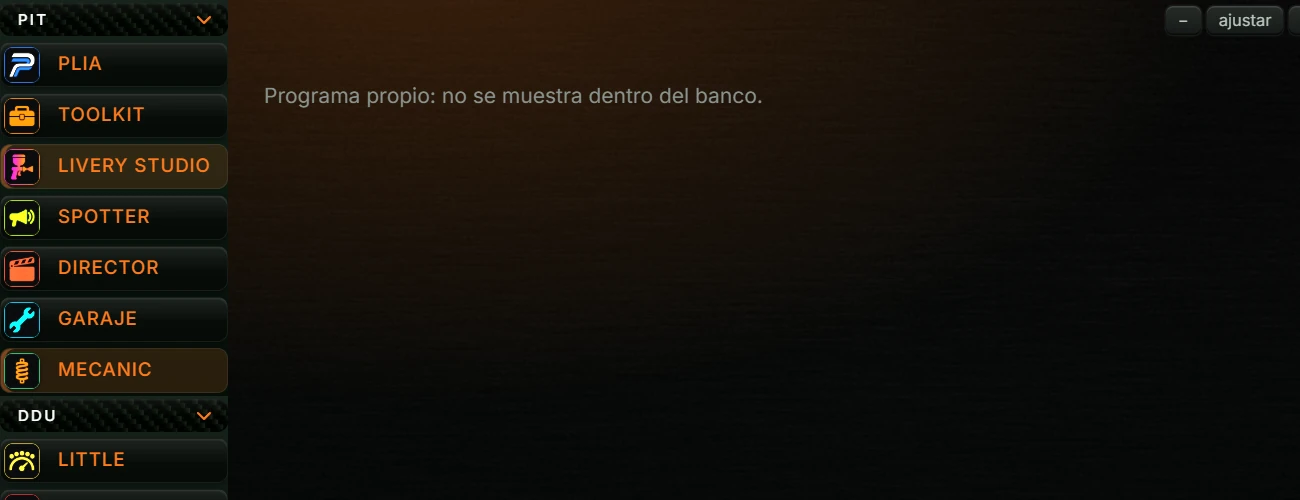
MECANIC is the Push & Lift setup workshop for iRacing. It has seven tabs in the left column:
| Tab | Purpose |
|---|---|
| Dashboard | Browse setups in the iRacing folder, filter them, copy them to Downloads or send them to the Recycle Bin. This is also where you open Historial (History). |
| Setups de Mecanic | Choose a car, track and driving style. MECANIC reads the setup loaded in the iRacing garage and lists the fields to change. It can apply the changes for you. |
| Mecanic Setups web | Open Mecanic Setups for each car and track in a browser. |
| Setup compare | Save a garage reading, make changes in iRacing, save another reading and see which fields changed. |
| Setup yourself | Compare a lap with a reference lap (CSV or IBT): time gained or lost, speed, throttle and brake. |
| Info track | Track profiles: specifications, iRacing layouts and what the track demands from the car. |
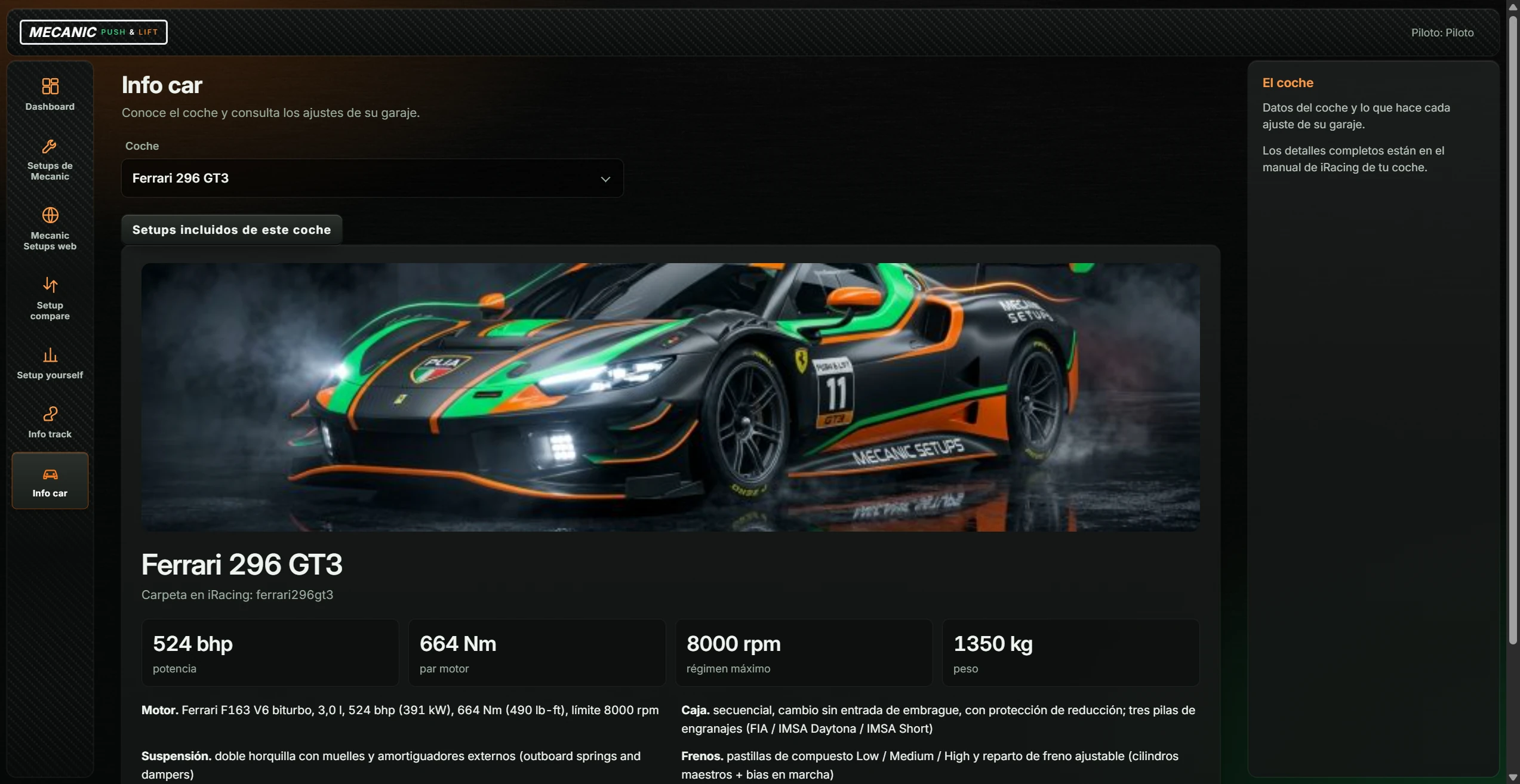
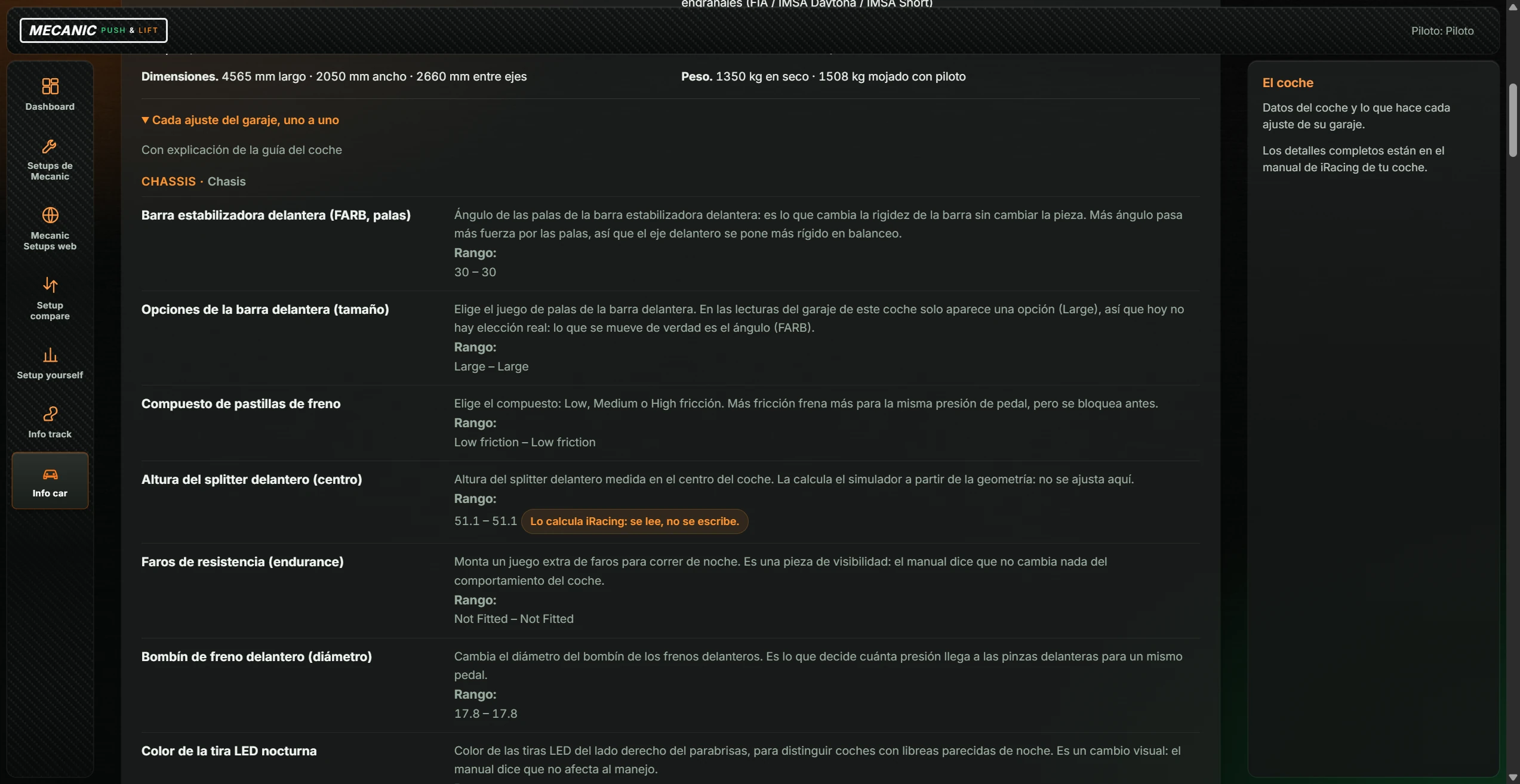
| Info car | Car profiles: engine, weight, gearbox and an explanation of each garage setting. |
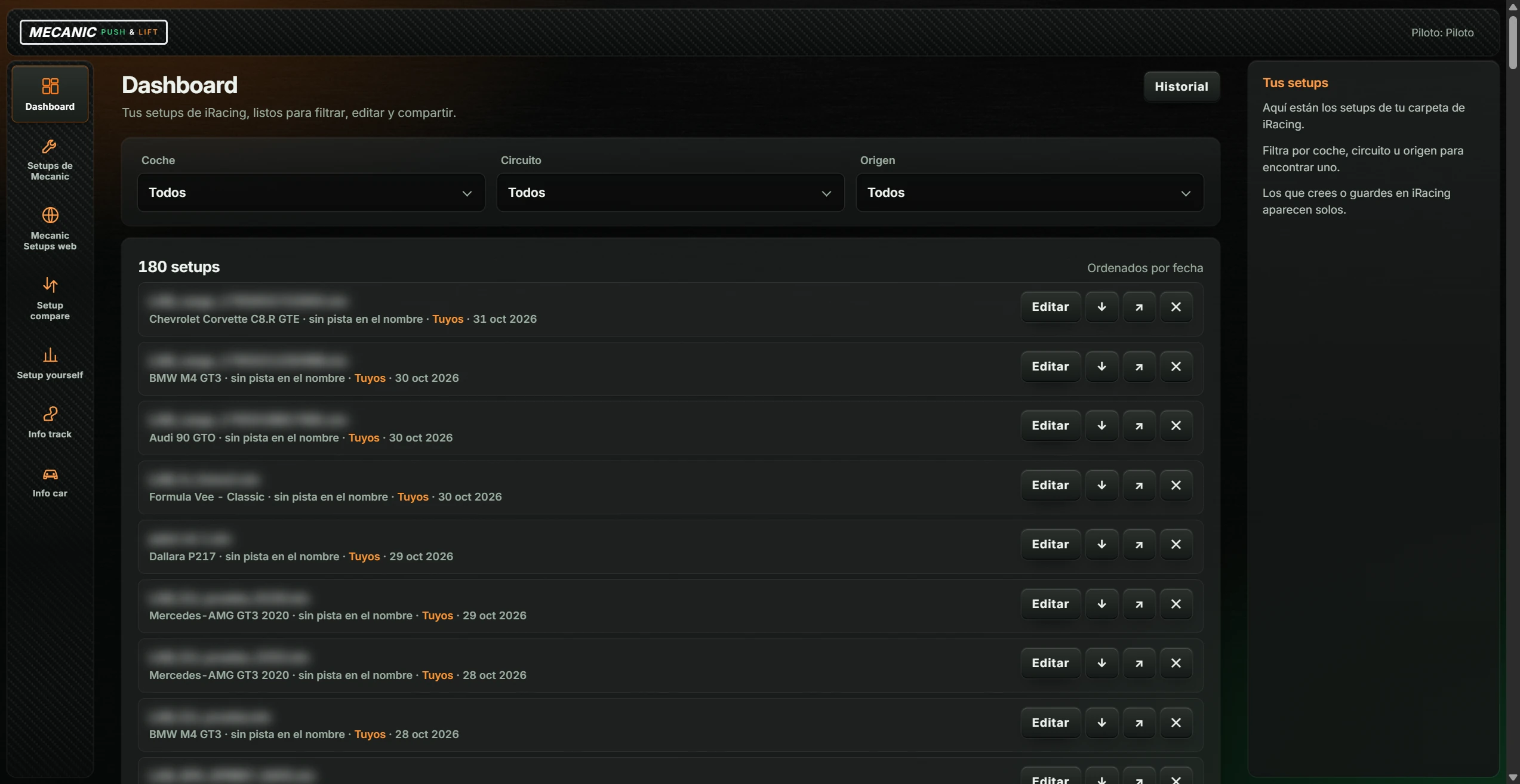
MECANIC opens on the Dashboard with the setups in the iRacing folder.
Without an account that has access, the tabs are replaced by “Mecanic necesita tu cuenta de Push & Lift”, one of the messages below, and the button Abrir Tu cuenta (Open your account):
| Message | Meaning |
|---|---|
| “Crea o confirma tu cuenta en Push & Lift para usar Mecanic.” (Create or confirm a Push & Lift account.) | You are not signed in. |
| “Tu licencia de Push & Lift no permite abrir Mecanic ahora mismo.” (The licence currently does not allow MECANIC access.) | The licence does not currently grant access. |
| “No se puede identificar tu cuenta; tu historial no se mezcla con el de nadie.” (The account cannot be identified; histories are kept separate.) | Push & Lift could not identify the account. |
| “Push & Lift no responde.” (Push & Lift is not responding.) | MECANIC could not communicate with Push & Lift. |
Abrir Tu cuenta (Open your account) opens the account section of Push & Lift AJUSTES. MECANIC updates automatically after sign-in or once access is restored.
Lists all .sto setups in Documentos › iRacing › setups (Documents › iRacing › setups) inside recognised car folders. Setups created or saved in iRacing appear automatically the next time the tab is opened.
| Control | Action |
|---|---|
| Historial (History) | Opens MECANIC history (see 4.2). |
| Coche (Car) | Dropdown: “Todos” (All) or a car with setups in the folder. |
| Circuito (Track) | Dropdown: “Todos” or a track. Only tracks from MECANIC-delivered setups appear; personal setups have no track information (“sin pista en el nombre”). |
| Origen (Source) | Dropdown: Todos (All), Tuyos (Yours), Mecanic (delivered by MECANIC) or Equipos (Teams). |
| “N setups” · “Ordenados por fecha” (Sorted by date) | Number matching the filters, newest first. |
Each row shows the file name, then the car, track or “sin pista en el nombre” (no track in the name), Tuyos (Yours) or Mecanic and date. Four buttons appear on the right:
| Button | Action |
|---|---|
| Editar (Edit) | Does not open anything in this version: setup editing is unavailable. |
| ↓ (Descargar — Download) | Copies the setup to Descargas (Downloads). A message shows its name and folder. If the name already exists, “_2”, “_3”, etc. are appended to the copy. |
| ↗ (Compartir — Share) | Places a copy in Descargas (Downloads) and copies its path to the clipboard. “Copiado.” (Copied) explains that sending is not automatic: attach the file yourself in Discord, WhatsApp or another service. |
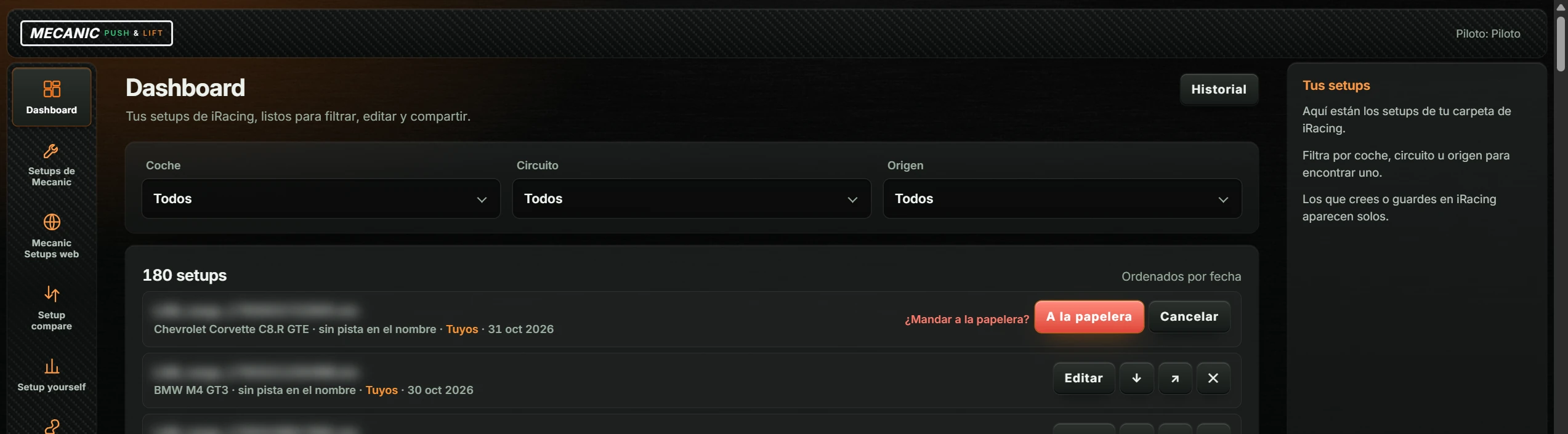
| ✕ (Borrar — Delete) | Asks “¿Mandar a la papelera?” (Send to Recycle Bin?), offering A la papelera (To Recycle Bin) and Cancelar (Cancel). |
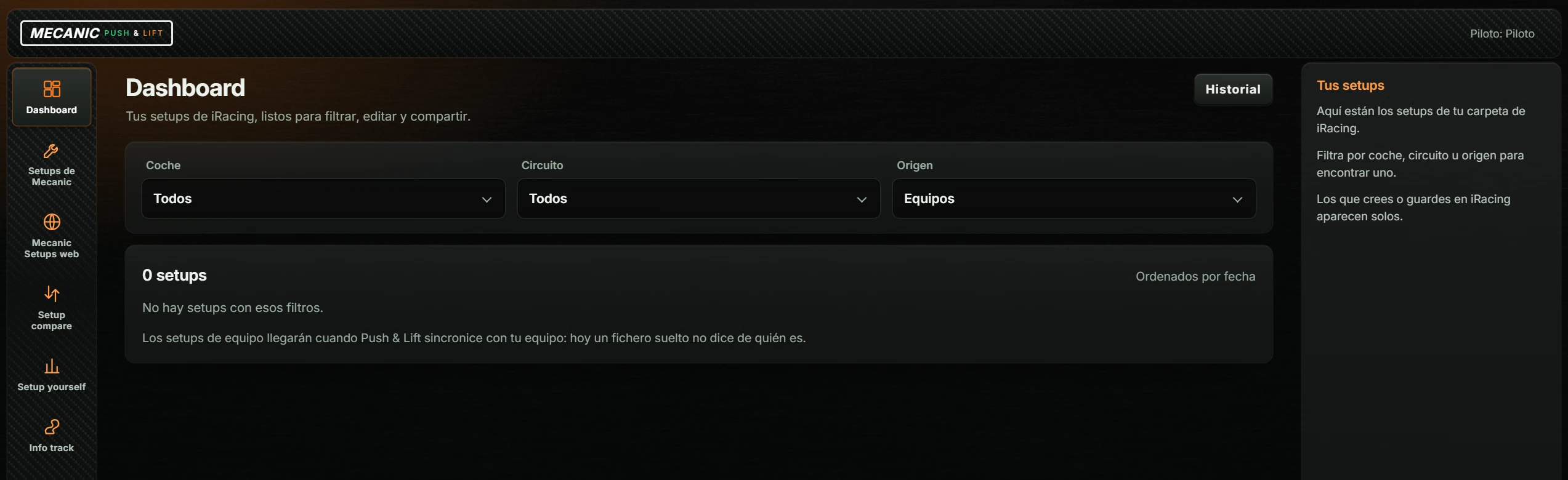
With Origen: Equipos (Source: Teams) the list is empty. The note explains that team setups will arrive when Push & Lift syncs with the team; a standalone file currently does not identify its owner.
An empty folder shows “Todavía no hay setups en …” and its path. No matching filters shows “No hay setups con esos filtros.”
Open it with Historial (History) on Dashboard. It stores MECANIC-delivered setups; each entry keeps its file, changes and personal feedback from driving it.
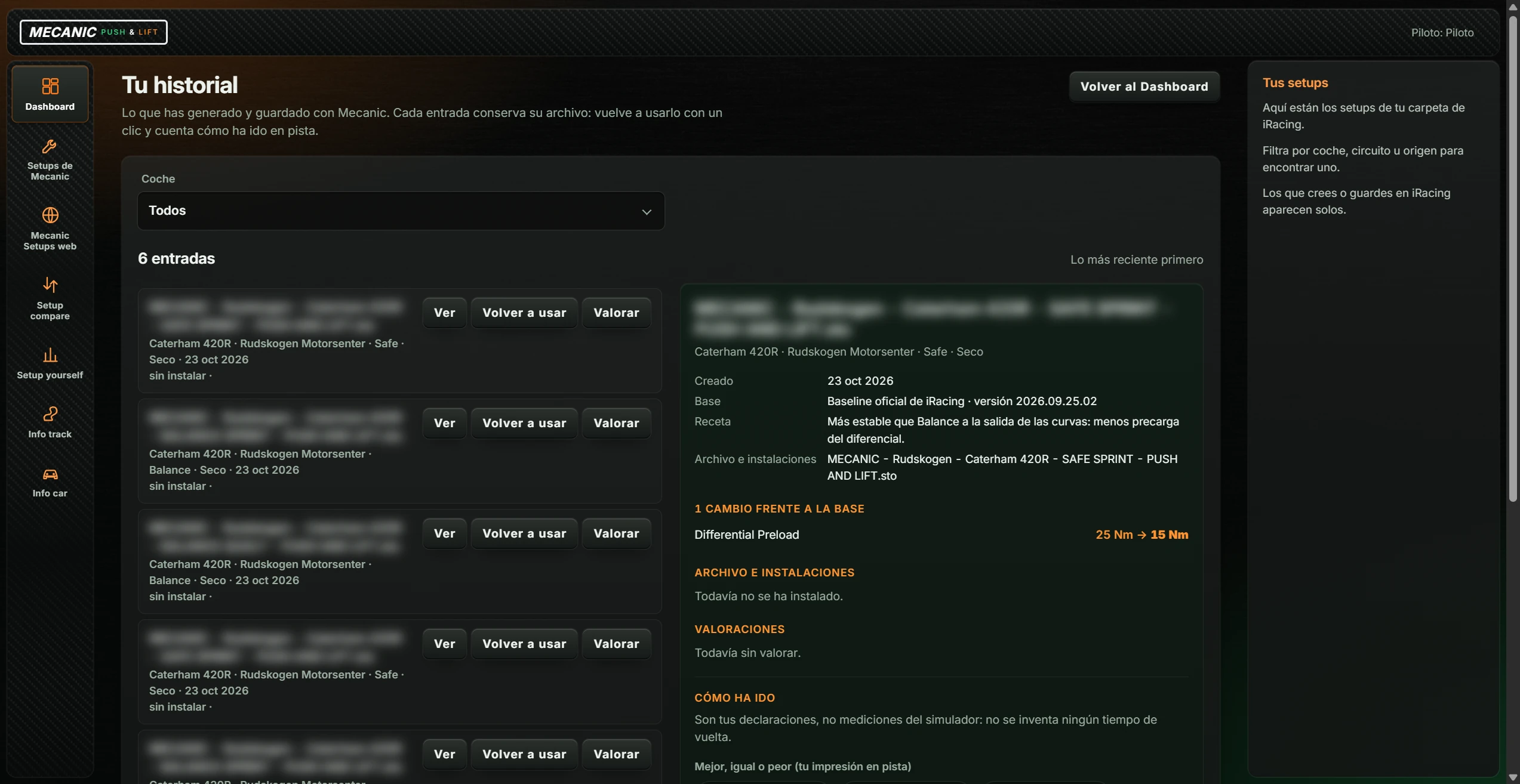
| Control | Action |
|---|---|
| Volver al Dashboard (Back to Dashboard) | Returns to Dashboard. Dashboard remains highlighted while viewing history. |
| Coche (Car) | Dropdown: “Todos” or a car from the entries. |
| “N entradas” · “Lo más reciente primero” (Entries · Newest first) | Number of entries. |
| Ver (View) | Opens entry details on the right. |
| Volver a usar (Use again) | Copies the file back into its car's iRacing folder and confirms its name. Disabled if the entry no longer has a file. |
| Valorar (Rate) | Opens the details and focuses the rating form. |
| Cargar más (Load more) | Appears only when more entries exist than can be shown at once. |
| Preparar el primero (Prepare the first one) | Appears only when history is empty (“Tus setups aparecerán aquí.”). Opens Setups de Mecanic. |
Each entry shows car, track, style (Safe, Balance or Aggressive), Seco/Mojado (Dry/Wet) and date. File status appears below: “sin instalar” (not installed), “preparando la copia” (preparing copy), “escribiendo” (writing), “en tu carpeta de iRacing” (in the iRacing folder), “exportado” (exported) or “instalación fallida” (installation failed). Missing files add “el fichero ya no está donde se colocó”. Rated entries show stars.
The detail panel shows file name, car, track, style and conditions; Creado (Created); Base (the starting setup); Receta (Recipe) (the style's objective); Archivo e instalaciones (File and installations); up to eight changes against the base (“before → after”); installation locations; and previous ratings.
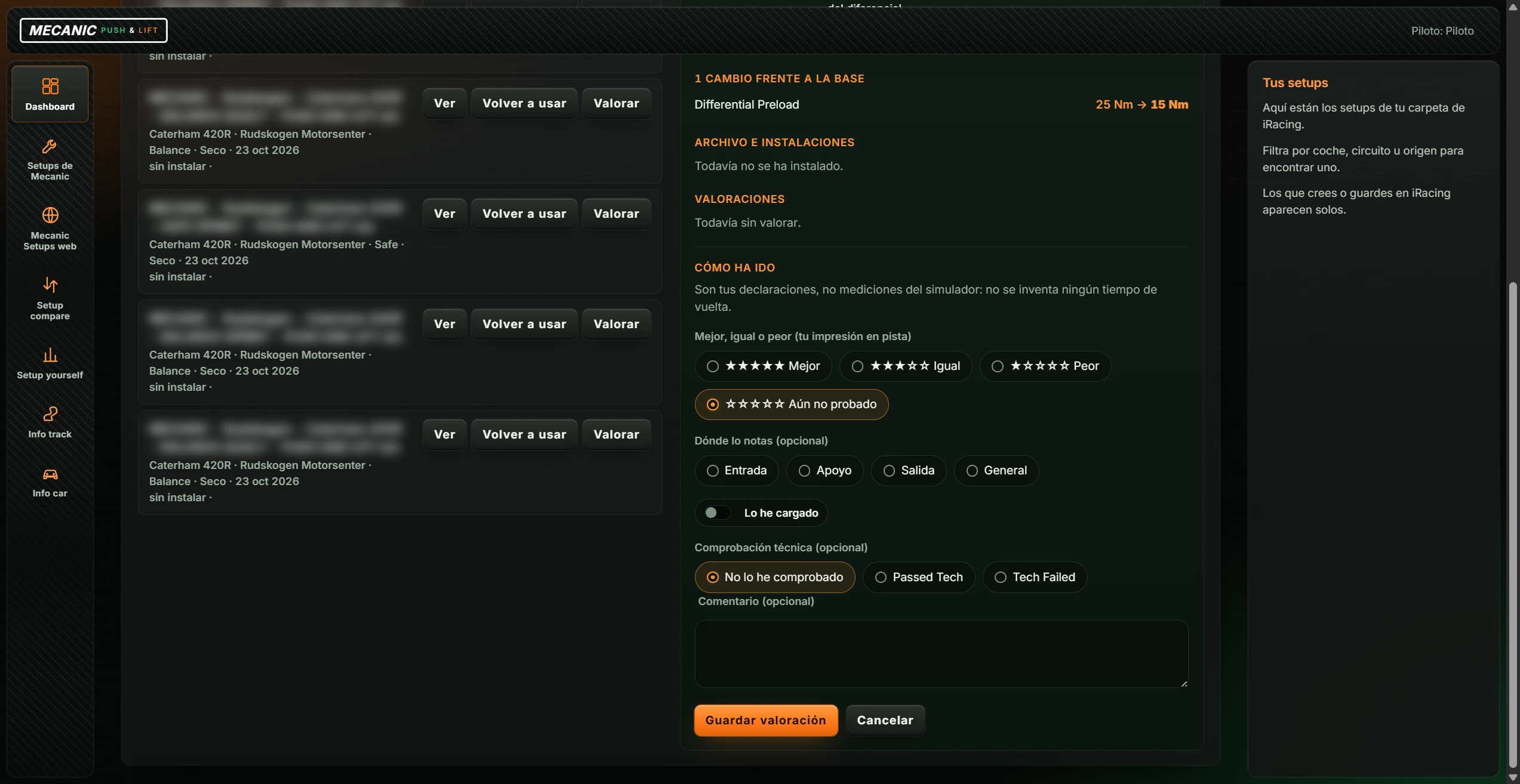
| Option | Values |
|---|---|
| Mejor, igual o peor (tu impresión en pista) — Better, same or worse (personal impression on track) | ★★★★★ Mejor (Better) · ★★★☆☆ Igual (Same) · ★☆☆☆☆ Peor (Worse) · ☆☆☆☆☆ Aún no probado (Not tested yet; default). |
| Dónde lo notas (opcional) — Where you notice it (optional) | Entrada (Entry) · Apoyo (Mid-corner) · Salida (Exit) · General. |
| Lo he cargado (I loaded it) | Switch to confirm that the setup was loaded in iRacing. |
| Comprobación técnica (opcional) — Technical check (optional) | No lo he comprobado (Not checked; default) · Passed Tech · Tech Failed. |
| Comentario (opcional) — Comment (optional) | Free text, up to 2000 characters. |
| Guardar valoración (Save rating) | Saves the rating and confirms the chosen score. If the entry has no file, the message states that it was saved without a file. |
| Cancelar (Cancel) | Clears the unsaved form selections. |
Choose car, track and style. With iRacing open in the garage, MECANIC reads the loaded setup and produces a change sheet: which fields to change and their target values.
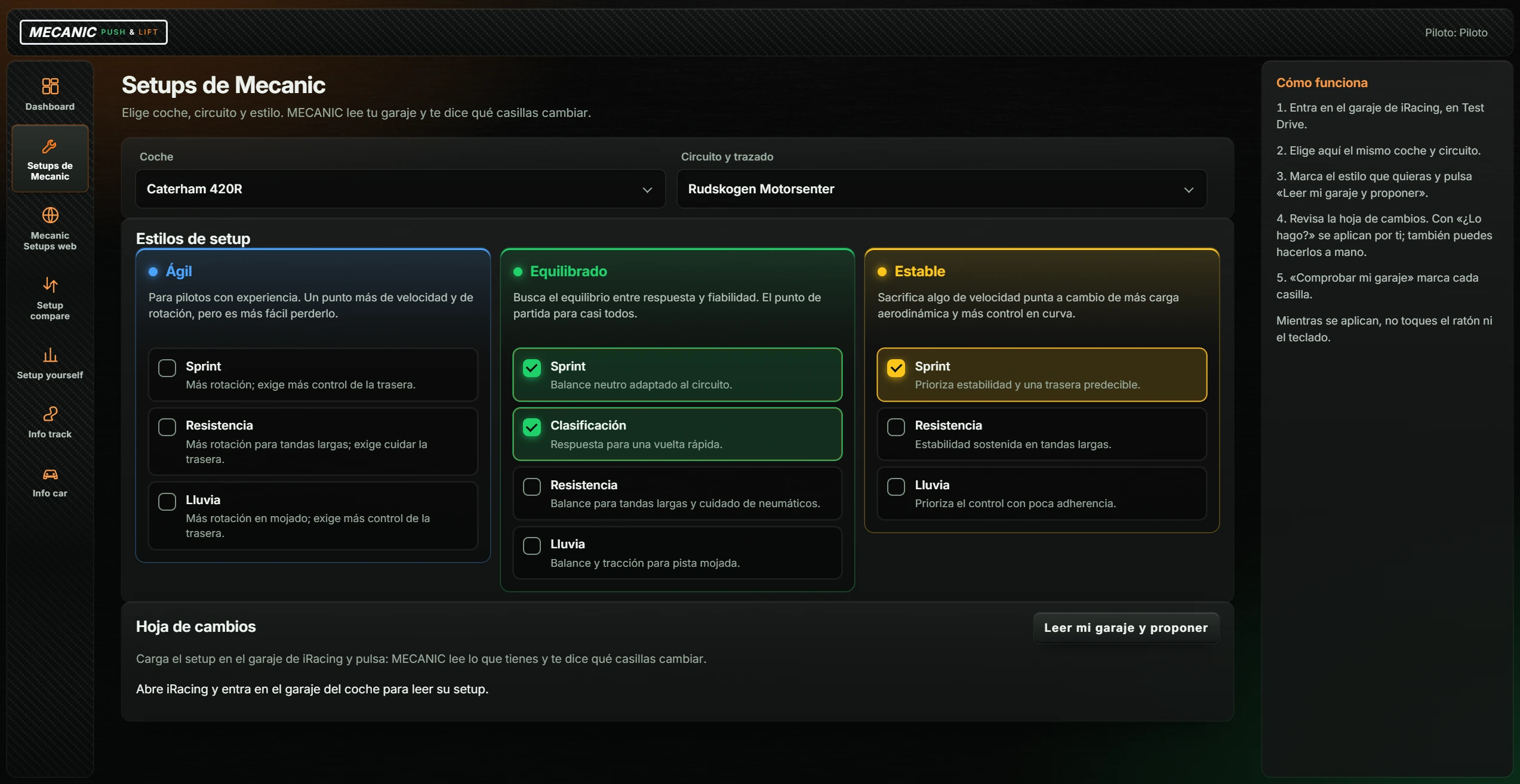
| Control | Action |
|---|---|
| Coche (Car) | Dropdown with the 72 supported cars. |
| Circuito y trazado (Track and layout) | Dropdown with 125 tracks and layouts. |
| Estilos de setup (Setup styles) | Select one or more styles (table below). Defaults are Equilibrado · Sprint, Equilibrado · Clasificación and Estable · Sprint. |
| Leer mi garaje y proponer (Read my garage and suggest changes) | Reads the iRacing garage setup and produces a change sheet for each selected style. Shows “Leyendo el garaje…” (Reading the garage). Does nothing if no style is selected. |
| Style | Objective | Options |
|---|---|---|
| Ágil (Agile) | For experienced drivers. More speed and rotation, but easier to lose control. | Sprint: more rotation; requires more rear-end control. Resistencia (Endurance): more rotation for long runs; requires care with the rear end. Lluvia (Rain): more rotation in wet conditions. |
| Equilibrado (Balanced) | Balances response and reliability. The starting point for most drivers. | Sprint: neutral balance adapted to the track. Clasificación (Qualifying): response for a fast lap. Resistencia (Endurance): balance for long runs and tyre care. Lluvia (Rain): balance and traction for wet tracks. |
| Estable (Stable) | Trades some top speed for more downforce and cornering control. | Sprint: prioritises stability and a predictable rear end. Resistencia (Endurance): sustained stability in long runs. Lluvia (Rain): prioritises control in low grip. |
Only Equilibrado offers Clasificación. In this version, all 72 cars have the ten styles.
After reading the garage, the sheet has a block for each selected style:
| Button for each style | Action |
|---|---|
| ¿Lo hago? (Apply it?) | Windows asks “¿Aplico estas N casillas al garaje de iRacing?” (Apply these N fields?). On confirmation, MECANIC changes the garage fields and reads them again. Do not touch the mouse or keyboard while changes are being applied. |
| Comprobar mi garaje (Check my garage) | Reads the garage again and marks ✓ on fields matching the sheet and ✗ on those that do not. Useful after making changes manually. |
Before suggesting changes, MECANIC checks the selected car and track against the garage. A mismatch shows “El coche elegido no coincide con el garaje.” or “El circuito elegido no coincide con la sesión.”
Shortcut to Mecanic Setups, included with the app. Requires internet. Links open in the browser.
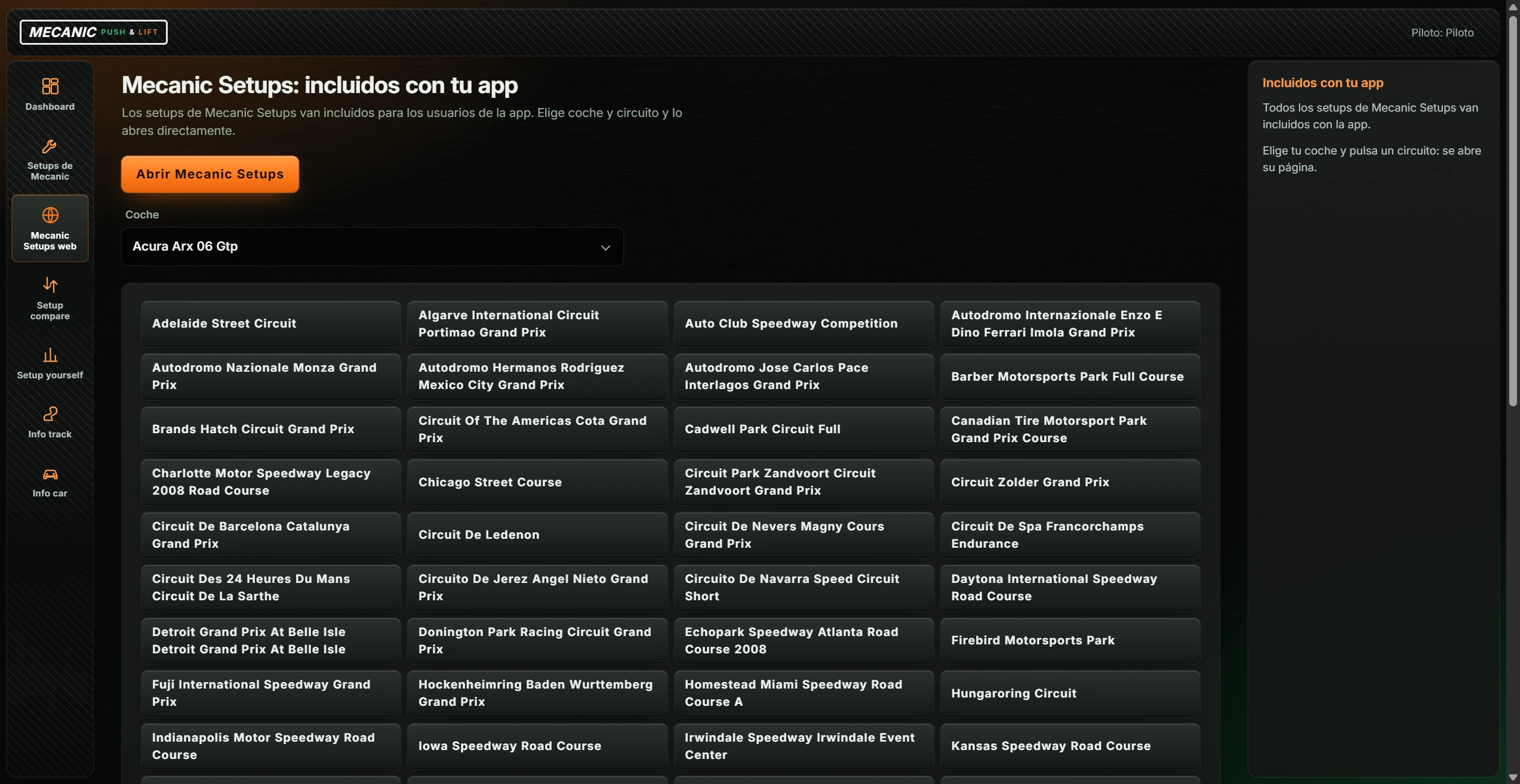
| Control | Action |
|---|---|
| Abrir Mecanic Setups (Open Mecanic Setups) | Opens the Mecanic Setups homepage in the browser. |
| Coche (Car) | Dropdown of cars with setups on the website. |
| Track buttons | One per track with setups for that car. Opens its page in the browser. |
If the list fails to load, the message asks to open the website using the button above.
Compares two garage readings from iRacing: save one, change the garage settings and save another.
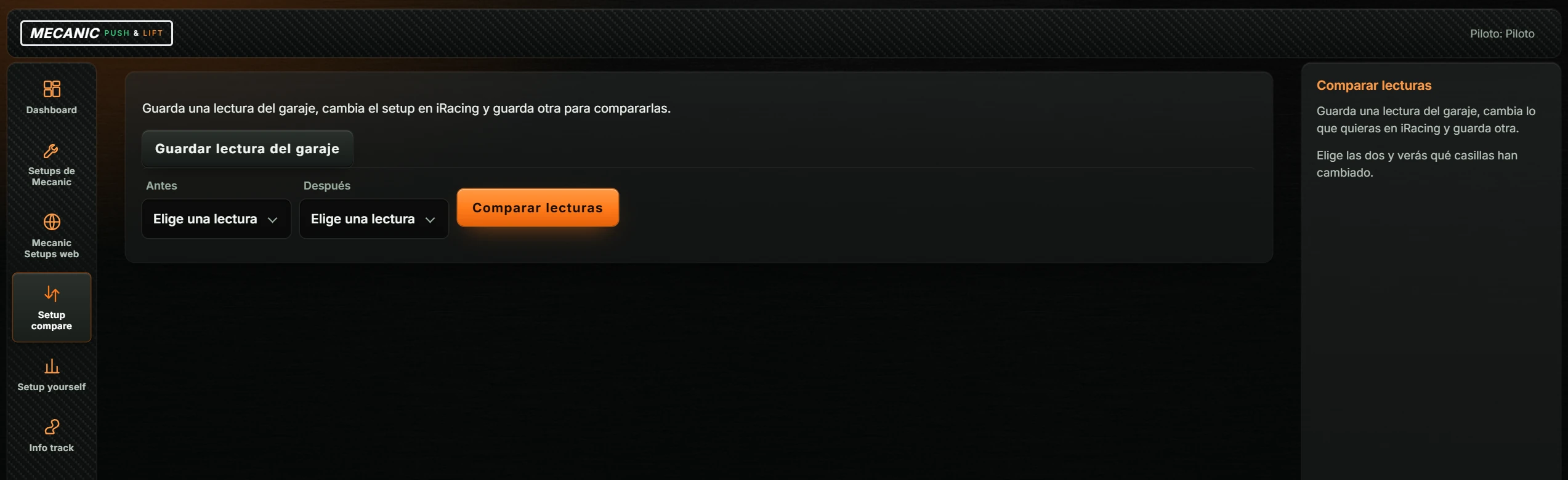
| Control | Action |
|---|---|
| Guardar lectura del garaje (Save garage reading) | Reads and saves the iRacing garage setup. Shows “Leyendo…” (Reading). The first reading is selected under Antes (Before); subsequent readings under Después (After). |
| Antes (Before) / Después (After) | Dropdowns of saved readings: car, track, layout and date. |
| Comparar lecturas (Compare readings) | Shows “N casillas distintas de M.” (N different fields out of M). Each row shows “before → after” if different or “before = after” if equal. Aerodynamic calculator fields are marked “· Calculador aero”. Missing fields say “Sin lectura” (No reading). |
The result warns if the readings use different iRacing versions, tracks or layouts.
Compare a lap with a reference without opening iRacing. Original files remain untouched.
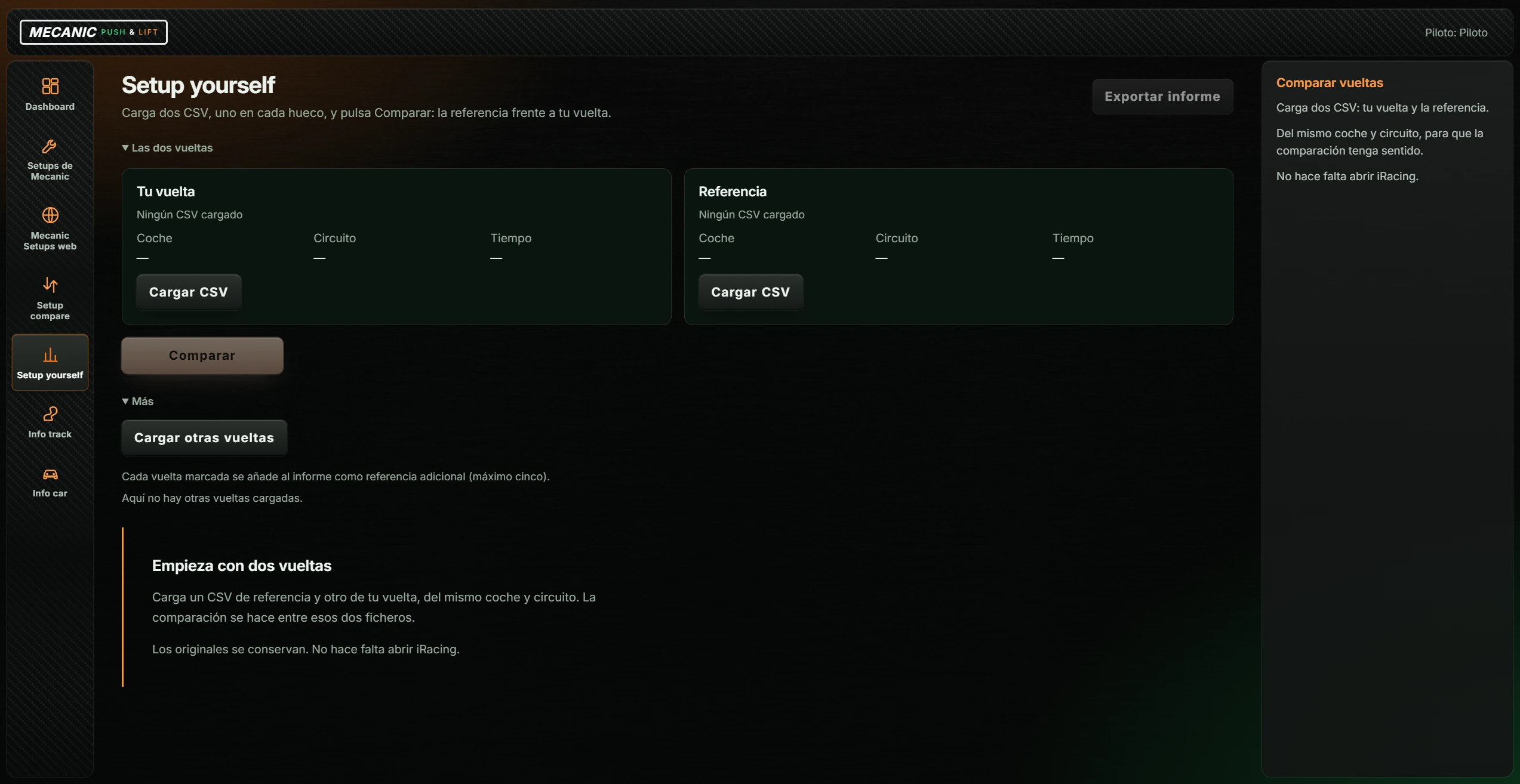
| Control | Action |
|---|---|
| Las dos vueltas (The two laps) | Expandable section with two cards. After comparison it closes and becomes “Cambiar las vueltas de la comparación” (Change the compared laps). |
| Cargar CSV (Load CSV) (in Tu vuelta (Your lap) and Referencia (Reference)) | Opens the Windows file picker at Downloads. Accepts CSV and iRacing telemetry (IBT). For multiple laps, it selects the fastest (“La más rápida de N vueltas del fichero.”). The card shows file, Coche (Car), Circuito (Track) and Tiempo (Time). |
| Comparar (Compare) | Enabled when both cards contain a lap. Starts comparison. |
| Exportar informe (Export report) | Enabled after comparison. Saves an HTML report, proposing “DOJO-MECANIC.html” in Downloads, and opens its folder. |
| Más (More) › Cargar otras vueltas (Load other laps) | Opens Documents › iRacing › telemetry to select up to eight files at once. Each lap has a checkbox; selected laps (up to five) become extra report references. |
The top shows the difference over the common distance (“Pierdes … s”, “Ganas … s” or “Mismo tiempo”: time lost, gained or equal), both lap times and a note on how timing was measured. Four tabs follow:
| Tab | Contents |
|---|---|
| Resumen (Summary) | Time gained/lost graph; “Qué revisar primero” with the three biggest losses and advice; “Gas a fondo” and “Sin pedales” as percentages of time (reference / own lap). For a loaded stint, also best lap, median and best-to-worst gap. |
| Gráficas (Graphs) | Time difference, speed, throttle and brake throughout the lap, for both reference and own lap. |
| Tramos (Segments) | Segment table: Inicio (Start), Fin (End), Delta (s), Frenada Δ (m) (braking difference), both minimum speeds and Qué revisar (What to review). |
| Datos y límites (Data and limits) | Each lap's car, track, layout and setup; “Frente a otras referencias” for extra laps; and “Qué permiten afirmar estos datos” (What these data support). |
The end shows “Confianza del análisis:” (Analysis confidence). Comparing two laps does not prove a setup is better; MECANIC states this in the result.
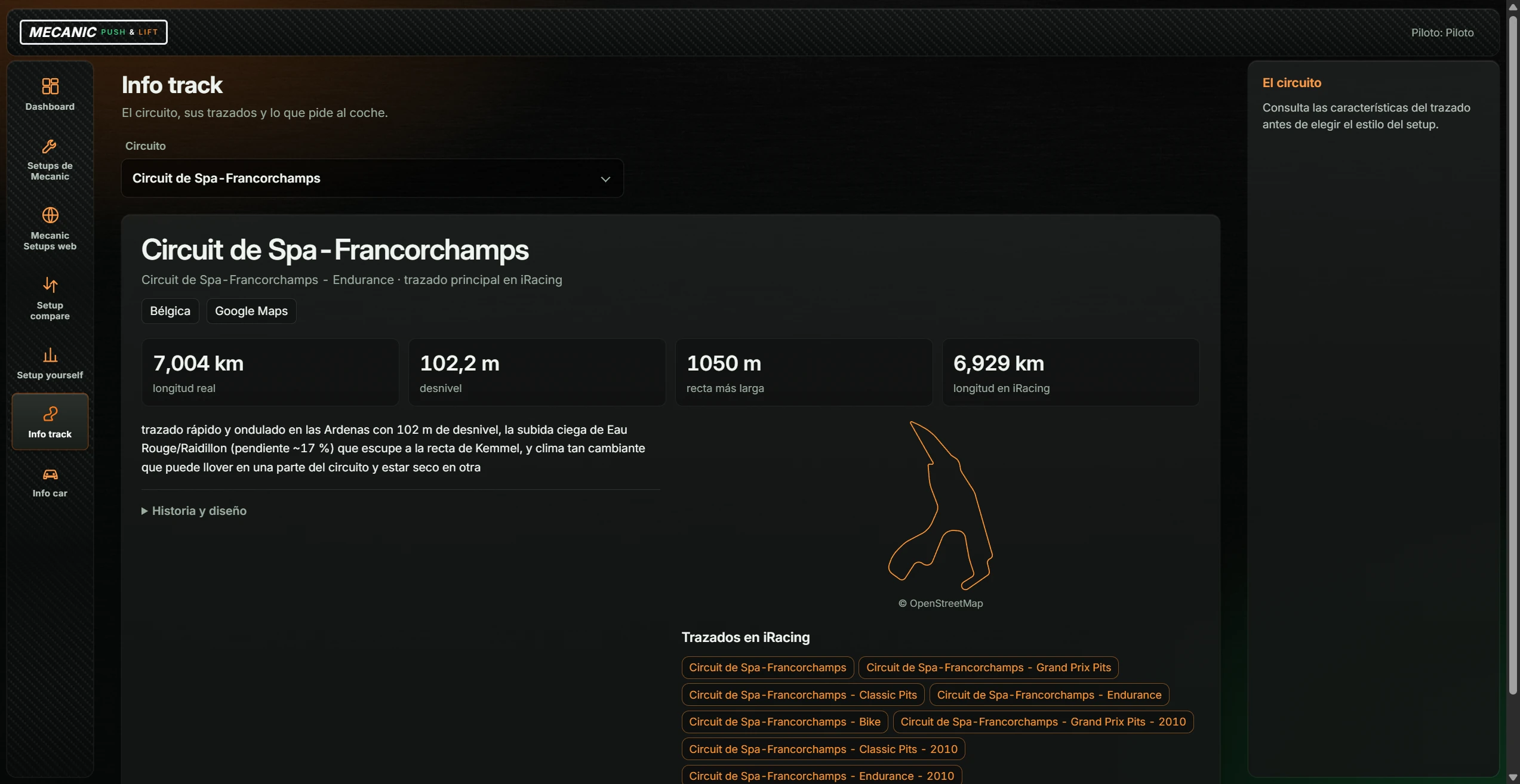
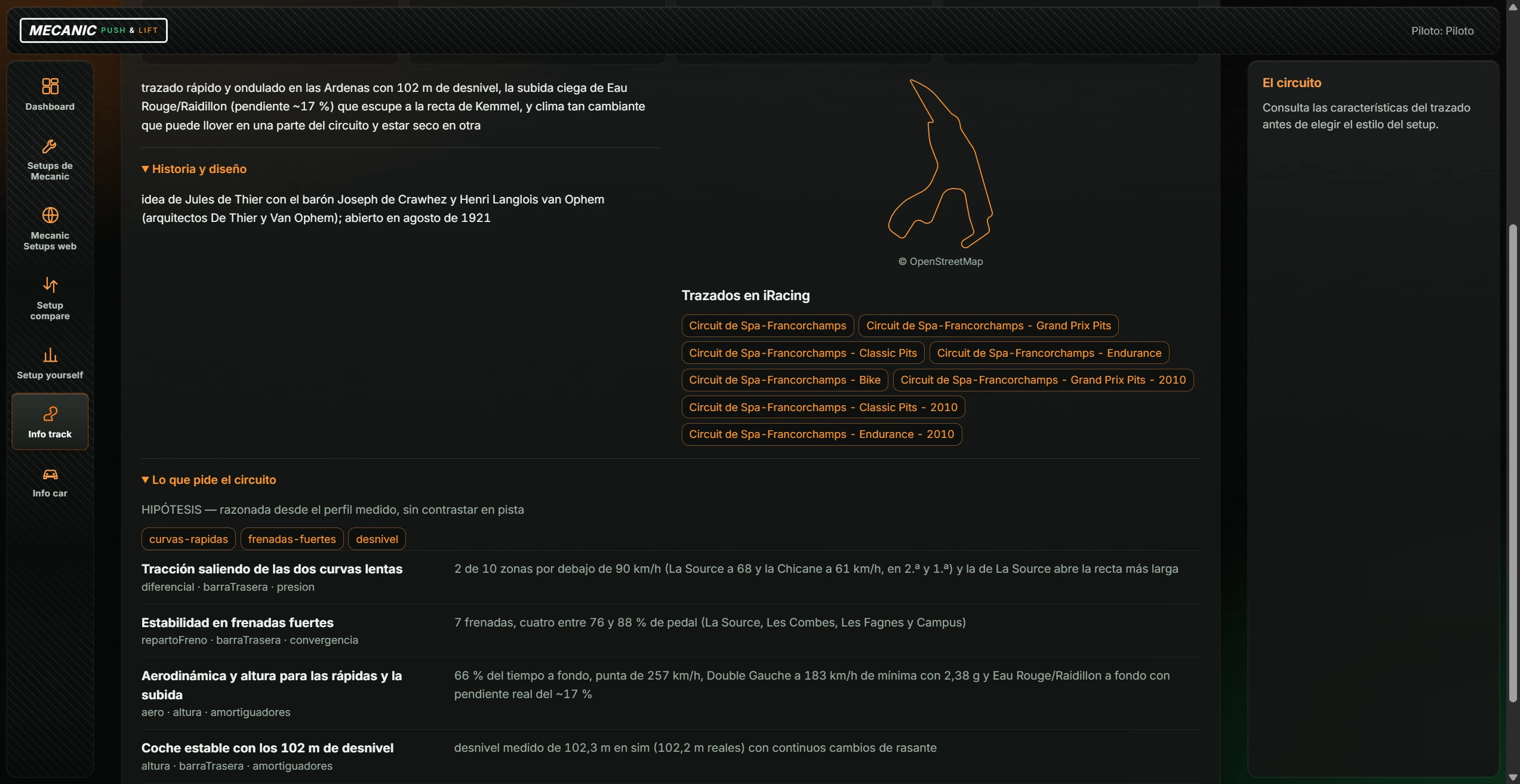
Track profiles. Select a track in Circuito (Track) (124 tracks).
Car profiles. Choose a car in Coche (Car) (182 cars).
MECANIC has no separate settings screen. Configuration comes from Push & Lift and the PC:
| Setting | Source |
|---|---|
| Language | From Push & Lift AJUSTES. In this version only a few texts are translated; the rest appear in Spanish. |
| Accent colour, font and text size | From appearance in Push & Lift AJUSTES. Size ranges from 100% to 150%. MECANIC uses orange if the selected colour has poor contrast against the background. |
| Setup folder | Documents › iRacing › setups, with a folder for each car. |
| History, ratings and garage readings | Stored locally on the PC, separately for each Push & Lift account. |
| Shortcut to open or close MECANIC | Push & Lift AJUSTES: “Encender o apagar MECANIC”. |
| What you see | What to do |
|---|---|
| “Mecanic necesita tu cuenta de Push & Lift” (Account required) | Click Abrir Tu cuenta (Open your account) and sign in or review the licence (see 3.1). |
| “Abre iRacing y entra en el garaje del coche para leer su setup.” (Open the iRacing garage.) | iRacing is closed or not in the garage. Enter the car's garage and try again. |
| “El coche elegido no coincide con el garaje.” / “El circuito elegido no coincide con la sesión.” (Car or track mismatch.) | Select the same car and track in MECANIC and iRacing. |
| “MECANIC todavía no sabe leer el garaje de este coche…” (This car's garage is not supported yet.) | That car cannot be read yet. Try another. |
| “No se puede identificar el coche del garaje.” (Cannot identify the garage car.) | Fully enter the car's garage in iRacing and try again. |
| “No se ha podido leer el setup del garaje” (Could not read the garage setup) | Try again with the garage open without changing cars. |
| Clicking Editar (Edit) does nothing | Expected in this version: setup editing is unavailable. |
| Clicking Guardar lectura del garaje (Save garage reading) shows “Leyendo…” but no reading appears | Open iRacing's garage and try again. |
| Clicking Comparar lecturas (Compare readings) shows nothing | Select a reading under Antes and another under Después. |
| Personal setups say “sin pista en el nombre” (no track in the name) | Expected: track information is only available for MECANIC-delivered setups. |
| Origen: Equipos is always empty | Team setups are not available yet. |
| “No se ha borrado nada: la papelera de Windows no lo ha aceptado…” (Recycle Bin refused the file.) | The file is unchanged. Use File Explorer to delete it if desired. |
| “Versión de iRacing pendiente de comprobar.” / “No encuentro la carpeta de setups de iRacing.” (Version not verified / setup folder missing.) | Check that iRacing is installed and Documents › iRacing › setups exists. |
| Setup yourself: “Ese fichero no trae una vuelta válida.” (No valid lap.) | The file has no complete lap. Export another lap. |
| Setup yourself: missing lap position, speed, throttle or brake columns (“Necesitas posición de vuelta, velocidad, acelerador y freno.” / “Faltan las columnas de acelerador y freno.”) | Export the CSV with those columns or use IBT. |
| Setup yourself: “El CSV supera 25 MB. Exporta una sola vuelta.” (CSV exceeds 25 MB.) | Export only one lap. |
| Setup yourself: “No se pueden comparar vueltas de distinto …” (Different car or track.) | Both laps must use the same car and track. |
| Setup yourself: “Las vueltas no comparten suficiente distancia.” / “Vuelta incompleta…” (Insufficient common distance / incomplete lap.) | Use two complete laps. |
| Setup yourself: “Límite de 120 vueltas…” / “Límite de memoria de la comparación…” (120-lap or memory limit.) | Close and reopen MECANIC to start a new comparison. |
| “No se ha podido cargar la lista. Abre la web con el botón de arriba.” (Could not load the list; open the website.) | Check the connection or click Abrir Mecanic Setups (Open Mecanic Setups). |
| Help panel and driver name are missing | The window is narrow. Enlarge or maximise it. |