 PUSH & LIFTPUSH & LIFT

Push & Lift · your spotter: the voice of the suite
SPOTTER is the voice of Push & Lift. While you race, it announces flags, cars alongside, pits and fuel, weather, damage, advice on your own lap and your rivals’ movements. Some alerts are beeps: gear, shifting, ABS and the braking countdown.

With SPOTTER selected on the Push & Lift screen, you have TRAER AL FRENTE (bring to front) (brings the SPOTTER window to the front) and CERRARLA (close it) (closes SPOTTER). These buttons are shared by all PIT apps and explained in the SUITE manual.
The text “identidad puesta en su ventana: PushAndLift.Spotter” means the window has its own taskbar button.
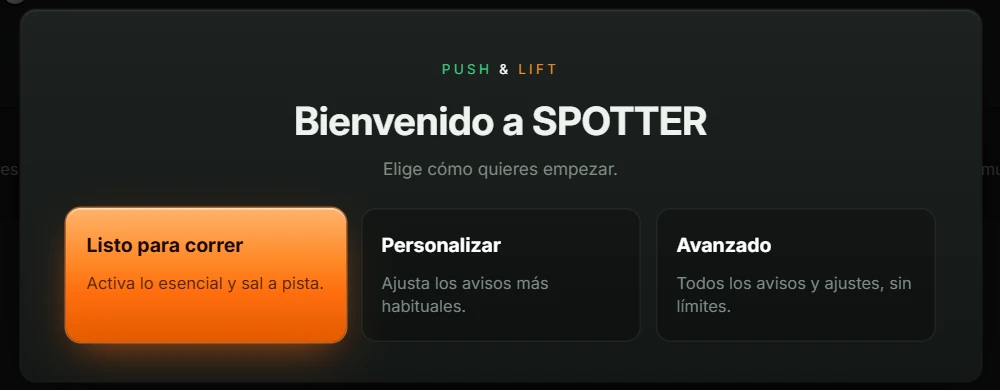
The first time you open SPOTTER, you see Bienvenido a SPOTTER (welcome to SPOTTER) with “Elige cómo quieres empezar.” (Choose how you want to start) and three buttons:
| Button | What it does |
|---|---|
| Listo para correr (ready to race) “Activa lo esencial y sal a pista.” (Enable the essentials and go on track.) | Enables the recommended alerts and hides the alert lists. You only see En directo (live) and Voz y sonido (voice and sound). |
| Personalizar (customise) “Ajusta los avisos más habituales.” (Adjust the most common alerts.) | Shows the alert groups, but only the most common alerts in each. |
| Avanzado (advanced) “Todos los avisos y ajustes, sin límites.” (All alerts and settings, without limits.) | Shows all nine groups and every alert. |
You can change this at any time using the top tabs (see 5.1 Levels).
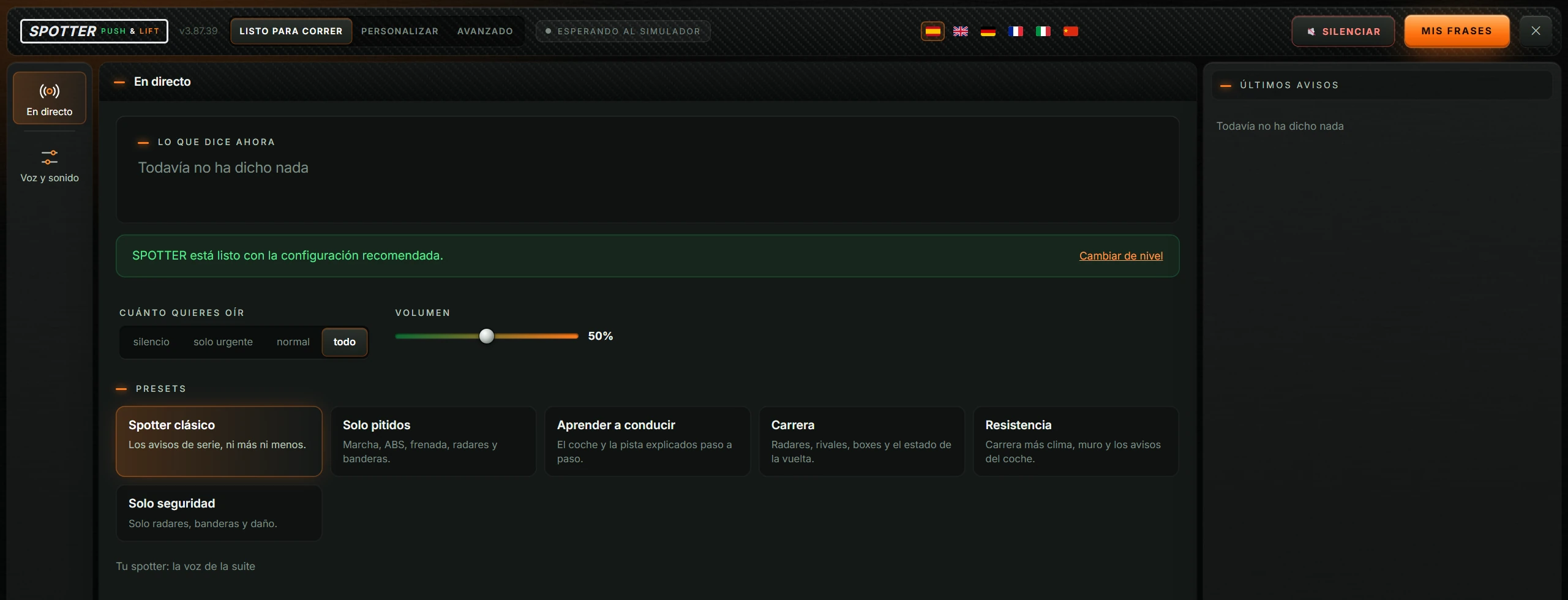
After your choice, SPOTTER opens on En directo (live):
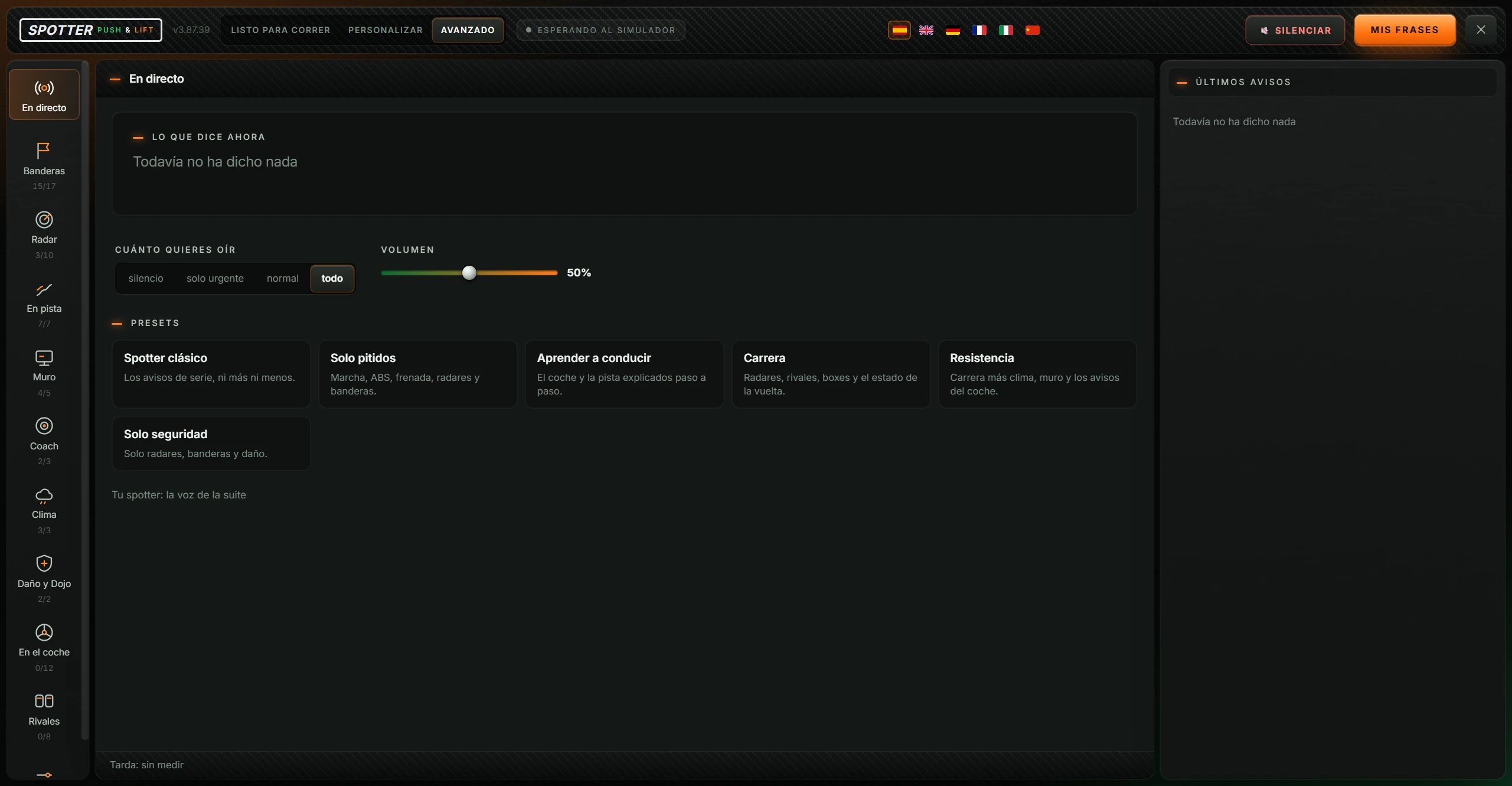
The window has four areas:

| Button or area | What it does |
|---|---|
| SPOTTER PUSH & LIFT and the number | The app name and installed version. |
| LISTO PARA CORRER (ready to race) · PERSONALIZAR (customise) · AVANZADO (advanced) | Change the level. The active level is highlighted. See 5.1 Levels. |
| Status | SPOTTER’s current state:
|
| Language flags (ES, EN, DE, FR, IT, ZH) | Change the interface and voice language. The active flag is highlighted. SPOTTER prepares the new language’s voices in the background. |
| 🔇 SILENCIAR (mute) | Mutes SPOTTER immediately, interrupting speech and preventing further announcements. The button becomes 🔊 EN SILENCIO · ACTIVAR VOZ (muted · enable voice), in red. Click again to restore speech. Muting is not saved: SPOTTER speaks when reopened. |
| MIS FRASES (my phrases) | Opens Mis frases (my phrases), where you create your own alerts. |
| ✕ | Saves everything and closes SPOTTER. |

Each icon opens a centre panel. The selected one is orange. Each alert group shows enabled/total alerts, for example “15/17”.
| Icon | What it opens | When it appears |
|---|---|---|
| En directo (live) | 4.3 En directo (live) | Always. |
| Banderas (flags), Radar, En pista (on track), Muro (pit wall), Coach, Clima (weather), Daño y Dojo (damage and Dojo) | Its alert group (4.4 and 4.5). | In Personalizar and Avanzado. |
| En el coche (in the car), Rivales (rivals) | Its alert group. | Only in Avanzado. |
| Voz y sonido (voice and sound) | 4.6 Voz y sonido (voice and sound) | Always, at the bottom of the column. Scroll the column if the window is short. |
Your everyday screen. It contains:
| Area | What it is |
|---|---|
| LO QUE DICE AHORA (what it is saying now) | The last spoken alert and its time. Before the first alert: “Todavía no ha dicho nada” (nothing spoken yet). |
| CUÁNTO QUIERES OÍR (how much you want to hear) | Four buttons: silencio (silent), solo urgente (urgent only), normal (normal) and todo (everything). See 5.2. |
| VOLUMEN (volume) | Slider from 0 to 100%. See 5.3. |
| PRESETS | Six buttons enable sets of alerts at once: Spotter clásico (classic spotter), Solo pitidos (beeps only), Aprender a conducir (learn to drive), Carrera (race), Resistencia (endurance) and Solo seguridad (safety only). The preset matching your alerts is highlighted. See 5.4. |
| “SPOTTER está listo con la configuración recomendada.” (SPOTTER is ready with the recommended settings) and Cambiar de nivel (change level) | Only at the Listo para correr level. Cambiar de nivel (change level) switches to Avanzado. |
All groups work alike. At the top: group name, enabled alert count and description. Below: one row per alert.
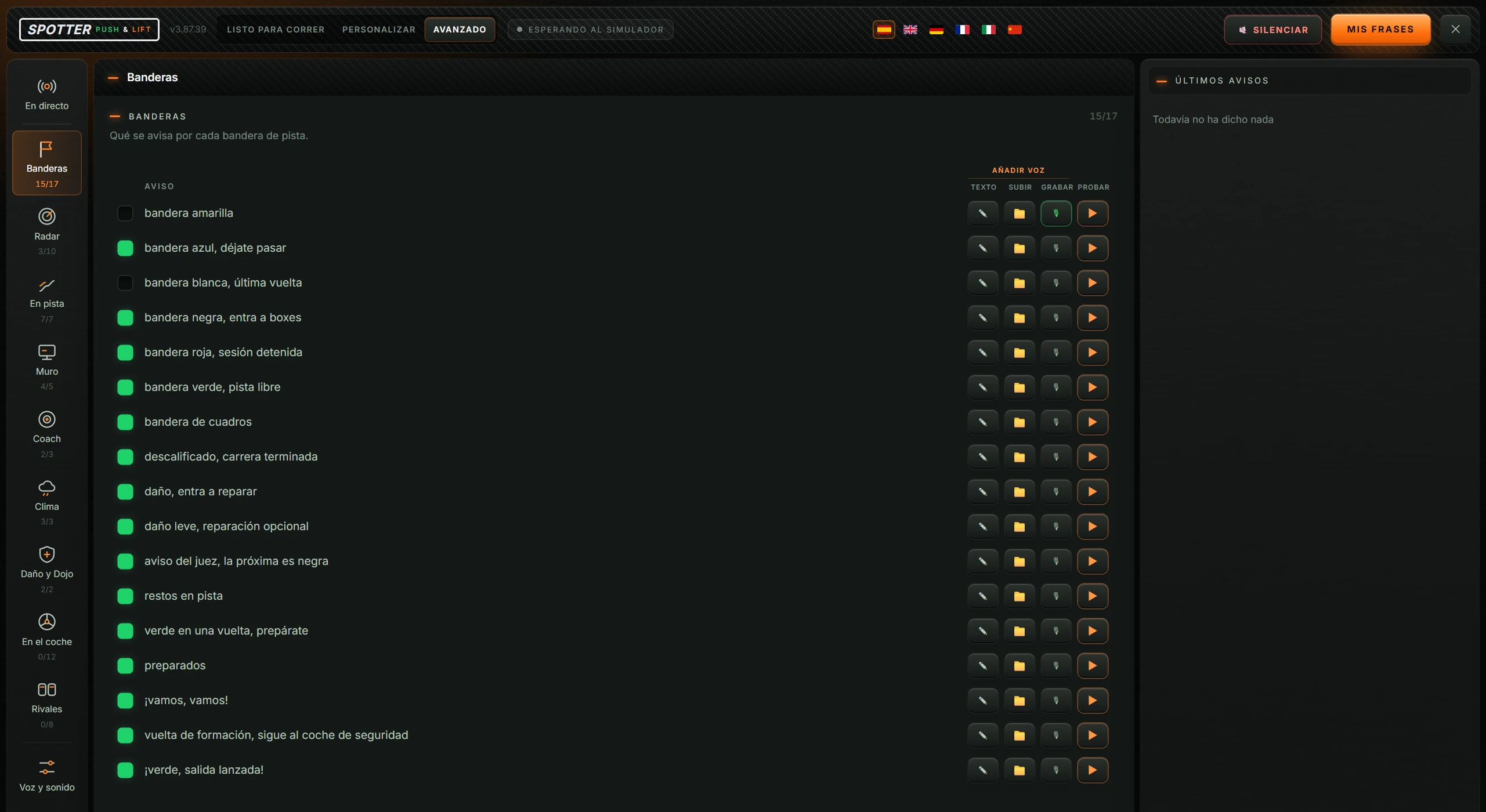
| Button | What it does |
|---|---|
| Checkbox (green or empty square) | Enables or disables the alert. Green means enabled. |
| AVISO (alert) | The alert text. Numbers and names are examples; during a race it uses actual data. Edited text has a ✏ pencil in front. |
| ✎ TEXTO (text) | Edits the alert wording. Opens Texto del aviso (alert text). |
| 📁 SUBIR (upload) | Choose a .wav file from your PC to replace the standard voice. If a file is already assigned, the highlighted button asks whether to restore the standard voice. |
| 🎙 GRABAR (record) | Records 3 seconds from your microphone for this alert. During recording it reads “Grabando… 3 s”. If a recording exists, the green button asks whether to restore the standard voice. Only shown when a microphone is available. |
| ▶ PROBAR (test) | Plays the alert now using example data, even when the alert is disabled or SPOTTER is muted. |
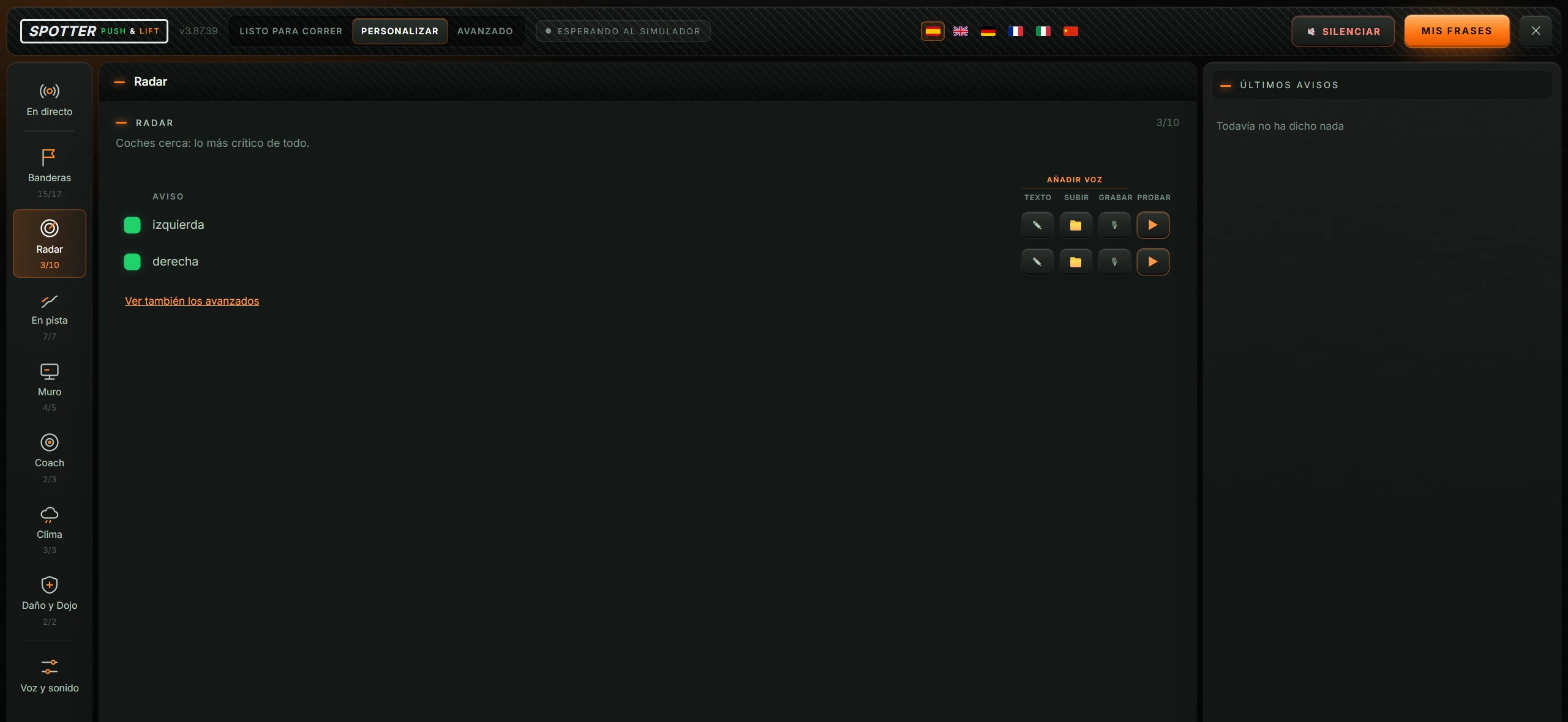
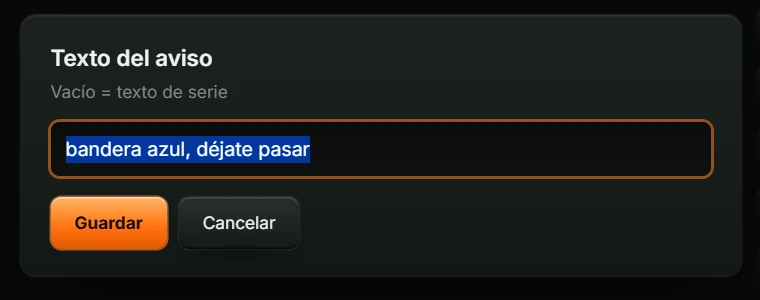
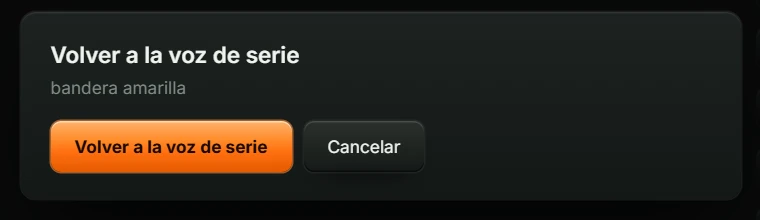
Volver a la voz de serie (restore standard voice) removes this alert’s file or recording and restores the standard voice. Cancelar (cancel) leaves it unchanged.
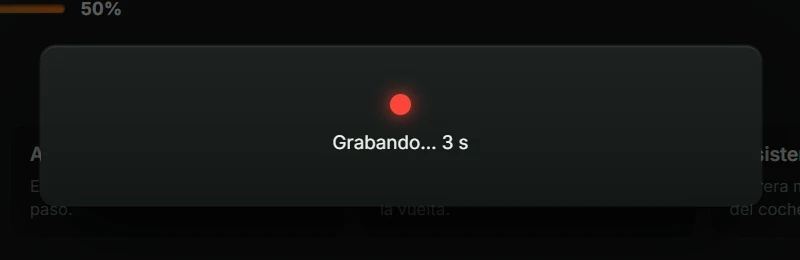
Each group’s contents. The full list, including what each preset enables, is in the appendix.
Alerts for track flags: yellow, blue, white, black, red, green and chequered; disqualification, damage, race-control warning, debris, green next lap and starts: get ready, go go, formation lap and rolling start. See the image in 4.4.
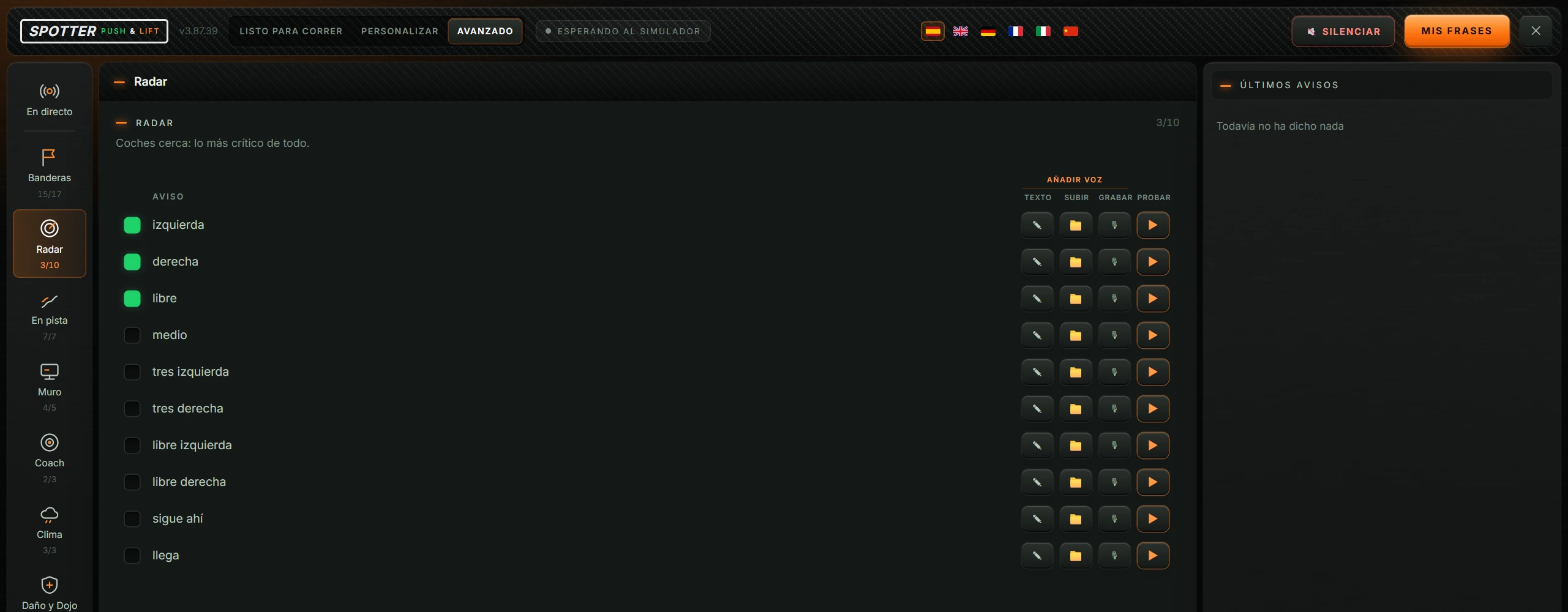
“Coches cerca: lo más crítico de todo.” (Nearby cars: most critical.) Car left/right, clear, middle, three wide, clear one side, still there and approaching.
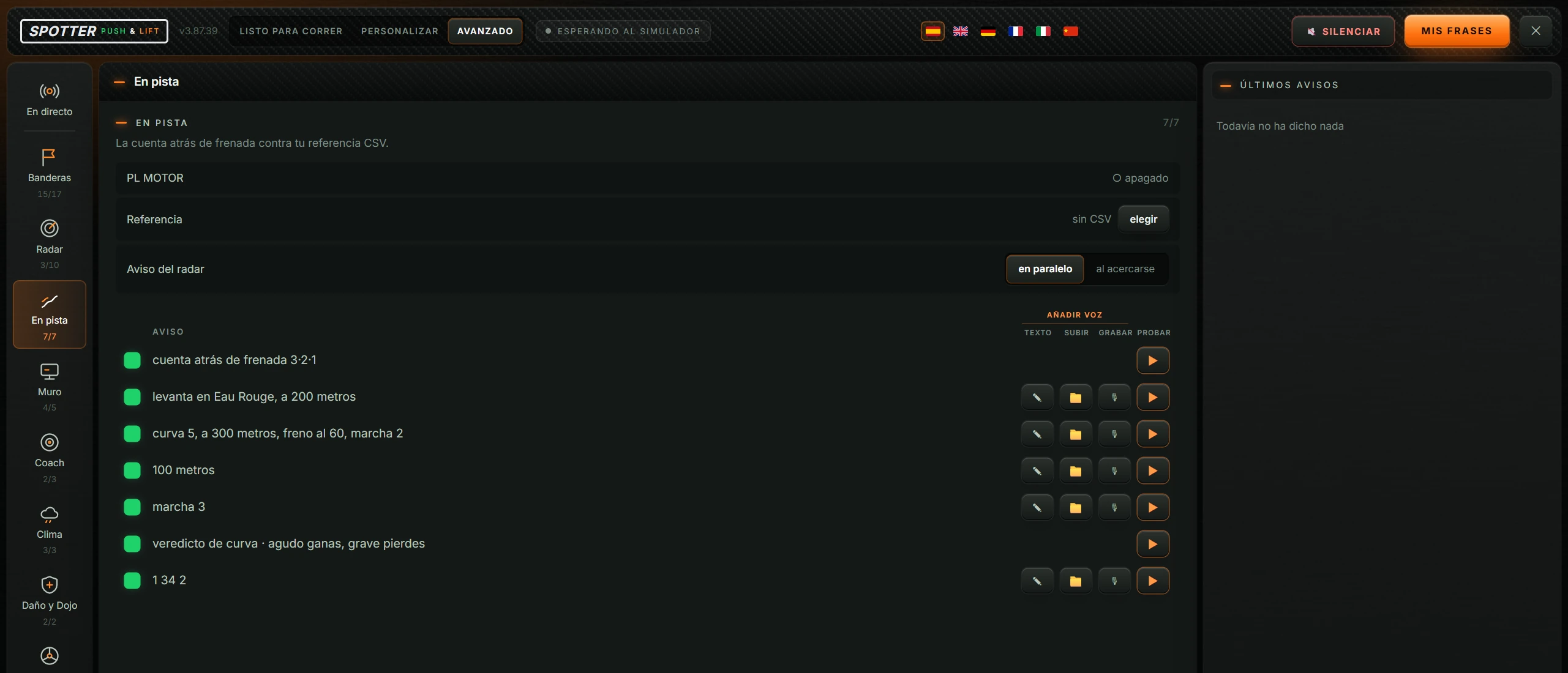
Braking countdown against your reference CSV. Three specific settings appear at the top:
| Setting | What it is |
|---|---|
| PL MOTOR | Whether the Push & Lift engine is connected: ● conectado (connected) or ○ apagado (off). |
| Referencia (reference) | Your reference CSV. Shows its name or “sin CSV” (no CSV). elegir (choose) opens the file picker for a .csv. Requires PL MOTOR connected; otherwise “Necesita PL MOTOR” appears. See 5.11. |
| Aviso del radar (radar alert) | en paralelo (alongside) or al acercarse (on approach). See 5.12. |
Alerts: braking countdown 3·2·1 (beeps), lift at a corner, upcoming corner briefing, metres, gear, corner verdict (high beep for a gain, low beep for a loss) and lap time.
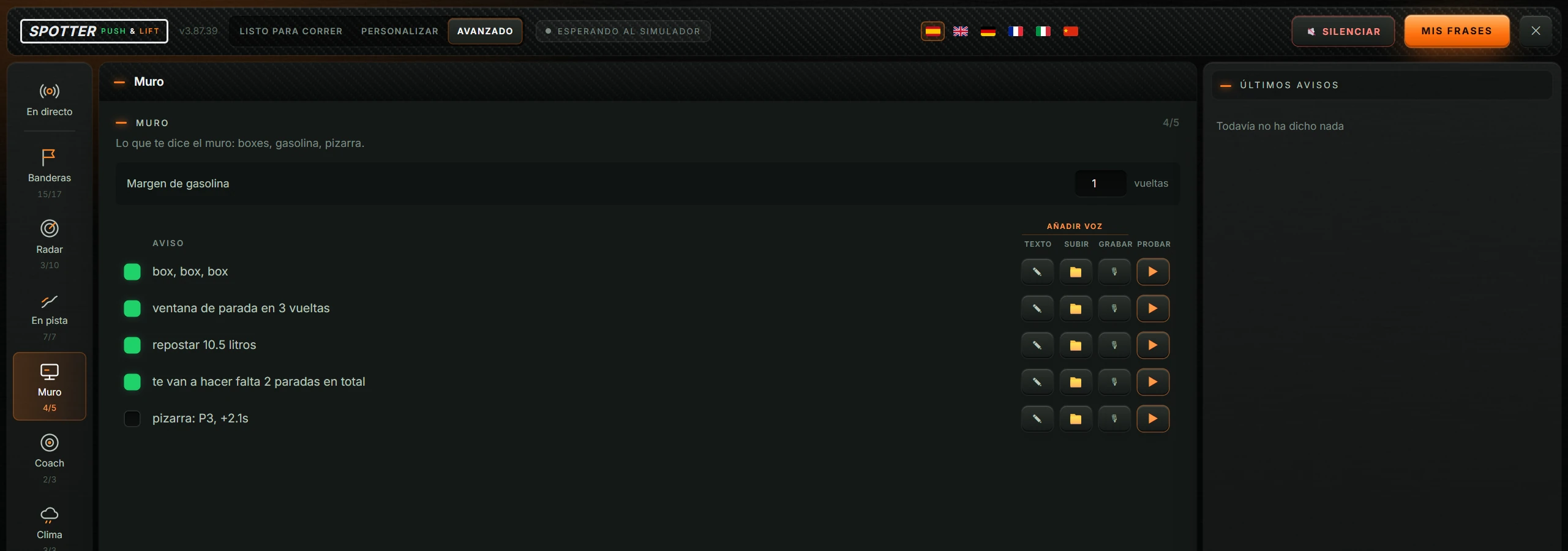
Pit-wall messages: box box box, pit window, litres to refuel, total stops needed and pit board. At the top: Margen de gasolina (fuel margin), in laps (see 5.13).
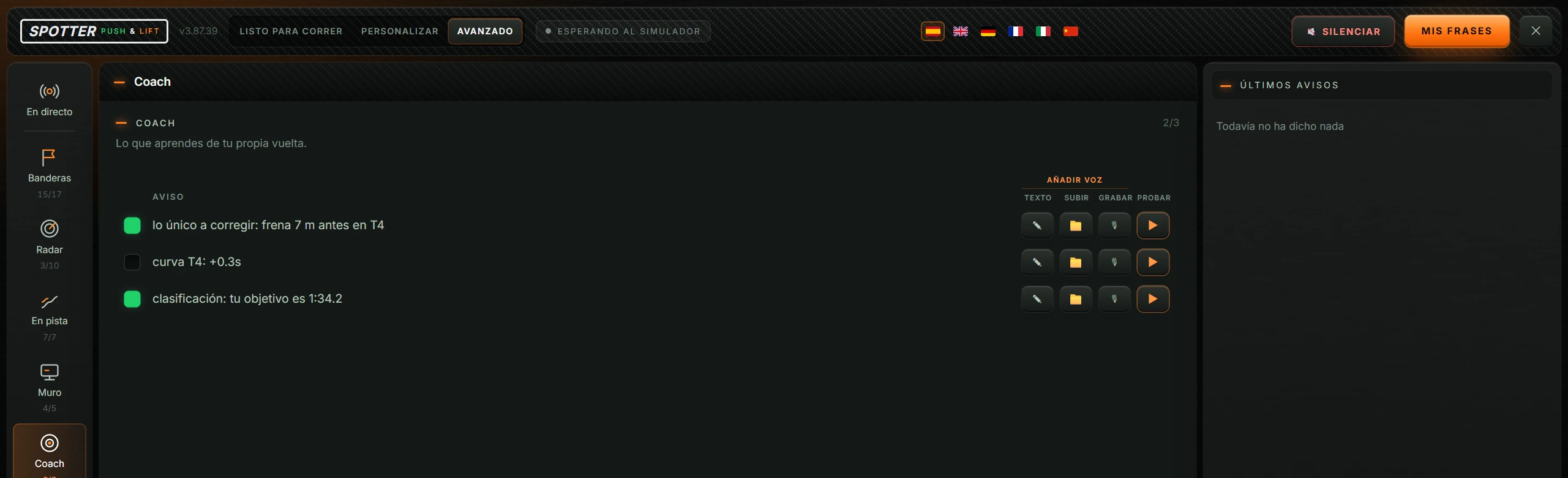
Lessons from your own lap: the one thing to correct, corner verdict and qualifying target.
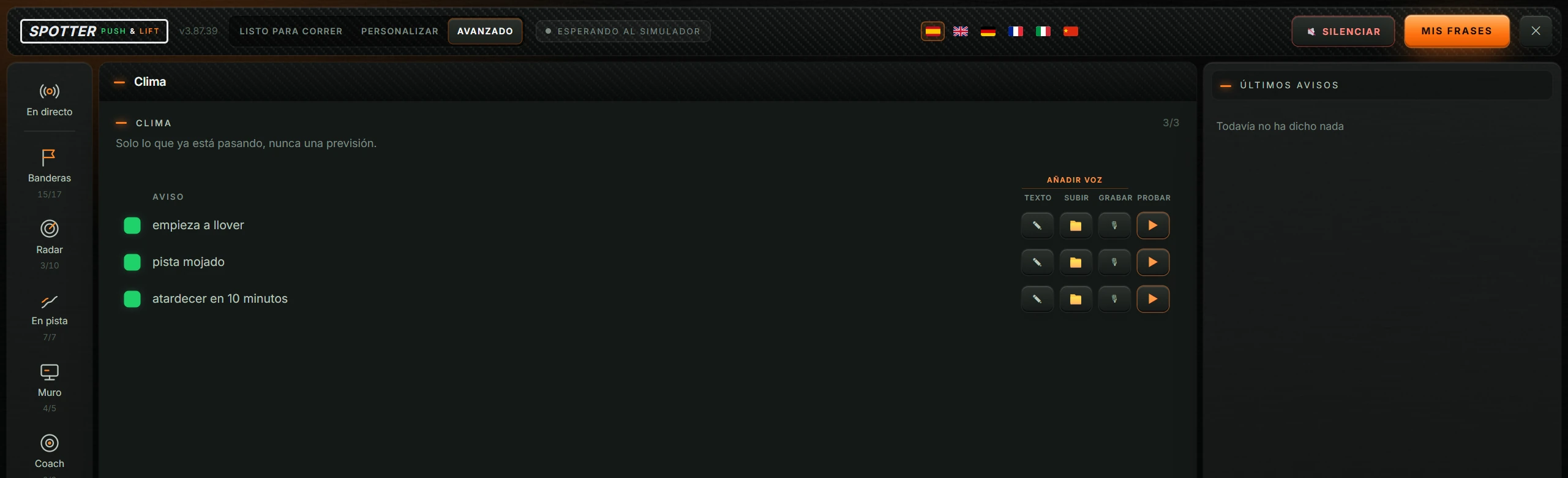
Only current events, never a forecast: rain starting, track condition (dry, mostly dry, damp, wet) and time until sunset.
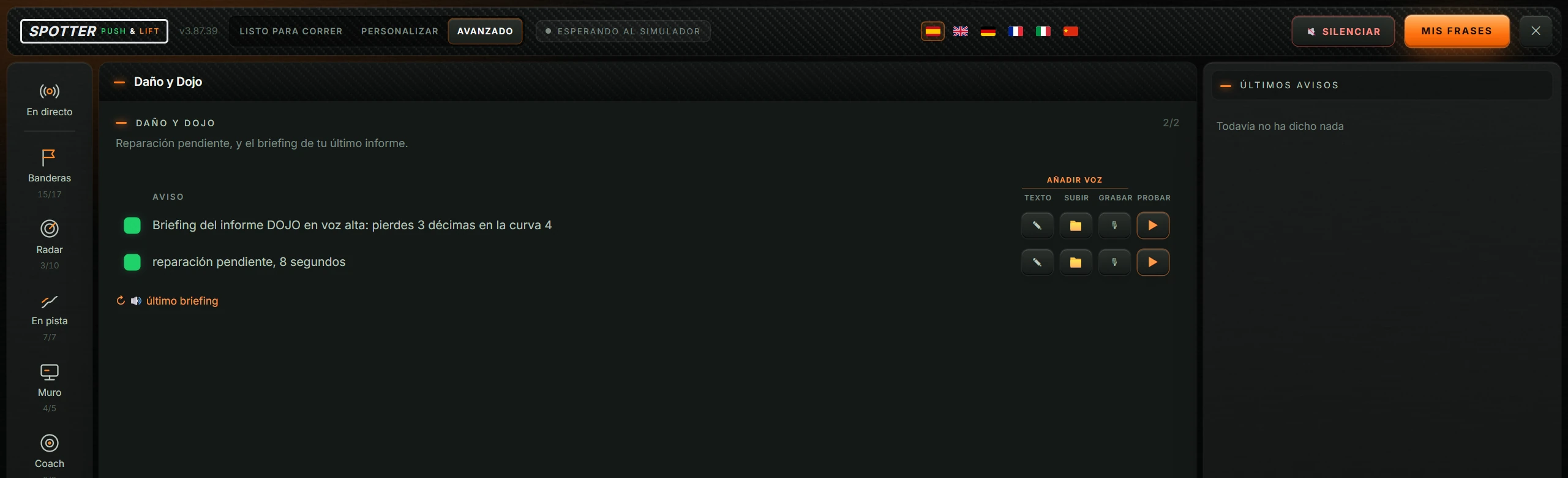
Pending repairs and spoken briefing from your latest DOJO report. Below is the button ↻ 🔊 último briefing (latest briefing), which finds and reads the latest PL DOJO briefing aloud. If none exists: “Sin briefing de PL DOJO”.
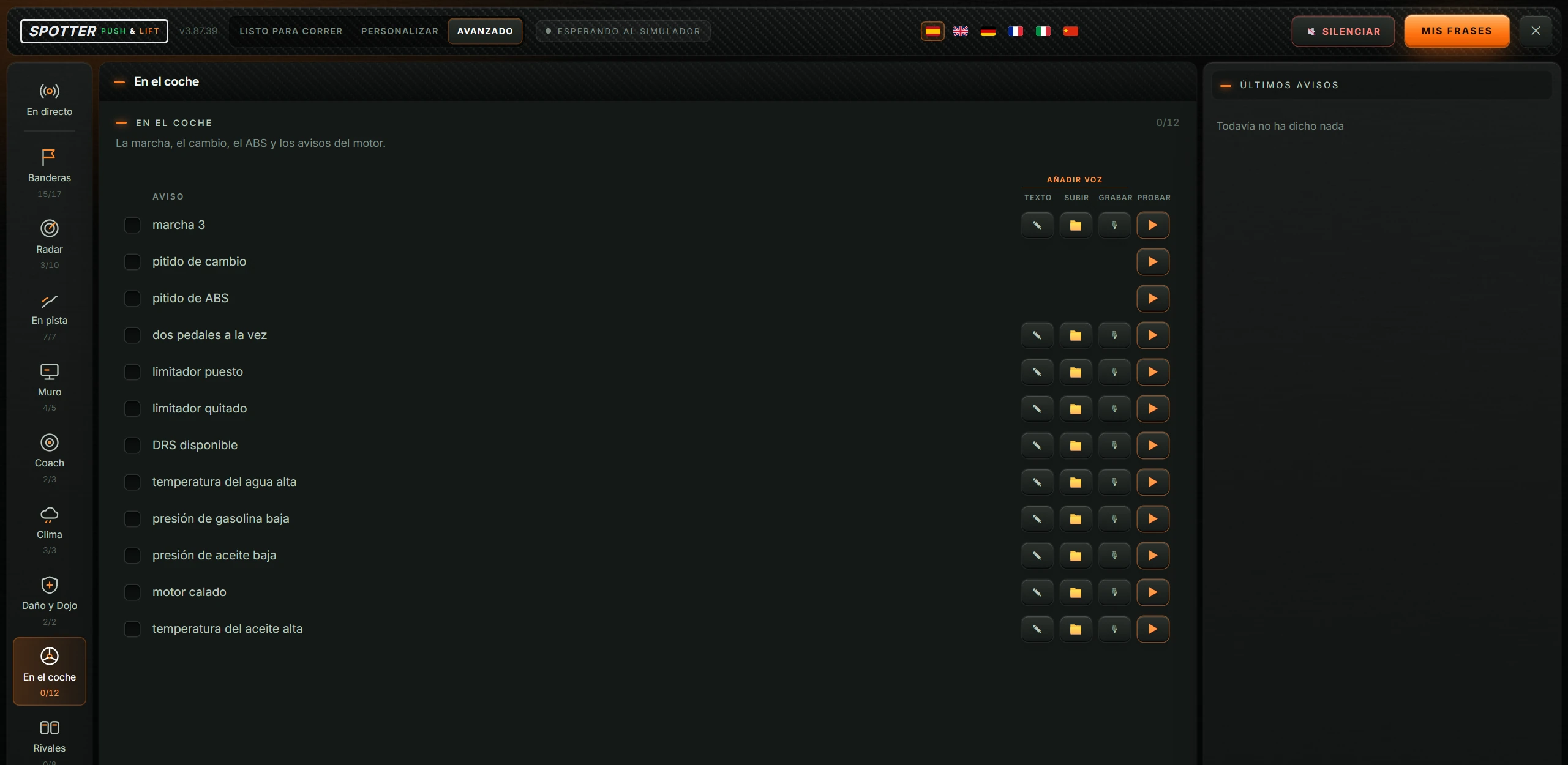
Gear, shift beep, ABS beep, both pedals together, limiter on/off, DRS, water/oil temperature, fuel/oil pressure and stalled engine. Only shown in Avanzado.
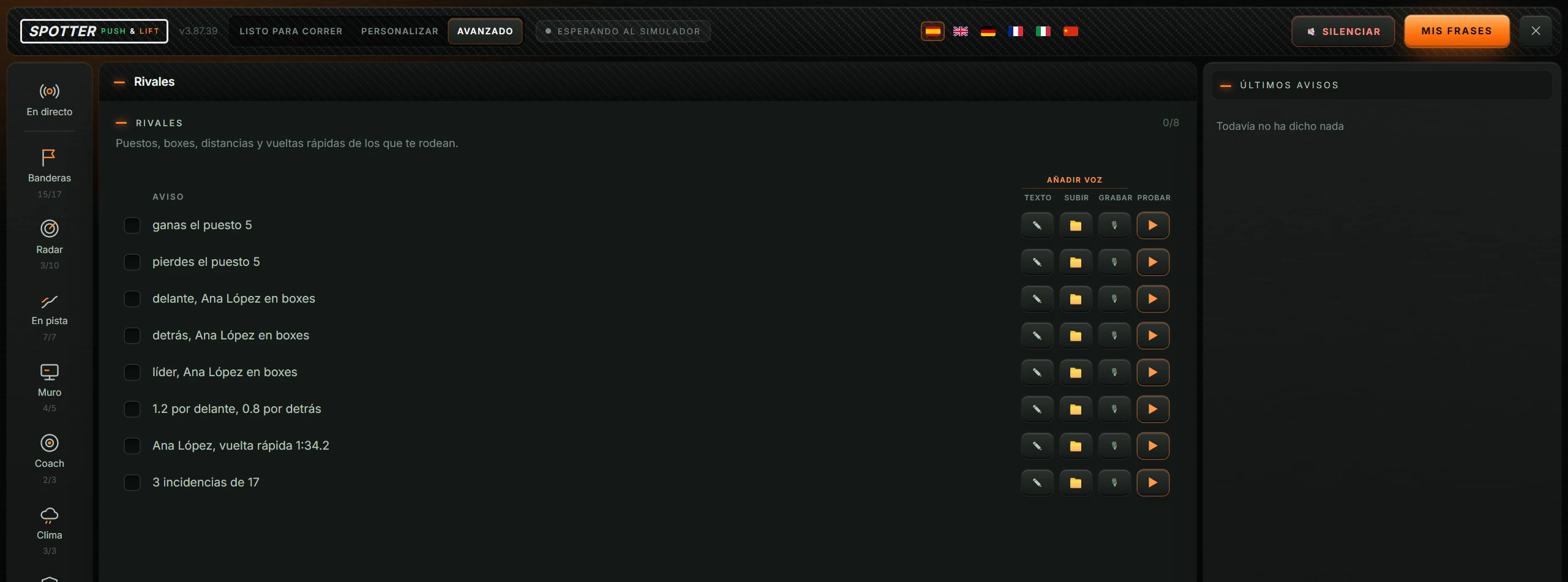
Positions, pits, gaps and fast laps of nearby drivers: position gained/lost, car ahead/behind or leader pitting, gaps, rival’s fast lap and incidents. Only in Avanzado.

| Option | What it is |
|---|---|
| VOZ (voice) | Which Windows voice speaks. See 5.6. |
| VELOCIDAD (speed) | Speaking speed, from 100 to 260. See 5.7. |
| MICRÓFONO (microphone) | Which microphone records your alerts. See 5.8. |
| SALIDA DE AUDIO (audio output) | Which speakers or headphones play the audio. See 5.9. |
| Voces preparadas (prepared voices): …/… and ↻ | Prepared standard voices out of the total needed. ↻ (regenerate) prepares them again. See 5.10. |
With MIS FRASES (my phrases) you create alerts using race data. The example above is “quedan {combustible} litros” (fuel remaining) when “combustible < 5”.
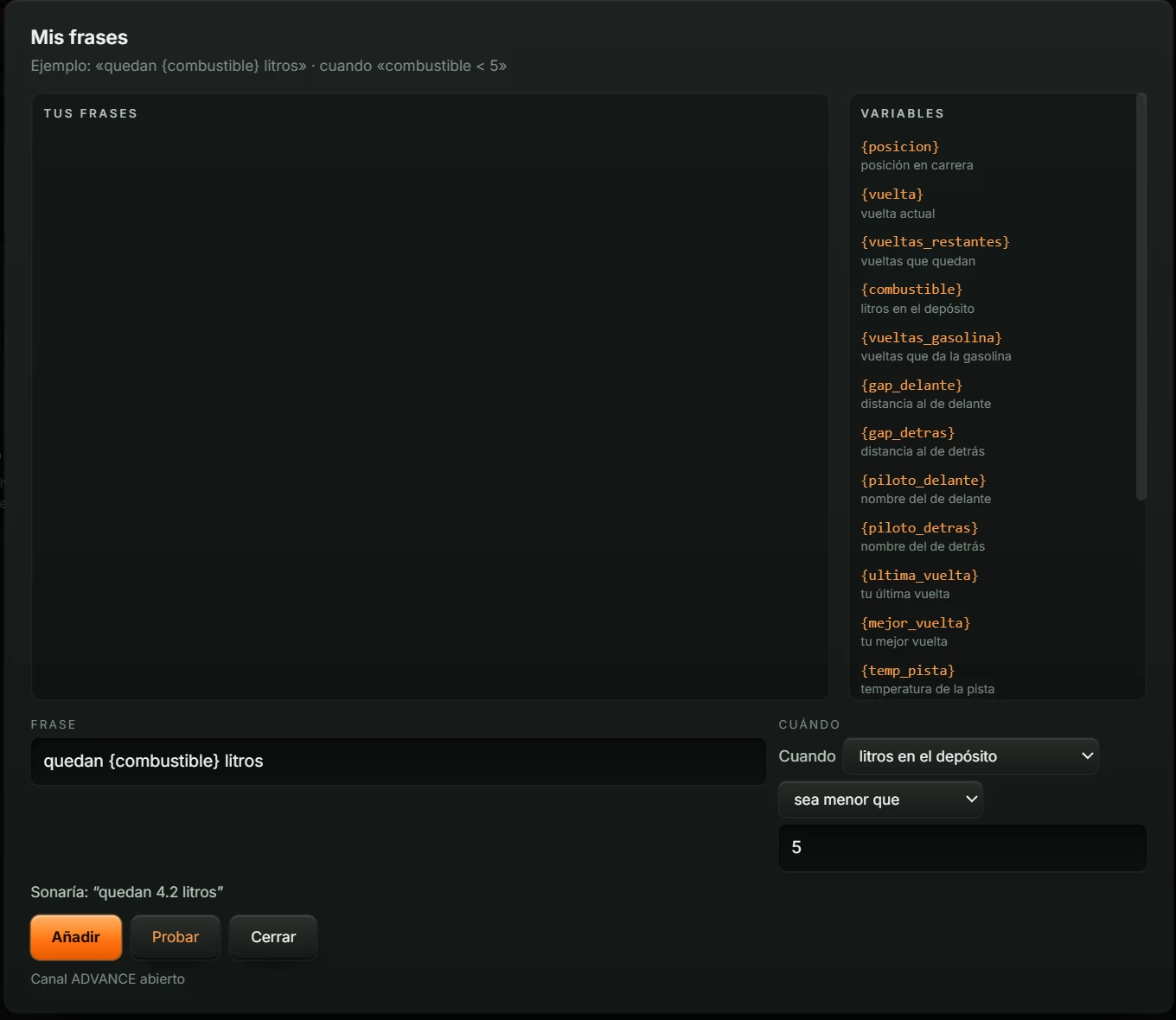
| Area or button | What it does |
|---|---|
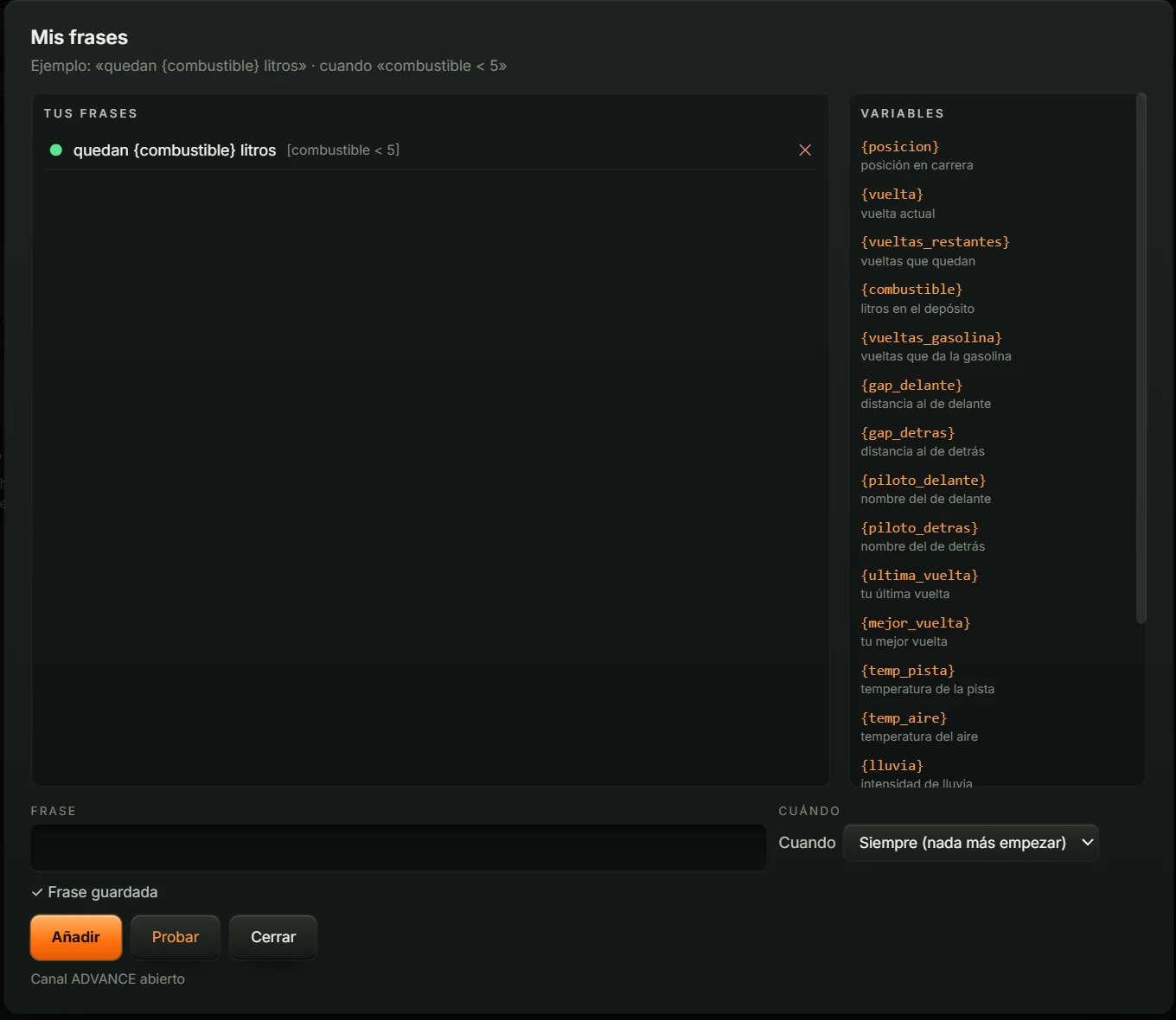
| TUS FRASES (your phrases) | Saved phrases. Each shows ● (active), text, condition in brackets and ✕ to delete it. |
| VARIABLES | Data available in phrases. Click a variable to insert it at the cursor. Full list below. |
| FRASE (phrase) | What you want it to say. Up to 200 characters. |
| CUÁNDO (when) | The condition: “Cuando” (when) + data item + comparison + number. The first list value, Siempre (nada más empezar) (always, at the start), leaves the phrase unconditional. Comparisons: less than, less than or equal, greater than, greater than or equal, equal, not equal. |
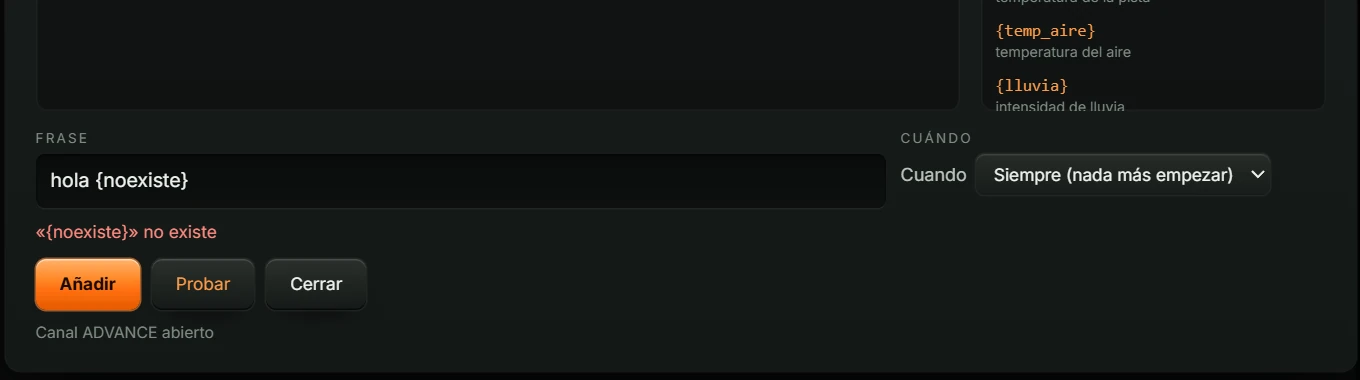
| Sonaría: “…” (would say) | Preview using example data. Errors appear in red, for example an unknown {noexiste} variable. |
| Añadir (add) | Saves the phrase and shows “✓ Frase guardada”. Without a condition, it warns that the phrase is spoken only once; add a condition to repeat it. |
| Probar (test) | Speaks the phrase now, even when muted. Uses example data if you are not on track. |
| Cerrar (close) | Closes the window. |
| Canal ADVANCE abierto (ADVANCE channel open) | SPOTTER listens to speech requests from other Push & Lift components, such as the COACH overlay. “Canal ADVANCE cerrado · puerto ocupado” means another program is using that channel. |
A conditional phrase plays when its condition is met and repeats no more often than every 30 seconds while the condition remains true.
| Variable | What it is |
|---|---|
| {posicion} | race position |
| {vuelta} | current lap |
| {vueltas_restantes} | laps remaining |
| {combustible} | litres in the tank |
| {vueltas_gasolina} | laps of fuel remaining |
| {gap_delante} | gap to the car ahead |
| {gap_detras} | gap to the car behind |
| {piloto_delante} | driver ahead’s name |
| {piloto_detras} | driver behind’s name |
| {ultima_vuelta} | your last lap |
| {mejor_vuelta} | your best lap |
| {temp_pista} | track temperature |
| {temp_aire} | air temperature |
| {lluvia} | rain intensity |
| {mojado} | track wetness 1–7 |
| {incidentes} | accumulated incidents |
| {reparacion} | repair seconds |
| {stint} | laps in this stint |
Invalid phrases show the reason when added: empty phrase, unmatched { } brace, unknown variable or more than 200 characters; conditions may report a missing operator (< > <= >= == !=) or unknown variable.
Two types of box may appear above the centre:
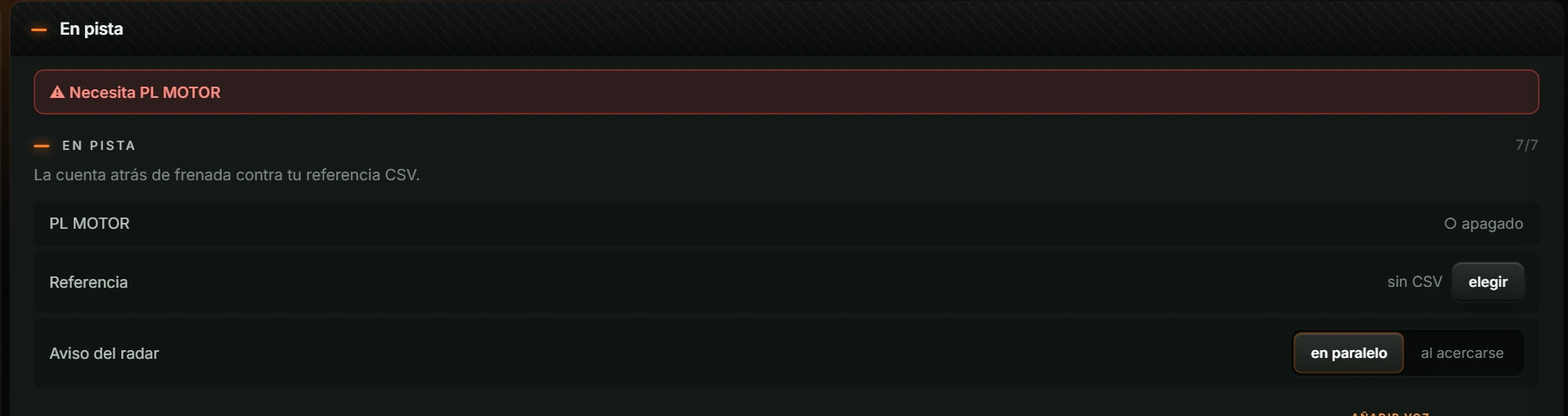
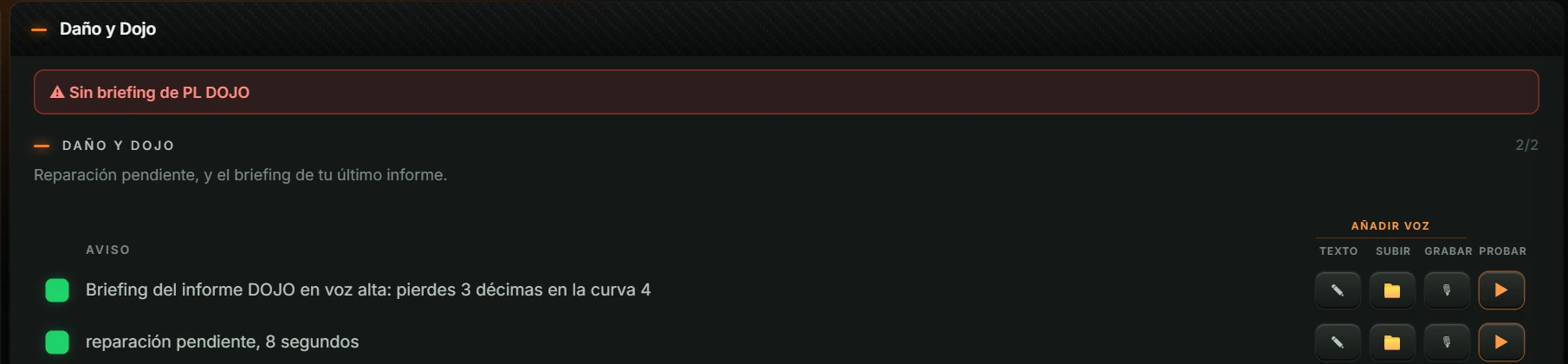
Possible errors: “Necesita PL MOTOR” (engine required), “CSV no válido” (invalid CSV), “Sin briefing de PL DOJO” (no briefing), “Formato no admitido · solo .wav” (only .wav supported), “Grabación fallida · sin micrófono” (recording failed, no microphone), failure to open the file picker (close and reopen SPOTTER; contact us if it persists), or failure to save text because the file is busy (try again). Remedies: 7. Common problems.
Changes are saved automatically, except SILENCIAR.
| Level | What you see | What selecting it changes |
|---|---|---|
| LISTO PARA CORRER (ready to race) | Only En directo and Voz y sonido. | Restores the recommended set (34 Spotter clásico alerts) and disables the others. |
| PERSONALIZAR (customise) | Groups containing common alerts, showing only those alerts. | No changes to your alerts. |
| AVANZADO (advanced) | All nine groups with every alert. | No changes to your alerts. |
Switching to LISTO PARA CORRER resets any alerts you enabled or disabled manually.
| Button | What plays |
|---|---|
| silencio (silent) | Only the most critical alerts, such as cars alongside and blue, black and red flags. |
| solo urgente (urgent only) | Critical and urgent alerts. |
| normal (normal) | Everything except low-priority alerts. |
| todo (everything) | All enabled alerts. Default setting. |
To stop all speech, use 🔇 SILENCIAR (mute).
Slider from 0 to 100%, with the value beside it. Applies when released.
A preset enables its alert set and disables all other alerts:
| Preset | Description underneath | Enabled alerts |
|---|---|---|
| Spotter clásico (classic spotter) | “The standard alerts, no more, no less.” | 34 |
| Solo pitidos (beeps only) | “Gear, ABS, braking, radar and flags.” | 8 |
| Aprender a conducir (learn to drive) | “The car and track explained step by step.” | 11 |
| Carrera (race) | “Radar, rivals, pits and lap status.” | 50 |
| Resistencia (endurance) | “Race plus weather, pit wall and car alerts.” | 56 |
| Solo seguridad (safety only) | “Radar, flags and damage only.” | 7 |
See each preset’s alerts in the Presets column of the appendix. Manually changing an alert removes the preset highlight.
The six top flags change interface and voice language. Opening from the Suite applies the Suite language. Custom texts, files and recordings are language-specific.
List with La recomendada (recommended) and your PC’s Windows voices. Changing voice clears and rebuilds the prepared voices.
Slider from 100 to 260. Default 185. The value is shown alongside.
Prepared voices use a fixed speed. Changing it invalidates them: Voces preparadas drops to 0 and PREPARANDO EL AUDIO appears. Press ↻ in Voz y sonido to prepare them at the new speed; otherwise they rebuild next time SPOTTER opens.
List with El del sistema (system default) and your PC’s microphones. This records alerts with 🎙. With no microphone, “Sin micrófono conectado” replaces the list and 🎙 buttons are hidden.
List with La del sistema (system default) and your PC’s audio outputs. With none available: “Sin salida de audio disponible”.
SPOTTER records the selected language’s standard phrases in advance for immediate playback. “Voces preparadas: 37/37” means all are ready. Preparation runs at startup if needed, after a language/voice change or text edit. While working it shows “generando …/…” and ↻ cannot be clicked. Click it yourself if alerts are slow to play.
In En pista (on track). Your braking-countdown reference CSV. Click elegir (choose) and select a .csv file. Requires PL MOTOR connected. SPOTTER remembers the CSV and reloads it when the engine connects.
In En pista (on track). When to warn about a car alongside:
In Muro (pit wall). Reserve laps, 0 to 5 in half-lap steps. Default 1. Adds this reserve to the recommended refuelling amount and brings the pit-window warning forward.
Enabled/disabled, text, .wav file or recording: set within each group, as explained in 4.4.
To restore the standard wording, clear the text and save.
With a file: click 📁 and select a .wav. Only .wav is supported.
To remove it, click the highlighted button (🎙 or 📁) again, then Volver a la voz de serie (restore standard voice).
To delete it, click its ✕ in TUS FRASES.
Click 🔇 SILENCIAR (mute). To restore speech, click 🔊 EN SILENCIO · ACTIVAR VOZ (muted · enable voice).
| What you see | What to do |
|---|---|
| Licence warning at startup | Open Push & Lift, check your account and licence under Ajustes > Tu cuenta, then reopen SPOTTER. |
| Top status: ESPERANDO AL SIMULADOR | Open iRacing and enter a session. |
| Top status: PREPARANDO EL AUDIO | Voices are being prepared. Wait for completion. |
| No speech | Check the top button does not read EN SILENCIO · ACTIVAR VOZ, VOLUMEN is above 0, CUÁNTO QUIERES OÍR is not silencio, and the alert is enabled. Try ▶. Check SALIDA DE AUDIO under Voz y sonido. |
| “Falta la voz de Windows en …” (missing Windows voice) | Install that language’s voice in Windows Settings > Time & language > Speech. Another voice is used meanwhile. |
| Voces preparadas at 0 after changing VELOCIDAD | Click ↻ under Voz y sonido. |
| “El último aviso tardó … ms en sonar…” (last alert took … ms) | Go to Voz y sonido and click ↻. |
| “Necesita PL MOTOR” (PL MOTOR required) | Start PL MOTOR from the Suite and click again elegir (choose). |
| “CSV no válido” (invalid CSV) | Choose a valid reference CSV. |
| “Sin briefing de PL DOJO” (no PL DOJO briefing) | SPOTTER found no saved briefing. |
| “Formato no admitido · solo .wav” (unsupported format · .wav only) | Use a .wav file. |
| “Grabación fallida · sin micrófono” (recording failed · no microphone) | Connect a microphone and select it in Voz y sonido. |
| No 🎙 buttons | No microphone: “Sin micrófono conectado”. Connect one. |
| “No se ha podido abrir el explorador de archivos…” (file picker could not open) | Close and reopen SPOTTER. Contact us if it persists. |
| Text or phrases could not be saved because the file was busy. | Try again. |
| “Canal ADVANCE cerrado · puerto ocupado” (channel closed · port busy) | Another program uses the channel. Close and reopen SPOTTER. |
| Cannot find a group (En el coche, Rivales…) | Switch to AVANZADO (advanced). |
| Manual alert choices lost | LISTO PARA CORRER and presets change your alerts. Enable your choices again in Avanzado. |
| An unconditional custom phrase played only once | This is expected: without CUÁNDO it plays once. Add a condition. |
All 67 SPOTTER alerts by group, retaining their Spanish on-screen wording with a translation. Numbers and names are examples.
| Alert | Default | Custom voice | Presets |
|---|---|---|---|
| bandera amarilla (yellow flag) | yes | yes | Spotter clásico, Carrera, Resistencia |
| bandera azul, déjate pasar (blue flag, let them pass) | yes | yes | Spotter clásico, Carrera, Resistencia |
| bandera blanca, última vuelta (white flag, last lap) | yes | yes | Spotter clásico, Carrera, Resistencia |
| bandera negra, entra a boxes (black flag, pit) | yes | yes | Spotter clásico, Solo pitidos, Carrera, Resistencia, Solo seguridad |
| bandera roja, sesión detenida (red flag, session stopped) | yes | yes | Spotter clásico, Solo pitidos, Carrera, Resistencia, Solo seguridad |
| bandera verde, pista libre (green flag, clear track) | yes | yes | Spotter clásico, Carrera, Resistencia |
| bandera de cuadros (chequered flag) | yes | yes | Spotter clásico, Carrera, Resistencia |
| descalificado, carrera terminada (disqualified, race over) | yes | yes | Spotter clásico, Solo pitidos, Carrera, Resistencia, Solo seguridad |
| daño, entra a reparar (damage, pit for repairs) | yes | yes | Spotter clásico, Carrera, Resistencia |
| daño leve, reparación opcional (minor damage, optional repairs) | yes | yes | Spotter clásico, Carrera, Resistencia |
| aviso del juez, la próxima es negra (steward warning, next is black flag) | yes | yes | Spotter clásico, Carrera, Resistencia |
| restos en pista (debris on track) | yes | yes | Spotter clásico, Carrera, Resistencia |
| verde en una vuelta, prepárate (green next lap, get ready) | yes | yes | Spotter clásico, Carrera, Resistencia |
| preparados (get ready) | yes | yes | Spotter clásico, Carrera, Resistencia |
| ¡vamos, vamos! (go, go!) | yes | yes | Spotter clásico, Carrera, Resistencia |
| vuelta de formación, sigue al coche de seguridad (formation lap, follow the safety car) | yes | yes | Spotter clásico, Carrera, Resistencia |
| ¡verde, salida lanzada! (green, rolling start!) | yes | yes | Spotter clásico, Carrera, Resistencia |
| Alert | Default | Custom voice | Presets |
|---|---|---|---|
| izquierda (left) | yes | yes | Spotter clásico, Solo pitidos, Aprender a conducir, Carrera, Resistencia, Solo seguridad |
| derecha (right) | yes | yes | Spotter clásico, Solo pitidos, Aprender a conducir, Carrera, Resistencia, Solo seguridad |
| libre (clear) | no | yes | — |
| medio (middle) | no | yes | Carrera, Resistencia, Solo seguridad |
| tres izquierda (three wide, left) | no | yes | Carrera, Resistencia |
| tres derecha (three wide, right) | no | yes | Carrera, Resistencia |
| libre izquierda (clear left) | no | yes | Carrera, Resistencia |
| libre derecha (clear right) | no | yes | Carrera, Resistencia |
| sigue ahí (still there) | no | yes | — |
| llega (approaching) | no | yes | Carrera, Resistencia |
| Alert | Default | Custom voice | Presets |
|---|---|---|---|
| cuenta atrás de frenada 3·2·1 (braking countdown) | yes | beep | Spotter clásico, Solo pitidos, Aprender a conducir, Carrera, Resistencia |
| levanta en Eau Rouge, a 200 metros (lift at Eau Rouge in 200 metres) | yes | yes | Spotter clásico, Aprender a conducir, Carrera, Resistencia |
| curva 5, a 300 metros, freno al 60, marcha 2 (turn 5 in 300 metres, brake at 60, gear 2) | no | yes | — |
| 100 metros (100 metres) | no | yes | — |
| marcha 3 (gear 3) | no | yes | — |
| veredicto de curva · agudo ganas, grave pierdes (corner verdict: high tone gains, low tone losses) | yes | beep | Spotter clásico, Carrera, Resistencia |
| 1 34 2 | yes | yes | Spotter clásico, Aprender a conducir, Carrera, Resistencia |
| Alert | Default | Custom voice | Presets |
|---|---|---|---|
| box, box, box | yes | yes | Spotter clásico, Carrera, Resistencia |
| ventana de parada en 3 vueltas (pit window in 3 laps) | yes | yes | Spotter clásico, Carrera, Resistencia |
| repostar 10.5 litros (refuel 10.5 litres) | yes | yes | Spotter clásico, Carrera, Resistencia |
| te van a hacer falta 2 paradas en total (2 total stops needed) | yes | yes | Spotter clásico, Carrera, Resistencia |
| pizarra: P3, +2.1s (pit board) | no | yes | Resistencia (endurance) |
| Alert | Default | Custom voice | Presets |
|---|---|---|---|
| lo único a corregir: frena 7 m antes en T4 (one correction: brake 7 m earlier in T4) | yes | yes | Spotter clásico, Aprender a conducir, Carrera, Resistencia |
| curva T4: +0.3s (turn T4) | no | yes | Aprender a conducir (learn to drive) |
| clasificación: tu objetivo es 1:34.2 (qualifying target) | yes | yes | Spotter clásico, Carrera, Resistencia |
| Alert | Default | Custom voice | Presets |
|---|---|---|---|
| empieza a llover (rain starting) | yes | yes | Spotter clásico, Carrera, Resistencia |
| pista mojado (wet track) | yes | yes | Spotter clásico, Carrera, Resistencia |
| atardecer en 10 minutos (sunset in 10 minutes) | yes | yes | Spotter clásico, Carrera, Resistencia |
| Alert | Default | Custom voice | Presets |
|---|---|---|---|
| Briefing del informe DOJO en voz alta: pierdes 3 décimas en la curva 4 (spoken DOJO briefing: losing 3 tenths in turn 4) | yes | yes | Spotter clásico, Carrera, Resistencia |
| reparación pendiente, 8 segundos (pending repair, 8 seconds) | yes | yes | Spotter clásico, Carrera, Resistencia, Solo seguridad |
| Alert | Default | Custom voice | Presets |
|---|---|---|---|
| marcha 3 (gear 3) | no | yes | Aprender a conducir (learn to drive) |
| pitido de cambio (shift beep) | no | beep | Solo pitidos, Aprender a conducir |
| pitido de ABS (ABS beep) | no | beep | Solo pitidos, Aprender a conducir |
| dos pedales a la vez (both pedals together) | no | yes | Aprender a conducir (learn to drive) |
| limitador puesto (limiter on) | no | yes | Carrera, Resistencia |
| limitador quitado (limiter off) | no | yes | Carrera, Resistencia |
| DRS disponible (DRS available) | no | yes | — |
| temperatura del agua alta (high water temperature) | no | yes | Resistencia (endurance) |
| presión de gasolina baja (low fuel pressure) | no | yes | Resistencia (endurance) |
| presión de aceite baja (low oil pressure) | no | yes | Resistencia (endurance) |
| motor calado (stalled engine) | no | yes | Resistencia (endurance) |
| temperatura del aceite alta (high oil temperature) | no | yes | Resistencia (endurance) |
| Alert | Default | Custom voice | Presets |
|---|---|---|---|
| ganas el puesto 5 (gain position 5) | no | yes | Carrera, Resistencia |
| pierdes el puesto 5 (lose position 5) | no | yes | Carrera, Resistencia |
| delante, Ana López en boxes (ahead, Ana López pitting) | no | yes | Carrera, Resistencia |
| detrás, Ana López en boxes (behind, Ana López pitting) | no | yes | Carrera, Resistencia |
| líder, Ana López en boxes (leader, Ana López pitting) | no | yes | Carrera, Resistencia |
| 1.2 por delante, 0.8 por detrás (1.2 ahead, 0.8 behind) | no | yes | Carrera, Resistencia |
| Ana López, vuelta rápida 1:34.2 (fastest lap) | no | yes | Carrera, Resistencia |
| 3 incidencias de 17 (3 incidents of 17) | no | yes | Carrera, Resistencia |