 PUSH & LIFTPUSH & LIFT

Push & Lift · build dashboards and overlays without programming
TOOLKIT is the workshop for building displays. Choose tools from a catalogue — a large value, bar, traffic light, rival table — place them on a canvas, resize and recolour them, then save. No programming is required.
The canvas is a grid. Its dimensions depend on where the design will be used:
| Display type | Cells | Where it is used |
|---|---|---|
| Pantalla ADVANCE (ADVANCE display) | 12 × 8 | In ADVANCE: menu → Pantalla (Display) → Preset entero (Full preset) → ★ and the kit name. Uses the whole screen. |
| Barra RACE (RACE bar) | 7 × 2 | In RACE: menu → Pantalla → Hueco 1, 2 or 3 (Slot 1, 2 or 3) → · and the kit name. Also available in ADVANCE boxes. |
| Pantalla especial (Special display) | 48 × 4 | A long strip. Special displays cannot yet be selected in the Suite. |
| Overlay transparente (Transparent overlay) | 15 × 15 | An overlay with a transparent background. With AÑADIR A OVERLAYS (ADD TO OVERLAYS) it appears in the Suite's OVERLAYS group. |

With TOOLKIT selected in Push & Lift:
These controls are shared by PIT apps and explained in the SUITE manual.
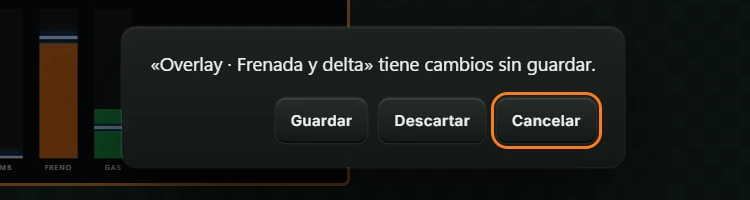
Closing TOOLKIT with unsaved changes opens a confirmation dialog (see 4.8 Messages).
On opening, TOOLKIT loads the base kit Base · ADVANCE: a ready-made ADVANCE display with moving demo data. Edit it or choose another starting point.
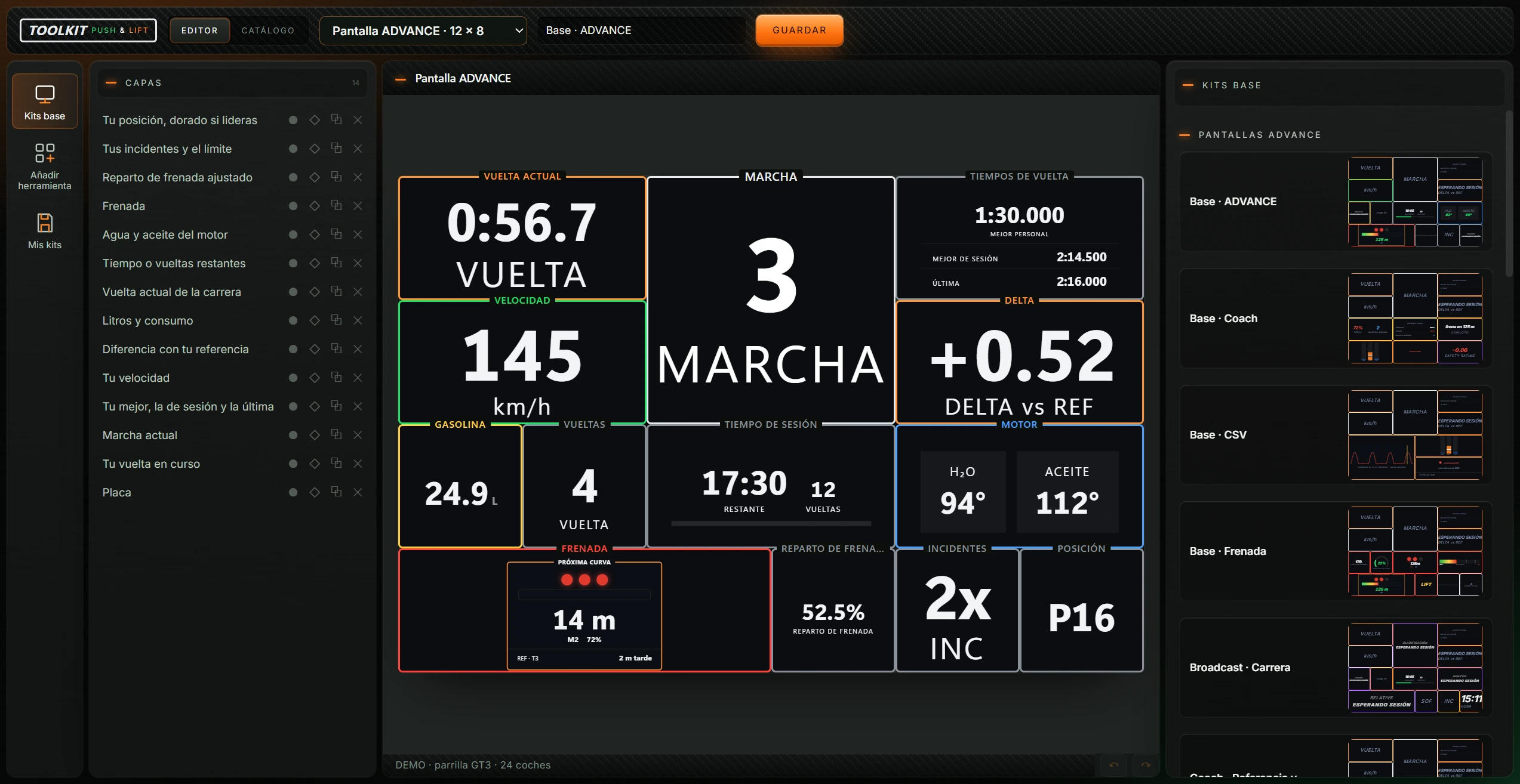
The window has five areas:
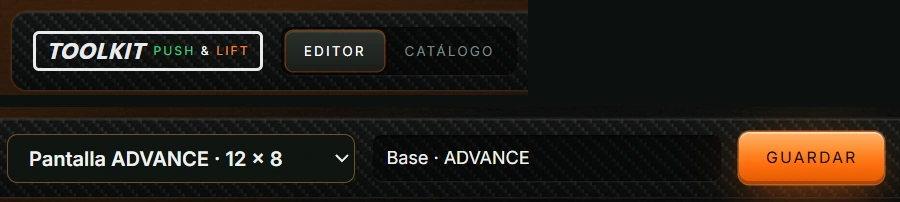
| Button or field | Action |
|---|---|
| EDITOR | The workspace: layers, canvas and panel. Shown on opening. |
| CATÁLOGO (CATALOGUE) | The 143 tools grouped by category (see 4.7). |
| Display type dropdown | Shows and changes the canvas type. Options: Pantalla ADVANCE · 12 × 8, Barra RACE · 7 × 2, Pantalla especial · 48 × 4, Overlay transparente · 15 × 15 and + Nueva en blanco (+ New blank design). Choosing another type clears and resizes the canvas and assigns a new name: “Mi Pantalla ADVANCE”, “Mi barra RACE”, “Mi Pantalla especial” or “Mi Overlay transparente”. Unsaved changes trigger confirmation first. + Nueva en blanco (+ New blank design) opens the dialog Nueva en blanco con PLIA (New blank design with PLIA). |
| Design name | The kit name, up to 80 characters. Used in RACE, ADVANCE or OVERLAYS. |
| GUARDAR (SAVE) | Saves the kit on the PC in Mis kits (My kits). Base kits are saved as new personal kits; the original stays unchanged. A message explains where to use the result, for example RACE → Pantalla → Hueco → · (name). It may call Mis kits “Mis presets”. |
| AÑADIR A OVERLAYS (ADD TO OVERLAYS) | Only appears for an open or newly saved transparent overlay. Registers it in the Suite's OVERLAYS group and confirms “Guardado para aparecer en OVERLAYS de la Suite.” Changes hide the button until saved again. |
Change the contents of the right panel. The active icon is highlighted.
| Icon | Opens |
|---|---|
| Kits base (Base kits) | Included Push & Lift kits, ready to use or edit (see 4.5.1). |
| Añadir herramienta (Add tool) | Catalogue for adding canvas tools (see 4.5.2). |
| Mis kits (My kits) | Personally saved kits (see 4.5.3). |
Clicking an icon deselects the currently selected box.
Lists all canvas tools and shapes. The heading shows CAPAS (LAYERS) and the count. The top layer is above others on the canvas. An empty canvas shows “Las herramientas y formas que añadas aparecerán aquí.” (Added tools and shapes will appear here.)
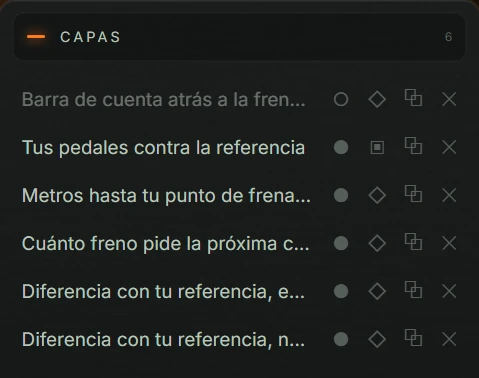
| Button | Action |
|---|---|
| Layer name | Selects the canvas box and opens OPCIONES. Highlights the selected layer. |
| ● / ○ (Ocultar / Mostrar — Hide / Show) | Hides or shows the box. Filled: visible. Empty: hidden. |
| ◇ / ▣ (Bloquear / Desbloquear — Lock / Unlock) | Locks movement and resizing by mouse or arrows. Empty: unlocked. Filled: locked. |
| ⧉ (Clonar — Clone) | Copies the box. Tool copies occupy the first free space; if none fits, a no-space message appears. Shape copies are slightly offset. |
| ✕ (Quitar — Remove) | Removes the box without confirmation. Undo restores it. |
Hovering over a button shows its action and layer name, for example “Ocultar Tu velocidad” or “Clonar «Tu velocidad»”.
The heading identifies the display type. RACE also shows “Barra RACE · 7 × 2”; special displays show “Franja especial · 48 × 4”.
Each tool has a border with a short label, such as VELOCIDAD or MARCHA. Change this in its options.
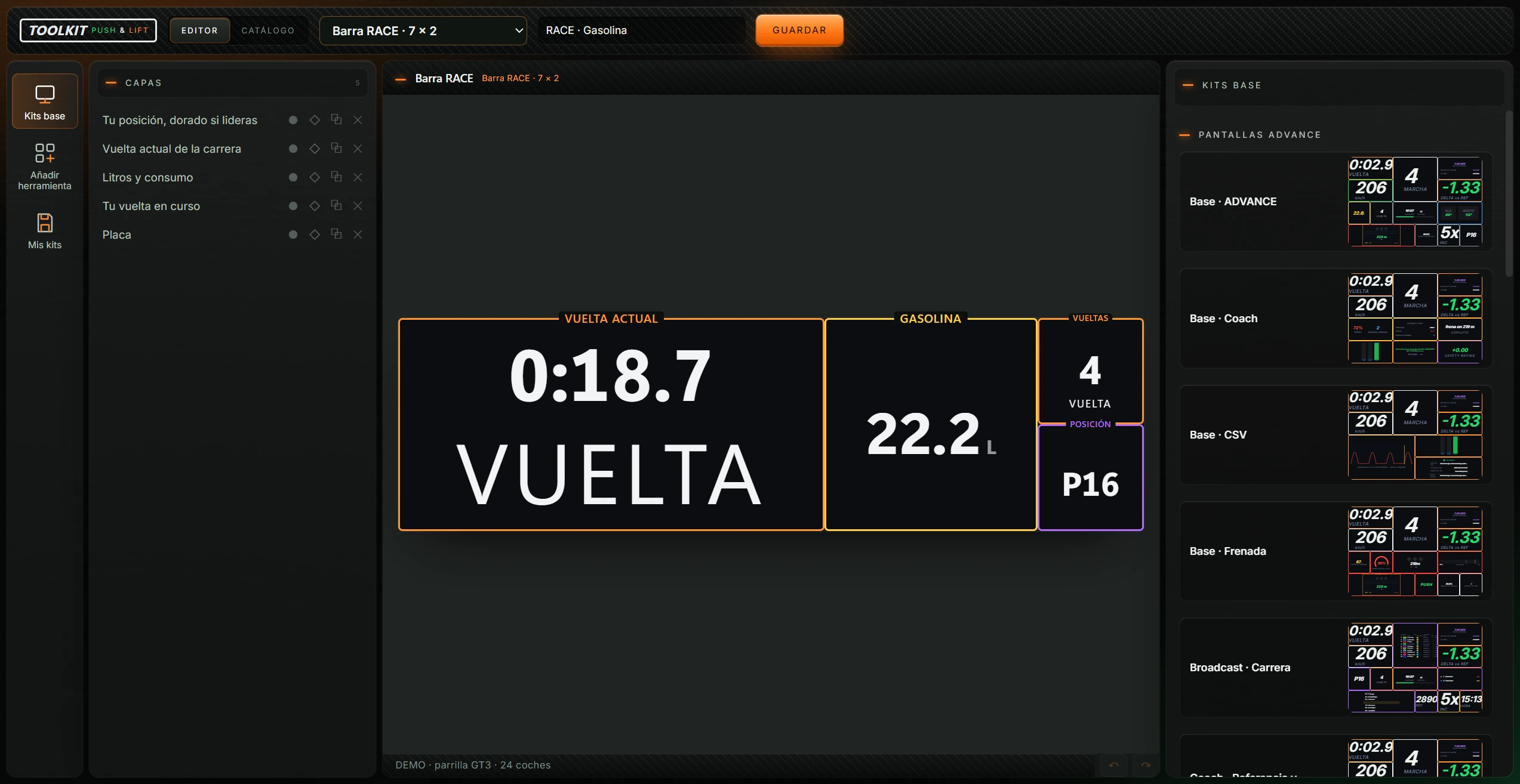
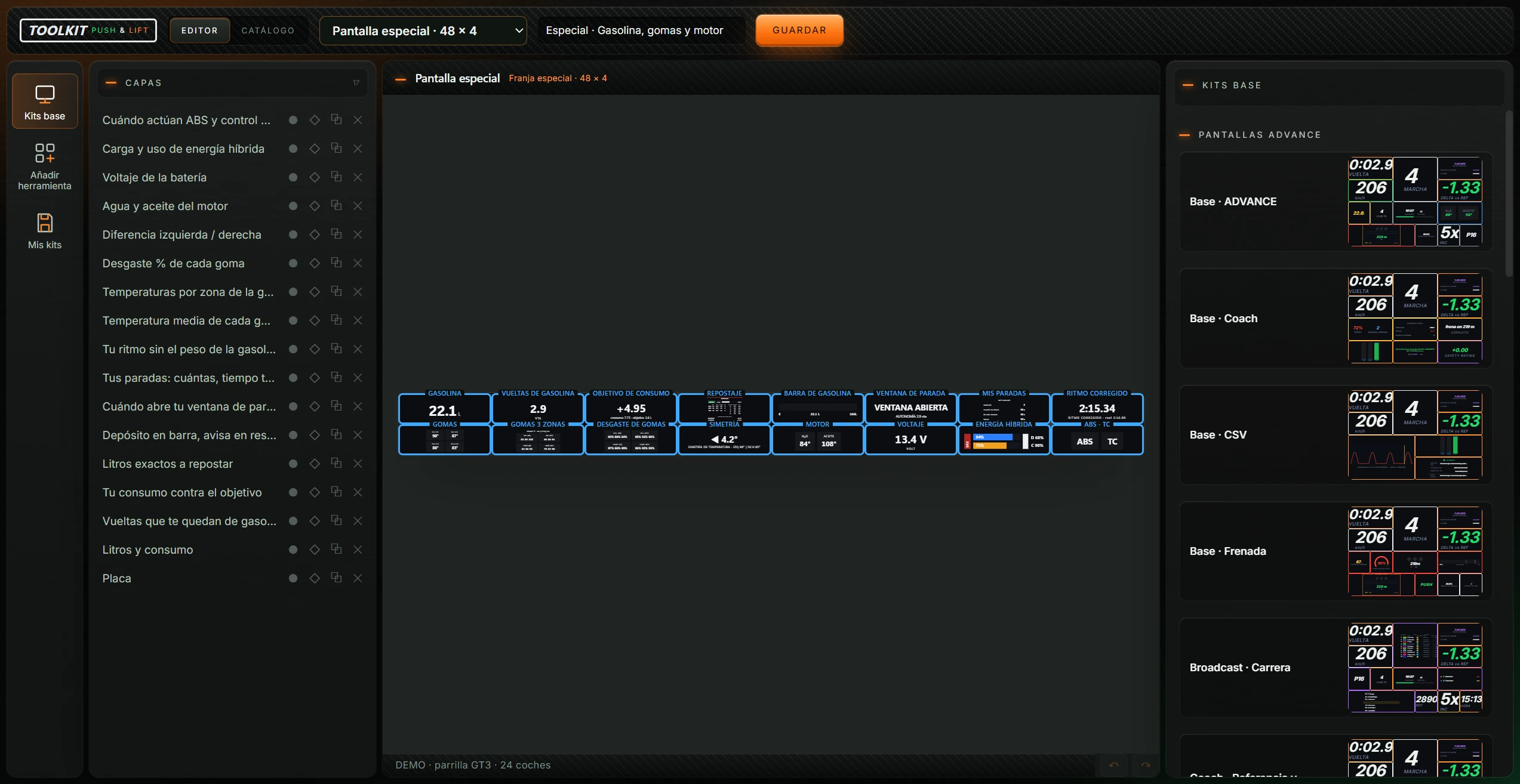
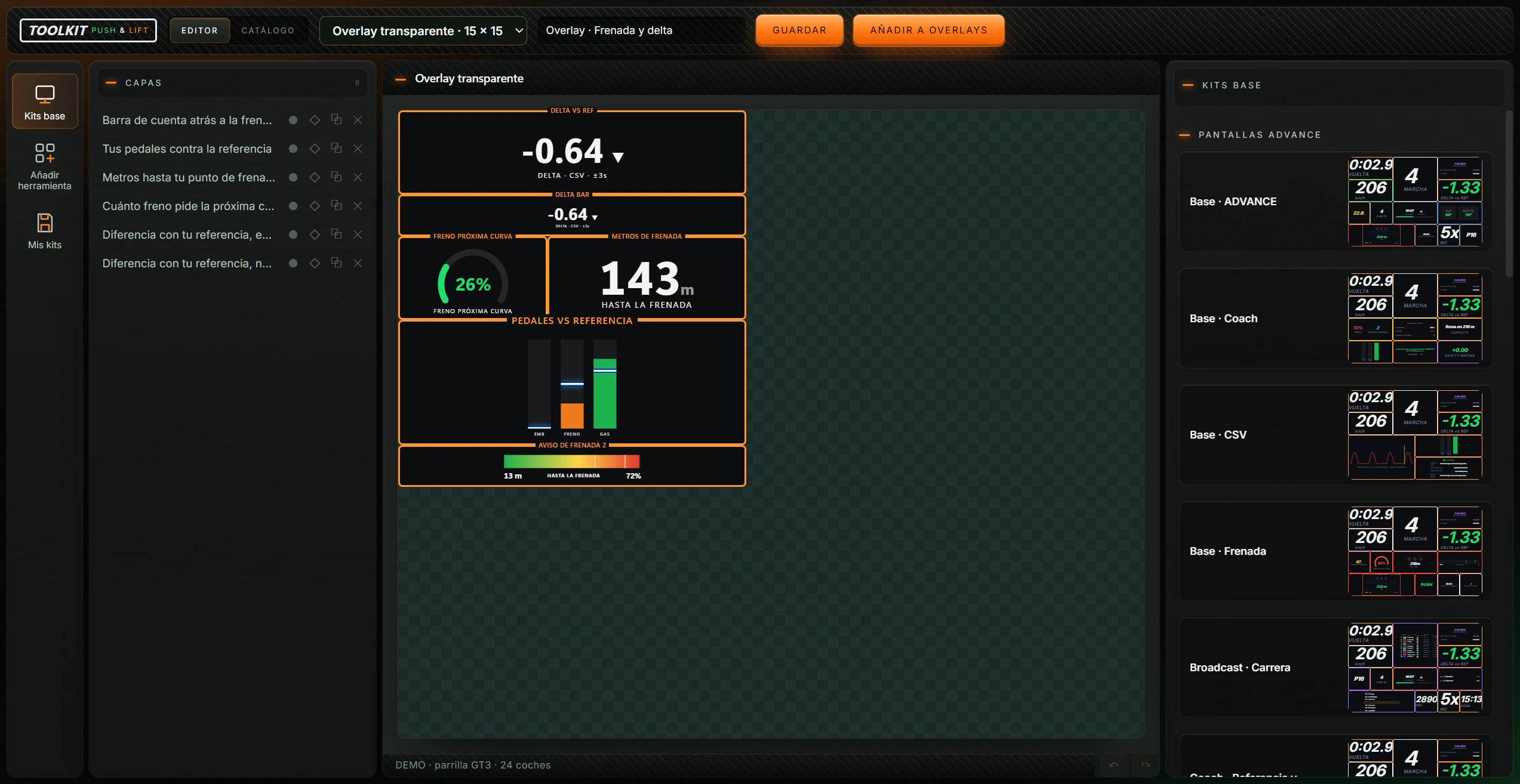
| Element | Meaning |
|---|---|
| Status line, bottom left | Data source: “Preparando la demostración…” (Preparing demo) on opening; “DEMO · parrilla GT3 · 24 coches” for demo data; “Datos del motor” for live engine data; “Esperando datos” after 5 seconds without data. |
| ↶ Deshacer (Undo) | Undoes the last change. Also Ctrl+Z. |
| ↷ Rehacer (Redo) | Reapplies undone changes. Also Ctrl+Y or Ctrl+Shift+Z. |
Undo stores up to 100 steps. Shortcuts are inactive while typing in fields. Opening another kit or changing display type resets the history.
Drag the edges of CAPAS and the right panel to resize them between 150 pixels and one third of the window.
Shows the selected left icon's contents. Selecting a canvas box shows its OPCIONES (OPTIONS) (see 4.6).
Included kits with previews. Click to open a copy on the canvas. GUARDAR creates a personal kit and leaves the base unchanged. Unsaved changes require confirmation first.
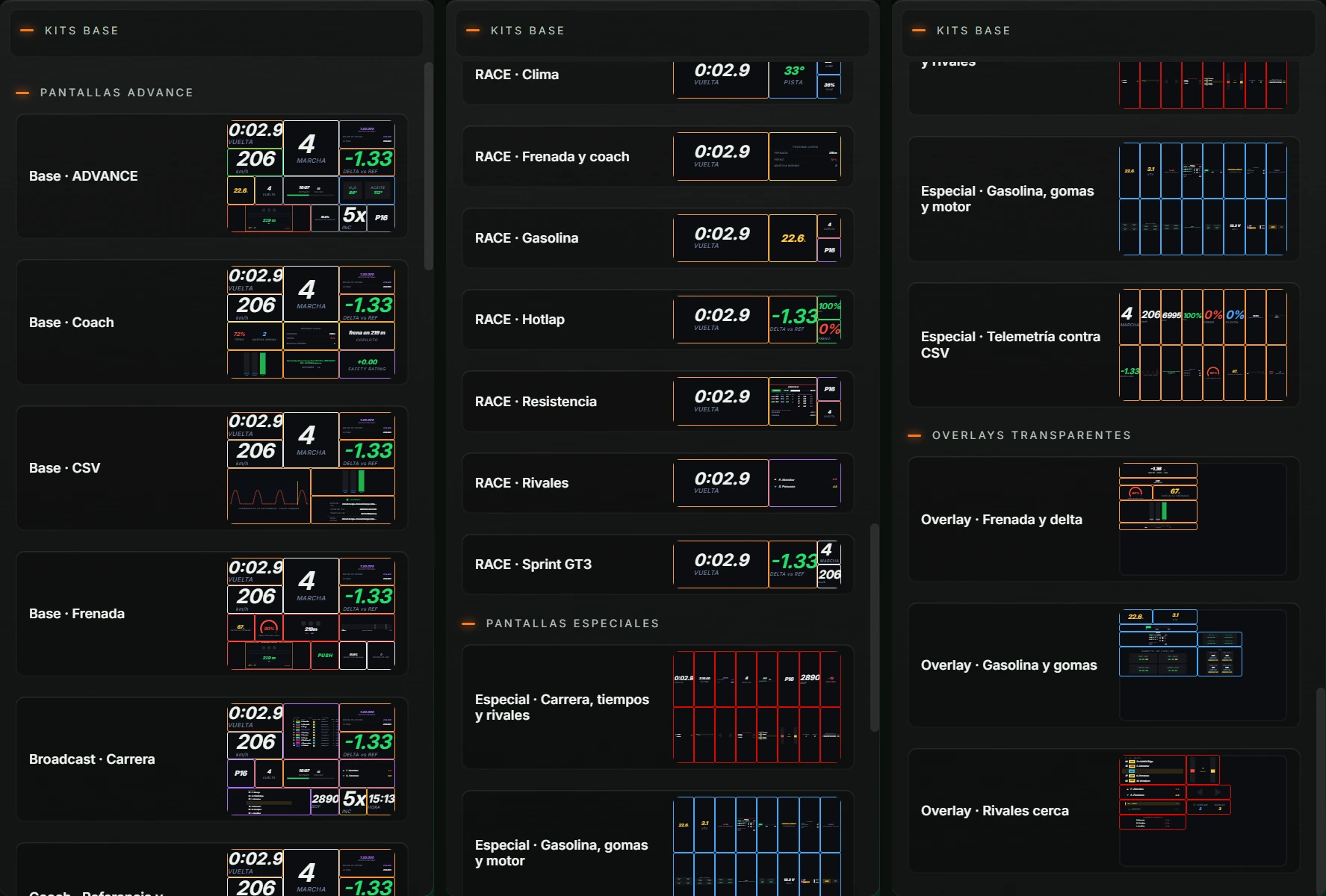
| Group | Kits |
|---|---|
| Pantallas ADVANCE (ADVANCE displays) | Base · ADVANCE; Base · Coach; Base · CSV; Base · Frenada (Braking); Broadcast · Carrera (Race); Coach · Referencia y consejos (Reference and advice); CSV · Referencia (Reference); Frenada · Puntos de frenada (Braking points); Mezcla · Clima y carrera (Weather and race); Referencias · Deltas (References · Deltas); Spotter · Alrededor (Around you); Stream · Directo (Live) |
| Presets RACE (RACE presets) | RACE · Clima (Weather); RACE · Frenada y coach (Braking and coach); RACE · Gasolina (Fuel); RACE · Hotlap; RACE · Resistencia (Endurance); RACE · Rivales (Rivals); RACE · Sprint GT3 |
| Pantallas especiales (Special displays) | Especial · Carrera, tiempos y rivales (Special · Race, times and rivals); Especial · Gasolina, gomas y motor (Special · Fuel, tyres and engine); Especial · Telemetría contra CSV (Special · Telemetry against CSV) |
| Overlays transparentes (Transparent overlays) | Overlay · Frenada y delta (Braking and delta); Overlay · Gasolina y gomas (Fuel and tyres); Overlay · Rivales cerca (Nearby rivals) |
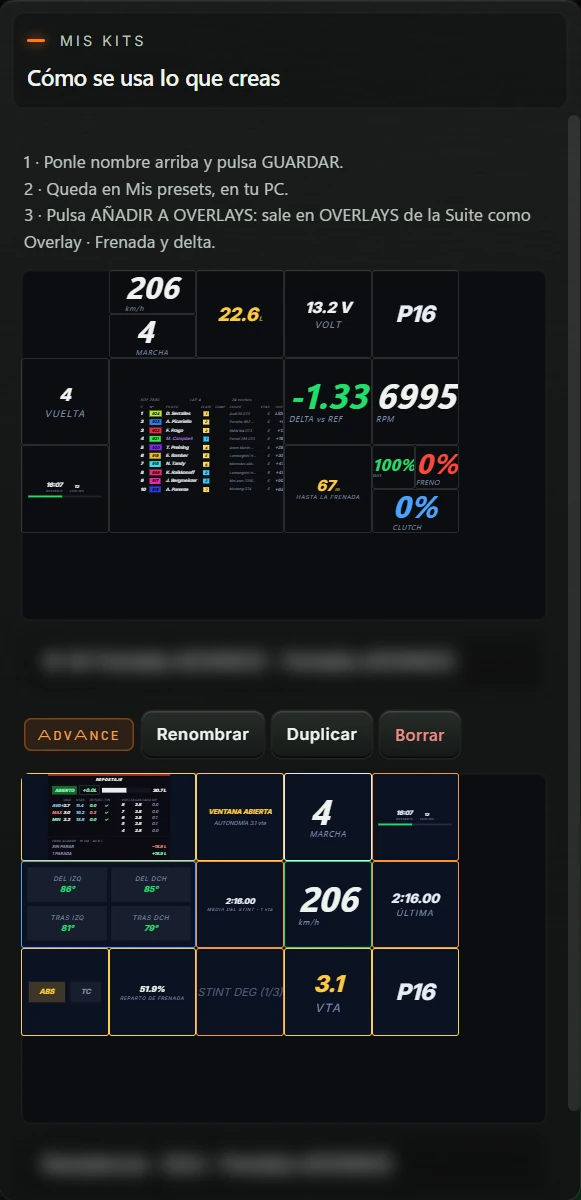
The top shows Cómo se usa lo que creas (How to use the design) with three steps for the current display type, as listed in 1. What TOOLKIT does. Kits follow alphabetically. An empty list says “Todavía no hay creaciones guardadas.” (No saved designs yet.)
| Element | Action |
|---|---|
| Thumbnail | Opens the kit on the canvas. |
| Name · type | Opens the kit. Favourites have a leading ★. |
| ADVANCE, RACE, ESPECIAL or OVERLAY label | Identifies the kit's display type. |
| Renombrar (Rename) | Replaces the row with a name field. Enter saves, as does clicking outside; Esc cancels. Confirms “Renombrado: «(name)».” |
| Duplicar (Duplicate) | Creates “(name) (copia)”. The copy is neither a favourite nor registered in OVERLAYS. Confirms “Duplicado: «(name)».” |
| Borrar (Delete) | Asks for confirmation (see 4.8) and permanently deletes the kit. |
Editing a personal kit and clicking GUARDAR overwrites that same kit.
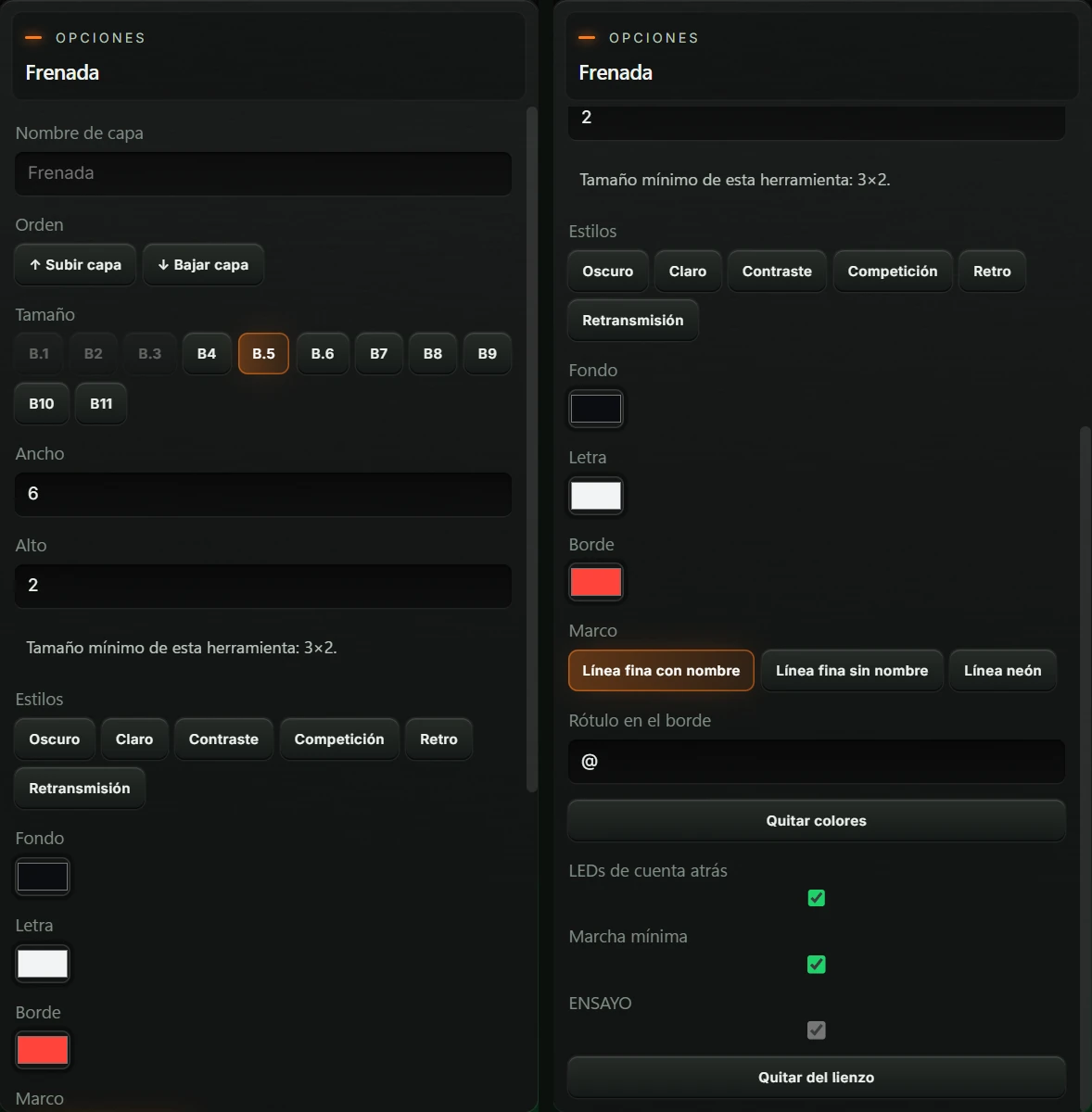
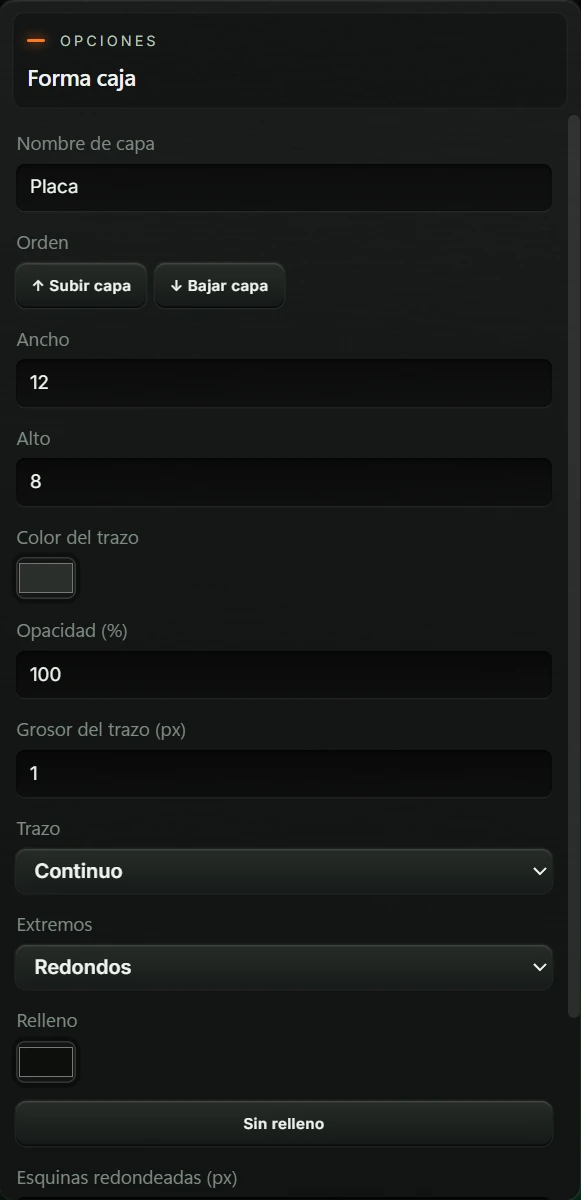
Appears when selecting a box. The heading shows OPCIONES (OPTIONS) and the tool or shape name, such as Frenada or Forma caja. Every option is explained in 5. Configuration.
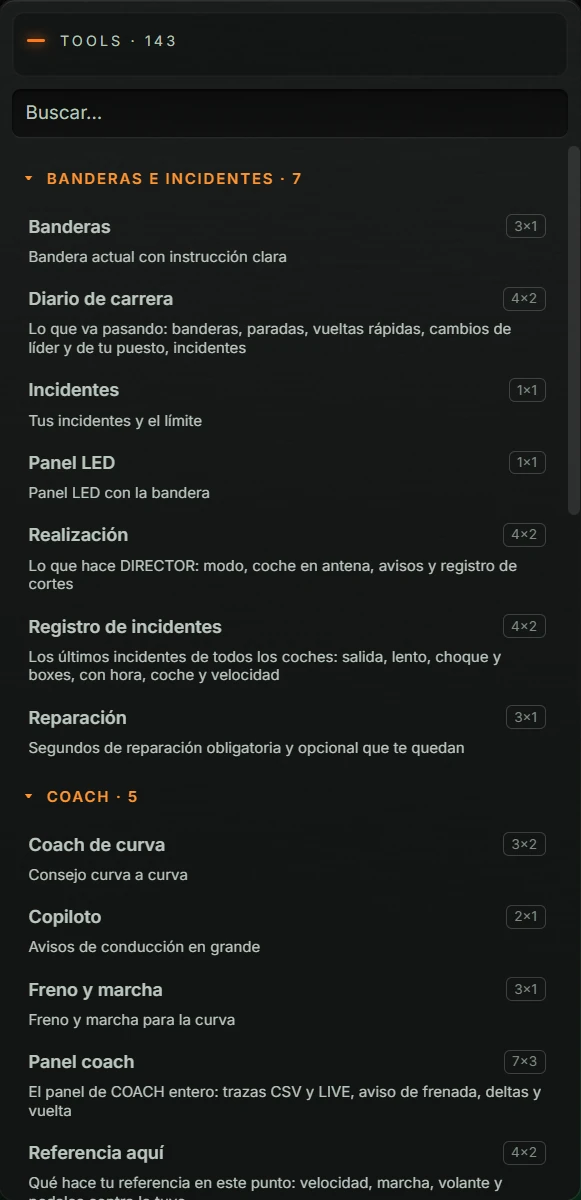
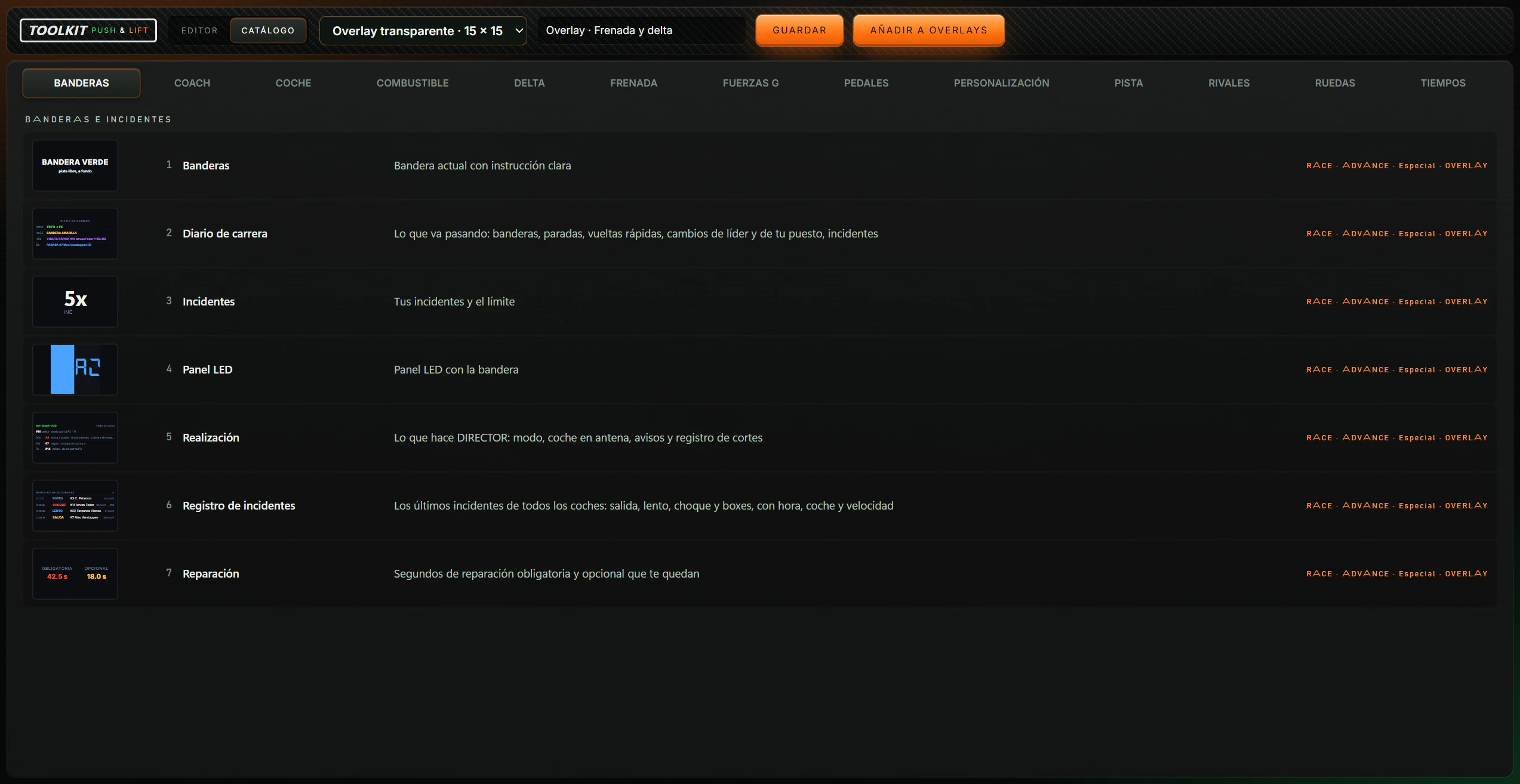
Browse every tool. This view does not add tools; use Añadir herramienta (Add tool).
Appears when opening another kit, changing display type or closing with unsaved canvas changes.
Appears when choosing + Nueva en blanco (+ New blank design) from the display-type dropdown.
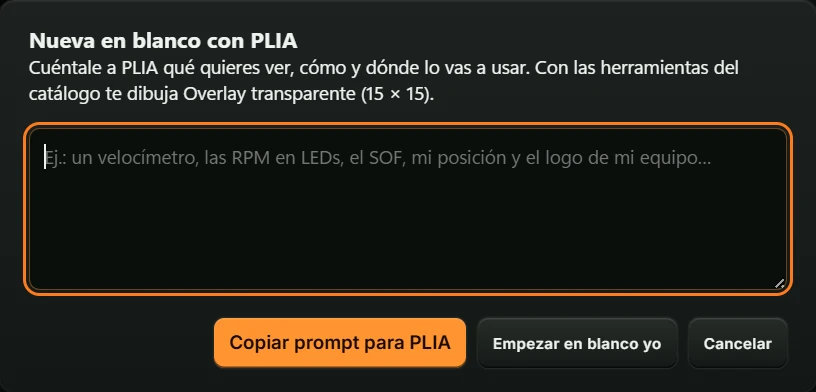
The copied prompt only works inside PLIA in Push & Lift, as the prompt itself states.
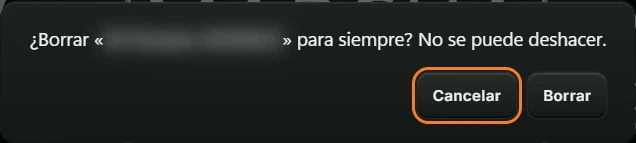
Borrar (Delete) deletes it and confirms “Borrada «(name)».” Cancelar (Cancel) or Esc cancels. If deleting the open kit, Base · ADVANCE loads.
Messages appear briefly at the bottom centre. Errors are red.

Meanings are explained in 7. Troubleshooting.
TOOLKIT has no separate settings screen: configure each box in OPCIONES. Changes appear immediately, but are only saved with GUARDAR.
| Option | Action |
|---|---|
| Nombre de capa (Layer name) | Name in CAPAS, up to 80 characters. Blank uses the tool name. |
| Orden (Order) · ↑ Subir capa (Raise layer) / ↓ Bajar capa (Lower layer) | Places it above or below other layers. |
| Tamaño (Size) · B.1–B11 | Quick cell sizes (width × height): B.1=1×1, B2=2×1, B.3=2×2, B4=4×2, B.5=6×2, B.6=4×4, B7=6×4, B8=3×2, B9=5×2, B10=7×2, B11=3×4. Current size is highlighted. Below-minimum or non-fitting sizes are disabled. |
| Ancho / Alto (Width / Height) | Exact cell dimensions, from the tool minimum to 7. |
| “Tamaño mínimo de esta herramienta: …” (Minimum tool size) | Reminder of the smallest supported size. |
| Estilos (Styles) | Six one-click background, text and border combinations: Oscuro (Dark), Claro (Light), Contraste (Contrast), Competición (Competition), Retro and Retransmisión (Broadcast). |
| Fondo (Background) | Box background colour. |
| Letra (Text) | Text colour. |
| Borde (Border) | Border and border-label colour. |
| Marco (Frame) | Línea fina con nombre (Thin line with name): thin border with a label. Línea fina sin nombre (Thin line without name): thin border without label. Línea neón (Neon line): glowing thin border. New tools default to Línea fina con nombre. |
| Rótulo en el borde (Border label) | Text above the border, up to 24 characters. Blank or @ uses the tool's uppercase short name. |
| Quitar colores (Reset colours) | Resets background, text and border to the tool's colours. |
| Tool-specific options | Options for that tool; full list in 5.3). |
| Quitar del lienzo (Remove from canvas) | Removes the box without confirmation. Undo restores it. |
Base kits have a background shape called Placa (Plate): a box behind the display. Its options are:
| Option | Action |
|---|---|
| Nombre de capa (Layer name) | As for tools. |
| Orden (Order) · ↑ Subir capa (Raise layer) / ↓ Bajar capa (Lower layer) | As for tools. |
| Ancho / Alto (Width / Height) | In cells, in 0.05 steps, up to the canvas edge. |
| Color del trazo (Stroke colour) | Outline colour. |
| Opacidad (%) (Opacity) | 0 (invisible) to 100 (opaque). |
| Grosor del trazo (px) (Stroke width) | 0.5 to 24. |
| Trazo (Stroke) | Continuo (Solid), Discontinuo (Dashed), Puntos (Dotted). |
| Extremos (Ends) | Redondos (Round) or Rectos (Square). |
| Relleno (Fill) | Interior colour. |
| Sin relleno (No fill) | Leaves the box hollow. |
| Esquinas redondeadas (px) (Corner radius) | 0 to 80. |
| Textura (Texture) | Sin textura (None), Carbono (Carbon), Carbono cobre (Copper), Carbono verde (Green), Carbono oro (Gold), Carbono clásico (Classic), Carbono azul (Blue). Texture hides the fill. |
| Quitar del lienzo (Remove from canvas) | Removes the shape without confirmation. |
Grouped in the same order as Añadir herramienta. “Mínimo” is minimum cell size (width × height); “Cabe en” lists compatible displays. Options are checkboxes (on/off), sliders (range), lists (values) or fields (text/image). Defaults appear in parentheses.
Many tools have an option labelled ENSAYO (DEMO) , sometimes qualified, such as “ENSAYO (sectores)”. In TOOLKIT it is always checked and disabled because the editor uses demonstration data.
| # | Tool | Minimum | Fits in | Tool-specific options |
|---|---|---|---|---|
| 1 | Banderas (Flags) Current flag with a clear instruction | 3 × 1 | RACE · ADVANCE · Special · OVERLAY |
|
| 2 | Diario de carrera (Race diary) Events as they happen: flags, pit stops, fastest laps, changes of leader and your position, incidents | 4 × 2 | RACE · ADVANCE · Special · OVERLAY |
|
| 3 | Incidentes (Incidents) Your incidents and the limit | 1 × 1 | RACE · ADVANCE · Special · OVERLAY |
|
| 4 | Panel LED (LED panel) LED panel showing the flag | 1 × 1 | RACE · ADVANCE · Special · OVERLAY |
|
| 5 | Realización (Direction) What DIRECTOR is doing: mode, car on air, notifications and cut log | 4 × 2 | RACE · ADVANCE · Special · OVERLAY |
|
| 6 | Registro de incidentes (Incident log) The latest incidents involving all cars: off track, slow, collision and pits, with time, car and speed | 4 × 2 | RACE · ADVANCE · Special · OVERLAY |
|
| 7 | Reparación (Repairs) Remaining mandatory and optional repair time in seconds | 3 × 1 | RACE · ADVANCE · Special · OVERLAY |
|
| # | Tool | Minimum | Fits in | Tool-specific options |
|---|---|---|---|---|
| 8 | Coach de curva (Corner coach) Advice for each corner | 3 × 2 | RACE · ADVANCE · Special · OVERLAY |
|
| 9 | Copiloto (Co-driver) Large driving notifications | 2 × 1 | RACE · ADVANCE · Special · OVERLAY |
|
| 10 | Freno y marcha (Brake and gear) Braking and gear for the corner | 3 × 1 | RACE · ADVANCE · Special · OVERLAY |
|
| 11 | Panel coach (Coach panel) The complete COACH panel: CSV and LIVE traces, braking warning, deltas and lap | 7 × 3 | ADVANCE · Special · OVERLAY |
|
| 12 | Referencia aquí (Reference here) What your reference does at this point: speed, gear, steering and pedals compared with yours | 4 × 2 | RACE · ADVANCE · Special · OVERLAY |
|
| # | Tool | Minimum | Fits in | Tool-specific options |
|---|---|---|---|---|
| 13 | Abs · TC (ABS · TC) When ABS and traction control intervene | 1 × 1 | RACE · ADVANCE · Special · OVERLAY |
|
| 14 | Actitud del coche (Car attitude) Car sideslip | 1 × 1 | RACE · ADVANCE · Special · OVERLAY |
|
| 15 | Ajustes del coche (Car settings) TC, ABS, brake bias, limiter and pit speed limit, tank, consumption, idle and LED thresholds | 3 × 4 | ADVANCE · Special · OVERLAY |
|
| 16 | Barra de RPM (RPM bar) Engine speed as a bar with coloured lights | 3 × 1 | RACE · ADVANCE · Special · OVERLAY | — |
| 17 | Barra de velocidad (Speed bar) Speed as a bar | 3 × 1 | RACE · ADVANCE · Special · OVERLAY | — |
| 18 | Bloqueo de rueda (Wheel lock) Warning of a locked wheel under braking | 1 × 1 | RACE · ADVANCE · Special · OVERLAY |
|
| 19 | Energía híbrida (Hybrid energy) Hybrid energy charge and usage | 2 × 1 | RACE · ADVANCE · Special · OVERLAY |
|
| 20 | Gráfica de velocidad (Speed graph) Your speed plotted over time | 3 × 2 | RACE · ADVANCE · Special · OVERLAY |
|
| 21 | Leds de cambio (Shift LEDs) Shift LEDs with flashing rev limit | 3 × 1 | RACE · ADVANCE · Special · OVERLAY |
|
| 22 | Líquidos (Fluids) Fluid levels and temperatures | 6 × 1 | RACE · ADVANCE · Special · OVERLAY |
|
| 23 | Marcha (Gear) Current gear | 1 × 1 | RACE · ADVANCE · Special · OVERLAY | — |
| 24 | Motor (Motor (Engine)) Engine water and oil | 2 × 1 | RACE · ADVANCE · Special · OVERLAY |
|
| 25 | Panel avanzado (Advanced panel) Gear, speed, RPM and position, with shift lights | 4 × 2 | RACE · ADVANCE · Special · OVERLAY |
|
| 26 | Reparto de frenada (Brake bias) Configured brake bias | 2 × 1 | RACE · ADVANCE · Special · OVERLAY |
|
| 27 | Reparto real (Actual bias) Actual brake bias | 1 × 1 | RACE · ADVANCE · Special · OVERLAY |
|
| 28 | Rpm Engine revolutions | 1 × 1 | RACE · ADVANCE · Special · OVERLAY | — |
| 29 | Velocidad (Speed) Your speed | 1 × 1 | RACE · ADVANCE · Special · OVERLAY | — |
| 30 | Voltaje (Voltage) Battery voltage | 2 × 1 | RACE · ADVANCE · Special · OVERLAY |
|
| # | Tool | Minimum | Fits in | Tool-specific options |
|---|---|---|---|---|
| 31 | Ayuda de boxes (Pit assistance) Limiter, distance to your pit box and tyres | 3 × 4 | ADVANCE · Special · OVERLAY |
|
| 32 | Barra de gasolina (Fuel bar) Tank level as a bar, warns when on reserve | 3 × 1 | RACE · ADVANCE · Special · OVERLAY | — |
| 33 | Estrategia de boxes (Pit strategy) Fuel and pressures for the next stop | 3 × 2 | RACE · ADVANCE · Special · OVERLAY |
|
| 34 | Gasolina (Fuel) Litres and consumption | 1 × 1 | RACE · ADVANCE · Special · OVERLAY | — |
| 35 | Mis paradas (My stops) Your stops: count, total time in pits, last, average and current stop | 3 × 2 | RACE · ADVANCE · Special · OVERLAY |
|
| 36 | Objetivo de consumo (Consumption target) Your consumption against the target | 2 × 1 | RACE · ADVANCE · Special · OVERLAY |
|
| 37 | Plan de gasolina (Fuel plan) The engine's fuel plan: average and last consumption, valid laps, remaining range, laps left, litres needed and surplus or shortfall | 3 × 3 | ADVANCE · Special · OVERLAY |
|
| 38 | Repostaje (Refuelling) Exact litres to add | 4 × 2 | RACE · ADVANCE · Special · OVERLAY |
|
| 39 | Ventana de parada (Pit window) When your pit window opens | 2 × 1 | RACE · ADVANCE · Special · OVERLAY |
|
| 40 | Vueltas de gasolina (Fuel laps) Laps remaining with your fuel | 2 × 1 | RACE · ADVANCE · Special · OVERLAY | — |
| # | Tool | Minimum | Fits in | Tool-specific options |
|---|---|---|---|---|
| 41 | Delta Difference from your reference | 1 × 1 | RACE · ADVANCE · Special · OVERLAY |
|
| 42 | Delta BAR Difference from your reference, as a bar | 4 × 1 | RACE · ADVANCE · Special · OVERLAY |
|
| 43 | Delta gráfica (Delta graph) Your delta plotted over time | 4 × 2 | RACE · ADVANCE · Special · OVERLAY |
|
| 44 | DELTA vs REF Difference from your reference, as a number and by sector | 4 × 2 | RACE · ADVANCE · Special · OVERLAY |
|
| 45 | Frenadas de la referencia (Reference braking) Your reference's braking points | 4 × 2 | RACE · ADVANCE · Special · OVERLAY |
|
| 46 | Info CSV Which reference is loaded and whether it matches your session | 4 × 2 | RACE · ADVANCE · Special · OVERLAY | — |
| 47 | Pedales vs referencia (Pedals vs reference) Your pedals against the reference | 3 × 3 | ADVANCE · Special · OVERLAY |
|
| 48 | Vuelta de referencia (Reference lap) Which CSV reference is loaded | 3 × 2 | RACE · ADVANCE · Special · OVERLAY | — |
| # | Tool | Minimum | Fits in | Tool-specific options |
|---|---|---|---|---|
| 49 | Aviso de frenada (Braking warning) Countdown to your braking point | 2 × 1 | RACE · ADVANCE · Special · OVERLAY |
|
| 50 | Aviso de frenada 2 (Braking warning 2) Braking countdown bar | 3 × 1 | RACE · ADVANCE · Special · OVERLAY |
|
| 51 | Barra race (Race bar) The RACE LED bar: 5 lights that go out during the 3 s before braking, plus the round 3–2–1–BRAKE display, with 6 styles | 3 × 1 | RACE · ADVANCE · Special · OVERLAY |
|
| 52 | Frenada (Braking) Braking | 3 × 2 | RACE · ADVANCE · Special · OVERLAY |
|
| 53 | Freno próxima curva (Next corner brake) How much braking the next corner requires | 2 × 2 | RACE · ADVANCE · Special · OVERLAY |
|
| 54 | Metros de frenada (Braking metres) Metres to your braking point | 2 × 1 | RACE · ADVANCE · Special · OVERLAY |
|
| 55 | Pl little The ultralight VR overlay: braking countdown, temperature of all 4 tyres and metres to the corner, with minimal LEDs | 3 × 1 | RACE · ADVANCE · Special · OVERLAY |
|
| 56 | Push / lift PUSH or LIFT according to pedal input | 1 × 1 | RACE · ADVANCE · Special · OVERLAY | — |
| 57 | Zona de frenada (Braking zone) The upcoming braking zone in detail: number, distance, length, requested pressure and difference | 3 × 3 | ADVANCE · Special · OVERLAY |
|
| # | Tool | Minimum | Fits in | Tool-specific options |
|---|---|---|---|---|
| 58 | Fuerzas G (G-forces) G-forces on a traction circle | 3 × 2 | RACE · ADVANCE · Special · OVERLAY |
|
| 59 | Fuerzas G combinadas (Combined G-forces) Actual G-forces from the SDK on a traction circle | 3 × 2 | RACE · ADVANCE · Special · OVERLAY |
|
| 60 | G lateral (Lateral G) Lateral cornering force in G | 3 × 1 | RACE · ADVANCE · Special · OVERLAY |
|
| 61 | G longitudinal (Longitudinal G) Acceleration and braking in G | 2 × 1 | RACE · ADVANCE · Special · OVERLAY |
|
| # | Tool | Minimum | Fits in | Tool-specific options |
|---|---|---|---|---|
| 62 | Acelerador (Throttle) Throttle | 1 × 1 | RACE · ADVANCE · Special · OVERLAY | — |
| 63 | Embrague (Clutch) Clutch | 1 × 1 | RACE · ADVANCE · Special · OVERLAY | — |
| 64 | Freno (Brake) Brake | 1 × 1 | RACE · ADVANCE · Special · OVERLAY | — |
| 65 | Gráfica de pedales (Pedal graph) Throttle and brake on a scrolling graph | 3 × 2 | RACE · ADVANCE · Special · OVERLAY |
|
| 66 | Pedales (Pedals) Pedals as bars | 2 × 2 | RACE · ADVANCE · Special · OVERLAY |
|
| 67 | Pedales y volante (Pedals and steering wheel) Throttle, brake and clutch on a graph | 3 × 2 | RACE · ADVANCE · Special · OVERLAY |
|
| 68 | Suavidad al volante (Steering smoothness) How smoothly you steer | 3 × 2 | RACE · ADVANCE · Special · OVERLAY | — |
| 69 | Volante (Steering wheel) Live steering angle | 1 × 1 | RACE · ADVANCE · Special · OVERLAY | — |
| # | Tool | Minimum | Fits in | Tool-specific options |
|---|---|---|---|---|
| 70 | Bienvenida (Welcome) How to build your dashboard | 4 × 1 | RACE · ADVANCE · Special · OVERLAY | — |
| 71 | Bloque de datos (Data block) A single large value of your choice | 2 × 1 | RACE · ADVANCE · Special · OVERLAY |
|
| 72 | Logo Your Push&Lift emblem | 3 × 1 | RACE · ADVANCE · Special · OVERLAY | — |
| 73 | Logo con imagen (Image logo) Your logo: upload a JPG or PNG | 1 × 1 | RACE · ADVANCE · Special · OVERLAY |
|
| 74 | Notas (Notes) Track notes, editable with a click | 2 × 1 | RACE · ADVANCE · Special · OVERLAY | — |
| 75 | Texto libre (Free text) Your own text, fixed or scrolling, normal or LED-panel style | 2 × 1 | RACE · ADVANCE · Special · OVERLAY |
|
| # | Tool | Minimum | Fits in | Tool-specific options |
|---|---|---|---|---|
| 76 | Agarre de pista (Track grip) How track grip improves | 3 × 1 | RACE · ADVANCE · Special · OVERLAY |
|
| 77 | Atardecer (Sunset) Time until sunset (or sunrise) at the track, calculated from sun elevation | 2 × 1 | RACE · ADVANCE · Special · OVERLAY |
|
| 78 | Cielo y pista (Sky and track) Sky, fog, air density, sun, track time, reported wetness, surface under the car and length | 3 × 3 | ADVANCE · Special · OVERLAY |
|
| 79 | Circuito (Circuito (Track)) Track name | 6 × 1 | RACE · ADVANCE · Special · OVERLAY | — |
| 80 | Datos del circuito (Track data) Track and session: SDK data | 4 × 3 | ADVANCE · Special · OVERLAY | — |
| 81 | Humedad (Humidity) Air humidity | 2 × 1 | RACE · ADVANCE · Special · OVERLAY |
|
| 82 | Mapa del circuito (Track map) The track with all cars | 2 × 2 | RACE · ADVANCE · Special · OVERLAY |
|
| 83 | Mapa lineal (Linear map) The track as a line, cars as dots | 4 × 1 | RACE · ADVANCE · Special · OVERLAY | — |
| 84 | Meteo (Weather) Track, air and rain, with the engine's forecast in one sentence | 3 × 1 | RACE · ADVANCE · Special · OVERLAY |
|
| 85 | Mini mapa (Mini map) Vertical strip centred on you | 2 × 2 | RACE · ADVANCE · Special · OVERLAY |
|
| 86 | Riesgo de lluvia (Rain risk) Probability of rain | 2 × 1 | RACE · ADVANCE · Special · OVERLAY |
|
| 87 | Temp. aire (Air temp.) Air temperature | 2 × 1 | RACE · ADVANCE · Special · OVERLAY | — |
| 88 | Temp. pista (Track temp.) Asphalt temperature | 2 × 1 | RACE · ADVANCE · Special · OVERLAY | — |
| 89 | Viento (Wind) Wind direction and strength | 2 × 1 | RACE · ADVANCE · Special · OVERLAY |
|
| # | Tool | Minimum | Fits in | Tool-specific options |
|---|---|---|---|---|
| 90 | Amenaza de undercut (Undercut threat) Rivals who could undercut you | 3 × 2 | RACE · ADVANCE · Special · OVERLAY |
|
| 91 | Ángulo muerto (Blind spot) Warning of a car alongside | 4 × 2 | RACE · ADVANCE · Special · OVERLAY |
|
| 92 | Barras radar (Radar bars) Nearby cars: ahead, behind and alongside | 3 × 2 | RACE · ADVANCE · Special · OVERLAY |
|
| 93 | Clasificación (Standings) Full session standings | 4 × 3 | ADVANCE · Special · OVERLAY |
|
| 94 | Clasificación de boxes (Pit standings) Who lost the most time in pits and their stops | 4 × 1 | RACE · ADVANCE · Special · OVERLAY |
|
| 95 | Clasificación TV (TV standings) Standings on a single row | 6 × 1 | RACE · ADVANCE · Special · OVERLAY |
|
| 96 | Doblados (Lapped cars) How many cars lap you and how many you lap | 2 × 1 | RACE · ADVANCE · Special · OVERLAY |
|
| 97 | Duelo (Duel) Direct duel with a rival | 7 × 2 | RACE · ADVANCE · Special · OVERLAY |
|
| 98 | Duelos de la pista (Track battles) Cars running close together in the race, from closest to furthest apart | 4 × 1 | RACE · ADVANCE · Special · OVERLAY |
|
| 99 | Fuerza de parrilla (Strength of field) Strength of field (average iRating) | 1 × 1 | RACE · ADVANCE · Special · OVERLAY | — |
| 100 | Huecos (Gaps) Gap to the cars ahead and behind | 3 × 1 | RACE · ADVANCE · Special · OVERLAY | — |
| 101 | iRATING iRating gained or lost | 2 × 1 | RACE · ADVANCE · Special · OVERLAY |
|
| 102 | Posición (Position) Your position, gold when leading | 1 × 1 | RACE · ADVANCE · Special · OVERLAY | — |
| 103 | Proximidad (Proximity) Proximity | 3 × 2 | RACE · ADVANCE · Special · OVERLAY |
|
| 104 | Radio Who is speaking on the radio now | 2 × 1 | RACE · ADVANCE · Special · OVERLAY |
|
| 105 | Relative Who is ahead and behind on track | 4 × 3 | ADVANCE · Special · OVERLAY |
|
| 106 | Relative básico (Basic relative) Simple relative, only the essentials | 4 × 3 | ADVANCE · Special · OVERLAY | — |
| 107 | Relative compacto (Compact relative) Reduced relative for limited space | 4 × 2 | RACE · ADVANCE · Special · OVERLAY | — |
| 108 | Relative por posición (Relative by position) Cars around your race position | 3 × 2 | RACE · ADVANCE · Special · OVERLAY | — |
| 109 | Relative sprint (Sprint relative) Relative with licence and iRating | 4 × 2 | RACE · ADVANCE · Special · OVERLAY | — |
| 110 | Retrovisor (Rear-view mirror) Rivals approaching from behind | 4 × 1 | RACE · ADVANCE · Special · OVERLAY |
|
| 111 | Safety rating Safety Rating gained or lost | 2 × 1 | RACE · ADVANCE · Special · OVERLAY |
|
| 112 | Tabla de clasificación (Standings table) Who is racing with you and their rating | 3 × 2 | RACE · ADVANCE · Special · OVERLAY |
|
| # | Tool | Minimum | Fits in | Tool-specific options |
|---|---|---|---|---|
| 113 | Datos LMU (LMU data) Extra Le Mans Ultimate data: brake, grip, camber, toe, carcass, wear, aids, energy, gaps, dents and track limits | 4 × 4 | ADVANCE · Special · OVERLAY |
|
| 114 | Desgaste de gomas (Tyre wear) Wear percentage for each tyre | 3 × 2 | RACE · ADVANCE · Special · OVERLAY |
|
| 115 | Gomas (Tyres) Average temperature of each tyre | 3 × 2 | RACE · ADVANCE · Special · OVERLAY |
|
| 116 | Gomas 3 zonas (3-zone tyres) Temperatures across each tyre's zones | 3 × 2 | RACE · ADVANCE · Special · OVERLAY | — |
| 117 | Presión de gomas (Tyre pressure) Hot, cold and requested pit-stop pressure for each tyre | 2 × 3 | ADVANCE · Special · OVERLAY |
|
| 118 | Simetría (Symmetry) Left/right difference | 3 × 1 | RACE · ADVANCE · Special · OVERLAY | — |
| 119 | Temperatura predicha (Predicted temperature) All 4 tyres with COACH's colour curve and their direction: trend and when they will enter green or overheat | 3 × 4 | ADVANCE · Special · OVERLAY |
|
| # | Tool | Minimum | Fits in | Tool-specific options |
|---|---|---|---|---|
| 120 | % de vuelta (Lap %) Percentage of lap completed | 2 × 1 | RACE · ADVANCE · Special · OVERLAY | — |
| 121 | Consistencia (Consistency) How much your clean laps vary: deviation, range and score | 2 × 1 | RACE · ADVANCE · Special · OVERLAY |
|
| 122 | Degradación (Degradation) How much you lose per lap | 3 × 2 | RACE · ADVANCE · Special · OVERLAY | — |
| 123 | Dispersión (Spread) Spread of lap times across the grid | 4 × 2 | RACE · ADVANCE · Special · OVERLAY |
|
| 124 | Gráfica de vueltas (Lap graph) Your laps on a graph | 3 × 2 | RACE · ADVANCE · Special · OVERLAY |
|
| 125 | Media de carrera (Race average) Your average over the whole race | 2 × 1 | RACE · ADVANCE · Special · OVERLAY | — |
| 126 | Media del stint (Stint average) Your average since the last stop | 2 × 1 | RACE · ADVANCE · Special · OVERLAY | — |
| 127 | Mejores vueltas (Best laps) Ranking of the session's best laps, with the gap to first | 4 × 2 | RACE · ADVANCE · Special · OVERLAY |
|
| 128 | Objetivo de clasificación (Qualifying target) Your best against the session pole and your class best, plus your position by lap time | 3 × 2 | RACE · ADVANCE · Special · OVERLAY |
|
| 129 | Registro de vueltas (Lap log) Lap history with deltas | 4 × 1 | RACE · ADVANCE · Special · OVERLAY |
|
| 130 | Reloj (Clock) Local time | 1 × 1 | RACE · ADVANCE · Special · OVERLAY |
|
| 131 | Ritmo corregido (Corrected pace) Your pace without the fuel weight | 3 × 1 | RACE · ADVANCE · Special · OVERLAY |
|
| 132 | Sectores (Sectors) Your S1, S2 and S3 sectors: current, previous and best clean | 3 × 2 | RACE · ADVANCE · Special · OVERLAY |
|
| 133 | Sesión y carrera (Session and race) Session type, total laps, green flag, session best, your position, top speed, incidents and what the engine records | 4 × 5 | ADVANCE · OVERLAY |
|
| 134 | Sesión y stint (Session and stint) Clock, tyre zones (48/95), stint and pit window | 4 × 3 | ADVANCE · Special · OVERLAY |
|
| 135 | Sesiones (Sessions) Event sessions and their duration | 3 × 1 | RACE · ADVANCE · Special · OVERLAY |
|
| 136 | Tiempo de sesión (Session time) Time or laps remaining | 3 × 2 | RACE · ADVANCE · Special · OVERLAY |
|
| 137 | Tiempo de vuelta (Lap time) Your best, session best and last | 2 × 2 | RACE · ADVANCE · Special · OVERLAY | — |
| 138 | Tiempos de vuelta (Lap times) Your best, session best and last | 3 × 2 | RACE · ADVANCE · Special · OVERLAY | — |
| 139 | Tipo de vuelta (Lap type) Clean lap, traffic or pit lap | 2 × 1 | RACE · ADVANCE · Special · OVERLAY | — |
| 140 | Última vuelta (Last lap) Your last lap, purple if it is the best | 2 × 1 | RACE · ADVANCE · Special · OVERLAY | — |
| 141 | Velocidad punta (Top speed) Your top speed on the current lap, last lap and session | 3 × 1 | RACE · ADVANCE · Special · OVERLAY |
|
| 142 | Vuelta actual (Current lap) Your lap in progress | 1 × 1 | RACE · ADVANCE · Special · OVERLAY | — |
| 143 | Vueltas (Laps) Current race lap | 1 × 1 | RACE · ADVANCE · Special · OVERLAY | — |
Click ↶ or Ctrl+Z as many times as needed. To redo, ↷ or Ctrl+Y.
| What you see | What to do |
|---|---|
| “No hay espacio libre para esta herramienta.” (No free space for this tool) | There is no space of the required size. Remove or shrink another box, or use a larger display. |
| “Esta herramienta necesita una pantalla ADVANCE.” (This tool needs an ADVANCE display) | It is larger than the open canvas. Use it on an ADVANCE display. |
| A tool is greyed out in Añadir herramienta (Add tool) | It does not fit the current display type. CATÁLOGO (CATALOGUE) shows which types it fits. |
| “Ese tamaño se superpone a otra herramienta o sale del lienzo.” (This size overlaps another tool or goes outside the canvas) | Move this box or neighbouring boxes first, or choose another size. |
| “Tamaño mínimo de esta herramienta: …” (Minimum tool size) | That tool cannot be smaller. Use the same size or a larger one. |
| A size button (B.1…B11) is greyed out | That size is below the tool's minimum or does not fit the canvas. |
| A box will not move | It is locked (filled diamond in CAPAS) or has nowhere to go. Unlock it or make room. |
| A box has disappeared from the canvas | It is hidden (empty circle in CAPAS). Click the circle. |
| When saving: “El nombre debe tener entre 1 y 80 caracteres.” (Name must contain 1–80 characters) | Enter a name at the top. |
| When saving: “Hay herramientas fuera del lienzo o superpuestas.” (Tools are outside the canvas or overlapping) | Place the boxes inside the canvas without overlaps. |
| When saving: “Demasiados elementos.” (Too many items) | A kit supports up to 60 tools and 60 shapes. Remove some. |
| “No he podido usar esa imagen: prueba con una más pequeña.” (Unable to use that image: try a smaller one) | Use a smaller JPG or PNG image. |
| A box says “Preparando demostración” (Preparing demo) | Data has not arrived yet. Wait a few seconds. |
| A box says “No se pudo mostrar esta herramienta” (Unable to display this tool) | The tool could not be drawn. Try another size or remove it and add it again. |
| The bottom says “Esperando datos” (Waiting for data) | No data has arrived from the engine for more than 5 seconds. Check that the engine is still on in the Push & Lift bar. |
| The bottom says “No se pudo preparar TOOLKIT” (Unable to prepare TOOLKIT), sometimes with “El catálogo está incompleto.” (The catalogue is incomplete) | TOOLKIT could not load its catalogue. Close it with CERRARLA (CLOSE IT) and reopen it from the menu. |
| “No se pudo leer un mensaje del motor.” (Unable to read an engine message) | An unreadable value arrived. If it happens again, close TOOLKIT and reopen it. |
| My special display does not appear in the Suite | This is expected: special displays cannot yet be selected in the Suite. |
| I cannot see AÑADIR A OVERLAYS (ADD TO OVERLAYS) | It appears only for a transparent overlay, and hides after changes. Click GUARDAR (SAVE) to show it again. |
| “No se pudo completar la operación.” (Unable to complete the operation) | Saving, renaming, duplicating or deleting failed. Try again; if the problem continues, close TOOLKIT and reopen it. |